
1. Introduction
Thank you for choosing an Indesit appliance. This manual provides essential information for the correct and safe use of your new Indesit BWE 101498X WKV IT 10kg front-load washing machine. Please read these instructions carefully before using the appliance and keep them for future reference. This washing machine is designed for domestic use only.

Image 1.1: Indesit BWE 101498X WKV IT washing machine in a home laundry setting.
The Indesit BWE 101498X WKV IT offers a generous 10 kg capacity and 16 programs, making it suitable for various laundry needs. Its energy-efficient design ensures optimal performance with reduced energy consumption.
2. Safety Information
Always follow basic safety precautions when using electrical appliances to reduce the risk of fire, electric shock, and injury to persons.
- Ensure the appliance is properly grounded.
- Do not allow children to play with or operate the appliance.
- Never force the door open.
- Unplug the appliance before cleaning or performing any maintenance.
- Do not install the appliance in an area exposed to extreme temperatures or direct sunlight.
- Keep packaging materials out of reach of children.
3. Product Overview
Familiarize yourself with the main components of your washing machine.

Image 3.1: Front view of the Indesit BWE 101498X WKV IT washing machine, highlighting its energy efficiency.
Control Panel
The control panel features a program selector dial, function buttons, and a display for cycle information.

Image 3.2: Detailed view of the washing machine's control panel, showing the program dial and display.
Detergent Dispenser
The detergent dispenser is located on the top left of the machine and has compartments for pre-wash, main wash detergent, and fabric softener.
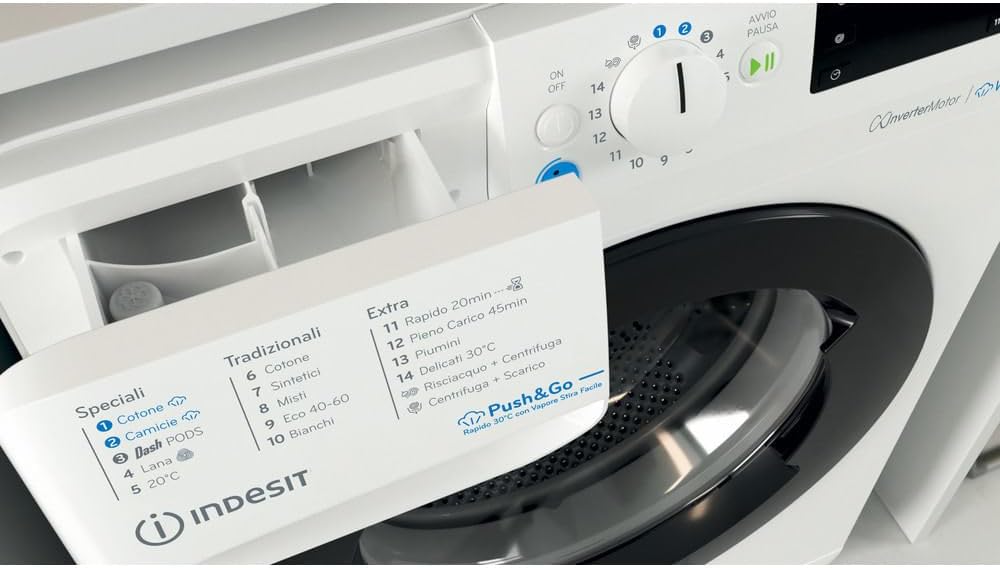
Image 3.3: The detergent dispenser drawer, open to show compartments for detergent and softener.
4. Setup and Installation
Proper installation is crucial for the performance and longevity of your washing machine.
4.1 Unpacking
- Remove all packaging materials.
- Remove the transport bolts from the rear of the machine. Keep them for future transport.
4.2 Positioning and Leveling
Place the machine on a flat, stable surface. Adjust the feet to ensure the machine is perfectly level to prevent vibrations during operation.

Image 4.1: Dimensional drawing of the washing machine (Height: 850mm, Width: 595mm, Depth: 605mm).
4.3 Water Connection
- Connect the water inlet hose to a cold water tap with a 3/4" thread.
- Ensure all connections are tight to prevent leaks.
4.4 Drain Hose Connection
- Position the drain hose at a height between 65 and 100 cm from the floor.
- Ensure the hose is not kinked or obstructed.
4.5 Electrical Connection
- Plug the appliance into a grounded electrical outlet.
- Do not use extension cords or multiple adapters.
4.6 First Use
Before the first wash, run a short cycle without laundry and detergent to clean the drum.
5. Operating Instructions
Follow these steps for effective and efficient washing.
5.1 Loading Laundry
- Sort laundry by fabric type, color, and degree of soiling.
- Open the door and load items loosely into the drum, ensuring not to overload.
5.2 Adding Detergent and Additives
- Pull out the detergent dispenser drawer.
- Add the recommended amount of detergent to the main wash compartment.
- If desired, add fabric softener to the designated compartment.
5.3 Selecting a Program
Turn the program selector dial to choose the desired wash program. The display will show the program duration and other relevant information.
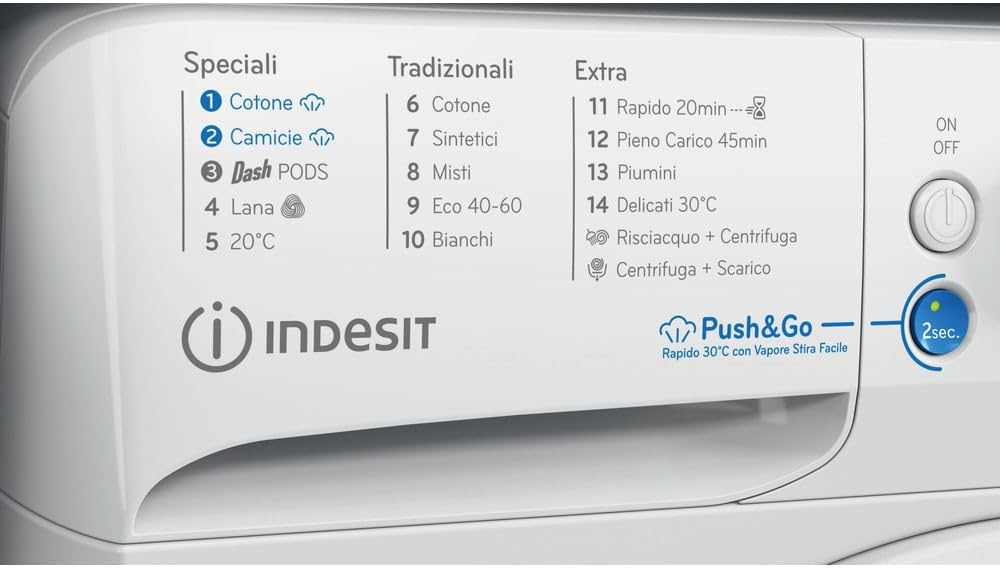
Image 5.1: Program list on the control panel, showing various wash cycles.
Key programs include:
- Cotone (Cotton): For normally soiled cotton garments.
- Sintetici (Synthetics): For synthetic items.
- Lana (Wool): Gentle cycle for woolens.
- Piumini (Duvets): Specific program for duvets and padded items.
- Rapido 20min (Rapid 20min): Quick wash for lightly soiled items.
- Delicati 30°C (Delicates 30°C): For delicate fabrics requiring low temperature.
- Eco 40-60: Energy-efficient program for cotton and synthetic items at 40-60°C.
5.4 Push&Go Function
The Push&Go function provides a quick and convenient wash cycle. Press and hold the Push&Go button for 2 seconds to start a 30°C rapid cycle with steam for easy ironing.

Image 5.2: The Push&Go button, indicating a 2-second press for activation.
5.5 Starting and Pausing a Cycle
- Press the Start/Pause button to begin the selected program.
- Press the Start/Pause button again to pause the cycle.
5.6 End of Cycle
At the end of the cycle, the machine will signal with an audible alert or a message on the display. The door can be opened once the door lock indicator light turns off.
6. Maintenance and Cleaning
Regular maintenance ensures optimal performance and extends the life of your appliance.
6.1 Cleaning the Detergent Dispenser
Remove the dispenser drawer and rinse it under running water. Clean any residue with a brush.
6.2 Cleaning the Filter
The filter should be cleaned periodically to prevent blockages. Locate the filter at the bottom front of the machine, open the cover, and carefully unscrew the filter to remove debris.

Image 6.1: Access panel for the drain pump filter, located at the bottom front of the machine.
6.3 Cleaning the Door Seal
Wipe the rubber door seal with a damp cloth after each wash to remove lint and detergent residue.
6.4 Care for the Exterior
Clean the exterior of the machine with a soft, damp cloth. Do not use abrasive cleaners or solvents.
6.5 Winter Precautions
If the machine is to be left in an unheated room for an extended period, drain all water from the hoses and pump to prevent freezing.
7. Troubleshooting
Before contacting customer service, try these solutions for common issues.
| Problem | Possible Cause | Solution |
|---|---|---|
| Machine does not start | Power cord unplugged, door not closed, program not selected, Start/Pause button not pressed. | Check power connection, ensure door is firmly closed, select a program, press Start/Pause. |
| Water not filling | Water tap closed, inlet hose kinked, water supply cut off. | Open water tap, straighten hose, check household water supply. |
| Water not draining | Drain hose kinked or blocked, filter blocked. | Straighten drain hose, clean the filter (refer to Section 6.2). |
| Excessive vibration | Machine not level, transport bolts not removed, uneven load. | Adjust leveling feet, remove transport bolts (refer to Section 4.1), redistribute laundry. |
| Poor washing results | Too much or too little detergent, incorrect program, overloaded machine. | Adjust detergent amount, select appropriate program, reduce load size. |
8. Specifications
Technical details of the Indesit BWE 101498X WKV IT washing machine.
| Feature | Detail |
|---|---|
| Model Number | BWE 101498X WKV IT |
| Brand | Indesit |
| Type | Front-load, Free-standing |
| Capacity | 10 kg |
| Spin Speed | 1400 rpm |
| Dimensions (HxWxD) | 85 cm x 59.5 cm x 60.5 cm |
| Weight | 75 kg |
| Color | White |
| Material | Stainless steel, Plastic |
| Control Type | Button, Rotary Dial |
| Energy Class | A (as per new EU energy label) |
9. Warranty and Support
For warranty information, please refer to the terms and conditions provided at the point of purchase or consult the official Indesit website for your region. In case of technical issues or for spare parts, please contact Indesit customer service. Ensure you have your model number (BWE 101498X WKV IT) and serial number ready when contacting support.
For returns or specific purchase-related inquiries, please refer to the retailer's return policy.


