
1. Introduction
The AWOL VISION RGB Glow Station is a universal stand designed for ultra-short-throw (UST) projectors, specifically for 120-inch screen setups. This station integrates comprehensive cable management, a built-in 4-outlet power strip, and remote-controlled RGB ambient lighting. It serves as a centralized hub to organize and enhance your home cinema experience.

The AWOL RGB Glow Station integrated into a home theater setup.
2. Package Contents
Before assembly, please verify that all components listed below are present in your package. If any parts are missing or damaged, please contact customer support.

Detailed view of all components included in the package.
The package includes all necessary components for assembly, such as various screws, nuts, panels, a 4-outlet power strip, power adapter, RGB LED light strip, remote control, and assembly tools. A user manual is also included.
3. Compatibility
The AWOL VISION RGB Glow Station is designed to accommodate a wide range of ultra-short-throw projectors.
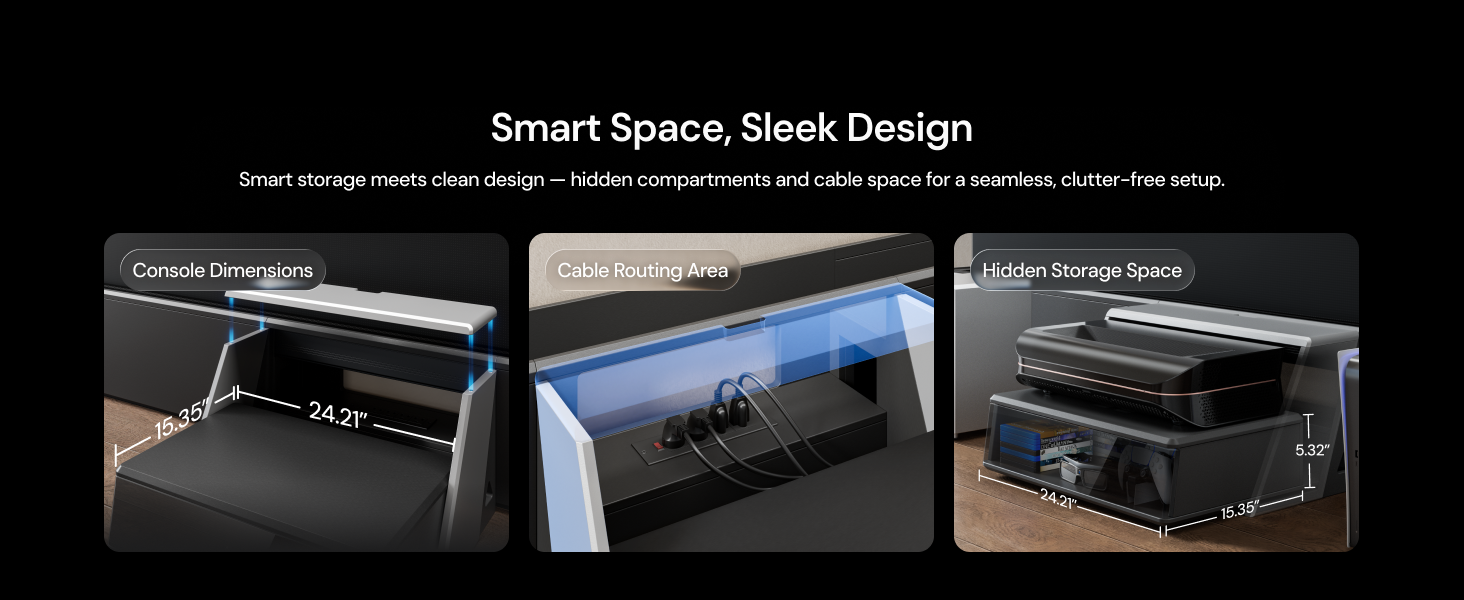
The Glow Station is designed for optimal placement of UST projectors.
- Throw Ratio: Designed for ultra-short-throw (UST) laser projectors with a throw ratio between 0.18 and 0.25.
- Brand Compatibility: Compatible with most major UST projector brands.
- AWOL VISION Projectors: Optimized for AWOL VISION Aetherion and LTV Series projectors.
- Incompatibility: Not compatible with LuxVision projectors.
4. Setup and Assembly
Assembly of the AWOL VISION RGB Glow Station typically takes 1 to 2 hours. For the 120-inch and 130-inch models, it is recommended that two people assist with the assembly process for ease and safety.
4.1. Assembly Video Tutorial
For detailed, step-by-step assembly instructions, please refer to the official installation tutorial video below:
This video provides a comprehensive guide for assembling the AWOL Smart Station, demonstrating how to connect the various panels and components.
4.2. General Assembly Tips
- Unpack all components and lay them out on a clean, soft surface to prevent scratches.
- Identify all parts using the provided parts list in the manual.
- Follow the instructions in the video or included manual carefully, ensuring all screws are tightened securely but do not overtighten.
5. Operating Instructions
5.1. Projector Placement and Alignment
The Glow Station is designed for seamless integration with floor-rising screens.
- Manually pull out the center tray to its fixed stop.
- Carefully place your UST projector onto the tray.
- Complete the initial alignment and calibration with your motorized floor-rising screen according to your projector's instructions.
- For subsequent use, simply power on your projector; no additional setup or alignment should be required.
5.2. Cable Management and Power
The station features an integrated solution for organizing your devices and cables.
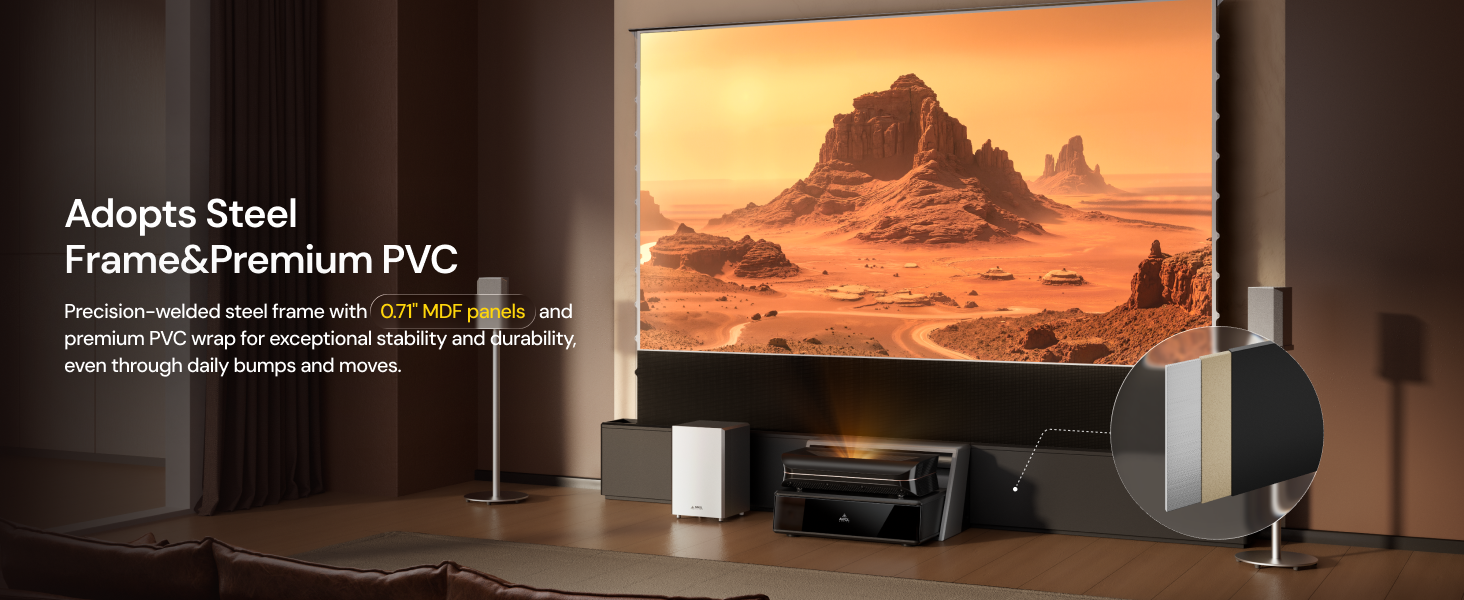
The Glow Station offers dedicated areas for cable management, power, and storage.
- Access: Flip open the magnetic top panel to access the integrated cable management channels and the built-in 4-outlet power strip.
- Connectivity: Plug in your projector and other media devices (e.g., streaming boxes, gaming consoles) into the power strip.
- Organization: Route all cables through the designated channels to maintain a clean and clutter-free setup. This allows devices to remain connected without needing to move the projector.
5.3. RGB Ambient Lighting
Enhance your viewing environment with customizable mood lighting.

The built-in LED strip provides customizable ambient lighting.
- Activation: The integrated 7-color LED light strip is controlled via the included remote control.
- Customization: Use the remote to select from various colors and lighting modes to set the perfect ambiance for movies, gaming, or relaxation.
5.4. Hidden Storage
Maintain a tidy entertainment area with discreet storage compartments.
- Access: The station features discreet compartments behind a magnetic front panel.
- Storage: Utilize these compartments to store accessories such as game discs, 3D glasses, remote controls, and other AV accessories.
- Organization: Close the magnetic panel to keep your space cinema-ready and clutter-free.
6. Maintenance
To ensure the longevity and appearance of your AWOL VISION RGB Glow Station, follow these simple maintenance guidelines:
- Cleaning: Use a soft, dry, lint-free cloth to clean all surfaces. For stubborn marks, a slightly damp cloth can be used, followed immediately by a dry cloth.
- Avoid Chemicals: Do not use abrasive cleaners, solvents, or chemical-based sprays, as these can damage the PVC finish and MDF panels.
- Ventilation: Ensure that the projector's ventilation areas are not obstructed by the stand or any other objects.
- Cable Management: Periodically check cable routing to ensure no cables are pinched or stressed.
7. Troubleshooting
If you encounter any issues with your AWOL VISION RGB Glow Station, please refer to the following common troubleshooting tips:
- LED Lights Not Working:
- Check if the LED strip is properly connected to the power adapter.
- Ensure the power adapter is plugged into a working outlet.
- Verify that the remote control has working batteries and is pointed directly at the LED receiver.
- Power Strip Not Supplying Power:
- Confirm the power strip's main plug is securely connected to a functional wall outlet.
- Check if the power strip's circuit breaker (if present) has tripped. Reset if necessary.
- Test the wall outlet with another device to ensure it is supplying power.
- Projector Alignment Issues:
- Ensure the projector is seated correctly and stably on the pull-out tray.
- Refer to your projector's user manual for specific alignment and keystone correction instructions.
- Verify the stand is on a level surface.
For issues not covered here, please contact AWOL VISION customer support.
8. Specifications
Detailed specifications for the AWOL VISION RGB Glow Station (120-inch version) are provided below:

Comprehensive specifications for the AWOL Vision SmartStation.
8.1. General Dimensions
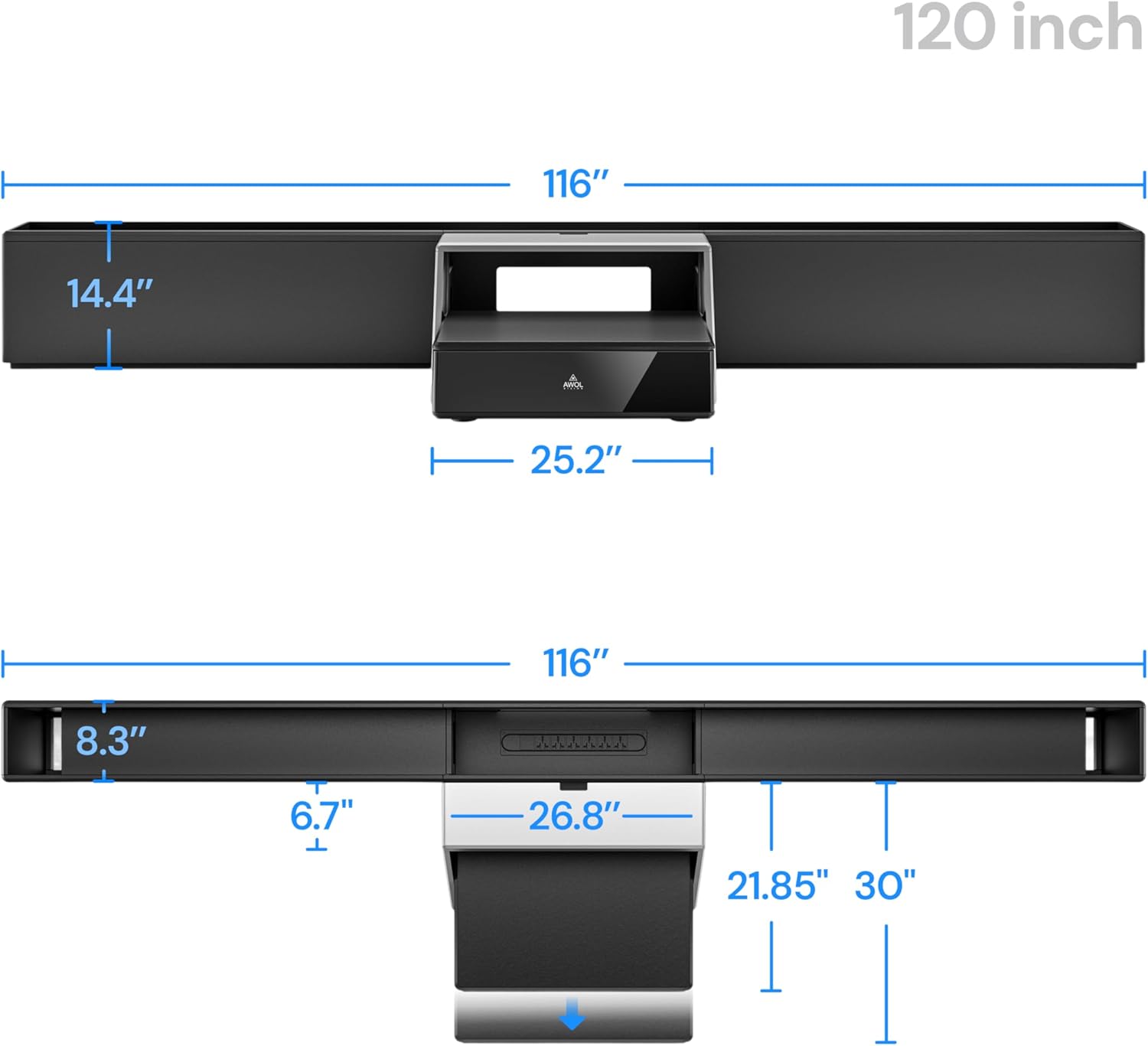
Detailed dimensions of the 120-inch AWOL RGB Glow Station.
| Feature | Specification |
|---|---|
| Model Number | 120B04US1A |
| UPC | 850076971489 |
| Compatibility | 120-inch (also available in 130-inch) |
| Projection Compatibility | Throw ratio of 0.18–0.25 (Any brand) |
| Color | Body: Black; Countertop Finish: Silver |
| Storage Space Dimensions | 24.2" x 15.4" x 5.4" |
| Mobile Island Countertop Dimensions | W25.2" x D16.5" |
| LED Light Setting | 7-color adjustment, Adapter with interchangeable plugs (US/UK/EU standards) |
| Power Strip | 4-outlets, AC cable length 2 meters |
| Frame Material | Precision-welded steel |
| Main Board Material | 18mm MDF density board |
| Size (120 Version) | 116.1" x 13.8" x 29.5" (L×W×H) |
| Packaging Dimensions (120 Version) | 51.2" x 27.6" x 10.2" (L×W×H) |
| Outer Box Dimensions (120 Version) | 62 kg / 136 lb |
9. Warranty and Support
AWOL VISION is committed to providing quality products and customer satisfaction.
- Warranty: The AWOL VISION RGB Glow Station comes with a 2-year limited warranty. Please refer to your product packaging or the official AWOL VISION website for the most current and detailed warranty information.
- Customer Support: For technical assistance, warranty claims, or any other inquiries, please contact AWOL VISION customer support:
- Phone/WhatsApp: +1 (888) 891-6866
- Email: support@awolvision.com