
Product Overview
The SAPPHERO Chronograph Watch Model SO2214-04 is a sophisticated timepiece designed for daily wear and various activities. It features a precise quartz movement, chronograph functions, a date display, and luminous hands for visibility in low light. Constructed with durable stainless steel and a comfortable leather strap, it offers 50 meters of water resistance.
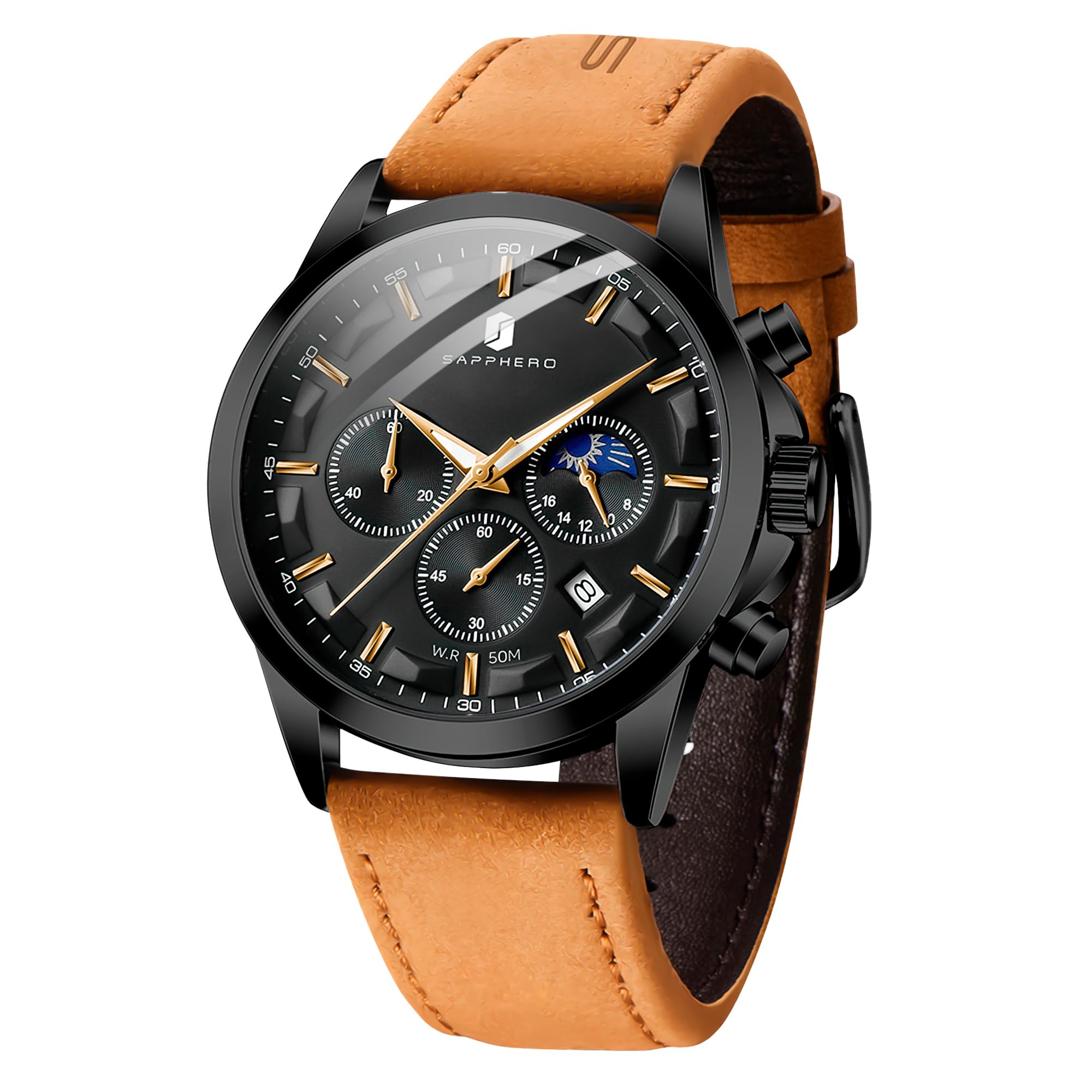
Image: Front view of the SAPPHERO Chronograph Watch Model SO2214-04 with a black dial and brown leather strap.
Components and Controls
Familiarize yourself with the main components and controls of your SAPPHERO Chronograph Watch:
- Crown: Used for setting time and date.
- Pushers (A & B): Used to operate the chronograph functions.
- Main Dial: Displays hours, minutes, and seconds.
- Sub-dials:
- Chronograph Seconds
- Chronograph Minutes
- 24-Hour Indicator
- Date Window: Displays the current date.
- Luminous Hands and Markers: Provide visibility in low light conditions.

Image: Diagram illustrating the watch controls, including the crown for time/date adjustment and pushers for chronograph functions.
Setup Instructions
Setting the Time
- Pull the crown out to the second click position (farthest out).
- Rotate the crown to adjust the hour and minute hands to the correct time. Ensure the 24-hour sub-dial also reflects the correct AM/PM.
- Push the crown back in to the normal position to start the watch.
Setting the Date
- Pull the crown out to the first click position.
- Rotate the crown clockwise or counter-clockwise (depending on the model) to adjust the date. Avoid setting the date between 9 PM and 3 AM, as this is when the date mechanism is engaged and could be damaged.
- Once the correct date is displayed, push the crown back in to the normal position.
Operating the Chronograph
The chronograph function allows for precise timing of events.
- Start: Press the upper pusher (A) to start the chronograph. The chronograph seconds hand and minute sub-dial will begin to move.
- Stop: Press the upper pusher (A) again to stop the chronograph. Read the elapsed time from the chronograph sub-dials.
- Reset: After stopping, press the lower pusher (B) to reset the chronograph hands to their zero positions.
For a visual guide on operating the watch, please refer to the video below:
Video: A demonstration of the SAPPHERO watch, showcasing its design and features, including how to operate the chronograph.
Maintenance and Care
Water Resistance (5 ATM / 50 Meters)
Your SAPPHERO watch is water-resistant up to 50 meters (5 ATM), making it suitable for daily use, hand washing, and short periods of swimming. However, to ensure its longevity:
- Do not operate the crown or pushers while the watch is wet or submerged.
- Avoid prolonged exposure to water, such as showering, bathing, or diving, as hot water and steam can compromise the seals.
- After exposure to saltwater, rinse the watch with fresh water and dry it thoroughly.

Image: Illustration highlighting the 50-meter water resistance feature of the watch.
Cleaning and Storage
- Wipe the watch case and strap with a soft, dry cloth regularly to remove dirt and moisture.
- For leather straps, avoid excessive moisture and direct sunlight to prevent damage and discoloration.
- Store your watch in a cool, dry place away from direct sunlight and extreme temperatures when not in use.
Battery Replacement
The watch is powered by an LR44 battery. When the watch stops or the second hand begins to skip, it indicates a low battery. Battery replacement should be performed by a qualified watch technician to ensure proper sealing and water resistance.
Troubleshooting
If you encounter any issues with your SAPPHERO watch, please refer to the following common troubleshooting steps:
- Watch Not Running:
- Check if the crown is fully pushed in.
- The battery may need replacement. Consult a professional watch technician.
- Date Not Changing:
- Ensure the time is set correctly, especially the AM/PM cycle. The date typically changes around midnight.
- Manually advance the date using the crown in the first click position.
- Chronograph Hands Not Resetting to Zero:
- Ensure the chronograph is stopped before attempting to reset.
- If hands are misaligned, some quartz chronographs allow for calibration. Refer to a professional watch technician if this feature is not explicitly detailed in your watch's specific manual.
- Water Inside Watch:
- Immediately take the watch to a professional watch repair shop to prevent further damage.
Specifications
Detailed specifications for the SAPPHERO Chronograph Watch Model SO2214-04:

Image: Visual representation of the watch dimensions and key specifications.
| Feature | Detail |
|---|---|
| Model Number | SO2214-04 |
| Movement Type | Quartz |
| Case Material | Stainless Steel |
| Case Diameter | 42 Millimeters |
| Case Thickness | 11 Millimeters |
| Band Material Type | Leather |
| Band Length | 220 Millimeters |
| Water Resistance Depth | 50 Meters (5 ATM) |
| Crystal Type | Hardlex Mineral Glass |
| Additional Features | Chronograph, Date Display, Luminous Hands |
| Battery Type | LR44 (included) |
| Item Weight | 4.66 ounces |
Warranty and Support
Your SAPPHERO Chronograph Watch comes with a warranty card. Please refer to the card for specific warranty terms and conditions. SAPPHERO is committed to providing satisfactory after-sales service.
If you encounter any issues or have questions regarding your watch, please contact SAPPHERO customer support through the retailer where you purchased the product or visit the official SAPPHERO website for contact information.
For general inquiries or assistance, please retain your purchase receipt and warranty card.