
INIA INIA 7-in-1
INIA 7-in-1 Red Light Therapy Facial Massager: User Manual for Model INIA 7-in-1
Comprehensive instructions for your INIA skincare device.
Introduction
Thank you for choosing the INIA 7-in-1 Red Light Therapy Facial Massager. This advanced skincare device combines multiple technologies to support your facial and neck skin health. Please read this manual thoroughly before use to ensure safe and effective operation.
Important Safety Information
WARNING:
Statements regarding dietary supplements have not been evaluated by the FDA and are not intended to diagnose, treat, cure, or prevent any disease or health condition. This device is intended for cosmetic use only and should not be used for medical purposes.
- Do not use on broken or irritated skin.
- Consult a physician before use if you have any underlying medical conditions, are pregnant, or have electronic implants.
- Keep out of reach of children.
- Avoid direct eye contact with LED lights.
- Discontinue use if irritation occurs.
What's in the Box
Your INIA 7-in-1 Facial Massager package includes:
- INIA GLACE Device (x1)
- USB Charging Cable (x1)
- Hydrating Conductive Gel (x1)
- Instruction Manual (x1)

Image: Contents of the INIA GLACE package, showing the device, USB cable, conductive gel, and instruction manual.
Device Overview
The INIA 7-in-1 device is ergonomically designed for comfortable use on both face and neck. It features multiple modes and intensity levels to customize your skincare routine.

Image: The INIA 7-in-1 device in gold, highlighting its ergonomic shape and control panel.
Controls and Indicators:
- Power Button: Press and hold to turn on/off. Short press to adjust intensity levels within a mode.
- Mode Button (M): Short press to cycle through different treatment modes (Face, Neck, Thermal, Cool).
- LED Indicators: Display current mode and intensity level.
- Treatment Head: Features micro-current nodes and LED lights.
Setup
1. Initial Charging:
Before first use, fully charge the device using the provided USB cable. The charging indicator will show progress and turn solid when complete.
2. Skin Preparation:
Cleanse your face and neck thoroughly. Apply a generous layer of the Hydrating Conductive Gel (or your preferred conductive serum) to the treatment area. This ensures optimal conductivity for micro-current and smooth gliding of the device.

Image: Tube of INIA Hydrating Conductive Gel, essential for micro-current treatments.
Operating Modes
The INIA 7-in-1 device offers four primary modes, each with specific benefits:
1. Face Lift Mode (Red LED + Micro-current + Vibration)
This mode combines micro-current technology with red LED light and vibration to help activate facial muscles, reduce puffiness, and define the jawline. It supports instant contouring and long-term firming appearance.

Image: The INIA device in Face Lift Mode, emitting red light, with a visual representation of jawline improvement.
2. Neck Firm Mode (Red & Blue LED + Micro-current + Vibration)
Designed specifically for the delicate neck area, this mode merges traditional Gua Sha design with micro-current, red and blue LED, and vibration. It aims to support lymphatic flow, temporarily firm the appearance, and reduce the visibility of wrinkles for a smoother-looking jawline and neck.

Image: The INIA device in Neck Firm Mode, emitting blue and red light, with a visual representation of neck line tightening.
3. Thermal Infusion Mode (3-Level Thermal + Red LED + Vibration)
This mode uses three adjustable heat settings with red LED and vibration. It gently warms the skin to support pore opening, encourage circulation, and improve product absorption, delivering a spa-like infusion experience.
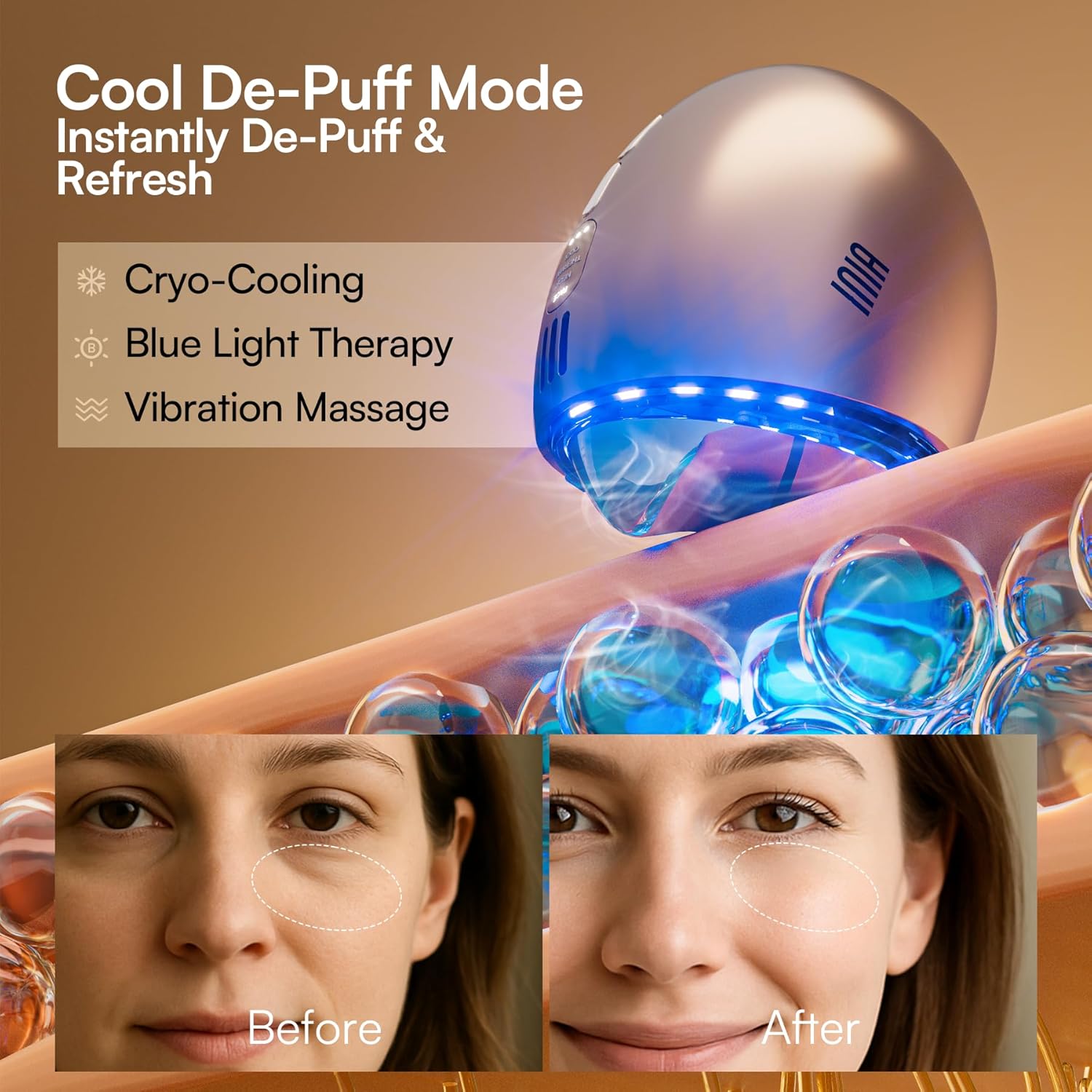
Image: The INIA device in Thermal Infusion Mode, emitting red light, demonstrating improved serum absorption.
4. Cool De-Puff Mode (Cryo-Cooling + Blue LED + Vibration)
Equipped with rapid-cooling technology (reaching 16°C in under 30 seconds) and blue LED with light vibration, this mode helps diminish puffiness and refresh tired skin, especially around the eyes. It's ideal for morning routines or post-sun exposure to calm redness and minimize pore appearance.

Image: The INIA device in Cool De-Puff Mode, emitting blue light, with a visual representation of reduced puffiness around the eyes.
How to Use Your INIA GLACE
- Step 1: Prep Skin. Cleanse your skin and apply a conductive gel or serum.
- Step 2: Select Mode & Intensity. Turn on the device and choose your desired mode (Face, Neck, Thermal, Cool) and intensity level using the Power and Mode buttons.
- Step 3: Glide & Lift/Drain.
- Face: Use upward strokes to lift and sculpt.
- Neck: Use upward strokes to tighten, and downward strokes to drain.
- Step 4: Focus on Areas. Target specific areas like the jawline for smoothing, boosting absorption, or instant de-puffing.
- Step 5: Finish. Rinse off any remaining gel, apply your regular skincare, and enjoy a refreshed look.

Image: Step-by-step visual instructions for using the INIA GLACE device on the face and neck.
Demonstration Videos:
Video: A user demonstrating the INIA Gua Sha tool, highlighting its various modes and effects on the face and neck.
Video: An influencer reviewing the INIA 7-in-1 Gua Sha tool, demonstrating its use and discussing its benefits for skincare.
Video: A detailed review of the INIA 7-in-1 Red Light Therapy Device, showcasing its features and application.
Video: An honest review demonstrating the 7-in-1 Red Light Therapy device for face and neck, highlighting its ease of use.
Video: A brief demonstration of the INIA Glace & Flare devices for skincare and anti-aging routines.
Video: A "Watch Before You Buy" video showcasing the INIA 7-in-1 device's features and benefits.
Video: A full review of the INIA Gua Sha tool, explaining why the user loves it and its various functions.
Video: A user demonstrating the sleek INIA 7-in-1 Anti-Aging Tool, describing it as a treat for the skin.
Video: A demonstration of the INIA Thermal & Cryo Facial Massager, showcasing its temperature modes.
Video: A short video demonstrating the operational aspects of the INIA device.
Maintenance
Cleaning:
After each use, gently wipe the treatment head with a soft, damp cloth. Ensure no gel residue remains. Do not submerge the device in water or use abrasive cleaners.
Storage:
Store the device in a cool, dry place, away from direct sunlight and extreme temperatures. Keep it in its original packaging or a protective pouch to prevent damage.
Troubleshooting
| Problem | Possible Cause | Solution |
|---|---|---|
| Device not turning on. | Low battery or not charged. | Charge the device fully. Ensure the power button is pressed and held. |
| No sensation during micro-current. | Insufficient conductive gel or poor skin contact. | Apply more conductive gel. Ensure both electrode heads are in full contact with the skin. Increase intensity if needed. |
| Device not cooling/heating. | Incorrect mode selected or device malfunction. | Ensure the correct Thermal or Cool mode is selected. If the issue persists, contact customer support. |
Specifications
- Brand: INIA
- Model Name: INIA 7-in-1
- ASIN: B0FP4MLKPK
- Color: Gold
- Material: Acrylonitrile Butadiene Styrene (ABS), Polycarbonate (PC)
- Package Dimensions: 5.94 x 5.94 x 3.62 inches
- Weight: 1.17 Pounds
- Manufacturer: INIA
- First Available Date: August 29, 2025
Warranty and Support
INIA offers protection plans for your device. You may consider purchasing a 2-Year or 3-Year Protection Plan for extended coverage. For any product-related inquiries, technical support, or warranty claims, please contact INIA Official US customer service.
You can visit the INIA Store on Amazon for more information and support resources.
Related documentsINIA 7-in-1


Ask a question about this manual
Ask about setup, troubleshooting, compatibility, parts, safety, or missing instructions. Manuals+ will review the question and use this page’s manual context to help answer it.