
Introduction
Welcome to your Grimtron Biometric Gun Safe. This manual provides essential information for the safe and effective use of your new biometric handgun safe. Please read these instructions carefully before setup and operation to ensure proper functionality and security.
Important Safety Information
- Always keep the safe locked and secured when not in use.
- Store backup keys in a secure location away from the safe and out of reach of children.
- Do not store loaded firearms in the safe unless local laws permit and it is done responsibly.
- Ensure the safe is mounted securely to prevent unauthorized removal.
- Keep fingerprints and passcodes confidential.
- This safe is designed to deter theft and unauthorized access, but it is not foolproof.
Package Contents
Verify all items are present in the package:
- 1 x Grimtron Biometric Gun Safe
- 2 x Backup Keys
- 2 x Mounting Bolts
- 1 x User Manual (this document)
- 2 x Mounting Screws
- 1 x USB-C Cable
- 1 x Security Cable

Image: The Grimtron Biometric Gun Safe displayed with its full set of accessories, including keys, mounting hardware, USB-C cable, and security cable.
Setup
Battery Installation
The safe requires 4 AA batteries (not included) for operation. Ensure you use new, high-quality alkaline batteries.
- Locate the battery compartment on the underside of the safe.
- Open the compartment cover.
- Insert 4 AA batteries, ensuring correct polarity (+/-).
- Close the battery compartment cover securely.
Mounting the Safe
For optimal security, it is highly recommended to mount the safe using the provided hardware. This prevents unauthorized removal of the safe itself.
- Permanent Mounting: Choose a secure location such as a nightstand, inside a closet, or in a vehicle. Use the provided mounting bolts and screws to firmly attach the safe to a solid surface.
- Temporary Securing: For portable use or in vehicles, utilize the included security cable to tether the safe to a fixed object, such as a car seat frame or a desk leg.

Image: The Grimtron safe demonstrated in different placement options, including under a car seat, in a suitcase, and on a shelf, highlighting its portability and mounting flexibility.
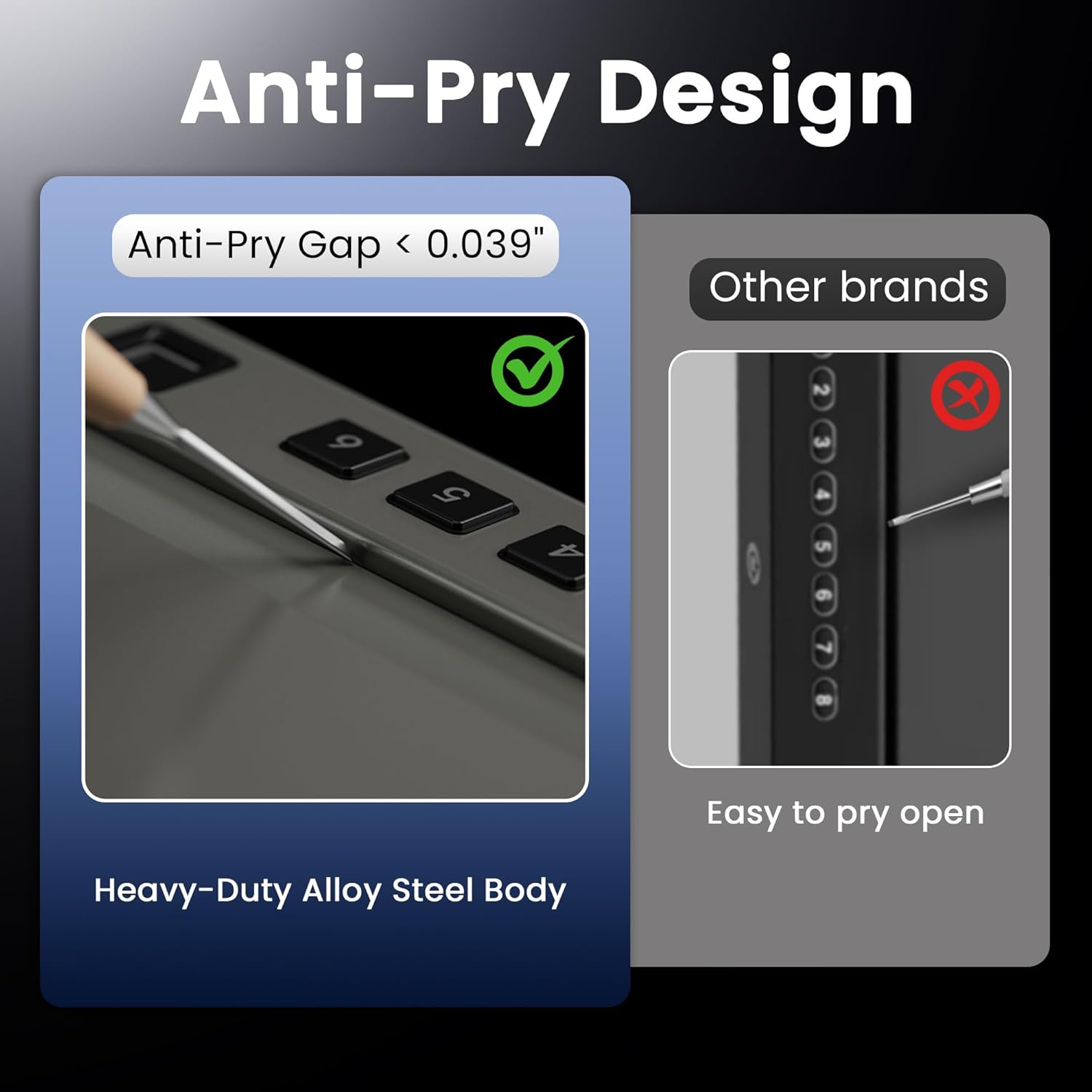
Image: A comparison showing the minimal anti-pry gap of the Grimtron safe's heavy-duty alloy steel body versus a larger gap on another brand's safe.
Operating the Safe
Biometric Fingerprint Access
The safe supports storage of up to 100 unique fingerprints for rapid access.
- To Register a Fingerprint: Press the internal programming button. Place your finger on the scanner, lift, and repeat several times until the safe confirms successful registration (e.g., with a beep or light indicator).
- To Open: Place a registered finger firmly on the biometric scanner. The safe will unlock within 0.1 seconds.

Image: An illustration detailing the upgraded fingerprint technology, highlighting features like 0.1-second recognition, 100 fingerprint capacity, 99% recognition rate, and self-adaptive learning.
Numeric Passcode Access
A custom 3-8 digit passcode can be programmed for keypad entry.
- To Set a Passcode: Press the internal programming button. Enter your desired 3-8 digit code, then press the '#' key to confirm.
- To Open: Enter your programmed passcode on the keypad, then press the '#' key.

Image: A woman demonstrating quick, no-look access to the safe using the recessed buttons with tactile dots on the keypad.
Key Unlock
Use the provided backup keys for manual access, especially if batteries are depleted or you forget your codes.
- Locate the emergency keyhole, usually concealed.
- Insert one of the backup keys into the keyhole.
- Turn the key to unlock and open the safe.

Image: The Grimtron safe on a nightstand, illustrating its three quick access methods: fingerprint recognition (within 0.1 seconds), numeric passcode entry (3-8 digits), and traditional key unlock (2 keys included).
Emergency USB Power Supply
If the batteries are completely depleted, you can temporarily power the safe using a USB-C cable and an external power source (e.g., power bank, car charger) to gain access via biometric or passcode methods.
- Locate the USB-C emergency power port on the safe.
- Connect a USB-C cable from a power source to the safe's port.
- Once powered, use your registered fingerprint or passcode to open the safe.

Image: The Grimtron safe being powered by a USB-C cable in a car, demonstrating the emergency power supply feature for situations where batteries are dead or keys are lost.
Maintenance
Care and Cleaning
- Keep the safe clean and dry. Wipe the exterior with a soft, damp cloth.
- Do not use abrasive cleaners or solvents, as they may damage the finish or electronic components.
- Ensure the fingerprint scanner and keypad are free from dirt, dust, or debris for optimal performance.
- Regularly check battery levels and replace them promptly when the low battery indicator appears to avoid being locked out.
Troubleshooting
Common Issues and Solutions
| Problem | Solution |
|---|---|
| Safe does not open with fingerprint | Ensure your finger is clean and dry. Try scanning a different registered finger. Re-register your fingerprint if necessary. Check battery level. |
| Safe does not open with passcode | Re-enter the passcode carefully, ensuring each digit is pressed firmly. Verify the passcode is correct. Check battery level. |
| No power or safe is unresponsive | Replace all batteries with new ones. If still unresponsive, use the emergency USB power supply. |
| Backup keys are lost | Access the safe using your registered fingerprint or passcode. Contact Grimtron customer support for potential key replacement options. |
Product Specifications
| Feature | Detail |
|---|---|
| Brand | Grimtron |
| Model Number | bdcb4c72-85b1-4132-adae-e1f9ac14fce1 |
| Lock Type | Biometric, Keypad, Key |
| Color | Black |
| Material | Alloy Steel |
| Mounting Type | Freestanding, Tabletop, Vehicle Mountable |
| Exterior Dimensions | 11.42" x 7.09" x 1.97" (29cm x 18cm x 5.05cm) |
| Interior Dimensions | 8.86" x 6.69" x 1.77" (22.5cm x 17cm x 4.5cm) |
| Net Weight | 8.2 LBS / 3.7 KG |
| Fingerprint Capacity | Up to 100 fingerprints |
| Passcode Length | 3-8 digits |
| Biometric Access Speed | Within 0.1 seconds |

Image: The interior of the Grimtron safe, demonstrating its capacity to hold two full-size pistols and displaying key dimensions in both inches and centimeters.
Warranty and Support
Warranty Information
Grimtron provides a limited warranty for this product. Please refer to the warranty card included in your package or visit the official Grimtron website for detailed terms and conditions regarding coverage and duration.
Customer Support
For technical assistance, troubleshooting, or parts replacement, please contact Grimtron customer support:
- Online: Visit the Grimtron Official Store on Amazon for product information and support resources.

