
1. Introduction
The ZOHAN 035 Bluetooth 5.4 Shooting Ear Protection Earmuffs are designed to provide advanced hearing protection while offering modern connectivity features. These earmuffs feature a Noise Reduction Rating (NRR) of 22dB, active noise reduction, and sound amplification to enhance situational awareness. Integrated Bluetooth 5.4 technology allows for seamless audio streaming and communication with compatible devices.
Key features include:
- Advanced Bluetooth 5.4: For stable wireless connection and audio streaming.
- Enhanced Hearing Protection: NRR 22dB with active noise reduction that activates within 0.01 seconds when noise exceeds 82dB.
- Sound Amplification: Amplifies low-level sounds up to 4X for improved communication and environmental awareness.
- Comfortable Design: Features a padded headband and adjustable earmuffs for extended wear.
- Foldable Design: For easy portability and storage.

Image: ZOHAN 035 Multifunctional Earmuffs highlighting Bluetooth 5.4, instant noise cutoff, and 4X sound amplification features.
2. Product Components
Familiarize yourself with the various parts of your ZOHAN 035 earmuffs:

Image: Detailed diagram of the ZOHAN 035 earmuffs, pointing out key components such as the padded headband, adjustable telescopic rod, omnidirectional microphones, Bluetooth indicator light, battery lid, and audio input jack.
- Padded Headband: For comfortable fit.
- Adjustable Telescopic Rod: Allows for size adjustment to fit various head shapes.
- 2 Omnidirectional Microphones: For sound amplification and situational awareness.
- Bluetooth Indicator Light: Shows Bluetooth status.
- Battery Lid: Access point for battery installation.
- Audio Input Jack: For connecting external audio devices via a 3.5mm cable (not included).
- Earmuff On/Off & Sound Amplification Control Button: Located on the right earcup, this knob controls the power for the earmuffs and adjusts the level of ambient sound amplification.
- Bluetooth On/Off Button: A dedicated button for activating and deactivating Bluetooth functionality.
- Bluetooth/Audio Volume Control Button: Adjusts the volume for Bluetooth audio and auxiliary input.
3. Setup
3.1 Battery Installation
- Locate the battery lid on one of the earmuffs.
- Open the battery lid.
- Insert 2 AAA batteries (not included) according to the polarity markings inside the compartment.
- Close the battery lid securely.

Image: The battery compartment of the ZOHAN 035 earmuffs, illustrating where to insert AAA batteries.
3.2 Adjusting Fit
Adjust the telescopic rods on both sides of the earmuffs to ensure a snug and comfortable fit over your ears. The padded headband should rest comfortably on your head.
4. Operation
4.1 Powering On/Off and Sound Amplification
- To power on the earmuffs and activate sound amplification, rotate the Earmuff On/Off & Sound Amplification Control Button clockwise.
- Continue rotating the knob clockwise to increase the amplification level of ambient sounds.
- To decrease amplification, rotate the knob counter-clockwise.
- To power off the earmuffs, rotate the knob fully counter-clockwise until it clicks.

Image: The Earmuff On/Off and Sound Amplification Control Button, used for powering the device and adjusting ambient sound levels.
4.2 Bluetooth Pairing and Connectivity
- Ensure the earmuffs are powered on.
- Press and hold the Bluetooth On/Off Button for approximately 3 seconds. The Bluetooth indicator light will flash, indicating pairing mode.
- On your device (smartphone, tablet, etc.), enable Bluetooth and search for available devices.
- Select "ZOHAN 035" from the list of available devices.
- Once paired, the Bluetooth indicator light will stop flashing and remain solid.
- To disconnect Bluetooth, press and hold the Bluetooth On/Off Button again for 3 seconds.

Image: The Bluetooth On/Off Button, used to activate and deactivate Bluetooth pairing mode.
4.3 Adjusting Bluetooth/Audio Volume
Use the dedicated Bluetooth/Audio Volume Control Button to adjust the volume of audio played via Bluetooth or the auxiliary input. This is separate from the ambient sound amplification control.

Image: The Bluetooth/Audio Volume Control Button, used to adjust the volume of connected audio sources.
4.4 Using the Auxiliary Input
Connect an external audio device (e.g., MP3 player) to the Audio Input Jack using a 3.5mm audio cable (not included). The volume can be controlled using the Bluetooth/Audio Volume Control Button.
5. Maintenance
5.1 Cleaning
- Wipe the earmuffs with a soft, damp cloth. Do not use abrasive cleaners or solvents.
- Ensure no liquid enters the microphone openings or audio input jack.
- Clean the ear cushions regularly to maintain hygiene and comfort.
5.2 Storage
- When not in use, store the earmuffs in a cool, dry place, away from direct sunlight and extreme temperatures.
- Remove batteries if the earmuffs will not be used for an extended period to prevent leakage.
- The foldable design allows for compact storage.
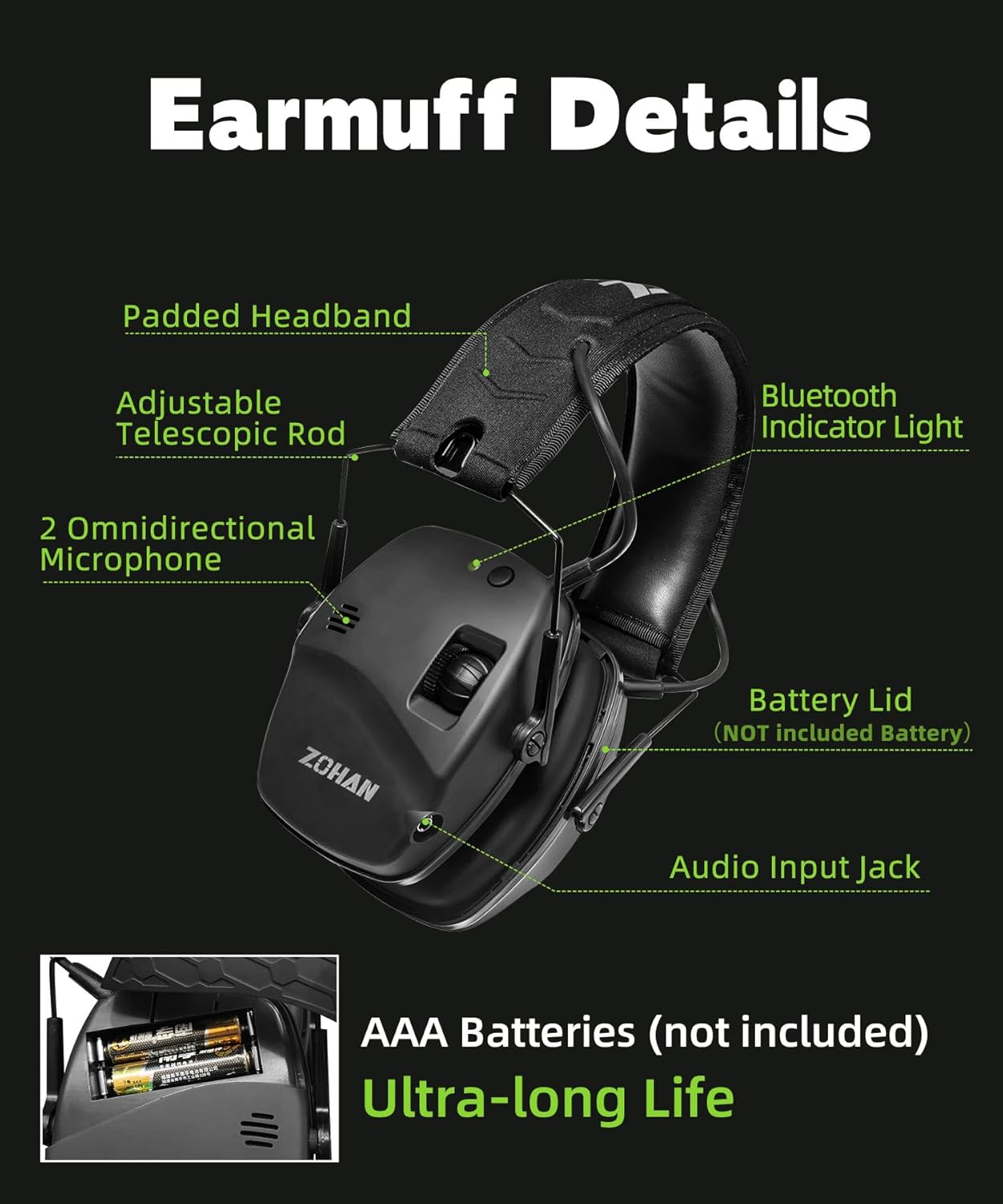
Image: The ZOHAN 035 earmuffs folded, demonstrating their compact design for storage and portability.
6. Troubleshooting
| Problem | Possible Cause | Solution |
|---|---|---|
| No power/No sound amplification | Dead or incorrectly inserted batteries. Earmuffs are off. | Check battery polarity and replace batteries if necessary. Rotate the Earmuff On/Off knob clockwise to power on. |
| Cannot pair via Bluetooth | Bluetooth not in pairing mode. Device Bluetooth is off. Earmuffs are too far from the device. | Ensure earmuffs are in pairing mode (flashing indicator light). Turn on Bluetooth on your device. Move earmuffs closer to the device. |
| Low Bluetooth audio volume | Device volume is low. Earmuff Bluetooth volume is low. | Increase volume on your connected device. Adjust the Bluetooth/Audio Volume Control Button on the earmuffs. |
| Ambient sound is distorted or too quiet | Amplification level is too low or too high. Microphones are obstructed. | Adjust the Earmuff On/Off & Sound Amplification Control Button. Ensure microphones are clear of obstructions. |
7. Specifications
- Model: ZOHAN 035
- Noise Reduction Rating (NRR): 22dB
- Bluetooth Version: 5.4
- Active Noise Reduction Reaction Time: 0.01 seconds (when noise exceeds 82dB)
- Sound Amplification: Up to 4X
- Power Source: 2 x AAA Batteries (not included)
- Material: Durable ABS shell and thicker noise-canceling foam
- Certifications: ANSI S3.19-1974, CE EN 352-1

Image: Visual representation of the earmuffs' high-performance features, including NRR 22dB, 4X sound amplification, and 0.01s reaction time.
8. Widespread Application
The ZOHAN 035 earmuffs are suitable for various noisy environments, providing essential hearing protection and enhanced situational awareness:
- Shooting ranges and hunting
- Woodworking and construction sites
- Mowing and other yard work
- Aviation and industrial settings

Image: Examples of widespread applications for the ZOHAN 035 earmuffs, including woodworking, mowing, hunting, and shooting, with typical noise levels.
9. Warranty and Support
For warranty information or technical support, please refer to the product packaging or contact ZOHAN customer service directly. Keep your purchase receipt for any warranty claims.
Contact information can typically be found on the official ZOHAN website or through your retailer.