
1. Introduction
This manual provides essential information for the safe and effective use of your UMAY Fitness Treadmill with Incline. Please read this manual thoroughly before assembly, operation, or maintenance to ensure proper function and user safety.
The UMAY Fitness Treadmill is designed for home use, offering a versatile workout experience with features such as automatic incline adjustment, a powerful yet quiet motor, and a compact foldable design for easy storage.
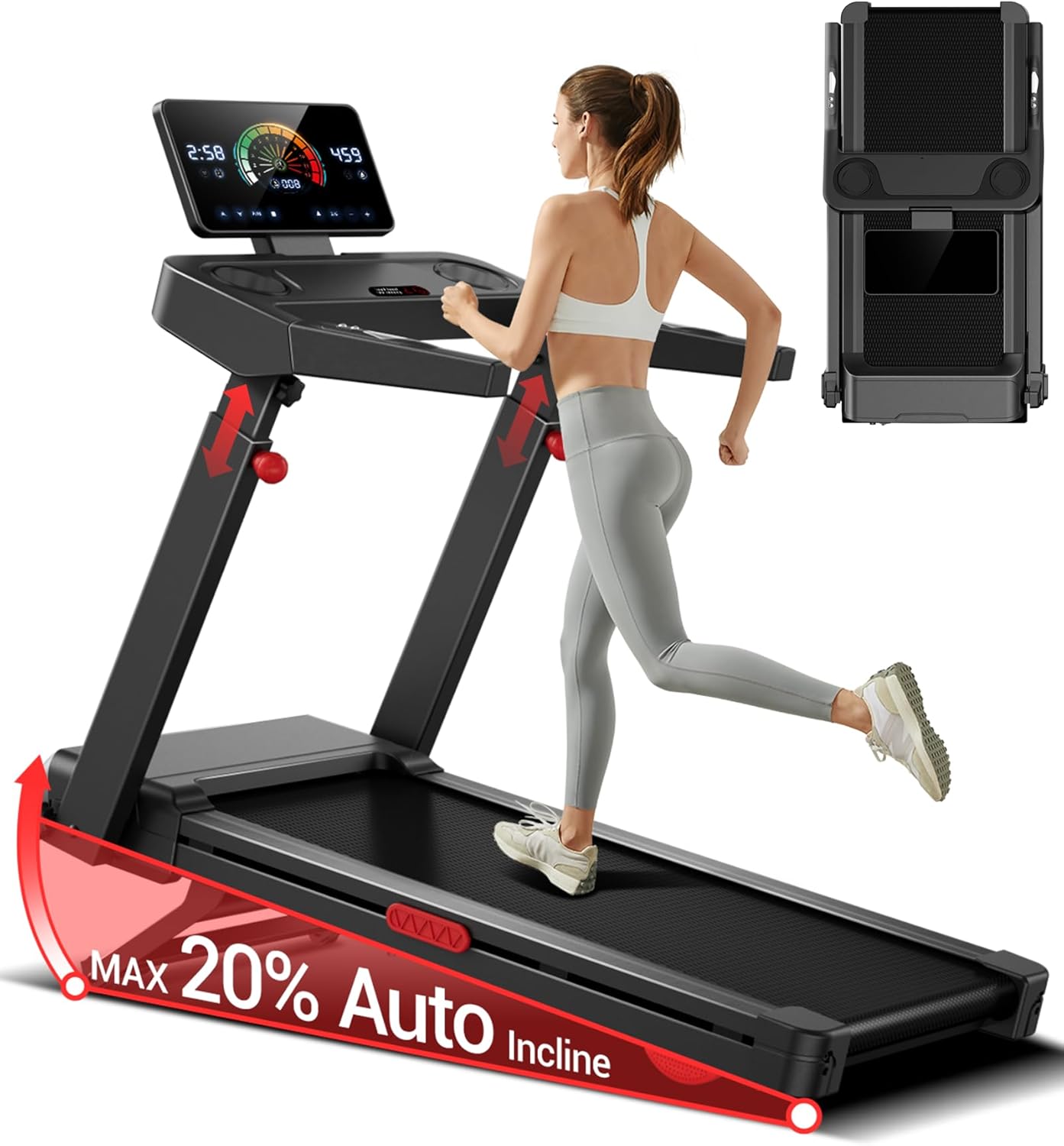
Image 1.1: UMAY Fitness Treadmill in operation, highlighting its design and display.
2. Safety Instructions
Your safety is paramount. Adhere to the following safety guidelines to prevent injury or damage to the treadmill.
- Always consult with a physician before starting any new exercise program.
- Place the treadmill on a flat, stable surface with adequate clearance around it (at least 6.5 feet behind and 2 feet on each side).
- Ensure the safety key is properly attached to your clothing before beginning a workout. The treadmill will stop if the safety key is disengaged.
- Do not allow children or pets near the treadmill while it is in operation.
- Keep hands and feet clear of all moving parts.
- Do not operate the treadmill if it is damaged or malfunctioning. Contact customer support immediately.
- Wear appropriate athletic footwear during use.
- The maximum user weight capacity for this treadmill is 400 pounds. Do not exceed this limit.

Image 2.1: Detail of the control panel and handrails, including the safety key location.
3. Assembly and Setup
Your UMAY Fitness Treadmill comes 90% pre-assembled, significantly reducing setup time. Most users can complete the assembly within 19 minutes.
3.1 Unpacking
- Carefully remove all components from the packaging.
- Verify all parts are present according to the packing list in the included user manual.
3.2 Initial Assembly Steps
Follow the detailed instructions in the included paper manual for the final assembly steps, which typically involve securing the console and handrails. Ensure all screws and bolts are tightened securely before use.
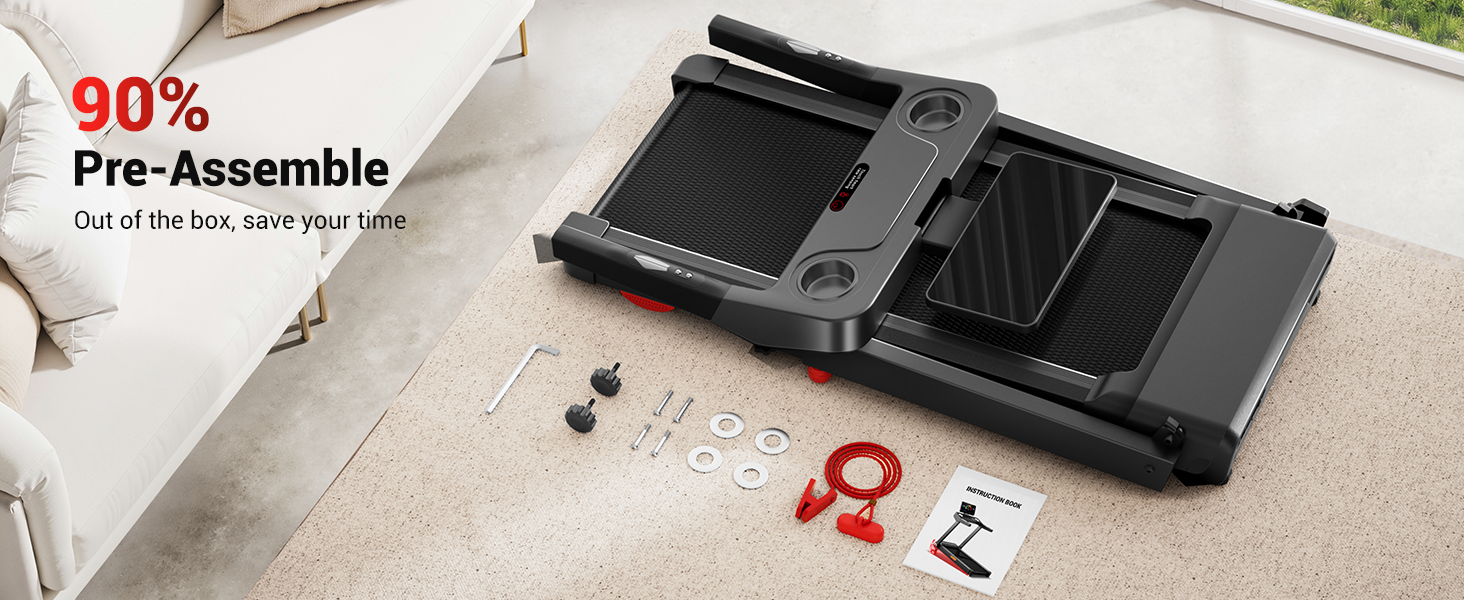
Image 3.1: The treadmill in its 90% pre-assembled state, ready for quick setup.
4. Operation
4.1 Control Panel Overview
The treadmill features a bright LED touchscreen display and integrated controls on the handrails for convenient adjustments during your workout.
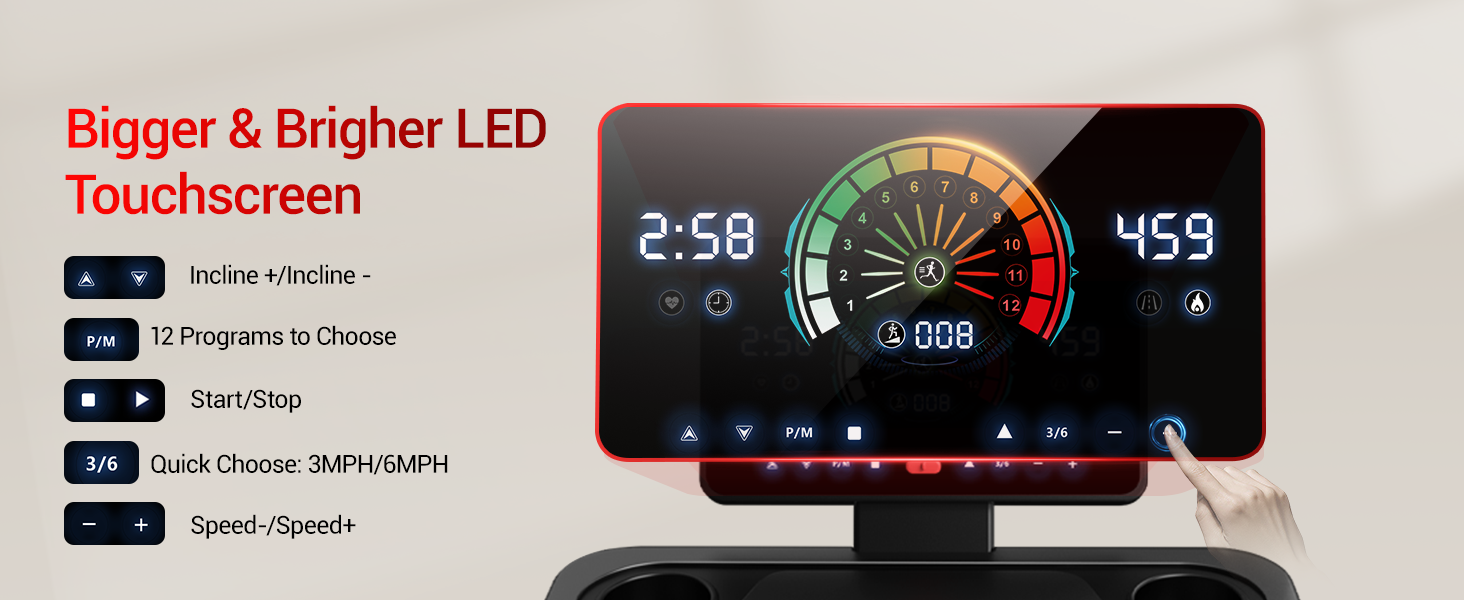
Image 4.1: The LED touchscreen display provides real-time workout data.
- Touchscreen Display: Shows Time, Calories, Speed, and Distance.
- Start/Stop Buttons: Initiate or pause your workout.
- Speed +/- Buttons: Adjust the running belt speed. Quick access buttons for 3MPH and 6MPH are also available.
- Incline +/- Buttons: Adjust the treadmill's incline level.
- Heart Rate Monitor: Integrated sensors on the handrails track your pulse.
- Safety Key: Magnetic key that must be in place for operation. Pulling it off will immediately stop the treadmill.
- Cup Holders: Two integrated cup holders for your convenience.
4.2 Adjusting Incline
The treadmill features a 2%-20% 20-level auto incline system. Use the Incline +/- buttons on the console or handrails to adjust the incline during your workout. Higher inclines increase calorie burn and target different muscle groups.

Image 4.2: Visual representation of the 2%-20% auto incline capability.
4.3 Using Programs
The treadmill offers 12 pre-set programs to vary your workouts. Refer to the detailed instructions in the main user manual for how to select and utilize these programs.
4.4 Adjustable Console Height
The console height can be adjusted by 8 inches across 3 levels, making it suitable for users of various heights. To adjust, loosen the knobs on both sides, pull the handle to snap it into the desired position, and then tighten the knobs. Adjust each side separately to ensure stability.

Image 4.3: Illustration of the adjustable console height feature for different users.
5. Folding and Storage
The UMAY Fitness Treadmill features a fully foldable design, allowing it to be stored compactly when not in use.
5.1 Folding Instructions
- Ensure the treadmill is powered off and unplugged.
- Carefully fold the console and handrails down towards the running deck.
- The screen can be flipped 90 degrees for a more compact profile.
- Once folded, the treadmill's dimensions are approximately 51.5" (length) x 25.5" (width) x 6.5" (height).
5.2 Storage
Its ultra-slim folded profile allows it to be stored under sofas, against walls, or in closets, making it ideal for small living spaces.

Image 5.1: The treadmill in its compact, fully folded state, demonstrating space-saving storage.
6. Maintenance
Regular maintenance ensures the longevity and optimal performance of your treadmill.
- Cleaning: Wipe down the treadmill surfaces with a damp cloth after each use to remove sweat and dust. Do not use abrasive cleaners.
- Belt Lubrication: Periodically lubricate the running belt according to the instructions in your main user manual. This typically involves applying silicone lubricant under the belt to reduce friction.
- Belt Tension and Alignment: Check the running belt tension and alignment regularly. Adjust as needed following the instructions in your main user manual to prevent slipping or uneven wear.
- Motor Area: Keep the area around the motor clean and free of dust and debris to ensure proper ventilation.

Image 6.1: The 7-layer running belt and shock absorption system, which benefit from proper maintenance.
7. Troubleshooting
If you encounter issues with your treadmill, refer to the following common troubleshooting steps. For problems not listed here, contact customer support.
| Problem | Possible Cause | Solution |
|---|---|---|
| Treadmill does not power on. | Power cord not plugged in; Safety key not in place; Circuit breaker tripped. | Ensure power cord is securely plugged in; Insert safety key fully; Check household circuit breaker. |
| Running belt slips or hesitates. | Belt too loose; Belt needs lubrication. | Adjust belt tension according to manual; Lubricate belt as per maintenance section. |
| Unusual noise during operation. | Loose parts; Motor issue; Belt friction. | Check all bolts and screws for tightness; Lubricate belt; If noise persists, contact support. |
| Incline not adjusting. | Obstruction; Motor issue. | Check for any obstructions under the treadmill; Contact support if issue continues. |
8. Specifications
Detailed technical specifications for the UMAY Fitness Treadmill.
| Feature | Specification |
|---|---|
| Model Name | u60 L20 |
| Part Number | U50-series |
| Brand | UMAY |
| Color | 20% Auto Incline (variant) |
| Product Dimensions (Unfolded) | 56"D x 29"W x 9"H |
| Folded Dimensions | 51.5"L x 25.5"W x 6.5"H |
| Material | Acrylonitrile Butadiene Styrene (ABS) |
| Motor Horsepower | 3.5HP (Brushless) |
| Maximum Speed | 8.7 MPH (Note: JSON lists 3500 Miles per Hour, which is an error. Using 8.7 MPH from product title.) |
| Incline Range | 2% - 20% (20-level Auto Incline) |
| Maximum Weight Recommendation | 400 Pounds |
| Running Belt Dimensions | 42.5" x 16.2" |
| Noise Level | <45dB |
| Included Components | User Manual |

Image 8.1: Key performance specifications including motor, capacity, and noise.
9. Warranty and Support
9.1 Warranty Information
The UMAY Fitness Treadmill comes with a 2-year warranty. Please retain your proof of purchase for warranty claims.
9.2 Customer Support
For any questions, technical assistance, or warranty claims, please contact UMAY customer support. Refer to the contact information provided in your product packaging or on the official UMAY website.


