1. Introduction
Thank you for choosing the TOLEAD Twin Daybed with Pop-Up Trundle and Storage Headboard. This manual provides essential information for the safe assembly, operation, and maintenance of your new daybed. Please read these instructions thoroughly before assembly and retain them for future reference.
Key Features:
- Hidden Storage Headboard: Features 3 flip-top drawers and 2 open shelves for convenient bedside storage.
- Built-In Charging Station: Includes 1 USB port, 1 USB-C port, and 2 AC outlets.
- Colorful LED Lighting: Integrated LED strips with over 60,000 RGB colors and 29 lighting modes, controllable via remote or app.
- Twin to King Versatility: Pop-up trundle extends to form a king-size bed or separates into two twin beds.
- Sturdy & Functional Frame: Durable metal structure with lockable wheels for stability and easy movement.
2. Safety Information
WARNING: Failure to follow these safety instructions could result in serious injury or damage to the product.
- Always secure the pop-up trundle when in use to prevent instability.
- Be cautious of sharp edges during assembly and use.
- Do not exceed the weight capacity of 350 pounds per bed.
- Follow assembly instructions carefully to ensure stability and safety.
- Keep all small parts and packaging materials away from children.
- Ensure all connections are tight before use. Periodically check and re-tighten hardware.
- Use only the recommended mattress thickness of 4-8 inches for twin size mattresses.
3. Package Contents
Before beginning assembly, verify that all parts are present and undamaged. If any parts are missing or damaged, do not proceed with assembly. Contact customer support for assistance.
Included Components:
- Twin Daybed Frame (main structure)
- Twin Pop-Up Trundle Bed Frame
- Storage Headboard Components
- LED Light Strips and Controller
- Integrated Charging Station
- Assembly Hardware (screws, bolts, washers, Allen wrench)
- Instruction Manual (this document)
Tools Required (Not Included):
- Phillips Head Screwdriver
- Rubber Mallet (optional, for gentle tapping)
4. Assembly Instructions (Setup)
Assembly typically requires two adults. Clear a spacious area for assembly and place all components on a soft, clean surface to prevent scratches.
Step-by-Step Guide:
- Unpack and Identify Parts: Carefully remove all components from the packaging. Refer to the parts list in your included manual to identify each piece.
- Assemble the Main Daybed Frame: Attach the side rails to the headboard and footboard using the provided hardware. Ensure all bolts are finger-tight at this stage.
- Install Bed Slats: Secure the bed slats to the main daybed frame. Ensure they are evenly spaced and firmly attached to provide adequate mattress support.
- Assemble the Trundle Frame: Construct the pop-up trundle frame, attaching the wheels and ensuring they are securely fastened.
- Integrate the Trundle: Slide the assembled trundle frame under the main daybed frame.
- Attach the Storage Headboard: Secure the storage headboard unit to the main daybed frame. This includes attaching the shelves and flip-top drawers.
- Install LED Lighting: Adhere the LED light strips to the designated area on the headboard. Connect the LED controller and power supply.
- Connect Charging Station: Ensure the integrated charging station is properly seated and connected to a power source.
- Final Tightening: Once all components are in place, systematically tighten all bolts and screws using the Allen wrench and screwdriver. Do not overtighten.
- Place Mattresses: Position your twin mattresses on both the main daybed and the trundle.

Image: Product dimensions and details of the integrated power outlet. The main daybed measures approximately 76.8 inches long, 43.3 inches wide, and 47.3 inches high. The trundle measures 70.1 inches long and 38.2 inches wide. The power outlet features 2 AC outlets, 1 USB port, and 1 USB-C port, with a 6.6 ft power cord.

Image: The fully assembled TOLEAD Twin Daybed with the pop-up trundle stored underneath. The storage headboard with LED lighting is visible.
5. Operating Instructions
5.1. Pop-Up Trundle Operation
- To Extend the Trundle: Gently pull the trundle frame out from under the main daybed. The trundle is equipped with wheels for easy movement.
- To Lift the Trundle: Once pulled out, lift the trundle frame upwards until it locks into its elevated position. This creates a second twin bed or, when placed next to the main daybed, a king-size sleeping surface.
- To Lock Wheels: For stability, engage the locks on the trundle wheels once it is in the desired position.
- To Retract the Trundle: Disengage the wheel locks. Press the release mechanism (if applicable, refer to specific trundle design) and gently lower the trundle. Push it back under the main daybed.

Image: Demonstrates the versatility of the trundle bed. It can be tucked away (Twin), pulled out as a separate twin bed (Pulled Out Twin-Twin), or lifted to stand at the same height as the main daybed to form a King-size bed (Stand King Size).

Image: A close-up view of a lockable wheel on the trundle bed, showing the 'ON' and 'OFF' positions for the locking mechanism. This feature enhances safety and stability.
5.2. LED Lighting System
The integrated LED lighting system can be controlled via a remote control or a dedicated smartphone application.
- Power On/Off: Use the designated button on the remote or app to turn the lights on or off.
- Color Selection: Choose from over 60,000 RGB colors using the color wheel or preset options.
- Mode Selection: Select from 29 dynamic lighting modes to create different atmospheres.
- Brightness Adjustment: Adjust the intensity of the light as desired.
- Music & Lights Sync: Some modes allow the lights to sync with music.
- Timing Mode: Set timers for the lights to turn on or off automatically.

Image: The daybed's headboard illuminated by LED lights, with illustrations of a remote control and a smartphone app interface for controlling the lighting features, including color selection and dynamic modes.
5.3. Charging Station Use
The built-in charging station provides convenient power access for your electronic devices.
- Plug the daybed's power cord into a standard wall outlet.
- Use the 2 AC outlets for devices requiring standard power.
- Connect compatible devices to the 1 USB port (5V/2A) or 1 USB-C port (5V/2A) for charging.
- Ensure devices are compatible with the provided voltage and amperage.

Image: A close-up view of the integrated charging station on the headboard, showing a laptop and smartphone connected. The station includes 2 AC outlets, 1 USB port, and 1 USB-C port, with a 6.6 ft power cord.
5.4. Storage Headboard Access
The headboard features both open shelves and flip-top drawers for storage.
- Open Shelves: Place items directly on the open shelves for easy access.
- Flip-Top Drawers: Gently lift the front panel of the drawers to access the hidden storage compartments. Close securely after use.
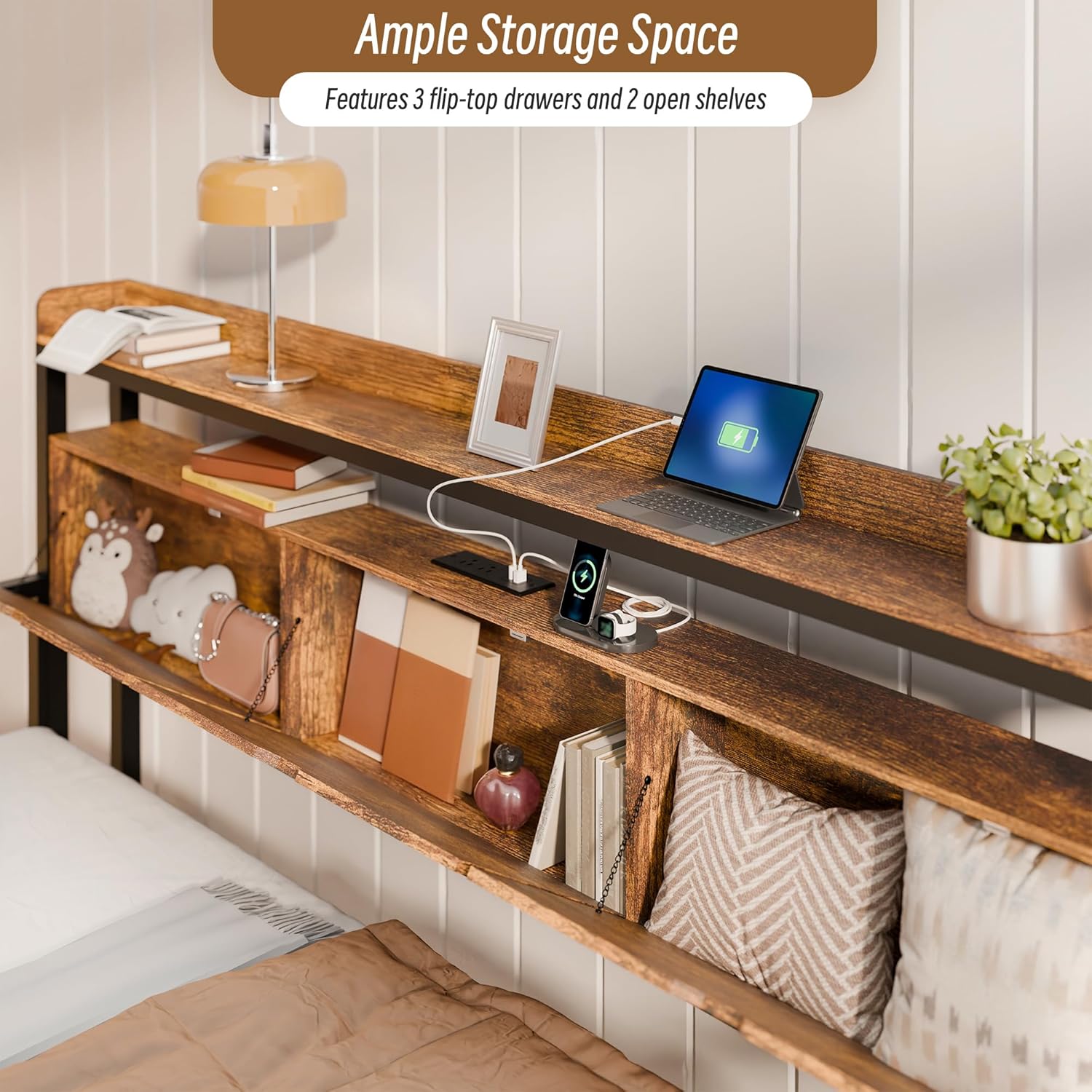
Image: A detailed view of the storage headboard, showcasing the three flip-top drawers and two open shelves. Various items like books, a laptop, and decorative objects are stored within.
6. Care and Maintenance
- Cleaning: Wipe the metal frame with a soft, damp cloth. For the wooden headboard, use a dry or slightly damp cloth. Avoid harsh chemicals or abrasive cleaners.
- Hardware Check: Periodically inspect all bolts, screws, and connections to ensure they remain tight. Re-tighten as necessary to maintain stability.
- Weight Distribution: Distribute weight evenly across the bed surface. Do not exceed the stated weight capacity of 350 pounds per bed.
- Trundle Wheels: Keep trundle wheels clean and free of debris to ensure smooth operation.
- Electrical Components: Ensure the charging station and LED lights are kept dry. Do not attempt to repair electrical components yourself.
7. Troubleshooting
7.1. LED Lights Not Working
- Check Power: Ensure the LED power adapter is securely plugged into a working wall outlet and into the LED controller.
- Remote/App Battery: Replace batteries in the remote control if applicable. Ensure the app is connected via Bluetooth/Wi-Fi.
- Connections: Verify all LED strip connections to the controller are secure.
7.2. Trundle Not Moving Smoothly or Locking
- Obstructions: Check for any objects or debris under the trundle or in the wheel path.
- Wheel Locks: Ensure wheel locks are disengaged when attempting to move the trundle.
- Alignment: Verify the trundle frame is properly aligned and not bent or damaged.
- Hardware: Check that all trundle assembly hardware is tight.
7.3. Charging Station Not Providing Power
- Wall Outlet: Ensure the daybed's main power cord is securely plugged into a functional wall outlet. Test the outlet with another device.
- Device Compatibility: Confirm your device is compatible with the USB/USB-C output specifications (5V/2A).
- Cable Integrity: Try a different charging cable to rule out a faulty cable.
8. Product Specifications
| Feature | Specification |
|---|---|
| Brand | TOLEAD |
| Model Number | MCTDJ043BN |
| Size | Twin Daybed with Pop Up Trundle Bed |
| Product Dimensions (L x W x H) | 77.2"L x 38.4"W x 38"H |
| Color | Black |
| Material | Engineered Wood, Metal |
| Finish Type | Powder Coated |
| Headboard Material | Wood |
| Item Weight | 56 pounds |
| Weight Capacity (Each Bed) | 350 pounds |
| Compatible Mattress Size | Twin (4"-8" thickness recommended) |
| Charging Station | 1 USB Port, 1 USB-C Port, 2 AC Outlets (125V/12A) |
| Power Cord Length | 6.6 ft |
| LED Lighting | 60,000+ RGB Colors, 29 Dynamic Modes |
| Assembly Required | Yes |
9. Warranty and Support
TOLEAD products are manufactured with quality and care. For specific warranty details, please refer to the documentation included with your purchase or contact TOLEAD customer support directly.
Customer Support:
If you encounter any issues with your product, require replacement parts, or have questions regarding assembly or operation, please contact TOLEAD customer support. Have your model number (MCTDJ043BN) and purchase information ready for faster service.
Contact information can typically be found on the TOLEAD official website or through your retailer's customer service portal.
