
VUOPAX B47A
Contents
VUOPAX Portable Bluetooth Speaker B47A Instruction Manual
Model: B47A
Introduction
This manual provides essential information for the safe and efficient operation of your VUOPAX Portable Bluetooth Speaker, model B47A. Please read this manual thoroughly before using the product and retain it for future reference.
Safety Information
- Do not expose the speaker to extreme temperatures or direct sunlight for extended periods.
- Avoid dropping or subjecting the speaker to strong impacts.
- Keep the speaker away from medical devices, as it contains magnets.
- Do not attempt to disassemble, repair, or modify the speaker yourself. Contact qualified service personnel.
- Ensure the charging port cover is securely closed when using the speaker near water to maintain its IP65 water resistance rating.
- Use only the provided charging cable or a certified equivalent.
Product Overview
The VUOPAX B47A is a portable Bluetooth speaker designed for robust audio performance in various environments. It features dual subwoofers and dual tweeters for clear sound and powerful bass, dynamic rhythm lights, and an IP65 dust and water resistance rating.
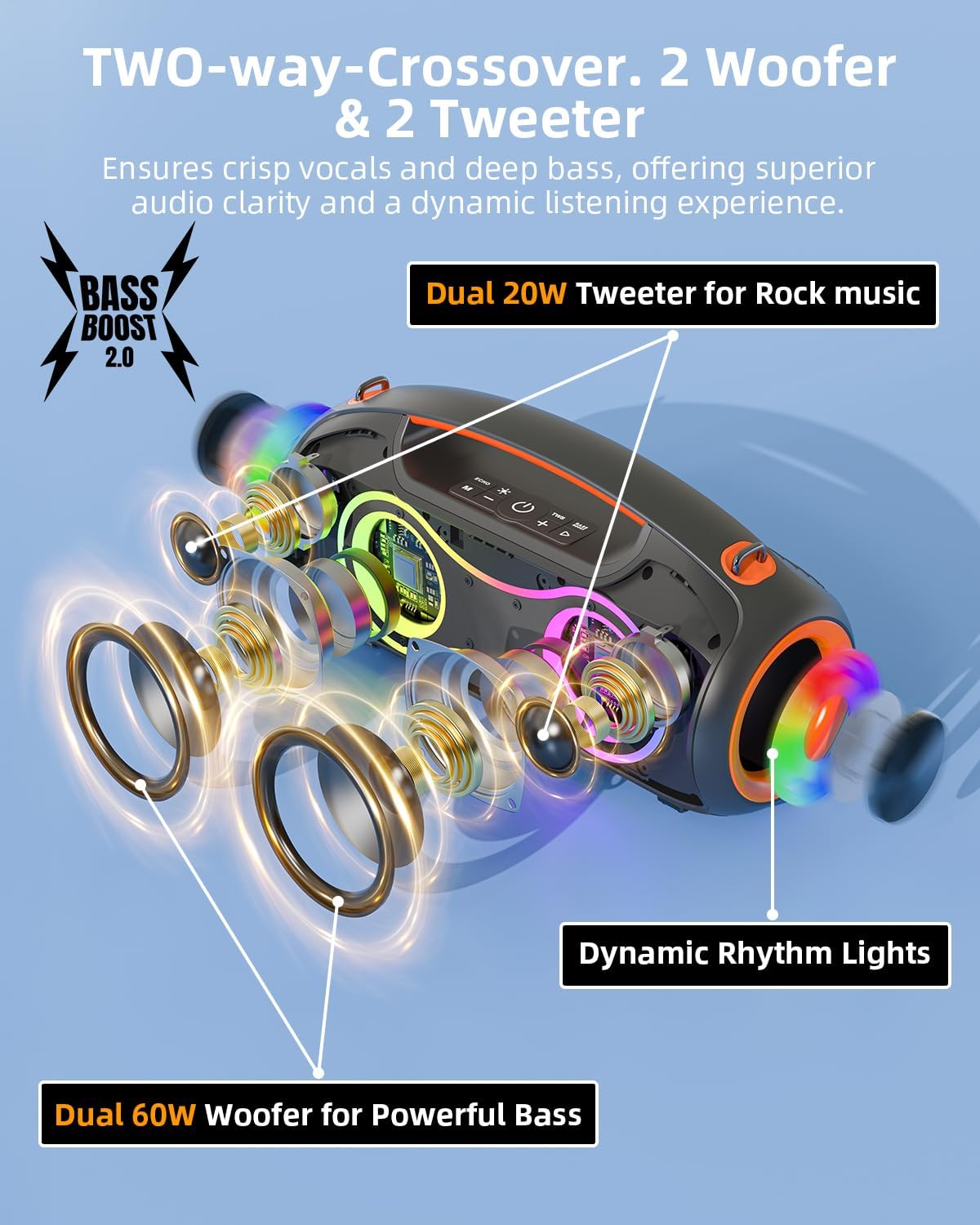
Figure 1: Internal Speaker Components. This image illustrates the internal structure of the VUOPAX B47A speaker, highlighting the two 60W woofers for powerful bass and two 20W tweeters for crisp vocals and dynamic audio. It also shows the dynamic rhythm lights integrated into the speaker design.
Package Contents
- VUOPAX Portable Bluetooth Speaker B47A
- USB-C Charging Cable
- 3.5mm AUX Audio Cable
- Shoulder Strap
- User Manual (this document)
Controls and Ports
Refer to the diagram below for the location of buttons and ports on your speaker.

Figure 2: Speaker Controls and Ports. This image displays the top panel controls including power, volume, play/pause, mode, and bass boost buttons. The rear panel, typically covered by a protective flap, houses the charging port, AUX input, USB port, and TF card slot.
- Power Button: Press and hold to power on/off.
- Play/Pause Button: Press to play or pause music.
- Volume Up/Next Track: Press to increase volume. Press and hold for next track.
- Volume Down/Previous Track: Press to decrease volume. Press and hold for previous track.
- Mode Button: Press to switch between Bluetooth, AUX, USB, and TF card modes.
- Bass Boost Button: Press to activate/deactivate Bass Boost function.
- Light Mode Button: Press to cycle through lighting effects.
- USB-C Charging Port: For charging the speaker.
- AUX Input: For wired audio connection.
- USB Port: For USB drive playback.
- TF Card Slot: For TF card playback.
Setup
Charging the Speaker
Before first use, fully charge the speaker. The speaker has a built-in 12000mAh high-capacity battery.
- Open the protective cover on the rear of the speaker to access the charging port.
- Connect the USB-C charging cable to the speaker's USB-C port.
- Connect the other end of the USB-C cable to a compatible USB power adapter (not included) or a computer's USB port.
- The charging indicator light will illuminate during charging and turn off when fully charged.
- Once charging is complete, securely close the protective cover to maintain water resistance.

Figure 3: Extended Battery Life. The speaker features a 12000mAh battery, providing up to 24 hours of playback, suitable for outdoor activities like camping.
Operating Instructions
Power On/Off
- Power On: Press and hold the Power button for approximately 2-3 seconds until you hear an audible prompt and the indicator lights illuminate.
- Power Off: Press and hold the Power button for approximately 2-3 seconds until you hear an audible prompt and the indicator lights turn off.
Bluetooth Pairing
The speaker uses Bluetooth 5.3 for a stable connection.
- Power on the speaker. It will automatically enter Bluetooth pairing mode, indicated by a flashing blue LED.
- Enable Bluetooth on your device (smartphone, tablet, laptop).
- Search for "VUOPAX B47A" in your device's Bluetooth list and select it to connect.
- Once connected, you will hear an audible confirmation, and the blue LED will remain solid.
- The speaker will automatically reconnect to the last paired device when powered on, if within range.

Figure 4: Bluetooth 5.3 Connectivity. This image demonstrates the speaker's ability to maintain a stable Bluetooth 5.3 connection up to 100 feet (approximately 30 meters) from the paired device.
True Wireless Stereo (TWS) Pairing
TWS allows you to connect two VUOPAX B47A speakers for a stereo sound experience.
- Ensure both VUOPAX B47A speakers are powered on and not connected to any Bluetooth device.
- On one speaker (this will be the primary speaker), press and hold the Play/Pause button for 3-5 seconds until you hear a prompt indicating TWS pairing mode.
- The two speakers will automatically search for and connect to each other. Once connected, you will hear a confirmation tone.
- Now, connect your device to the primary speaker via Bluetooth as described in the "Bluetooth Pairing" section.
- Both speakers will play audio in stereo.
Audio Input Modes (AUX, USB, TF Card)
Press the Mode Button to cycle through available input modes: Bluetooth, AUX, USB, and TF Card.
- AUX Mode: Connect an audio device using the 3.5mm AUX cable. The speaker will automatically switch to AUX mode or can be selected via the Mode button.
- USB Mode: Insert a USB flash drive into the USB port. The speaker will automatically switch to USB mode and begin playing supported audio files.
- TF Card Mode: Insert a TF (microSD) card into the TF card slot. The speaker will automatically switch to TF card mode and begin playing supported audio files.
Controlling Playback
- Play/Pause: Press the Play/Pause button.
- Volume Up: Press the Volume Up button.
- Volume Down: Press the Volume Down button.
- Next Track: Press and hold the Volume Up button.
- Previous Track: Press and hold the Volume Down button.
Bass Boost Function
Press the Bass Boost Button to activate or deactivate the enhanced bass output. This feature provides deeper, more resonant low frequencies.
Lighting Modes
The speaker features dynamic RGB lights that pulse with the music. Press the Light Mode Button to cycle through the 9 available lighting effects.
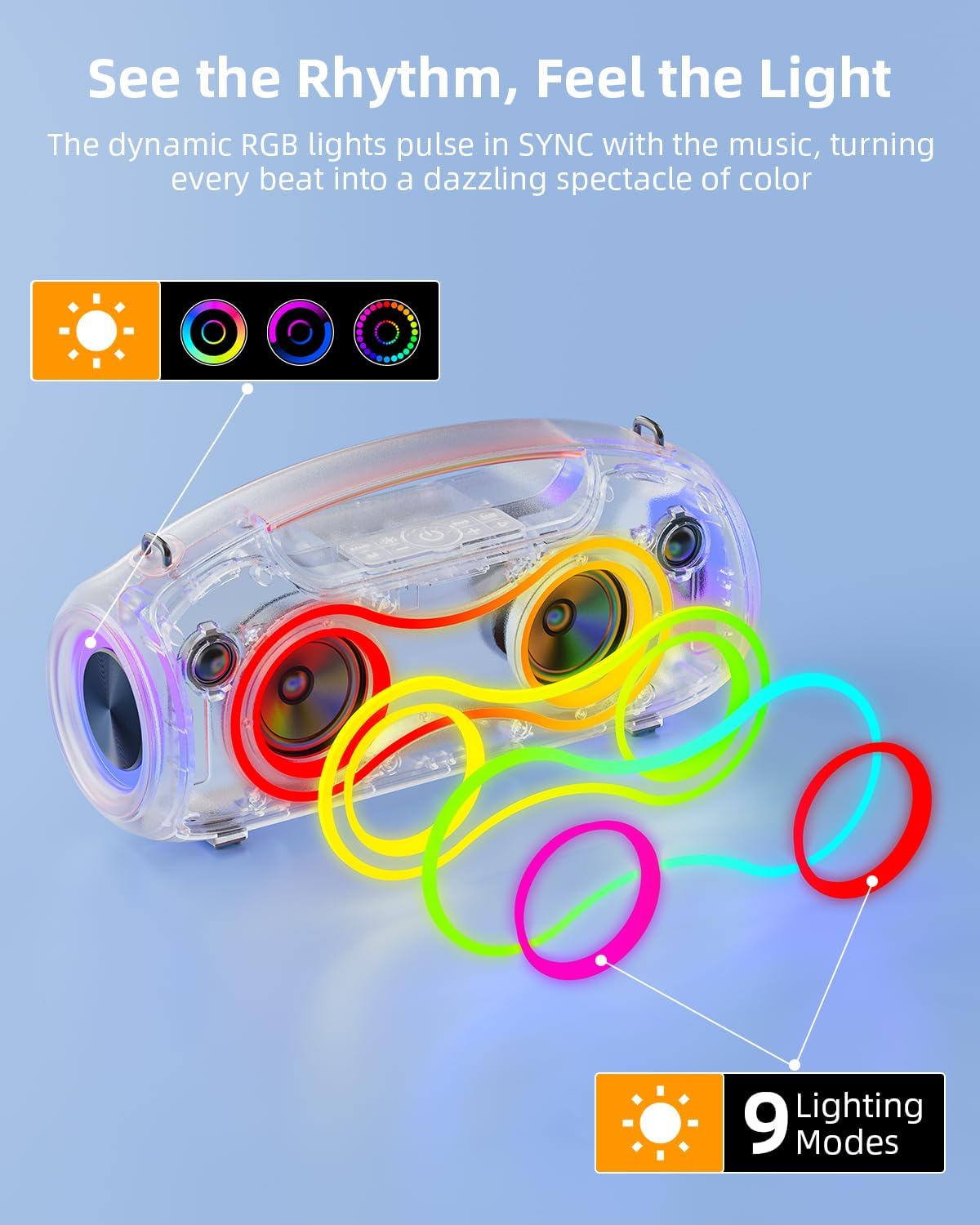
Figure 5: Dynamic RGB Lighting. This image shows the speaker's dynamic RGB lights synchronizing with music, offering 9 distinct lighting modes to enhance the listening experience.
Maintenance
Cleaning
- Wipe the speaker with a soft, damp cloth.
- Do not use abrasive cleaners, alcohol, or chemical solvents, as these may damage the surface.
- Ensure all port covers are closed before cleaning with a damp cloth.
Storage
- Store the speaker in a cool, dry place away from direct sunlight and extreme temperatures.
- If storing for an extended period, charge the battery to approximately 50% every few months to prolong battery life.
Water Resistance (IP65 Rating)
The VUOPAX B47A speaker is rated IP65, meaning it is protected against dust ingress and low-pressure water jets from any direction. This makes it suitable for outdoor use and environments where it might encounter splashes or light rain.
- Always ensure the rubber flap covering the charging and input ports is securely closed to maintain water resistance.
- Do not submerge the speaker in water.
- Avoid exposing the speaker to high-pressure water jets.
- If the speaker gets wet, wipe it dry with a soft cloth before opening any port covers or charging.

Figure 6: IP65 Dust and Water Resistance. The image shows the speaker in an outdoor setting near a pool, highlighting its IP65 rating for protection against dust and water splashes, making it suitable for various outdoor adventures.
Troubleshooting
| Problem | Possible Cause | Solution |
|---|---|---|
| Speaker does not power on. | Low battery. | Charge the speaker fully. |
| Cannot pair via Bluetooth. | Speaker not in pairing mode; device Bluetooth off; too far from speaker. | Ensure speaker is in pairing mode (flashing blue LED). Turn on Bluetooth on your device. Move device closer to speaker (within 10 meters). Forget previous pairings on your device and try again. |
| No sound. | Volume too low; incorrect input mode; device not playing. | Increase speaker and device volume. Press the Mode button to select the correct input (Bluetooth, AUX, USB, TF). Ensure music is playing on your connected device. |
| Sound distortion. | Volume too high; low battery; poor audio source. | Reduce volume on both speaker and device. Charge the speaker. Try a different audio source or file. |
| TWS pairing fails. | Speakers already paired to a device; too far apart. | Ensure both speakers are disconnected from any Bluetooth device. Place speakers close to each other. Follow TWS pairing steps carefully. |
Specifications
| Model Name | B47A |
| Brand | VUOPAX |
| Speaker Type | Outdoor, Portable |
| Connectivity Technology | Bluetooth 5.3, Auxiliary, USB, TF Card |
| Speaker Maximum Output Power | 180 Watts (Peak) |
| Audio Driver Type | 2 x 60W Woofers, 2 x 20W Tweeters |
| Frequency Response | 20 Hz - 20000 Hz |
| Signal-to-Noise Ratio | 80 dB |
| Wireless Communication Range | Up to 10 meters (33 feet) |
| Power Source | Battery Powered (12000mAh) |
| Battery Life | Up to 24 hours (varies with volume and content) |
| Water Resistance Rating | IP65 |
| Product Dimensions | 8.62"D x 6.7"W x 7.2"H |
| Item Weight | 7.27 Pounds |
| Control Method | Touch Buttons |
Warranty and Support
The VUOPAX B47A speaker comes with a limited warranty. Please refer to the warranty card included in your package for specific terms and conditions. For technical support, troubleshooting assistance, or warranty claims, please contact VUOPAX customer service through the retailer where the product was purchased or visit the official VUOPAX website for contact information.
Please retain your proof of purchase for warranty purposes.
Ask a question about this manual
Ask about setup, troubleshooting, compatibility, parts, safety, or missing instructions. Manuals+ will review the question and use this page’s manual context to help answer it.