
Introduction
Thank you for choosing the CubiCubi Electric Standing Desk. This manual provides essential information for the safe assembly, operation, and maintenance of your new desk. Please read these instructions carefully before use and retain them for future reference.

Image: The CubiCubi Electric Standing Desk, Rustic Brown, set up in a modern home office environment, showcasing its spacious desktop and ergonomic design.
Safety Information
- Ensure all components are present and undamaged before assembly. Do not use if any parts are missing or damaged.
- Keep children and pets away from the desk during operation to prevent injury.
- Do not overload the desk. The maximum weight capacity is 176 lbs (80 kg).
- Ensure the power cord is not pinched or damaged. Connect to a grounded outlet.
- Avoid placing liquids directly on the control panel or motor components.
- Regularly check all screws and connections to ensure they remain tight.
Assembly Instructions
Assembly of the CubiCubi Electric Standing Desk is designed to be straightforward, typically taking approximately 30 minutes. All necessary tools and a detailed instruction manual are included to guide you through the process.
- Attach the crossbeam: Securely attach the main crossbeam to the desk legs using the provided hardware.
- Install the feet: Install the feet onto the bottom of the legs to provide strong support and stability.
- Attach side wings: Connect the side wings to the frame for enhanced structural stability.
- Secure the tabletop: Carefully place the tabletop onto the assembled frame and secure it with the remaining screws. Ensure proper alignment.

Image: A visual guide illustrating the four-step assembly process for the CubiCubi Electric Standing Desk, highlighting the crossbeam, feet, side wings, and tabletop attachment.
Operating Instructions
Height Adjustment
The desk features an electric motor for smooth height adjustment, allowing you to transition between sitting and standing positions. The height range is from 28.3 inches (71.9 cm) to 46.5 inches (118.1 cm).

Image: A visual representation of the desk's adjustable height, showing the minimum height of 28.3 inches and maximum height of 46.5 inches.
Control Panel Functions
The programmable control panel allows for easy height adjustments and memory settings.
- Up/Down Buttons: Use the arrow buttons to manually adjust the desk height.
- Memory Presets (1, 2, 3): Save up to three preferred heights. To set a memory position, adjust the desk to the desired height, then press the 'M' button followed by the number (1, 2, or 3). The desk will automatically move to the saved height when the corresponding number button is pressed.
- LED Display: Shows the current desk height in inches.
- Child Lock: The motor system includes a child lock feature for safety. Refer to the detailed manual for activation and deactivation instructions.
- Anti-Collision Function: The desk is equipped with an anti-collision system that automatically retracts if it encounters an obstruction during movement, preventing damage or injury.
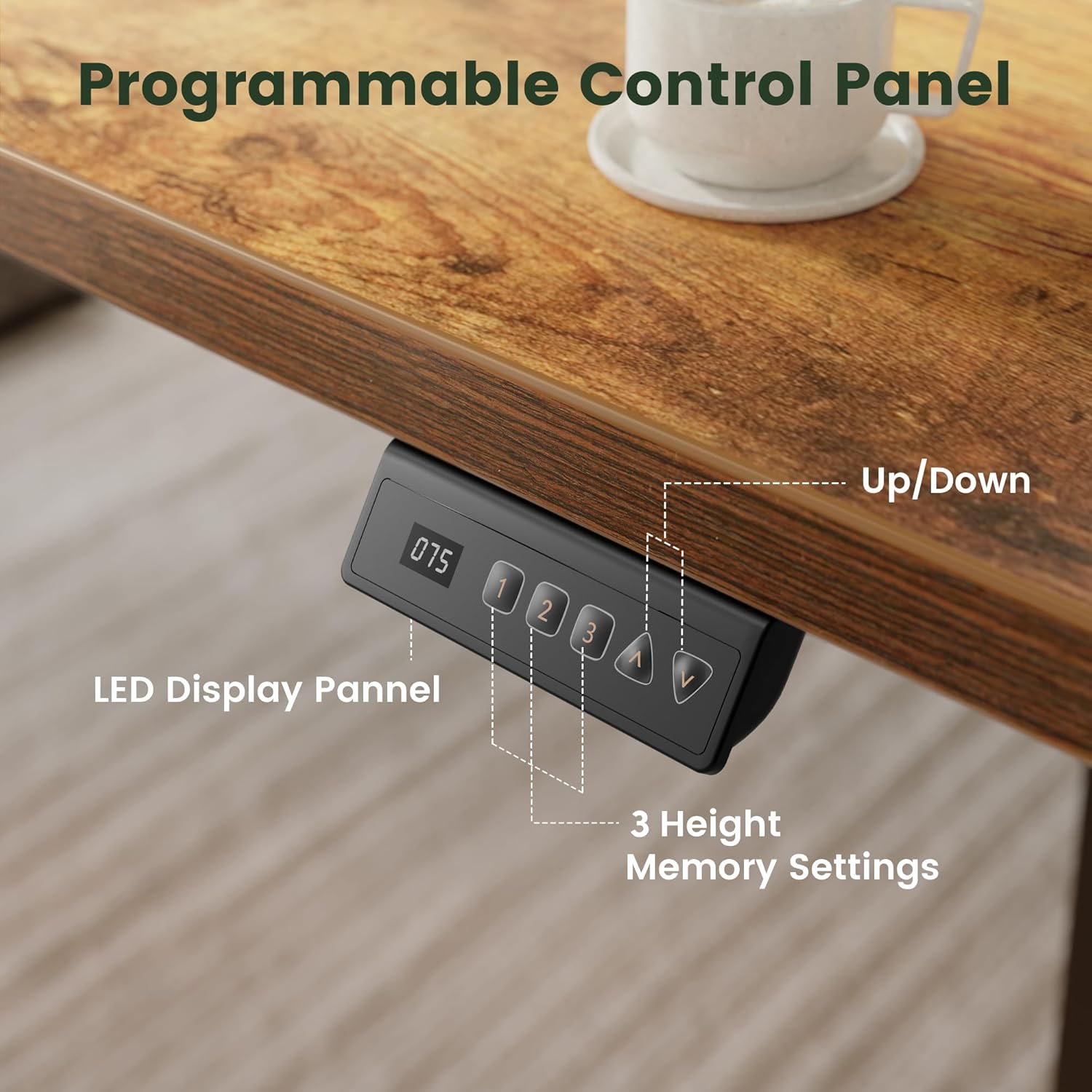
Image: A detailed view of the desk's control panel, featuring an LED display, up/down arrows, and three programmable memory buttons for customized height settings.
Maintenance
- Cleaning: Wipe the desk surface and frame with a soft, damp cloth. Avoid abrasive cleaners or harsh chemicals.
- Inspections: Periodically check all screws and bolts to ensure they are tight. Loose connections can affect stability and operation.
- Cable Management: Ensure power cables and other cords are neatly managed and not interfering with the desk's movement.
Troubleshooting
- Desk not moving: Check if the power cord is securely plugged into both the desk and a working wall outlet. Ensure the child lock is not activated.
- Uneven movement: Perform a reset by lowering the desk to its lowest position and holding the down arrow button for 5-10 seconds until it recalibrates.
- Error codes on display: Refer to the full instruction manual for a list of specific error codes and their corresponding solutions. Often, unplugging the desk for 10 minutes and plugging it back in can resolve minor electronic glitches.
- Wobbling: Ensure all assembly screws are tightened. The desk is built with a reinforced steel frame and 30% longer vertical steel supports to minimize wobble.
Specifications
| Feature | Detail |
|---|---|
| Model Number | DJHQ |
| Dimensions (D x W x H) | 23.6"D x 55.1"W x 28.3"H (60cm D x 140cm W x 72cm H) |
| Adjustable Height Range | 28.3" - 46.5" (71.9 cm - 118.1 cm) |
| Maximum Weight Capacity | 176 lbs (80 kg) |
| Material | Alloy Steel Frame, Engineered Wood Top |
| Motor Noise Level | Under 45dB |
| Color | Rustic Brown |
| Special Features | Ergonomic Design, Memory Presets, Child Lock, Anti-Collision Function |
Key Features Visualized

Image: Illustration highlighting the enhanced structural stability and weight capacity of the desk, featuring 30% longer frame wing lengths to support up to 176 lbs.

Image: A demonstration of the desk's durable lifting system, tested for over 60,000 cycles to ensure reliable long-term operation.

Image: A visual comparison demonstrating the desk's quiet operation, with a motor noise level of less than 45dB, ensuring a peaceful workspace.
Warranty and Support
For warranty information, please refer to the documentation included with your product or contact CubiCubi customer support directly. If you encounter any issues or have questions regarding your electric standing desk, please reach out to our support team.
Customer Support:
- Website: Visit the CubiCubi Store on Amazon
- Email: support@cubi-cubi.com (Example)
- Phone: 1-800-XXX-XXXX (Example)