
KitchenBoss G320PS
KitchenBoss WiFi Sous Vide Cooker G320PS Instruction Manual
1. Introduction
Thank you for choosing the KitchenBoss WiFi Sous Vide Cooker G320PS. This device is designed to provide precise temperature control for sous vide cooking, ensuring perfectly cooked meals every time. This manual provides essential information for safe operation, setup, usage, and maintenance of your new appliance.
2. Safety Information
Please read all safety instructions carefully before using the appliance to prevent injury or damage.
- Always ensure the appliance is plugged into a grounded electrical outlet with the correct voltage (120V).
- Do not immerse the top part of the sous vide cooker (above the MAX water line) in water. The lower stainless steel part is IPX7 waterproof.
- Keep hands and face away from the hot water bath and steam during operation.
- Do not operate the appliance if the power cord or plug is damaged. Contact customer support for assistance.
- Keep the appliance out of reach of children and pets.
- Always place the cooking container on a stable, heat-resistant surface.
- Unplug the appliance from the power outlet when not in use and before cleaning.
3. Product Overview
The KitchenBoss G320PS is an advanced sous vide immersion circulator featuring a powerful 1100W heating element, an ultra-quiet brushless DC motor, and a vibrant TFT color display. It offers both manual and WiFi app control for convenience.
Components
- KitchenBoss G320PS Sous Vide Cooker
- Adjustable Clamp
Key Features
- 1100W Rapid Heating: Ensures quick and efficient water heating.
- TFT Color Display: Provides clear visuals for settings and built-in recipes.
- WiFi APP Control: Manage cooking settings and monitor progress remotely via the KitchenBoss app.
- Ultra-Quiet Brushless DC Motor: Operates with minimal noise (as low as 15dB).
- IPX7 Waterproof: The lower section is fully waterproof for easy cleaning.
- Food-Grade SUS304 Stainless Steel: Durable and rust-resistant construction.
- Precise Temperature Control: Maintains water temperature within 0.1°F/0.1°C.

Image: Overview of the KitchenBoss G320PS Sous Vide Cooker.

Image: Detailed view of the precision temperature and timer settings on the display.
4. Setup
- Attach to Container: Securely attach the sous vide cooker to the side of a heat-safe pot or container using the adjustable clamp. Ensure the clamp is tightened firmly.
- Fill Water: Fill the container with water, ensuring the water level is between the 'MIN' and 'MAX' lines indicated on the stainless steel sleeve of the circulator.
- Plug In: Plug the power cord into a standard 120V electrical outlet. The display will illuminate.

Image: The sous vide cooker properly set up in a cooking pot with food.
5. Operating Instructions
5.1 Manual Control
Use the control panel on the top of the device to set temperature and time.
- Power On/Off: Press the 'ON/OFF' button to turn the device on or off.
- Set Temperature: Press the 'SET' button (temperature icon). Rotate the magnetic knob to adjust the desired temperature. Press 'SET' again to confirm.
- Set Time: Press the 'SET' button (timer icon). Rotate the magnetic knob to adjust the desired cooking time. Press 'SET' again to confirm.
- Start/Stop: Press the 'Start/Stop/Confirm' button (play/pause icon) to begin or end the cooking cycle.
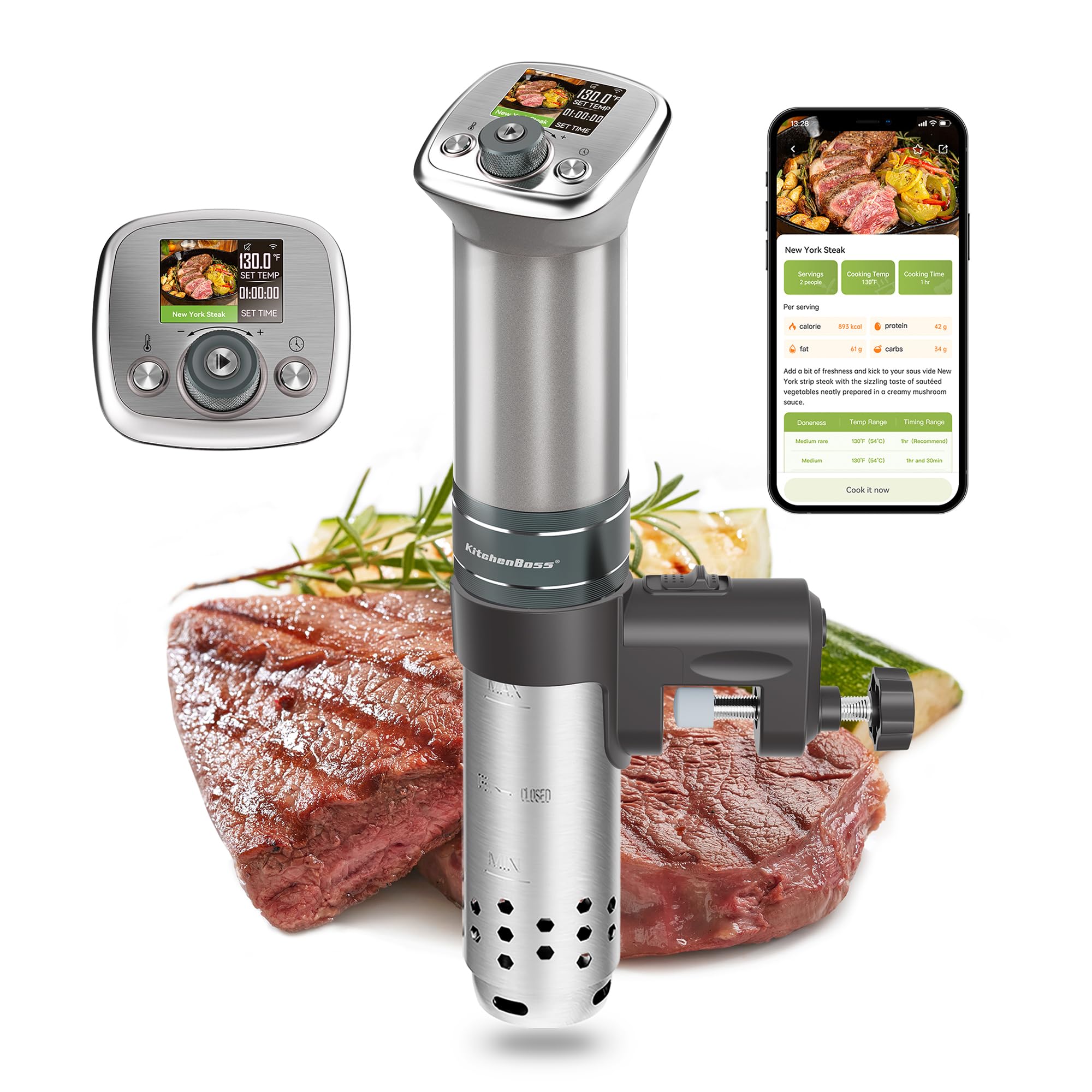
Image: The TFT color display and magnetic control knob for manual operation.
5.2 App Control (WiFi)
Control your sous vide cooker remotely using the KitchenBoss app.
- Download App: Download the "KitchenBoss" app from your smartphone's app store (available on Google Play and Apple App Store).
- Connect to WiFi: On the device, press and hold the 'Start/Stop/Confirm' button for 5 seconds to activate WiFi pairing mode. Follow the in-app instructions to connect your device to your home WiFi network.
- Set Parameters: Use the app interface to set the desired temperature and cooking time.
- Access Recipes: The app provides access to 25 original healthy recipes and 4 custom recipes. Select a recipe, and the app will automatically set the recommended temperature and time.
- Monitor Progress: Monitor the cooking status and remaining time directly from your phone.

Image: The KitchenBoss mobile application interface for remote control and recipe access.
Video: Official demonstration of the KitchenBoss WiFi Sous Vide Cooker G320PS in operation, showcasing its features and ease of use.
5.3 Cooking Process
- Prepare Food: Season your food and place it in a vacuum-sealable bag. Ensure all air is removed from the bag.
- Submerge Food: Once the water reaches the set temperature, carefully submerge the sealed food bag into the water bath. Ensure the bag is fully immersed and not touching the heating element.
- Monitor: The device will maintain the precise temperature for the set duration.
- Finish: After cooking, carefully remove the food bag. For a seared finish, quickly sear the food in a hot pan or grill.
6. Maintenance and Cleaning
Regular cleaning ensures optimal performance and longevity of your sous vide cooker.
- Unplug: Always unplug the appliance and allow it to cool completely before cleaning.
- Exterior Cleaning: Wipe the exterior of the device with a damp cloth. Do not use abrasive cleaners.
- Removable Sleeve: The stainless steel sleeve is removable for thorough cleaning. Twist and pull the sleeve to detach it. Clean the sleeve and the heating element/impeller area with a soft brush and mild dish soap. Rinse thoroughly.
- IPX7 Waterproof: The lower part of the circulator can be rinsed directly under running water due to its IPX7 waterproof rating. Ensure the top control panel is not submerged.
- Descaling: If mineral deposits accumulate on the heating element, fill the cooking container with a mixture of water and white vinegar (equal parts). Run the device at 140°F (60°C) for 30 minutes. Rinse thoroughly afterward.

Image: Demonstrating the IPX7 waterproof feature for easy cleaning of the lower unit.
7. Troubleshooting
If you encounter issues, refer to the following common problems and solutions:
| Problem | Possible Cause | Solution |
|---|---|---|
| Device does not power on. | Not plugged in; power outlet issue; damaged cord. | Ensure the power cord is securely plugged in. Test the outlet with another appliance. Check the power cord for visible damage. |
| Temperature is not accurate. | Mineral buildup on heating element; sensor malfunction. | Perform descaling as described in the Maintenance section. If the problem persists, contact customer support. |
| WiFi connection fails. | Incorrect WiFi password; device too far from router; router settings. | Ensure correct WiFi password. Move the device closer to the router. Check router settings (2.4GHz network recommended). Restart the device and try pairing again. |
| Water not circulating. | Impeller blocked; low water level. | Check for obstructions around the impeller. Ensure water level is above the 'MIN' line. |
8. Specifications
| Feature | Specification |
|---|---|
| Product Dimensions | 3.35"D x 3.35"W x 15"H |
| Capacity | 20 Liters (max water bath volume) |
| Wattage | 1100 watts |
| Voltage | 120V |
| Item Weight | 2.7 Pounds |
| Control Method | App, Push Button, Magnetic Knob |
| Temperature Range | 104°F to 194°F (40°C to 90°C) |
| Temperature Accuracy | ±0.1°F / ±0.1°C |
| Material | Stainless Steel (SUS304) |
| Water Flow | 20L/min |
| Waterproof Rating | IPX7 (lower section) |
| Model Number | G320PS |
9. Warranty and Support
The KitchenBoss WiFi Sous Vide Cooker G320PS comes with a manufacturer's warranty. Please refer to the warranty card included in your product packaging or visit the official KitchenBoss website for detailed warranty terms and conditions.
For technical support, troubleshooting assistance, or any product-related inquiries, please contact KitchenBoss customer service through their official website or the contact information provided in your product documentation.
Related documentsG320PS


Ask a question about this manual
Ask about setup, troubleshooting, compatibility, parts, safety, or missing instructions. Manuals+ will review the question and use this page’s manual context to help answer it.