
1. Introduction
This manual provides detailed instructions for the safe and efficient operation, setup, and maintenance of your AGARO Imperial Robot Vacuum Cleaner. Please read this manual thoroughly before using the product and retain it for future reference.

Image: The AGARO Imperial Robot Vacuum Cleaner, highlighting its 5000 mAh battery, 360° LiDAR 2.0 Navigation, and 150 minutes run time.
2. Product Overview
The AGARO Imperial Robot Vacuum Cleaner is a 2-in-1 automatic cleaning device designed for both dry vacuuming and wet mopping. It features advanced navigation and powerful suction for comprehensive floor care.
2.1 Key Features
- Dual Functionality: Dry vacuuming and wet mopping capabilities.
- Powerful Suction: Up to 10000 Pa with 4 adjustable modes and auto-boost.
- Smart Navigation: SLAM LiDAR (Intelligent Mapping and Route Planning) for efficient coverage.
- App Control: Manage cleaning schedules, modes, and no-go zones via a mobile application.
- Long Runtime: Up to 150 minutes of continuous cleaning.
- Voice Assistant Compatibility: Works with Amazon Alexa and Google Assistant.
- Safety Sensors: Multiple sensors to prevent falls and collisions.

Image: Overview of the AGARO Imperial Robot Vacuum Cleaner's features, including 2-in-1 cleaning, low noise, 360° LiDAR 2.0 Navigation, app control, 10000Pa suction, and 5000mAh Lithium-ion battery.
2.2 Package Contents
Verify that all components are present in the package:

Image: Detailed view of the package contents, including the robotic vacuum, mop holder with mop, water tank & dust box, side brushes, adapter, charging dock, HEPA filters, cleaning brush, and user manual.
- 1 x Robotic Vacuum (Main Unit)
- 1 x Mop Holder with Mop (1 in Machine + 1 Extra)
- 1 x Water Tank & Dust Box (Combined)
- 4 x Side Brush (2 in Machine + 2 Extra)
- 1 x Power Adapter
- 1 x Charging Dock
- 2 x HEPA Filter (1 in Machine + 1 Extra)
- 1 x Cleaning Brush
- 1 x User Manual
3. Setup
3.1 Initial Charging
- Place the charging dock against a wall in an open area, ensuring there are no obstacles within 1 meter to the sides and 1.5 meters in front.
- Connect the power adapter to the charging dock and plug it into a power outlet.
- Place the robot vacuum onto the charging dock. Ensure the charging contacts on the robot align with those on the dock. The indicator light will show charging status.
- Allow the robot to fully charge before its first use. This may take approximately 5 hours.
3.2 Connecting to the Mobile App
The AGARO Imperial Robot Vacuum Cleaner can be controlled via a mobile application. Follow these steps to connect:

Image: Four-step guide for connecting the robot vacuum to the "Smart Life" app, including downloading the app, registering, adding a device, and selecting the 2.4GHz Wi-Fi network.
- Step 1: Search for "Smart Life" in your mobile app store (Google Play Store or Apple App Store) and download the application.
- Step 2: Register for an account and log into the app. Click "Add a device" or the "+" icon in the top right corner.
- Step 3: Select "Small household appliance" then "Robot vacuum cleaner (Wi-Fi)" from the device list.
- Step 4: Select your 2.4GHz Wi-Fi network and enter the password. Note: The device will only connect to 2.4GHz Wi-Fi networks and is not compatible with other bandwidths.
4. Operating Instructions
The AGARO Imperial Robot Vacuum Cleaner offers various cleaning modes and customization options for efficient floor cleaning.
4.1 Cleaning Modes
- Sweep & Mop: Performs both dry vacuuming and wet mopping simultaneously.
- Sweep Only: Dry vacuuming for debris and dust.
- Mop Only: Wet mopping for hard floors.
- Spot Cleaning: Concentrated cleaning in a specific area.
- Y-Shaped Cleaning (Mopping): Mimics manual mopping for thorough wet cleaning.
- Edges Cleaning: Cleans along walls and furniture edges.
- Zigzag Cleaning: Standard systematic cleaning pattern.
- U-Shaped Cleaning: Another systematic cleaning pattern.
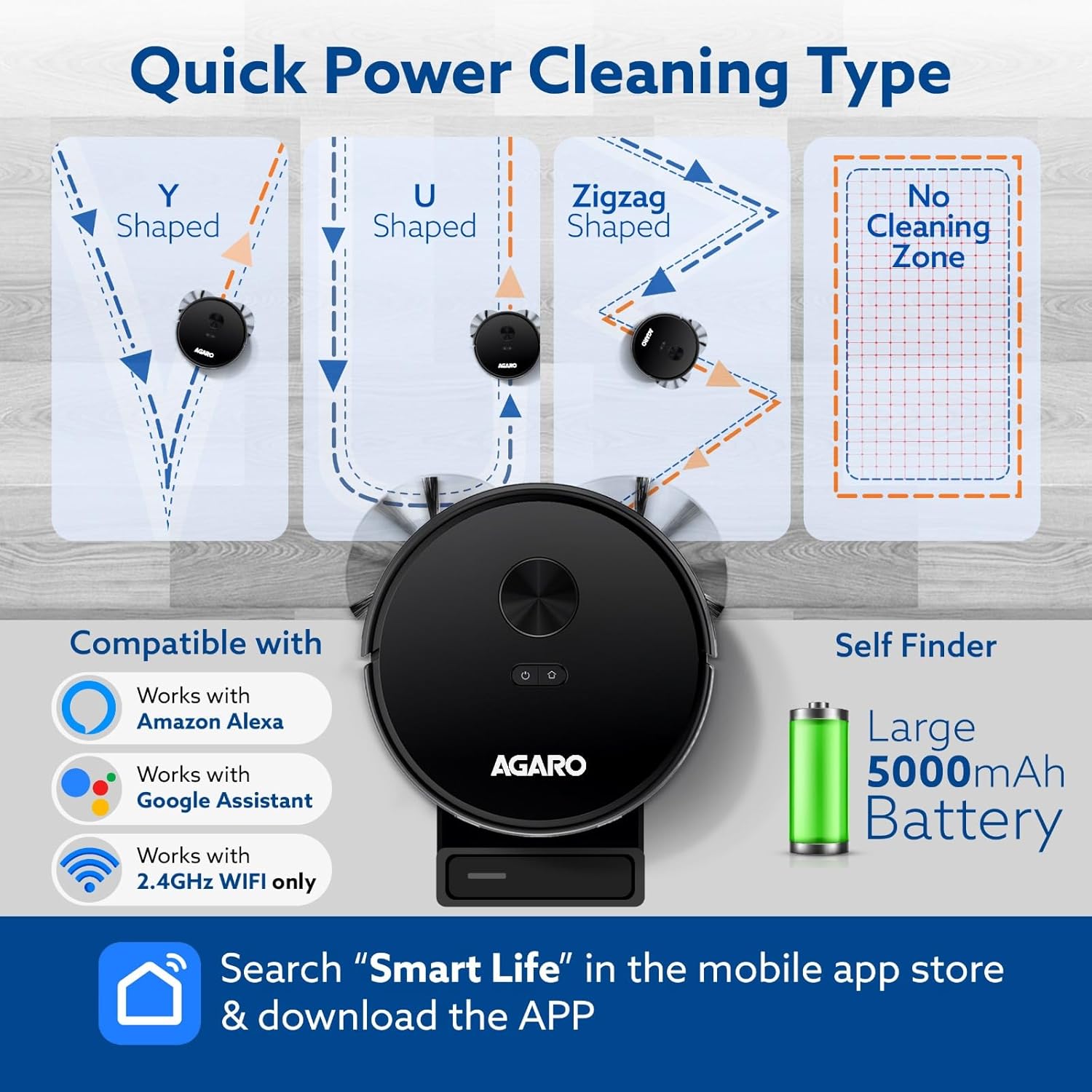
Image: Illustration of different cleaning patterns (Y-Shaped, U-Shaped, Zigzag) and the "No Cleaning Zone" feature. Also shows compatibility with Amazon Alexa and Google Assistant, and the "Smart Life" app download.
4.2 Suction Power Adjustment
The robot features a powerful brushless motor with adjustable suction settings:
- Quiet: Lower suction for minimal noise.
- Normal: Standard suction for daily cleaning.
- Strong: Increased suction for tougher dirt.
- Strong Plus (10000 Pa): Maximum suction for deep cleaning.
- Auto Boost: Automatically adjusts suction to high when different flooring (e.g., carpet) is detected.

Image: The robot vacuum cleaner operating, illustrating its 10000Pa strong suction and the four adjustable suction settings: Eco (1800Pa), Standard (3300Pa), Strong (5000Pa), and Super Strong (10000Pa).
4.3 Smart Mapping and Scheduling
Utilize the app to manage your cleaning environment:
- Lidar Navigation: The robot uses advanced SLAM LiDAR for quick room mapping and efficient route planning.
- Editable Map: View and edit the generated map in the app to define specific cleaning areas or set "No-Go Zones" where the robot should avoid.
- Customized Schedule: Set daily or weekly cleaning schedules for different rooms or areas, specifying cleaning modes and times.

Image: A mobile app displaying a floor plan, demonstrating how to set cleaning areas and "No-Go Zones" for targeted cleaning.

Image: A mobile app displaying a customized cleaning schedule for different days and rooms, illustrating zigzag, U-shaped, Y-shaped, and spot cleaning.
5. Maintenance
Regular maintenance ensures optimal performance and extends the lifespan of your robot vacuum cleaner. Always power off the robot before performing any maintenance.
5.1 Dust & Water Container
- Empty the dust container after each cleaning cycle.
- Rinse the water tank and dry it thoroughly to prevent mold or odors.
5.2 Filters
- Clean the HEPA filter and sponge filter regularly using the provided cleaning brush.
- Replace filters every 3-6 months, or as needed, depending on usage.
5.3 Brushes
- Remove and clean the detachable rolling brush and side brushes regularly. Remove any tangled hair or debris.
- Replace worn-out side brushes to maintain effective edge cleaning.
5.4 Sensors and Charging Contacts
- Wipe the anti-drop sensors, anti-collision sensors, and charging contacts with a dry cloth to ensure proper function.
6. Troubleshooting
If you encounter issues with your AGARO Imperial Robot Vacuum Cleaner, refer to the following common problems and solutions:
| Problem | Possible Cause | Solution |
|---|---|---|
| Robot does not turn on or charge. | Low battery; charging contacts are dirty or misaligned; power adapter not connected. | Ensure the robot is properly seated on the charging dock. Clean charging contacts. Verify power adapter is plugged in. |
| Robot gets stuck frequently. | Obstacles on the floor; sensors are dirty. | Clear cables, small objects, and thick carpets. Clean all sensors. |
| Poor cleaning performance. | Dustbin full; filters clogged; brushes tangled. | Empty dustbin. Clean or replace filters. Remove hair and debris from brushes. |
| App connection issues. | Incorrect Wi-Fi password; not connected to 2.4GHz Wi-Fi; router too far. | Ensure correct 2.4GHz Wi-Fi network and password. Move robot closer to router. Restart router and robot. |
| Robot makes unusual noise. | Brushes or wheels obstructed; foreign object inside. | Check and clean main brush, side brushes, and wheels for obstructions. |
For further assistance, please contact customer support.
7. Specifications
Technical specifications for the AGARO Imperial Robot Vacuum Cleaner:
| Feature | Detail |
|---|---|
| Brand | AGARO |
| Model Name | Imperial |
| Special Feature | Smart Mapping |
| Colour | Black |
| Product Dimensions | 31.6L x 31.6W x 9.8H Centimeters |
| Filter Type | HEPA |
| Dust Container Capacity | 350 Milliliters (integrated with water tank) |
| Water Tank Capacity | 250 Milliliters (integrated with dust container) |
| Power Source | Battery Powered |
| Battery Capacity | 5000 mAh |
| Run Time | Up to 150 minutes |
| Suction Power | Up to 10000 Pa |
| Control Method | App, Remote Control |
| Form Factor | Robotic |
| Item Weight | 3 kg 500 g |
| Country of Origin | China |
8. Warranty and Support
The AGARO Imperial Robot Vacuum Cleaner comes with a 1-year warranty from the date of purchase. Please retain your purchase receipt as proof of warranty.
For any technical issues, troubleshooting assistance, or warranty claims, please contact AGARO Customer Care.
Customer Care Number: 9821486487
Manufacturer: Universal Corporation Limited, Guangdong, China
Importer: Universal Corporation Limited, 4/1 Middleton Street, Sikkim Commerce House, Kolkata-71