
1. Introduction
The Xiaomi Redmi Pad 2 is an 11-inch tablet designed for versatile use, offering powerful performance in a lightweight and durable unibody metal design. It features a sharp 2.5K (2560 x 1600 px) display with 10-bit color depth and 600 nits peak brightness, enhanced by a 90 Hz AdaptiveSync refresh rate and TÜV Rheinland blue light certification for comfortable viewing.
Equipped with a MediaTek G100-Ultra processor, the tablet ensures fluid multitasking. Its audio experience is enriched by four stereo speakers supporting Hi-Res Audio and Dolby Atmos. The device boasts a 9000 mAh battery with 18W fast charging via USB-C, providing extended autonomy. Running on Xiaomi HyperOS, it offers smart productivity and connectivity with Wi-Fi 5 and Bluetooth 5.3, alongside expandable storage up to 2 TB.

Figure 1.1: Front view of the Xiaomi Redmi Pad 2 tablet.
2. What's in the Box
Upon unboxing your Xiaomi Redmi Pad 2, please verify that all the following items are included:
- Xiaomi Redmi Pad 2 Tablet
- Instruction Manual (this document)
- USB-C Charging Cable or Connector
3. Setup
3.1. Charging the Device
Before initial use, fully charge your Redmi Pad 2. Connect the provided USB-C cable to the tablet's USB-C port and the other end to a compatible power adapter (not always included) or a computer's USB port. The tablet supports 18W fast charging.
3.2. Powering On/Off
- To Power On: Press and hold the Power button located on the side of the tablet until the Xiaomi logo appears on the screen.
- To Power Off: Press and hold the Power button until the power options appear. Select "Power off" from the menu.
- To Restart: Press and hold the Power button until the power options appear. Select "Restart" from the menu.
3.3. Initial Setup
Upon first power-on, the tablet will guide you through the initial setup process. This includes:
- Language Selection: Choose your preferred language.
- Wi-Fi Connection: Connect to a Wi-Fi network to access the internet and complete the setup.
- Google Account: Sign in with your Google account or create a new one. This is essential for downloading apps from the Google Play Store and syncing data.
- Xiaomi Account: You may be prompted to sign in or create a Xiaomi account for additional services and cloud backup.
- Security Settings: Set up a screen lock (PIN, pattern, password, or facial recognition).
3.4. Expandable Storage
The Redmi Pad 2 supports expandable storage up to 2 TB via a microSD card. Locate the microSD card slot on the side of the tablet, insert your card carefully until it clicks into place. You can then use this storage for photos, videos, and other files.
4. Operating Instructions
4.1. Display and Navigation
The 11-inch 2.5K display offers a vibrant visual experience. Navigate the tablet using touch gestures:
- Tap: Select an item or open an app.
- Swipe: Scroll through pages, home screens, or menus.
- Pinch-to-Zoom: Zoom in or out on photos, maps, and web pages.
- Long Press: Access contextual menus or move app icons.
The 90 Hz AdaptiveSync refresh rate provides smooth scrolling and responsiveness. The TÜV Rheinland blue light certification helps reduce eye strain during prolonged use.
4.2. Audio Features
The Redmi Pad 2 is equipped with four stereo speakers, providing an immersive audio experience. It supports Hi-Res Audio and Dolby Atmos for enhanced sound quality when watching movies, listening to music, or playing games.
4.3. Performance and Multitasking
Powered by the MediaTek G100-Ultra processor, the tablet delivers efficient performance for daily tasks and multitasking. Xiaomi HyperOS optimizes system resources for a smooth user experience.
4.4. Connectivity
- Wi-Fi 5: Connect to wireless networks for internet access. Go to Settings > Wi-Fi to manage connections.
- Bluetooth 5.3: Pair with Bluetooth devices such as headphones, speakers, or keyboards. Go to Settings > Bluetooth to manage pairings.
- USB-C: Use the USB-C port for charging, data transfer, and connecting to other peripherals.
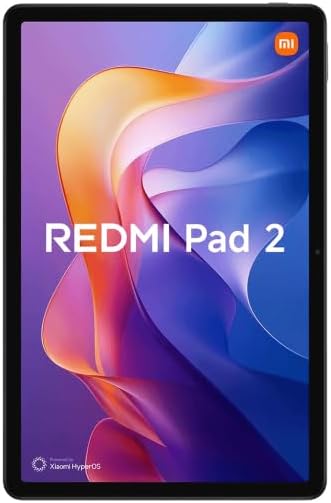
Figure 4.1: Back view of the Xiaomi Redmi Pad 2 tablet.
5. Maintenance
5.1. Cleaning the Tablet
To clean your tablet, power it off and disconnect all cables. Use a soft, lint-free cloth slightly dampened with water or a screen cleaner specifically designed for electronics. Avoid using harsh chemicals, abrasive materials, or excessive moisture.
5.2. Battery Care
The Redmi Pad 2 features a 9000 mAh battery with an average life of 12 hours. To prolong battery lifespan:
- Avoid extreme temperatures.
- Do not let the battery drain completely too often.
- Use the original charging cable or a certified compatible one.
- Unplug the charger once the battery is full.
5.3. Software Updates
Regularly check for and install software updates to ensure optimal performance, security, and access to new features. Go to Settings > About tablet > System update to check for available updates.
6. Troubleshooting
If you encounter issues with your Redmi Pad 2, try the following steps:
- Device Not Responding: Press and hold the Power button for about 10-15 seconds to force a restart.
- Connectivity Issues (Wi-Fi/Bluetooth): Turn Wi-Fi or Bluetooth off and then on again. If the issue persists, restart the tablet and your router/Bluetooth device.
- Apps Crashing/Freezing: Close the app and reopen it. If the problem continues, clear the app's cache (Settings > Apps > [App Name] > Storage > Clear cache) or uninstall and reinstall the app.
- Battery Draining Quickly: Check background app usage (Settings > Battery). Reduce screen brightness, disable unnecessary features like GPS or Bluetooth when not in use.
- Slow Performance: Close unused apps, clear cache, and ensure sufficient storage space. Consider a factory reset as a last resort (backup your data first).
For more complex issues, refer to the official Xiaomi support website or contact customer service.
7. Specifications
| Feature | Detail |
|---|---|
| Model Number | VHU5973EU |
| Display Size | 11 inches |
| Display Resolution | 2560 x 1600 pixels (2.5K) |
| Refresh Rate | 90 Hz AdaptiveSync |
| Processor | MediaTek G100-Ultra (3.4 GHz max clock speed) |
| RAM | 8 GB |
| Internal Storage | 256 GB |
| Expandable Storage | Up to 2 TB (microSD) |
| Operating System | Xiaomi HyperOS (based on Android) |
| Battery Capacity | 9000 mAh (typical) |
| Battery Life (Average) | 12 hours |
| Charging | 18W Fast Charging (USB-C) |
| Connectivity | Wi-Fi 5 (802.11ac), Bluetooth 5.3 |
| Dimensions (L x W x H) | 15 x 15 x 20 cm (approximate) |
| Weight | 890 grams (approximate) |
| Audio | Quad Stereo Speakers, Hi-Res Audio, Dolby Atmos |
| Camera Resolution (Digital Zoom) | 7 Mpx |
| Headphone Jack | 3.5 mm |
8. Warranty and Support
8.1. Warranty Information
The Xiaomi Redmi Pad 2 comes with a three-year warranty against manufacturing defects. This warranty covers defects in materials and workmanship under normal use. Please retain your proof of purchase for warranty claims.
8.2. Customer Support
For further assistance, technical support, or warranty claims, please visit the official Xiaomi support website or contact their customer service. You can usually find contact information and FAQs on the official Xiaomi website for your region.
Online Resources: Xiaomi Official Support


