Introduction
Welcome to the TOZO S8 AMOLED Smart Watch user manual. This guide provides essential information for setting up, operating, maintaining, and troubleshooting your new smart watch. The TOZO S8 is designed to be a comprehensive companion for your health, fitness, and daily connectivity needs, featuring an Ultra HD AMOLED display, extensive health tracking, and smart communication capabilities.
What's in the Box
- TOZO S8 Smart Watch
- Magnetic Charging Cable
- Quick Guide & User Manual
Setup Guide
1. Initial Charging
Before first use, fully charge your TOZO S8 Smart Watch using the provided magnetic charging cable. Connect the USB end to a compatible power adapter (not included) and the magnetic end to the charging points on the back of the watch. A full charge ensures optimal performance from the start.

The TOZO S8 offers long-lasting battery life, with up to 10 days of typical use and 30 days standby time. It charges fully in approximately 2.5 hours using the convenient magnetic charging cable shown.
2. App Installation
Download and install the 'Fit Cloud Pro' application from your smartphone's app store (available for both iOS and Android). This app is essential for pairing your watch and accessing all its features, including data synchronization and customization options.
3. Bluetooth Pairing
Open the 'Fit Cloud Pro' app on your smartphone. Navigate to the device section and follow the on-screen instructions to pair your TOZO S8 Smart Watch via Bluetooth. Ensure Bluetooth is enabled on your smartphone for successful connection. The watch will prompt you to select your preferred language.
4. Personalization
Within the 'Fit Cloud Pro' app, you can set personal goals, such as daily step targets, and customize watch faces to match your style and preferences. Explore the app's settings to tailor your watch experience.
Operating Instructions
Display and Interface
The TOZO S8 features a 1.32-inch AMOLED HD color screen with a 466x466 resolution, providing clear visuals and vibrant colors. The display is designed for optimal visibility even in direct sunlight. You can navigate through menus and features using touch gestures and the side button.

This image highlights the stunning AMOLED display of the TOZO S8, emphasizing its clarity (353 PPI), size (1.32 inches), and high resolution (466x466). It also showcases several dynamic watch face options available for personalization.

The elegant round design of the TOZO S8 is shown on a woman's wrist, featuring polished edges for a premium appearance. The watch is designed for comfort and durability, paired with a sweat-resistant silicone strap suitable for all-day wear.
Smart Calls & Messages
Connect your watch to your smartphone via Bluetooth to enable hands-free calling. You can answer and make calls directly from your watch, eliminating the need to reach for your phone. The watch also provides vibration alerts for incoming calls, text messages, and schedule reminders, keeping you informed throughout your day.
This video demonstrates the call answering and making functionality of the TOZO S8 Smart Watch, showcasing how users can manage phone calls directly from their wrist when connected via Bluetooth.

This image illustrates the smart notification capabilities of the TOZO S8, showing a call screen on the watch face. Icons indicate support for Bluetooth calls, SMS, email, and various social media alerts, ensuring users stay connected.
Health Monitoring
The watch offers continuous 24/7 monitoring of heart rate, blood oxygen saturation (SpO2), and stress levels. This data provides real-time insights into your body's changes. Trend analysis is available through the companion app for a complete health overview. Note: This device is not a medical device and should not be used for medical diagnosis or treatment.
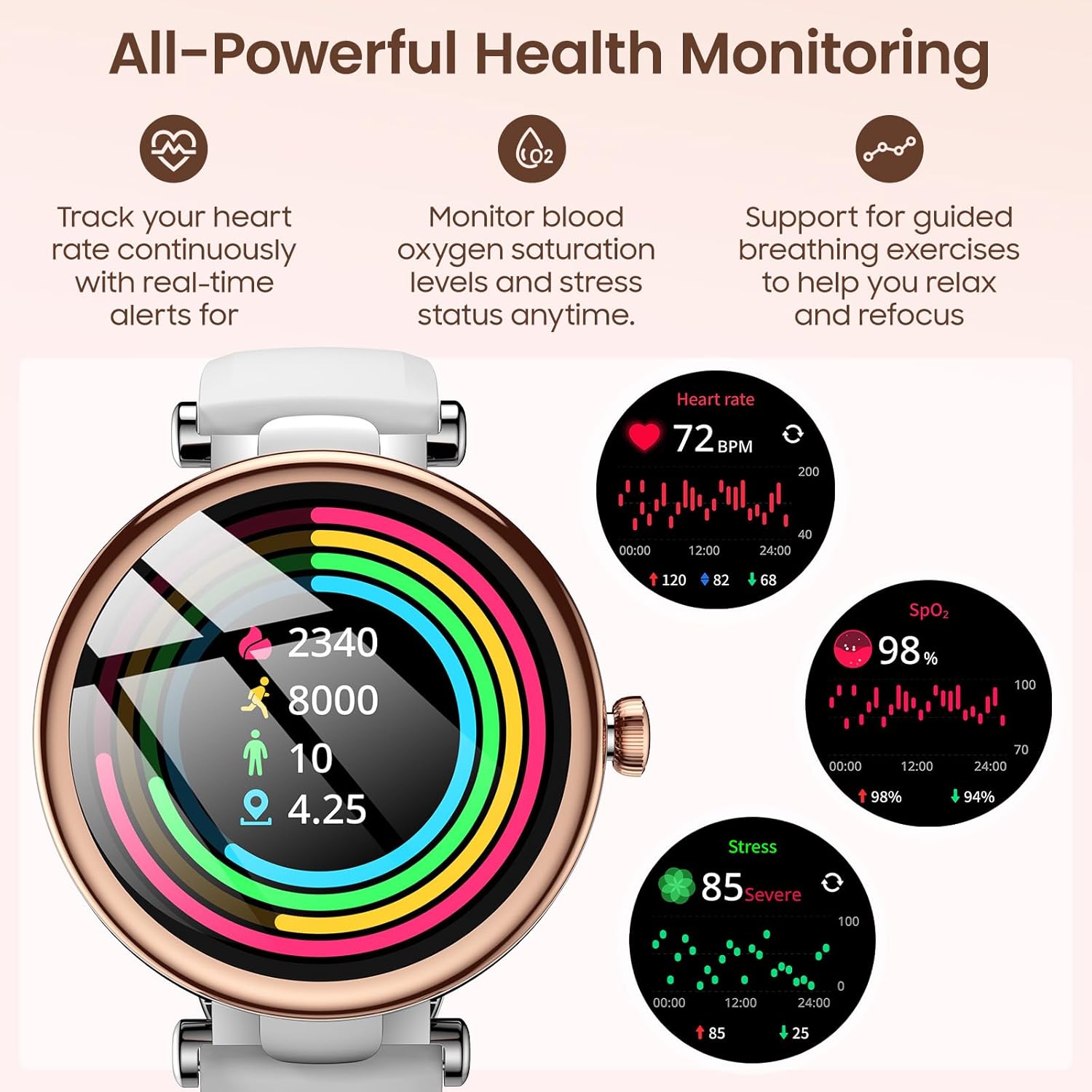
The TOZO S8 provides comprehensive health monitoring, as depicted by the watch face showing real-time heart rate (72 BPM), blood oxygen saturation (98% SpO2), and stress levels (85 Severe), along with historical data graphs.
Sleep Tracking
Wear the watch during sleep to automatically track sleep duration and quality, distinguishing between deep sleep, light sleep, and wake-up times. A detailed sleep report is generated each morning, helping you understand and adjust your sleep patterns for improved rest.

This image demonstrates the precise sleep tracking feature of the TOZO S8. The watch face shows sleep duration (4h 30mins), quality score (99), and a breakdown of sleep stages, helping users understand their rest patterns.
Sports Modes
The TOZO S8 supports over 100 exercise modes, including walking, running, yoga, and cycling. It automatically tracks workout duration, heart rate, and calories burned, generating weekly and monthly progress reports to help you achieve your fitness goals.

The TOZO S8 supports over 100 sports modes, tracking activities like running, cycling, and walking. The image shows a woman exercising, with text highlighting the watch's ability to track distance, steps, and calories to support fitness goals.
Water Resistance
The TOZO S8 features 3ATM water resistance, making it suitable for daily activities such as washing hands or being exposed to rain. It is not recommended for swimming, diving, or exposure to hot water/steam.
Daily Smart Features
The watch includes several convenience features: sedentary reminders to prompt you to move after prolonged sitting, hydration reminders for regular water intake, and weather forecasts. Additional functions include an alarm clock, music control, and a phone finder feature to help locate your paired smartphone.
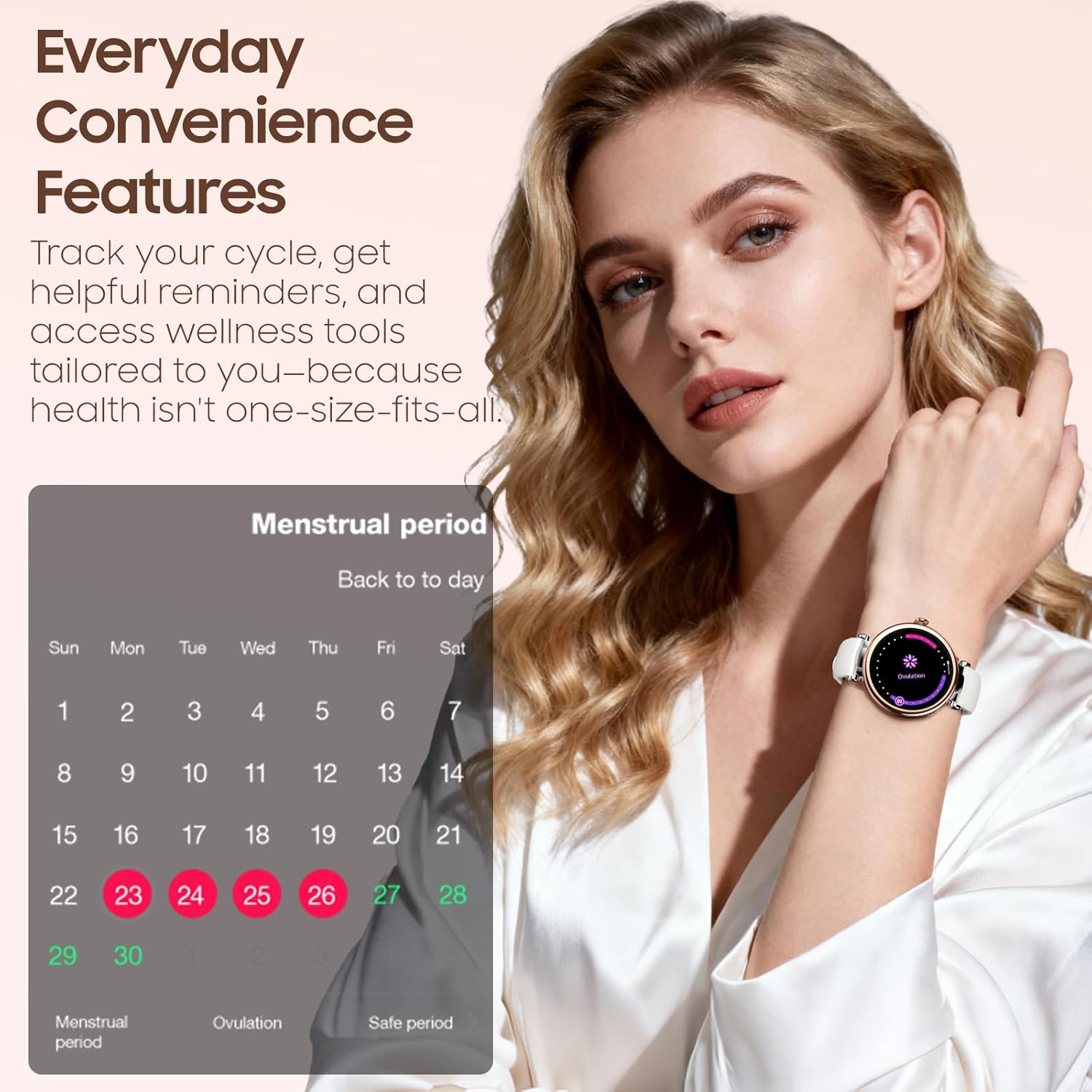
Among its everyday convenience features, the TOZO S8 includes menstrual cycle tracking. The image shows a calendar interface on the watch, providing helpful reminders and wellness tools tailored for women's health.
Specifications
| Feature | Detail |
|---|---|
| Package Dimensions | 10.24 x 3.15 x 0.67 inches |
| Item Weight | 1.66 ounces (47 Grams) |
| ASIN | B0FNZZQS27 |
| Item Model Number | S8 |
| Batteries | 1 Lithium Ion batteries required (included) |
| Standing Screen Display Size | 1.32 Inches |
| Memory Storage Capacity | 128 MB |
| RAM Memory Installed Size | 128 MB |
| Operating System | NO |
| Special Feature | Ladies Watches, Women's Bracelet Watch, Women's Watches, Women's Wrist Watch |
| Battery Capacity | 300 Milliamp Hours |
| Connectivity Technology | Bluetooth |
| Wireless Communication Standard | Bluetooth |
| Battery Cell Composition | Lithium Ion |
| GPS | No GPS |
| Shape | Round |
| Screen Size | 1.32 Inches |
Maintenance
Cleaning
Regularly clean your watch and strap with a soft, dry cloth. Avoid harsh chemicals, abrasive materials, or strong detergents, as these can damage the watch's finish or sensors.
Storage
Store the watch in a cool, dry place when not in use. Avoid exposing it to extreme temperatures, direct sunlight for prolonged periods, or high humidity, which can affect battery life and electronic components.
Water Exposure
While the watch is 3ATM water-resistant, it is not designed for prolonged submersion. Avoid wearing it during swimming, diving, or in hot showers/saunas, as steam and high temperatures can compromise the water-resistant seals.
Troubleshooting
Watch Not Turning On
Ensure the watch is fully charged. If it still doesn't turn on, try connecting it to the charger for at least 15 minutes. If the issue persists, contact customer support.
Pairing Issues
Check that Bluetooth is enabled on your phone and the watch. Ensure the 'Fit Cloud Pro' app is updated to the latest version. Try restarting both your phone and the watch, then attempt to pair again. Keep the watch close to your phone during pairing.
Inaccurate Data
For accurate heart rate, SpO2, and step tracking, ensure the watch is worn snugly on your wrist, but not too tight. For best results, wear it slightly above the wrist bone. Calibrate settings in the 'Fit Cloud Pro' app if available.
Notifications Not Appearing
Verify that notification permissions are granted to the 'Fit Cloud Pro' app in your phone's settings. Ensure the watch is connected via Bluetooth and that the app is running in the background. Check the app's notification settings to ensure desired alerts are enabled.
Warranty and Support
The TOZO S8 Smart Watch comes with a manufacturer's warranty. For detailed warranty information, product support, or service inquiries, please refer to the official TOZO website or contact their customer service directly. The package includes a Quick Guide & User Manual for additional assistance and contact details.


