1. Introduction
Welcome to the world of premium coffee with your Jura WE6 Coffee and Espresso Machine. This automatic coffee center is designed to deliver exceptional coffee experiences, especially in professional environments like workplaces and offices. This manual provides essential information for the setup, operation, and maintenance of your machine to ensure consistent, delicious results and optimal hygiene.
This is a Manufacturer Refurbished product, backed by a 1-year warranty.
2. Important Safety Instructions
- Read all instructions carefully before using the appliance.
- Do not immerse the appliance, power cord, or plug in water or other liquids.
- Keep the appliance out of reach of children.
- Always unplug the appliance from the power outlet before cleaning or when not in use.
- Do not operate the appliance with a damaged cord or plug, or after the appliance malfunctions or has been damaged in any manner.
- Use only original Jura maintenance products for cleaning and descaling to ensure proper function and hygiene.
3. Initial Setup
3.1 Unpacking
Carefully remove all packaging materials and ensure all components are present. Place the machine on a stable, level surface.
3.2 Filling the Water Tank
The Jura WE6 features a generous 3-liter water tank. Remove the water tank, fill it with fresh, cold water, and reinsert it securely into the machine.

Image: The transparent 3-liter water tank of the Jura WE6, filled with water, attached to the side of the machine.
3.3 Filling the Bean Container
Open the lid of the 500g bean container and fill it with your preferred whole coffee beans. Close the lid firmly to preserve aroma.

Image: A top-down view of the Jura WE6's bean container, open and filled with whole coffee beans.
3.4 Power Connection & Initial Rinse
Connect the machine to a suitable power outlet. Follow the on-screen instructions on the 2.8-inch color TFT display for the initial rinse process. This prepares the system for first use.
4. Operating Your Jura WE6
4.1 The 2.8-inch Color TFT Display
The intuitive 2.8-inch color TFT display and front buttons make operation simple. Navigate through the menu to select your desired beverage.
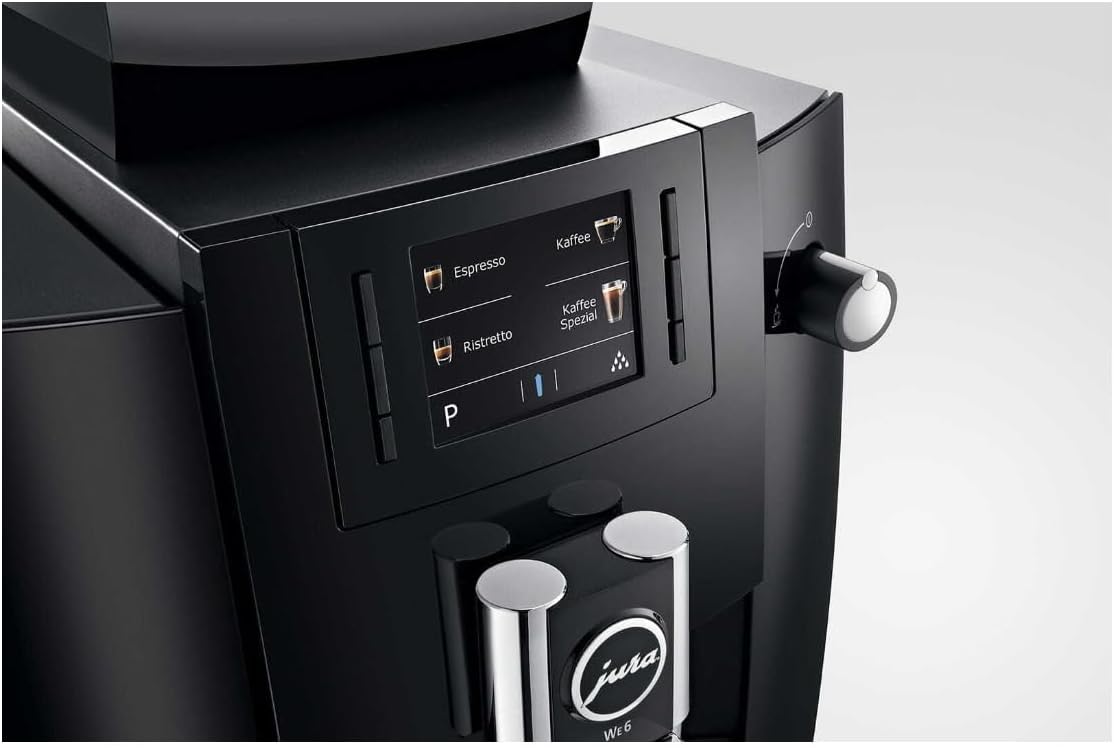
Image: A close-up of the Jura WE6's color TFT display, showing various coffee selection options like Espresso, Coffee, and Ristretto.
4.2 Selecting Beverages
The Jura WE6 offers 8 coffee specialties, including ristretto, espresso, and coffee. Simply touch the icon for your desired drink on the display.
4.3 Adjusting Brew Strength and Grind
You can adjust the brew strength to your preference. The Professional AromaG3 Grinder ensures a consistent, high-quality grind with 12.2% more aroma. The Six-Level AromaG3 Grinder allows for fine-tuning the grind. The Variable Brewing Unit (5–16g) ensures optimal coffee extraction for every cup.
4.4 Pulse Extraction Process (P.E.P.)
The innovative Pulse Extraction Process (P.E.P.) optimizes brewing time for short coffee specialties, delivering rich flavor and crema.
4.5 Using Pre-Ground Coffee
Your Jura WE6 also allows for the use of pre-ground coffee. Refer to the detailed instructions in the full user manual for specific steps on how to use this feature.
5. Maintenance and Cleaning
Regular maintenance is crucial for the longevity and performance of your Jura WE6. The machine features integrated rinsing and cleaning programs, combined with specially developed cleaning products, to ensure perfect hygiene at the touch of a button (TÜV-Certified Hygiene Guarantee).
5.1 Emptying Drip Tray and Coffee Grounds Container
The machine will prompt you when the drip tray and the 25-portion coffee grounds container need to be emptied. Remove, clean, and reinsert these components regularly.
5.2 Integrated Cleaning Programs
Follow the instructions on the display to run the integrated cleaning programs. These programs guide you through the process, often requiring Jura cleaning tablets.
5.3 Water Filter
The machine is equipped with a water filter. Replace the filter as indicated by the machine's display or according to the recommended schedule to ensure optimal water quality and prevent limescale buildup.
5.4 Descaling
The machine will indicate when descaling is necessary. Use only Jura descaling products and follow the on-screen instructions carefully.
6. Troubleshooting
If you encounter any issues with your Jura WE6, please refer to the following common solutions before contacting customer support:
- Machine not turning on: Ensure the power cord is securely plugged into both the machine and a working power outlet.
- "Fill Water Tank" message: Remove, refill, and securely reinsert the water tank.
- "Empty Grounds" or "Empty Drip Tray" message: Remove, empty, clean, and reinsert the drip tray and coffee grounds container.
- Coffee not brewing: Check if the bean container has enough beans and if the water tank is filled. Ensure all covers are properly closed.
- Poor coffee quality: Adjust the grind setting (finer for stronger, coarser for milder) and brew strength. Ensure fresh beans and clean water are used. Run a cleaning program if necessary.
For more complex issues, consult the comprehensive troubleshooting guide in the full user manual or contact Jura customer support.
7. Specifications
| Feature | Detail |
|---|---|
| Brand | Jura |
| Model Name | Jura WE6 |
| Item Model Number | 15343FR |
| Color | Black |
| Product Dimensions | 17.7"D x 12.6"W x 15"H |
| Item Weight | 28.2 pounds |
| Water Tank Capacity | 3 Liters |
| Bean Container Capacity | 500g |
| Coffee Grounds Container Capacity | 25 portions |
| Coffee Input Type | Whole bean, Ground |
| Operation Mode | Fully Automatic |
| Special Features | 2.8-inch Color TFT Display, Adjustable Brew Strength, AromaG3 Professional Grinder, Self-Cleaning, Water Filter, Pulse Extraction Process (P.E.P.) |
| UPC | 196271975984 |
8. Warranty and Support
8.1 Warranty Information
This Jura WE6 Coffee and Espresso Machine is a Manufacturer Refurbished product and comes with a 1-year warranty. Please retain your proof of purchase for warranty claims.
8.2 Customer Support
For technical assistance, warranty claims, or to purchase original Jura maintenance products, please visit the official Jura website or contact their customer service department. Contact details can typically be found in the original packaging or on the manufacturer's website.


