
1. Introduction
The Aume 4MP Solar Outdoor Camera System (Model JA-D300) provides robust and reliable wireless home security. This 2-camera kit features 4-megapixel resolution, color night vision, 360° viewing capabilities, and real-time motion alerts. Designed for outdoor use, the cameras are solar-powered, eliminating the need for frequent battery changes or electrical outlets. The system includes a hub for local storage, ensuring your footage is secure without monthly subscription fees.
2. Package Contents
Please verify that all items are present in your package:
- 2 x Aume 4MP Solar Outdoor Cameras (Model JA-D300)
- 2 x Solar Panels with USB-C cables
- 1 x Aume Hub (with 32GB local storage pre-installed)
- Mounting Hardware (screws, wall anchors)
- User Manual (this document)
3. Product Features
- 4MP High-Resolution Video: Captures clear and detailed footage.
- 360° Pan and Tilt: Motorized control allows for comprehensive area surveillance.
- Color Night Vision: Equipped with 4 LED lights for clear, full-color video in low-light conditions.
- Solar Powered: Integrated solar panels provide continuous power, reducing the need for manual charging.
- Local Storage: Includes a 32GB hub for secure, no-subscription local video storage, expandable up to 128GB.
- Real-time Alerts: Motion detection triggers instant notifications to your smartphone.
- Two-Way Audio: Communicate directly through the camera via the mobile app.
- Wireless Connectivity: Supports both 2.4Ghz and 5Ghz Wi-Fi for flexible and stable connection.
- Weatherproof Design: Built to withstand various outdoor conditions.
- App Control: Manage and view cameras remotely via a dedicated smartphone application.
4. Setup and Installation
4.1 Charging the Cameras
Before installation, ensure the cameras are fully charged. Connect the solar panels to the cameras using the provided USB-C cables. Position the solar panels in an area that receives direct sunlight for optimal charging.
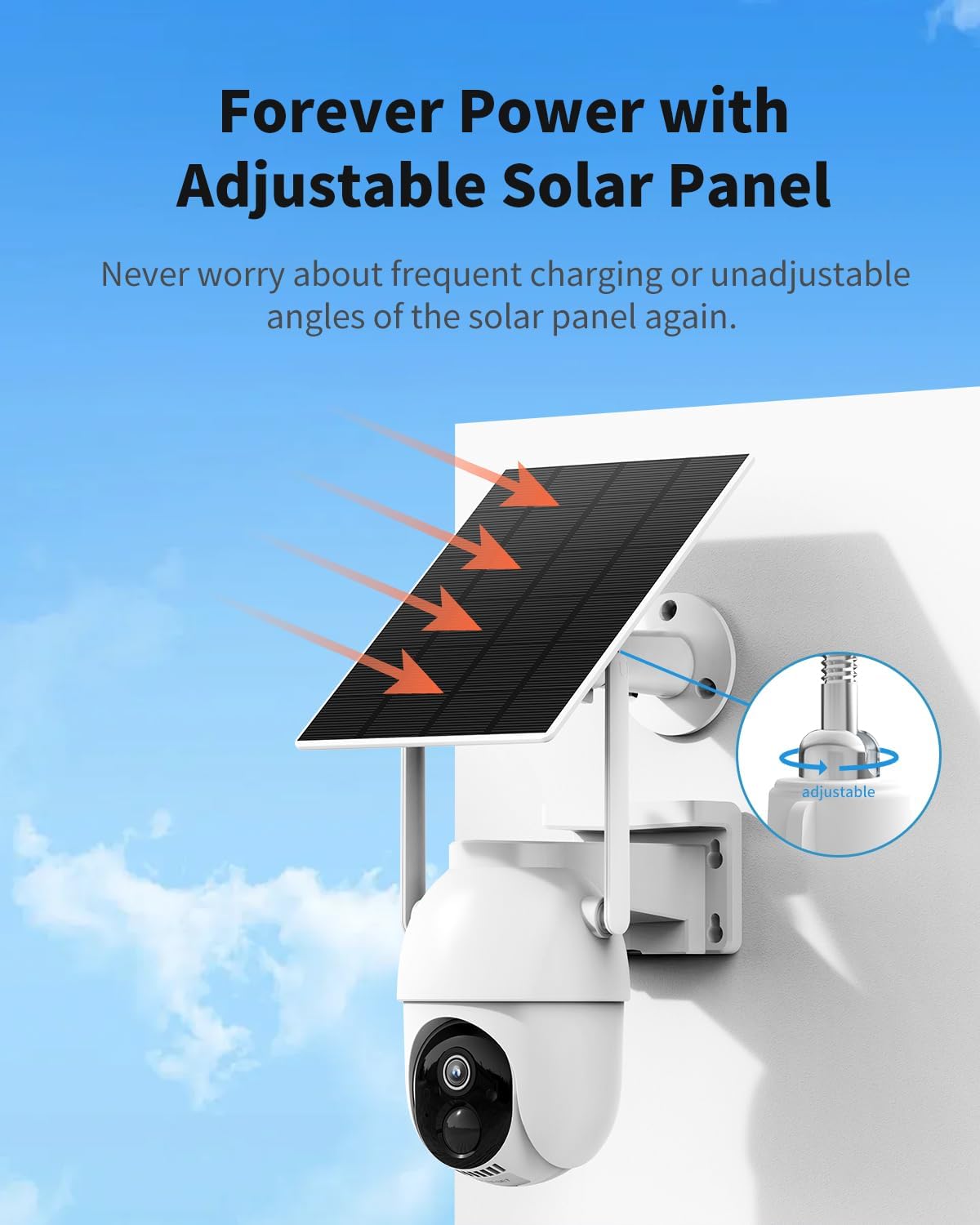
Image: Aume camera connected to an adjustable solar panel for continuous power.
4.2 Hub Setup
- Connect the Aume Hub to your router using an Ethernet cable.
- Plug the hub into a power outlet.
- Wait for the indicator lights on the hub to stabilize, indicating a successful connection.

Image: The Aume hub, illustrating its local storage capability and connection ports.
4.3 Camera Mounting
Select a suitable outdoor location for each camera, ensuring a clear field of view and good Wi-Fi signal strength. Use the provided mounting hardware to securely attach the cameras to a wall or other stable surface. The cameras are designed for wall mount installation.
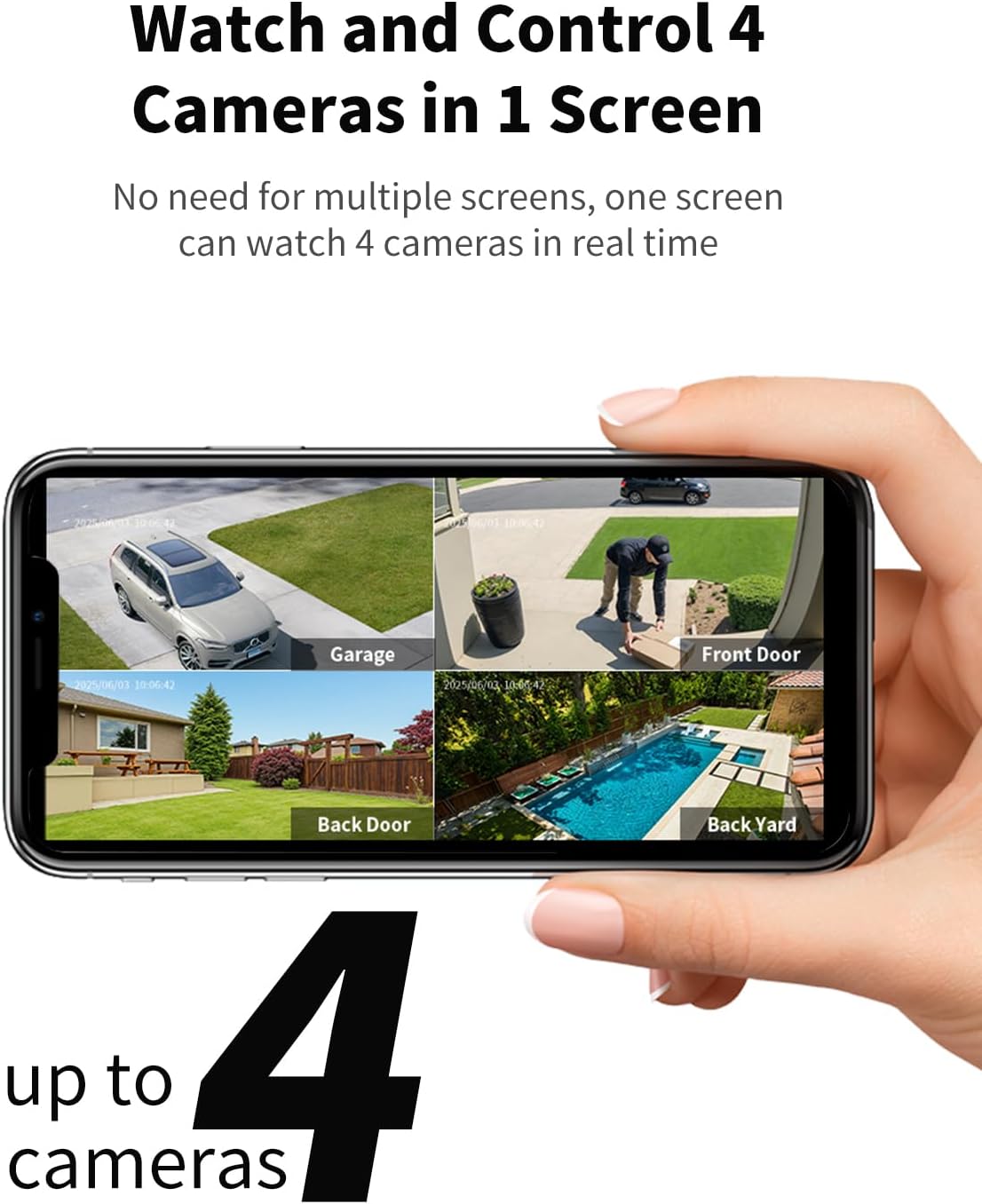
Image: An aerial view demonstrating strategic placement of multiple Aume cameras for comprehensive home security coverage.
4.4 App Pairing
- Download the Aume mobile application from your smartphone's app store.
- Create an account and log in.
- Follow the in-app instructions to add your Aume Hub and pair your cameras. This typically involves pressing a sync button on the hub and then on each camera.
- Ensure your smartphone is connected to the same 2.4Ghz or 5Ghz Wi-Fi network as your hub during the pairing process.
5. Operating the Camera System
5.1 Live View and Remote Control
Access the live feed from your cameras through the Aume app. You can remotely control the pan (355°) and tilt (90°) functions of each camera to adjust the viewing angle. The app allows simultaneous viewing of up to 4 cameras on a single screen.

Image: A smartphone displaying a quad-view of live camera feeds, demonstrating the ability to monitor multiple areas at once.

Image: An Aume camera illustrating its extensive 360-degree pan and tilt range for comprehensive surveillance.
5.2 Motion Detection and Alerts
The cameras are equipped with motion detection. When motion is detected, you will receive real-time alerts on your smartphone. Sensitivity settings can be adjusted within the app to minimize false alarms.
5.3 Night Vision
The cameras automatically switch to night vision mode in low-light conditions. With 4 LED lights, they provide clear color night vision, allowing for better identification of objects and individuals in the dark.

Image: A night vision view from an Aume camera, clearly showing a figure in a dimly lit backyard.
5.4 Two-Way Audio
Use the two-way audio feature in the app to speak through the camera's speaker and listen through its microphone. This is useful for communicating with visitors or deterring unwanted guests.
5.5 Local Storage Management
Video footage is stored on the 32GB local storage within the Aume Hub. This provides up to 120 days of video loop recording. The storage can be expanded by replacing the memory card in the hub (up to 128GB). Access and manage recorded footage directly through the Aume app.
6. Maintenance
- Clean Lenses: Regularly wipe the camera lenses with a soft, damp cloth to ensure clear image quality.
- Solar Panel Cleaning: Keep solar panels free of dirt, dust, and debris to maintain optimal charging efficiency.
- Firmware Updates: Check the Aume app periodically for firmware updates to ensure your system has the latest features and security enhancements.
- Battery Health: While solar-powered, monitor battery levels via the app, especially during prolonged periods of low sunlight.
7. Troubleshooting
- Camera Offline:
- Check Wi-Fi connection of the hub and camera.
- Ensure the camera's battery is charged (check solar panel exposure).
- Restart the camera and hub.
- Poor Image Quality:
- Clean the camera lens.
- Check Wi-Fi signal strength; a weak signal can affect streaming quality.
- No Motion Alerts:
- Verify motion detection settings in the Aume app.
- Ensure app notifications are enabled on your smartphone.
- Solar Panel Not Charging:
- Ensure the solar panel is positioned to receive direct sunlight.
- Clean the surface of the solar panel.
- Check the USB-C cable connection.
8. Specifications
| Feature | Detail |
|---|---|
| Model Number | JA-D300 |
| Video Resolution | 4MP |
| Pan/Tilt Range | 355° Pan, 90° Tilt |
| Night Vision | Color Night Vision (4 LED lights) |
| Power Source | Solar Powered (Lithium Ion batteries included) |
| Connectivity | Wireless (2.4Ghz & 5Ghz Wi-Fi support) |
| Storage | 32GB Local Storage (expandable up to 128GB) |
| Control Method | App Control (Smartphone) |
| Indoor/Outdoor Usage | Outdoor |
| Item Weight | 2.22 Kilograms (4.88 pounds) |
| Manufacturer | Aume |
9. Warranty and Support
For warranty information and technical support, please refer to the official Aume website or contact their customer service directly. Keep your purchase receipt for warranty claims.