
Ajazz AK35I V4
Ajazz AK35I V4 Customizable Wireless Gaming Mechanical Keyboard User Manual
Introduction
This manual provides detailed instructions for the setup, operation, and maintenance of your Ajazz AK35I V4 Customizable Wireless Gaming Mechanical Keyboard. Please read this manual thoroughly to ensure optimal performance and longevity of your device.
Key Features
- Smart Color Screen and Multifunction Knob: Displays essential information and allows for quick adjustments.
- Tri-mode Connectivity: Supports Bluetooth 5.0, 2.4GHz wireless, and USB-C wired connections.
- Advanced Gasket Structure: Features silicone pads and PCB groove design for enhanced typing feel and reduced noise.
- Full-Color RGB Backlighting: Offers 20 lighting effects and 16.8 million colors with side-illuminated lighting.
- Programmable Software: Customize key mappings, macros, screen animations, and RGB effects.
- Hot-Swappable Key Zone: Compatible with 3-pin/5-pin switches for personalized customization.
- 10000mAh Battery: Provides extended usage for gaming and productivity.

Overview of the Ajazz AK35I V4 keyboard highlighting its main features.
Setup
Package Contents
Upon unboxing, ensure all the following items are present:
- Ajazz AK35I V4 Mechanical Keyboard
- USB-C to USB-A Cable
- 2.4GHz Wireless Dongle (often stored in the keyboard's base)
- Keycap Puller
- Switch Puller
- Extra Switches (for replacement or customization)
- User Manual (this document)
Connectivity Modes
The Ajazz AK35I V4 keyboard offers three versatile connection options:
- Wired Mode (USB-C): Connect the keyboard directly to your device using the provided USB-C cable. This mode also charges the keyboard.
- 2.4GHz Wireless Mode: Insert the 2.4GHz USB dongle into your computer's USB port. Switch the keyboard's mode selector to 2.4G.
- Bluetooth 5.0 Mode: Switch the keyboard's mode selector to BT. On your device, search for available Bluetooth devices and select "Ajazz AK35I V4" to pair. The keyboard supports pairing with multiple Bluetooth devices.

Illustration of the keyboard's triple-mode connectivity.
Operating Instructions
Smart Color Screen and Multifunction Knob
The keyboard features a 1.14-inch color screen and a multifunction knob for intuitive control:
- Screen Display: The screen shows date, time, battery level, system information, connection mode, and status indicators.
- Knob Functions:
- Rotate left/right to adjust volume.
- Press to mute/unmute audio.
- Press and hold to access system settings, connection mode selection, RGB lighting modes, language, and screen images/GIFs.

Detailed view of the multifunction knob and its controls.
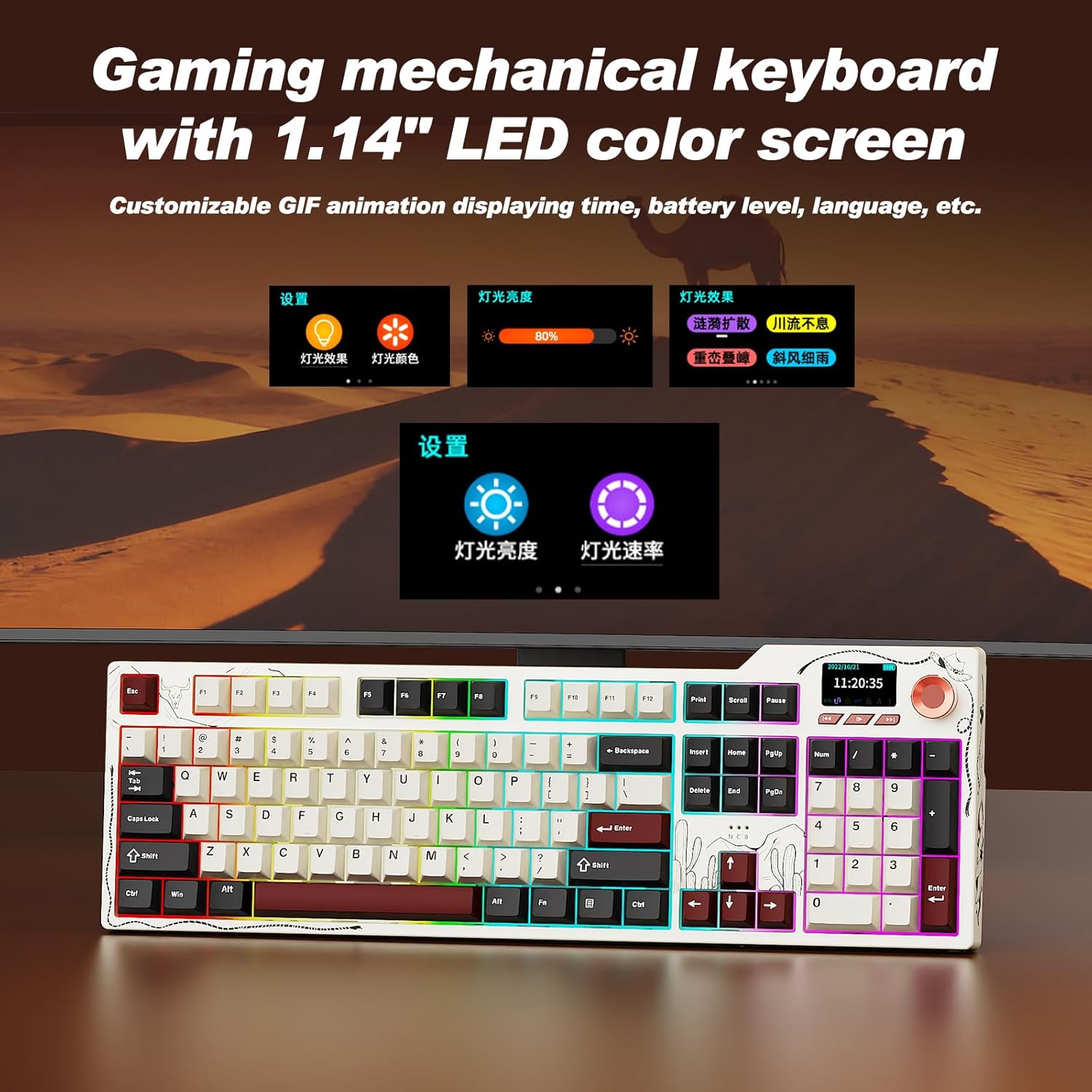
The 1.14-inch color screen displaying various customizable information.
Video demonstrating the mechanical keyboard with its integrated screen.
RGB Backlighting Control
The keyboard features 20 lighting effects and 16.8 million RGB colors. Use the following key combinations to adjust the backlighting:
- FN + ↑ (Up Arrow): Increase lighting brightness.
- FN + ↓ (Down Arrow): Decrease lighting brightness.
- FN + ← (Left Arrow): Adjust lighting effect direction.
- FN + → (Right Arrow): Switch interface colors.
- FN + \|: Switch lighting effects.

Visual guide for controlling the RGB backlighting.
Programmable Software
The keyboard supports full key programming through dedicated software. This allows you to:
- Customize key mappings.
- Set macro commands.
- Adjust sleep time.
- Upload on-screen GIF animations.
- Modify RGB lighting effects, including music-synced backlighting.
Hot-Swappable Key Zone
The AK35I V4 features a hot-swappable design, allowing you to easily change switches without soldering. It supports both 3-pin and 5-pin mechanical switches, offering extensive customization options for your typing experience.

Diagram illustrating the internal gasket structure of the keyboard.
Maintenance
- Cleaning: Regularly clean the keyboard with a soft, dry cloth. For deeper cleaning, remove keycaps using the provided keycap puller and use compressed air to clear debris.
- Battery Care: To prolong battery life, avoid fully discharging the keyboard frequently. Charge it when the battery indicator on the screen shows low power.
- Storage: Store the keyboard in a cool, dry place away from direct sunlight and extreme temperatures.
Troubleshooting
- Keyboard Not Responding: Ensure the keyboard is charged and properly connected (wired, 2.4GHz dongle, or Bluetooth paired). Try restarting your computer or device.
- Connectivity Issues:
- For 2.4GHz, ensure the dongle is securely plugged in and the keyboard is in 2.4G mode.
- For Bluetooth, ensure Bluetooth is enabled on your device and the keyboard is in BT mode and successfully paired. Try re-pairing if necessary.
- RGB Lights Not Working: Check the keyboard's RGB settings via the multifunction knob or programmable software. Ensure brightness is not set to zero.
- Screen Not Displaying Correctly: Try restarting the keyboard. If issues persist, consult the programmable software for screen settings or contact support.
- Keys Not Registering: If individual keys are not working, try replacing the switch using the provided switch puller and extra switches.
Specifications
| Feature | Detail |
|---|---|
| Model Number | AK35I V4 |
| Connectivity Technology | 2.4GHz Wireless, Bluetooth 5.0, USB-C Wired |
| Battery Capacity | 10000mAh |
| Keyboard Description | Mechanical |
| Key Backlighting | RGB (20 effects, 16.8 million colors) |
| Special Features | Backlit, Hot-Swappable, Hotkeys and Media Keys, TFT Display Screen, Volume Roller |
| Compatible Devices | Laptop, PC, Smart TV, Smartphone, Tablet (Windows, Mac, iOS, Android) |
| Product Dimensions | 17 x 5 x 1.22 inches |
| Item Weight | 4.55 pounds |
Video showcasing the multifunctionality of the Ajazz AK35I V4 gaming keyboard.
Warranty and Support
The Ajazz AK35I V4 keyboard comes with a manufacturer's warranty. For specific warranty details, please refer to the warranty card included in your product packaging or visit the official Ajazz website. For technical support, troubleshooting assistance, or any product-related inquiries, please contact Ajazz customer service through their official channels.
Related documentsAK35I V4


Ask a question about this manual
Ask about setup, troubleshooting, compatibility, parts, safety, or missing instructions. Manuals+ will review the question and use this page’s manual context to help answer it.