
1. Product Overview
The Hoorola CS05 is a compact digital camera designed for photography and video recording. It features 5K Ultra HD video capability and 80-megapixel still photo resolution. The camera includes a dual-screen configuration, auto-focus, 18X digital zoom, and a built-in flash. It supports various shooting modes and can function as a webcam.
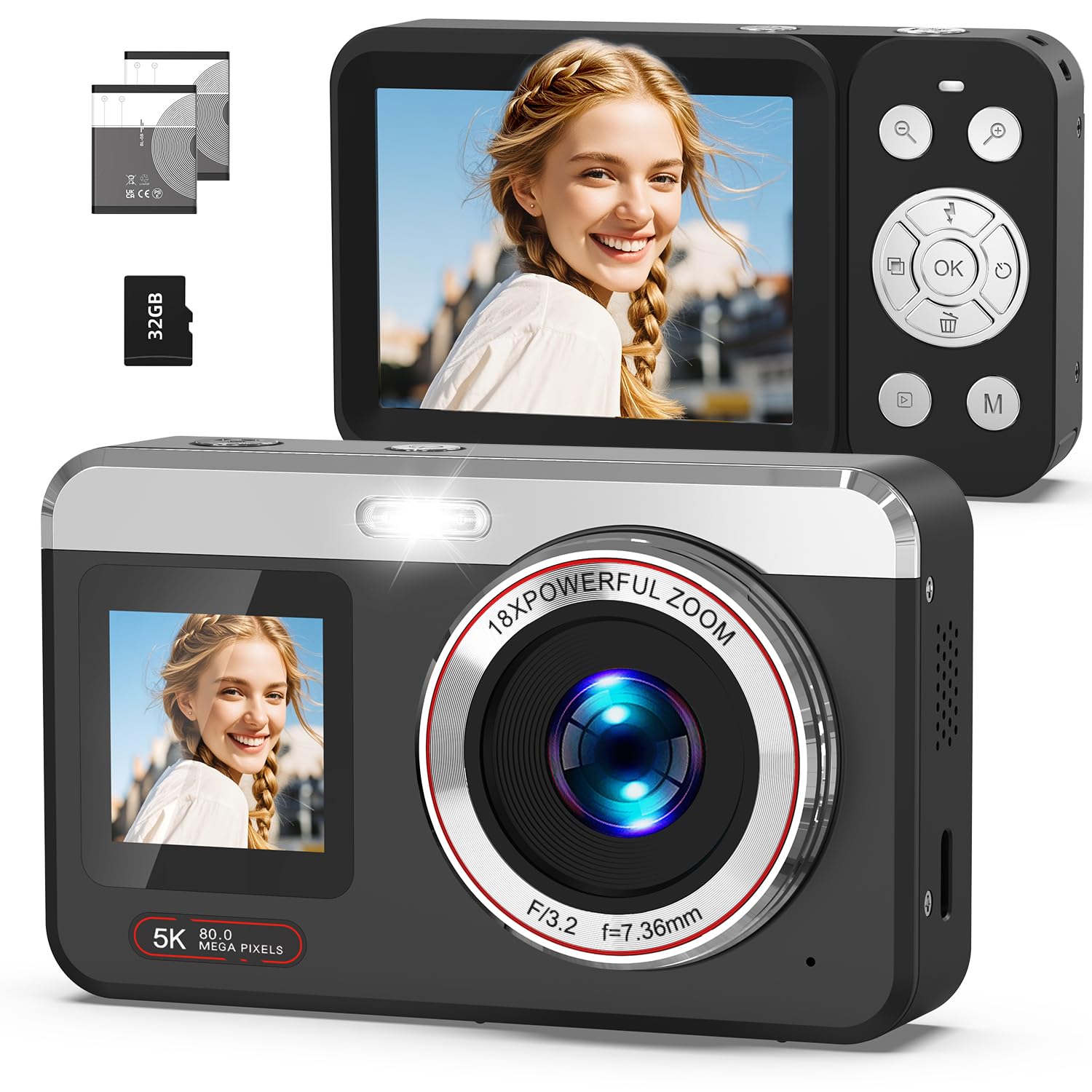
Front view of the Hoorola CS05 Digital Camera, showcasing its compact design and lens.
2. Package Contents
Verify that all items are present in the package:
- Digital Camera x1
- 32GB SD Card x1
- Type-C Cable x1
- Rechargeable Battery x2
- Storage Bag x1
- Cleaning Cloth x1
- User Manual x1
- Lanyard x1

Illustration of the complete package contents, including the camera, accessories, and documentation.
3. Setup
3.1 Battery Installation and Charging
- Open the battery compartment cover located on the bottom of the camera.
- Insert a rechargeable battery, ensuring the correct polarity (+/-) aligns with the markings inside the compartment.
- Close the battery compartment cover securely.
- To charge, connect the camera to a power source using the provided Type-C USB cable. The charging indicator will illuminate.
- A full charge typically takes approximately 160 minutes of recording time. The camera supports recording while charging.
3.2 SD Card Installation
- Locate the SD card slot, usually on the side or bottom of the camera.
- Insert the 32GB SD card with the metal contacts facing the correct direction (refer to the diagram near the slot).
- Gently push the card until it clicks into place. To remove, push again until it springs out.
4. Operating Instructions
4.1 Power On/Off
Press and hold the power button (usually marked with a circle and a vertical line) to turn the camera on or off.
4.2 Basic Photography (Still Images)
- Turn on the camera.
- Select the still image mode (often indicated by a camera icon).
- Frame your shot using the rear LCD screen.
- Half-press the shutter button to activate auto-focus. The focus frame will appear on the screen.
- Fully press the shutter button to capture the 80-megapixel photo.

Visual guide for using the 80MP auto-focus function by half-pressing the shutter button.
4.3 Video Recording (5K)
- Switch the camera to video recording mode (often indicated by a video camera icon).
- Press the 'OK' button to start recording 5K video. A 'REC' indicator will typically appear on the screen.
- Press the 'OK' button again to stop recording.

Demonstration of 5K video recording, with an on-screen display of 5K 30FPS and a 'REC' indicator.
4.4 Dual Screen Functionality
The camera features both a rear 2.8-inch LCD display and a 1.4-inch front selfie screen.
- To switch between the front and rear screens, press and hold the 'OK' button for 3 seconds. This allows for easy selfie mode or vlogging.

Visual guide demonstrating the simple dual-screen switching by holding the 'OK' button for 3 seconds.
4.5 Zoom Function
The camera supports 18X digital zoom.
- Use the zoom in/out buttons (often marked with 'W' for wide and 'T' for telephoto, or '+' and '-') to adjust the zoom level.

Example of 18X digital zoom in use, alongside a demonstration of different filter effects available.
4.6 Special Features and Modes
The Hoorola CS05 offers various creative modes:
- Filters: Apply various creative filters to your photos and videos.
- Slow-motion: Record videos in slow motion.
- Time-lapse: Capture a sequence of images over time to create a time-lapse video.
- Burst Shooting: Take multiple photos in quick succession.
- Webcam Function: Connect the camera to a computer via USB to use it as an HD webcam for video conferences or live streaming.
- Manual Controls: Adjust ISO, white balance, and metering for more control over your shots.
5. Data Transfer
Transfer photos and videos from your camera to a computer or mobile device.
- To Computer: Connect the camera to your computer using the Type-C USB cable. The camera will appear as a removable drive, allowing you to copy files.
- To Phone: Use a compatible card reader (not included) to transfer files from the SD card to your smartphone.

Demonstration of the camera functioning as a webcam and the process of downloading content to a phone via a card reader.
6. Maintenance
- Cleaning: Use the provided cleaning cloth to gently wipe the camera body and lens. Avoid using harsh chemicals or abrasive materials.
- Storage: When not in use, store the camera in the provided storage bag in a cool, dry place away from direct sunlight and extreme temperatures.
- Battery Care: Remove batteries if the camera will not be used for an extended period.
7. Troubleshooting
| Issue | Possible Cause | Solution |
|---|---|---|
| Camera does not power on | Low or depleted battery; improperly inserted battery. | Charge the battery; ensure battery is correctly inserted. |
| Cannot take photos/videos | SD card full or not inserted; incorrect mode selected. | Insert/replace SD card; ensure sufficient space; switch to photo/video mode. |
| Blurry images | Auto-focus not engaged; camera shake; dirty lens. | Half-press shutter for auto-focus; hold camera steady; clean the lens. |
| Cannot connect to computer | Incorrect cable; driver issue; camera not in transfer mode. | Use provided Type-C cable; try a different USB port; ensure camera is recognized as a storage device. |
8. Specifications
| Feature | Detail |
|---|---|
| Brand | Hoorola |
| Model | CS05 |
| Resolution | 80 MP (Still Image) |
| Video Capture Resolution | 5K (2160p) |
| Digital Zoom | 18x |
| Display Type | LCD |
| Standing Screen Display Size | 2.8 Inches (Rear), 1.4 Inches (Front) |
| Memory Storage Capacity | 32 GB (Included SD Card) |
| Battery Type | Lithium Ion (2 included) |
| Battery Average Life | 160 Minutes (Recording) |
| Hardware Interface | USB Type C |
| Special Features | Auto Focus, Dual-Screen, Flash, Selfie, Time Lapse, Slow Motion, Webcam Function, Filters, ISO/WB Adjustment |
| Item Weight | 249 g |
| Material | Plastic |
| Country of Origin | China |
9. Safety Information
- Do not expose the camera to water or moisture.
- Avoid dropping the camera or subjecting it to strong impacts.
- Keep the camera away from extreme temperatures and direct sunlight.
- Do not attempt to disassemble or repair the camera yourself. Contact customer support for assistance.
- Keep batteries out of reach of children.
10. Warranty and Support
Hoorola products typically come with a limited warranty. Please refer to the warranty card included in your package or visit the official Hoorola website for detailed warranty terms and conditions.
For technical support, troubleshooting assistance, or warranty claims, please contact Hoorola customer service through their official channels. Contact information can usually be found on the product packaging or the brand's website.