
CVXDD VM Plus 3.5KW
Contents
CVXDD VM Plus 3.5KW 24V Hybrid Solar Inverter
User Manual
1. Introduction
This manual provides essential information for the safe and efficient operation of your CVXDD VM Plus 3.5KW 24V Hybrid Solar Inverter. Please read this manual thoroughly before installation and use, and retain it for future reference. This device integrates a solar charge controller, inverter, and battery charger functions to offer uninterruptible power support.
2. Safety Instructions
- Installation must be performed by qualified personnel in accordance with all local electrical codes.
- Ensure all connections are secure and correct before applying power. Loose connections can cause overheating.
- Do not disassemble the inverter. There are no user-serviceable parts inside.
- Avoid exposing the inverter to rain, snow, spray, or any liquids.
- Ensure adequate ventilation around the inverter to prevent overheating.
- Always disconnect all power sources (PV, battery, AC input) before performing any maintenance or wiring.
- This inverter contains high voltage components. Exercise extreme caution.
3. Product Features
- 3.5KW Pure Sine Wave Inverter with built-in MPPT 100A Solar Controller.
- Capable of generating power directly from PV to supply loads, even without a battery.
- High PV to AC efficiency.
- Wide PV input voltage range (120-500VDC).
- Supports lithium batteries.
- Optional WiFi module for remote monitoring.
4. Product Overview and Components
The CVXDD VM Plus 3.5KW Hybrid Solar Inverter is designed for efficient power management in solar energy systems. Below are visual representations of the unit and its integration.

Figure 4.1: Front view of the CVXDD VM Plus 3.5KW Hybrid Solar Inverter. This image displays the main unit with its integrated LCD screen and control buttons, indicating its compact design and user interface.

Figure 4.2: Rear panel connections of the CVXDD VM Plus 3.5KW Hybrid Solar Inverter. This view highlights the AC input/output terminals, battery connections (POS+, NEG-), PV input terminals (+PV IN-), and communication interfaces (USB, RS232, GPRS, WIFI), along with the input breaker and warning labels.

Figure 4.3: Side view of the CVXDD VM Plus 3.5KW Hybrid Solar Inverter, showing a detailed specification label. The label provides critical technical data such as model name, rated power, operating temperature range, inverter mode details, AC charger mode details, and solar charger mode specifications, including maximum PV array power and MPPT voltage range. The barcode 92090200925017 is visible on the label.
5. Installation and System Overview
Proper installation is crucial for the performance and safety of the hybrid solar inverter. It is recommended that installation be carried out by a certified electrician or solar professional.

Figure 5.1: Diagram illustrating a typical residential solar power system integrating the CVXDD Hybrid Solar Inverter. This setup shows solar panels on the roof, the inverter, a battery bank, and connections to both the utility grid and household loads, demonstrating how the system manages energy flow.
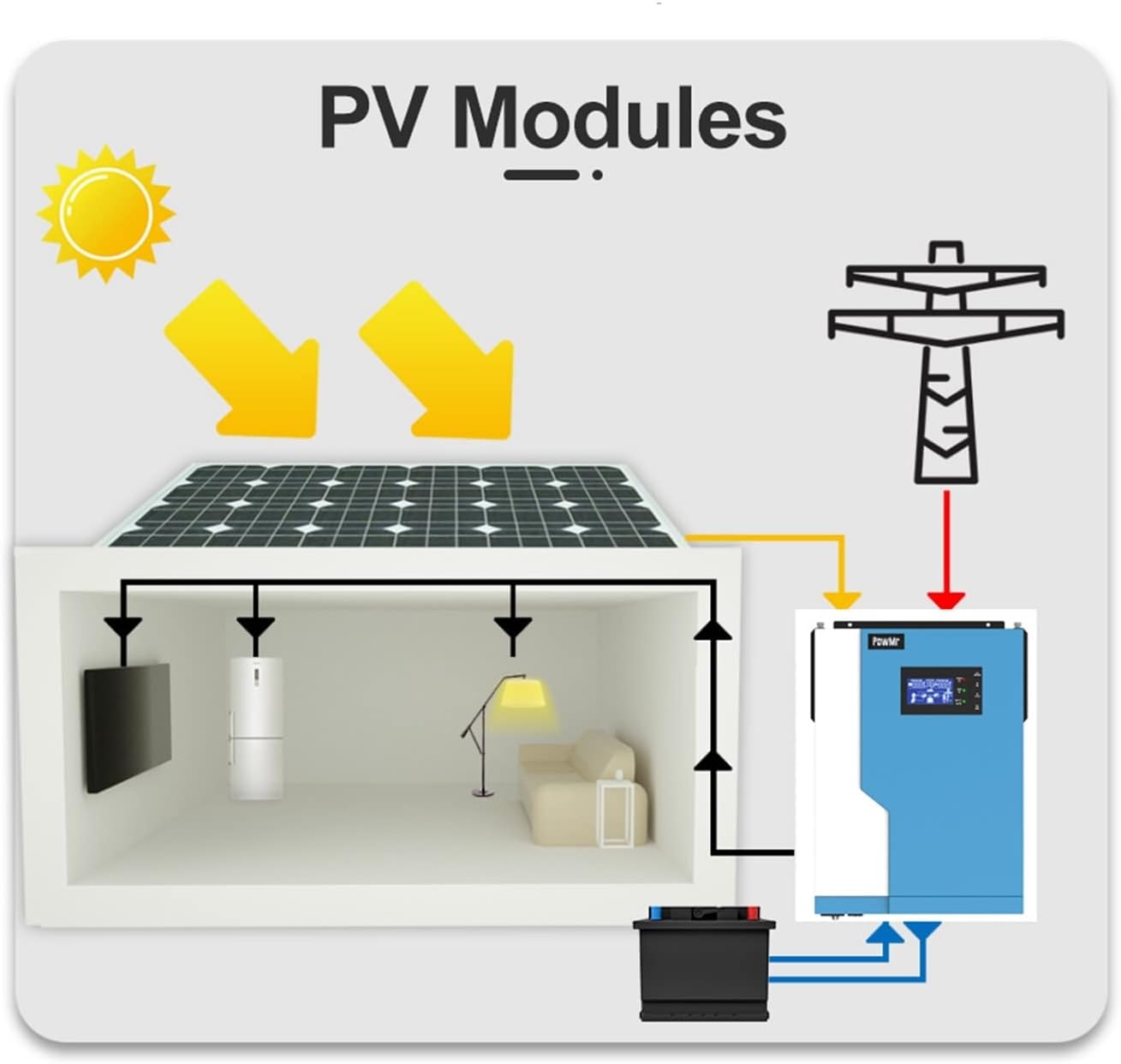
Figure 5.2: Simplified diagram focusing on PV module connection to the inverter. Solar energy from PV modules is directed to the inverter, which then supplies power to household appliances and charges the connected battery bank, highlighting the direct energy flow from solar to consumption and storage.

Figure 5.3: Comprehensive system diagram illustrating various power inputs and outputs. This diagram shows the inverter connected to solar power, a generator, the utility grid, and battery packs, all supplying power to home appliances. It demonstrates the inverter's capability to manage multiple power sources for continuous supply.
5.1 Wiring Connections
- PV Array Connection: Connect the positive and negative terminals of your solar panel array to the designated PV input terminals on the inverter's rear panel. Ensure the PV open circuit voltage does not exceed 500VDC.
- Battery Connection: Connect the battery bank (24VDC for this model) to the battery terminals (POS+ and NEG-) on the inverter. Observe correct polarity.
- AC Input Connection: Connect the utility grid or generator AC input to the AC IN terminals.
- AC Output Connection: Connect your household loads to the AC OUT terminals.
- Grounding: Ensure the inverter is properly grounded according to local electrical codes.
After all connections are made, double-check for correctness and tightness before powering on the system.
6. Operating Instructions
6.1 Powering On
- Ensure all external wiring is complete and secure.
- Switch on the battery breaker (if applicable).
- Switch on the PV array breaker (if applicable).
- Switch on the AC input breaker (if applicable).
- Press and hold the power button on the inverter's front panel for a few seconds to turn it on.
6.2 LCD Display and Settings
The LCD display provides real-time operational status, input/output voltages, battery status, and error codes. Use the navigation buttons (UP, DOWN, ENTER, ESC) to browse through menus and adjust settings. Refer to the on-screen prompts for specific parameter adjustments.
6.3 Operational Modes
The inverter can operate in various modes, including PV priority, utility priority, and battery priority. These settings can be configured via the LCD panel to optimize energy usage based on your specific requirements.
6.4 Optional WiFi Module
If equipped with the optional WiFi module, follow the separate instructions provided with the module to connect it to your local network. This allows for remote monitoring and control of the inverter via a dedicated application or web interface.
7. Maintenance
- Regular Inspection: Periodically inspect the inverter and all connections for any signs of damage, corrosion, or loose wiring.
- Cleaning: Keep the inverter's ventilation openings clear of dust and debris to ensure proper airflow. Use a dry cloth to clean the exterior. Do not use liquid cleaners.
- Battery Maintenance: Follow the battery manufacturer's guidelines for maintenance to ensure optimal performance and lifespan.
- Firmware Updates: Check the manufacturer's website for any available firmware updates for improved performance or new features.
8. Troubleshooting
If the inverter is not functioning as expected, consult the LCD display for error codes or warning messages. Common issues and basic troubleshooting steps are listed below:
- No Power Output: Check all input power sources (PV, battery, AC grid) and their respective breakers. Verify all wiring connections are secure.
- Overload Warning: Reduce the connected load. The inverter may temporarily shut down to protect itself.
- Battery Low Voltage: Ensure batteries are adequately charged. Check battery connections and charging sources.
- Over-temperature: Ensure the inverter has sufficient ventilation. Clear any obstructions from the cooling vents.
- PV Input Error: Check PV array connections and ensure the voltage is within the acceptable MPPT range.
For persistent issues or complex problems, contact qualified service personnel or CVXDD customer support.
9. Specifications
Technical specifications for the CVXDD VM Plus 3.5KW Hybrid Solar Inverter (Model: MPS-V-3500W-PLUS).
| Category | Parameter | Value |
|---|---|---|
| General | Rated Power | 3500VA/3500W |
| Communication Interface | USB, RS232, GPRS, WIFI | |
| Input (AC) | Voltage | 230VAC |
| Selectable Voltage Range | 170-280VAC (For Personal Computers); 90-280VAC (For Home Appliances) | |
| Frequency Range | 50Hz/60Hz (Auto sensing) | |
| Output (AC) | AC Voltage Regulation (Batt. Mode) | 230VAC±5% |
| Surge Power | 7000VA | |
| Efficiency (Peak) PV to INV | 97% | |
| Efficiency (Peak) Battery to INV | 94% | |
| Transfer Time | Transfer Time | 10ms (For Personal Computers); 20ms (For Home Appliances) |
| Battery & AC Charger | Battery Voltage | 24VDC |
| Floating Charge Voltage | 27VDC | |
| Overcharge Protection | 33VDC | |
| Maximum Charge Current | 80A | |
| Solar Charger | Maximum PV Array Power | 5000W |
| MPPT Range Operating Voltage | 120-450VDC | |
| Maximum PV Array Open Circuit Voltage | 500VDC | |
| Maximum Charging Current | 100A | |
| Maximum Efficiency | 98% | |
| Physical & Environment | Dimension (DWH mm) | 100x300x440 |
| Net Weight (kgs) | 11 | |
| Humidity | 5 to 95% Relative Humidity (Non-condensing) | |
| Operating Temperature | 0-55°C |
10. Warranty and Support
CVXDD products are designed for reliability and performance. For warranty information, please refer to the warranty card included with your product or visit the official CVXDD website. For technical support, troubleshooting assistance, or spare parts, please contact CVXDD customer service through the contact information provided on the product packaging or website. When contacting support, please have your model number (VM Plus 3.5KW) and serial number (if applicable) ready.
Documents and downloads
Ask a question about this manual
Ask about setup, troubleshooting, compatibility, parts, safety, or missing instructions. Manuals+ will review the question and use this page’s manual context to help answer it.