
1. Introduction
The WOLFBOX MegaVolt10 Air is a versatile, all-in-one portable device designed for automotive emergencies and convenience. It integrates a powerful 2000A jump starter, a 150PSI air compressor, a 10000mAh power bank, and a 200-lumen LED flashlight into a compact unit. This manual provides essential instructions for safe and effective operation.

Figure 1: WOLFBOX MegaVolt10 Air with included accessories.
2. What's in the Box
- Jump Starter Host (WOLFBOX MegaVolt10 Air)
- User Manual
- Storage Bag
- Smart Battery Clamps
- USB A to USB C Charger Cable
- 20" Inflatable Hose
- Air Nozzle (3 pieces)
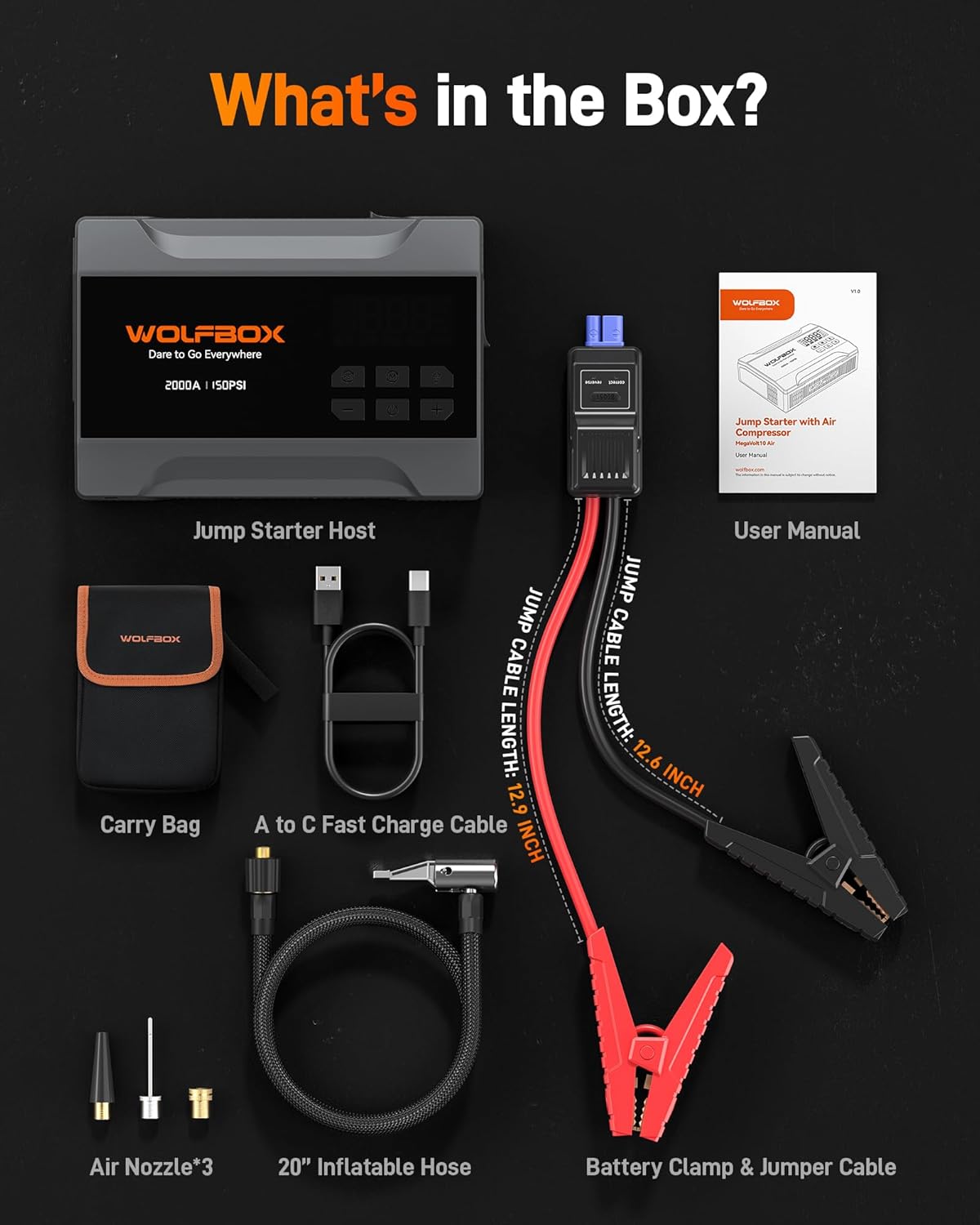
Figure 2: All components included in the WOLFBOX MegaVolt10 Air package.
3. Setup
3.1 Charging the Device
Before first use, fully charge the WOLFBOX MegaVolt10 Air. Connect the provided USB A to USB C Charger Cable to the USB-C input port on the device and to a compatible USB power adapter (not included). The LED display will indicate the charging progress. A full charge typically takes 1.5-2 hours with a 15W USB-C input.
3.2 Connecting Jumper Cables
To prepare for jump starting, lift the dust cover on the side of the device labeled "JUMPER CABLE". Insert the smart battery clamps connector into this port. The connector is designed to fit only in the correct orientation to prevent incorrect connection.
3.3 Connecting Air Hose
For tire inflation, screw the 20" inflatable hose into the designated port on the device until it is fully seated. Attach the quick-release end of the hose to the tire valve stem.
4. Operating Instructions
4.1 Jump Starting a Vehicle
The WOLFBOX MegaVolt10 Air can jump-start 12V car batteries (up to 5L gasoline engines).
- Ensure the jump starter is adequately charged.
- Connect the smart battery clamps to the device (as per Section 3.2).
- Attach the red clamp to the vehicle's positive (+) battery terminal.
- Attach the black clamp to the vehicle's negative (-) battery terminal.
- Observe the indicator light on the smart battery clamps. A green light indicates a correct connection. A red light indicates an incorrect or reverse connection.
- Once the indicator is green, start the vehicle normally.
- If the vehicle does not start, or if the battery is extremely low, press and hold the BOOST button on the smart clamps for 3 seconds until the indicator turns green. Then, start the vehicle within 30 seconds.
- Once the vehicle starts, immediately disconnect the clamps from the vehicle battery within 30 seconds, then disconnect from the jump starter.

Figure 3: Normal and Boost jump starting procedures.
4.2 Using the Air Compressor
The built-in air compressor offers a maximum pressure of 150 PSI and features automatic stop inflation.
- Connect the air hose to the device and the tire valve stem (as per Section 3.3).
- Power on the device. The large LED display will show the current tire pressure and the preset target pressure.
- Press the Mode (M) button to cycle through different inflation modes: Car, Motorcycle, Bicycle, Ball, and Manual. Each mode has a default preset pressure.
- Use the + and - buttons to adjust the target pressure to your desired PSI.
- Press the Power button to begin inflation. The compressor will automatically stop once the target pressure is reached.
- Disconnect the air hose from the tire valve and the device.

Figure 4: Using the air compressor to inflate a car tire.
4.3 Using as a Power Bank
The WOLFBOX MegaVolt10 Air features a 10000mAh battery and can function as a compact power bank.
- It has a 15W USB-C input port and a 12W USB-A output port.
- Connect your electronic devices (phones, laptops, iPads) to the appropriate USB output port using their charging cables.
- The device will automatically begin charging your connected device.
4.4 Using the LED Flashlight
The integrated 200-lumen LED flashlight provides illumination for various situations.
- Press the Flashlight button once for constant illumination (Lighting mode).
- Press the button again to activate Strobe (Red) mode for signaling.
- Press the button a third time for SOS mode.
- Press the button a fourth time to turn the flashlight off.

Figure 5: LED flashlight modes for roadside emergencies.
5. Safety and Protection
The WOLFBOX MegaVolt10 Air is designed with multiple safety features and is rated IP64 for protection against dust and water splashes. It has passed UL, FCC, CE, and CA65 safety tests.
5.1 Operating Environment
The device is engineered to perform reliably in extreme conditions, with an operating temperature range of -4°F to 140°F (-20°C to 60°C).
5.2 Built-in Protections
- Reverse Charge Protection
- Reverse Polarity Protection
- Overcurrent Protection
- Low Temperature Protection
- Overload Protection
- Overvoltage Protection
- Overcharge Protection
- Short Circuit Protection
- High Temperature Protection

Figure 6: Cold-resistant operation and 10 safety protections.
6. Troubleshooting
If you encounter issues, refer to the following common problems and solutions:
6.1 Jump Starter Issues
- No Power: Ensure the device is charged. If the battery is completely drained, it may not power on immediately.
- Smart Clamps Indicator is Red: This indicates incorrect connection. Recheck the clamps on the battery terminals (red to positive, black to negative).
- Vehicle Does Not Start After Normal Attempt: Use the BOOST function for severely discharged batteries.
- Low/High Temperature Alarm: The device may be operating outside its safe temperature range. Allow it to return to normal operating temperature before use.
6.2 Air Compressor Issues
- No Inflation: Ensure the air hose is securely screwed into the device and the quick-release connector is properly attached to the tire valve. Check if the device is powered on and a target pressure is set.
- Inaccurate Pressure Reading: Ensure the air hose connection is tight. The display shows real-time pressure.
- Compressor Stops Prematurely: The device automatically stops when the preset target pressure is reached. Adjust the target pressure if needed.
7. Maintenance
- Charging: For optimal battery life, fully charge the device every 3-6 months, even if not in use.
- Storage: Store the WOLFBOX MegaVolt10 Air in its provided storage bag in a cool, dry place away from direct sunlight and extreme temperatures.
- Cleaning: Wipe the device with a soft, dry cloth. Do not use harsh chemicals or abrasive materials.
8. Specifications
| Feature | Specification |
|---|---|
| Brand | WOLFBOX |
| Model | MegaVolt10 Air |
| Product Dimensions | 7.09"D x 4.92"W x 2.05"H |
| Item Weight | 1.8 Pounds |
| Peak Output Current | 2000 Amps |
| Battery Capacity | 10000 mAh |
| Max Air Pressure | 150 PSI |
| USB-C Input | 15W |
| USB-A Output | 12W |
| LED Flashlight | 200 Lumens (Lighting, Strobe, SOS modes) |
| Operating Temperature | -4°F to 140°F (-20°C to 60°C) |
| IP Rating | IP64 |
9. Warranty and Customer Support
The WOLFBOX MegaVolt10 Air comes with a 24-month warranty. WOLFBOX is committed to resolving any issues related to the product, installation, or usage.
- Return Policy: 7 Days Return Policy, Returns on Defects.
- Customer Service: 24/7 support available.
- Email: service@wolfbox.com
- Phone: +1 888 296 8399


