
1. Introduction
This manual provides essential information for the safe and efficient operation of your MFUZOP 1500W Pure Sine Wave Inverter. This device converts 12V DC battery power to 110V/120V AC household power, suitable for various applications including RVs, trucks, solar systems, and backup power.
The inverter delivers a smooth, stable pure sine wave output, making it suitable for sensitive electronics such as TVs, laptops, and CPAP machines. It features a 3000W peak power capability to handle startup surges from appliances.
2. Safety Information
Please read and understand all safety instructions before operating the inverter. Failure to follow these instructions may result in electric shock, fire, or serious injury.
- Proper Ventilation: Ensure adequate ventilation around the inverter to prevent overheating. Do not block cooling fans.
- Dry Environment: Operate the inverter in a dry environment. Avoid exposure to water, rain, or moisture.
- Correct Voltage: Connect the inverter only to a 12V DC power source. Do not connect to 24V or 48V systems.
- Polarity: Always connect the positive (+) terminal of the inverter to the positive (+) terminal of the battery and the negative (-) terminal of the inverter to the negative (-) terminal of the battery. Reverse polarity can cause severe damage.
- Grounding: Ensure the inverter is properly grounded.
- Load Capacity: Do not exceed the inverter's rated output power of 1500W continuous and 3000W peak. Overloading can damage the inverter and connected devices.
- Children and Pets: Keep the inverter out of reach of children and pets.
- Flammable Materials: Do not operate the inverter near flammable liquids or gases.
- Internal Components: Do not attempt to open or modify the inverter. There are no user-serviceable parts inside.

Image: The MFUZOP 1500W Pure Sine Wave Inverter is designed with comprehensive protection features, including reverse connection, over-temperature, overload, over-voltage, low voltage, and short circuit protection. The image shows the inverter next to a camera and a wood stove, illustrating its versatility for various loads.
3. Package Contents
Verify that all items are present in the package:
- 1500W Pure Sine Wave Power Inverter
- 2 x 20-inch Battery Cables
- 20 FT Wired Remote Control
- Instruction Manual (this document)

Image: This illustration shows the MFUZOP 1500W Pure Sine Wave Inverter with its physical dimensions (9.45in x 12.4in x 3.15in), along with the included remote controller, user guide, and battery cables (2x4AWG, 3ft). Various appliances are also depicted, suggesting common uses.
4. Product Overview
Familiarize yourself with the components and ports of the MFUZOP 1500W Pure Sine Wave Inverter.

Image: This diagram highlights the various ports and controls on the MFUZOP 1500W Inverter. Key features include the Negative Terminal, Positive Terminal, Cooling Fans, AC Output ON/OFF Switch, LCD Display (showing Voltage, Output Power, Fault Code), Dual AC Outlets, USB Port, Type-C Port, Ground Terminal, Remote Switch Connection, and Frequency Adjustment (50Hz/60Hz switch).
Front Panel Features:
- AC Output ON/OFF Switch: Controls the AC power output.
- LCD Display: Shows real-time input/output voltage, battery status, and load levels.
- Dual AC Outlets: Standard 110V/120V AC outlets for connecting appliances.
- USB Port: 5V USB output for charging mobile devices.
- Type-C Port: USB Type-C output for charging compatible devices.
- Frequency Adjustment Switch: Allows selection between 50Hz and 60Hz output frequency.
- Remote Switch Connection: Port for connecting the wired remote control.
- Ground Terminal: For proper grounding of the inverter.
Rear Panel Features:
- Positive (+) Terminal: Connects to the positive terminal of the 12V battery.
- Negative (-) Terminal: Connects to the negative terminal of the 12V battery.
- Cooling Fans: Automatically activate to dissipate heat during operation.
5. Setup Instructions
Follow these steps to set up your MFUZOP 1500W Pure Sine Wave Inverter:
- Choose a Location: Select a dry, well-ventilated area for the inverter. Ensure it is away from direct sunlight, heat sources, and moisture. The inverter comes with a safety cushioning base for stable placement.
- Prepare the Battery: Ensure your 12V battery is fully charged and in good condition.
- Connect Battery Cables:
- Connect the red battery cable to the positive (+) terminal of the inverter.
- Connect the other end of the red battery cable to the positive (+) terminal of the 12V battery.
- Connect the black battery cable to the negative (-) terminal of the inverter.
- Connect the other end of the black battery cable to the negative (-) terminal of the 12V battery.
- Ensure all connections are tight and secure to prevent arcing and overheating.
- Grounding: Connect a grounding wire (not included) from the inverter's ground terminal to a suitable earth ground point (e.g., vehicle chassis, ground rod).
- Remote Control (Optional): If using the wired remote control, plug it into the "REMOTE" port on the front panel.
- Initial Power On: Once all connections are secure, switch the AC Output ON/OFF switch to the "ON" position. The LCD display should illuminate, showing input voltage.

Image: The inverter is shown on a wooden outdoor table, highlighting its stable placement using the safety cushioning base. This setup suggests its suitability for outdoor and portable power needs.
6. Operating Instructions
After successful setup, follow these steps to operate your inverter:
- Power On: Ensure the inverter's AC Output ON/OFF switch is in the "ON" position. The LCD display will show the battery voltage.
- Connect Appliances: Plug your AC appliances into the dual AC outlets. For USB charging, use the USB or Type-C ports.
- Monitor Display: The LCD display provides real-time information:
- Input Voltage: Displays the current DC voltage from the battery.
- Output Power: Shows the current AC power consumption of connected devices.
- Battery Status: Indicates the battery charge level.
- Fault Code: Displays error codes if a protection mechanism is triggered. Refer to the Troubleshooting section for details.
- Frequency Adjustment: If your appliances require a specific frequency (50Hz or 60Hz), use the frequency adjustment switch to select the appropriate setting. Ensure the inverter is off before changing this setting.
- Independent Voltage Adjustment: This inverter allows fine-tuning of the output voltage within a small range. Consult the detailed user guide for specific instructions on how to access and adjust this setting, if required for specialized applications.
- Power Off: When finished, first disconnect all AC appliances, then switch the inverter's AC Output ON/OFF switch to the "OFF" position.
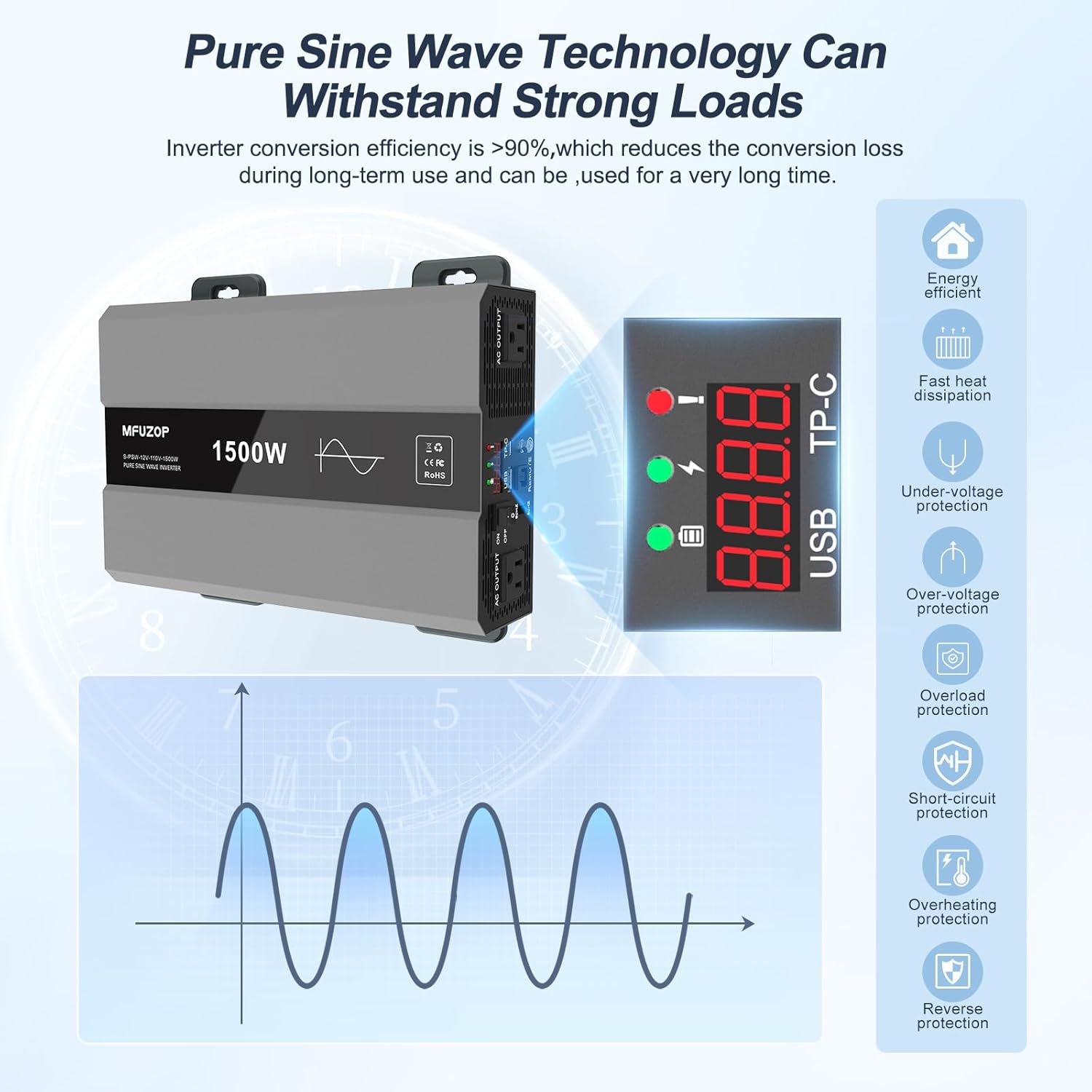
Image: This image emphasizes the pure sine wave technology and comprehensive protection features of the MFUZOP 1500W Inverter. It shows the inverter's display and icons representing energy efficiency, fast heat dissipation, under-voltage, over-voltage, overload, short-circuit, overheating, and reverse polarity protection.
7. Maintenance
Regular maintenance ensures optimal performance and longevity of your inverter:
- Keep Clean: Periodically clean the exterior of the inverter with a dry, soft cloth. Do not use liquids or abrasive cleaners.
- Check Connections: Regularly inspect battery cable connections for tightness and corrosion. Clean any corrosion with a wire brush and baking soda solution.
- Ventilation: Ensure the cooling fans and vents are free from dust and obstructions. Blocked vents can lead to overheating.
- Storage: When not in use for extended periods, store the inverter in a cool, dry place. Disconnect it from the battery.
8. Troubleshooting
This section addresses common issues you might encounter with your inverter.
| Problem | Possible Cause | Solution |
|---|---|---|
| No power output / Inverter not turning on |
|
|
| Overload alarm / Inverter shuts down |
|
|
| Over-temperature alarm / Inverter shuts down |
|
|
| Low voltage alarm / Inverter shuts down |
|
|
| Inverter makes buzzing noise |
|
|
9. Specifications
| Feature | Specification |
|---|---|
| Brand | MFUZOP |
| Model Name | Pure Sine Wave Inverter |
| Model Number | 1500 Watt Inverter |
| Input Voltage | 12V DC |
| Output Voltage | 110V/120V AC |
| Continuous Output Power | 1500 Watts |
| Peak Output Power | 3000 Watts |
| Electrical Output Waveform | Pure Sine Wave |
| Frequency | 50Hz / 60Hz (Selectable) |
| Conversion Efficiency | >93% |
| Display Type | LED |
| Protection Features | Overload, Overheat, Low Voltage, Short Circuit, Reverse Polarity, Over Voltage |
| Material | Durable Aluminum Housing |
| Color | Black |
10. Warranty and Support
The MFUZOP 1500W Pure Sine Wave Inverter comes with a 1-year manufacturer's warranty covering quality issues. For technical support, warranty claims, or any questions regarding your product, please contact MFUZOP customer service.
You can typically find contact information on the manufacturer's website or through your purchase platform. MFUZOP aims to provide professional after-sales service.

Image: A wide shot of the MFUZOP 1500W Pure Sine Wave Inverter placed on an outdoor table, with a scenic mountain and forest background, emphasizing its suitability for outdoor and off-grid applications.


