
1. Introduction
The XHDATA R108 is a compact, high-sensitivity portable DSP radio designed for multi-band reception. It supports FM, AM, Longwave (LW), Shortwave (SW), and Airband frequencies, making it suitable for various listening environments. Equipped with a DSP chip, it offers enhanced reception and audio quality. Its portable design, combined with a rechargeable battery and USB Type-C charging, ensures convenience for both indoor and outdoor use.

Image: XHDATA R108 radio highlighting its multi-band reception (FM/AM/SW/LW), noise reduction, airband, auto scan, 500 memory stations, and alarm clock features.
2. Safety Information
- Do not expose the radio to extreme temperatures, direct sunlight, or high humidity.
- Avoid dropping or subjecting the radio to strong impacts.
- Do not attempt to disassemble or modify the radio. This may void the warranty and cause damage.
- Use only the specified charging cable and battery type (BL-5C).
- Keep the radio away from water and other liquids. This product is not waterproof.
- Dispose of batteries according to local regulations.
3. Package Contents
Verify that all items are present in the package:
- 1 x XHDATA R108 Multi-Band Portable DSP Radio
- 1 x USB Type-C Charging Cable
- 1 x External Antenna
- 1 x BL-5C Rechargeable Battery
- 1 x User Manual

Image: The XHDATA R108 radio shown alongside its included accessories: an external antenna, a hand strap, a USB charging cable, and the user manual.
4. Product Overview
The XHDATA R108 features a compact design with intuitive controls and a clear LCD display. Key components include:
- Telescopic Rod Antenna: For FM, SW, LW, and Airband reception.
- Built-in AM Antenna: For AM reception.
- LCD Display: Shows frequency, time, temperature, signal strength, and other operational indicators.
- Tuning Knob: For manual frequency adjustment.
- Volume Knob: Adjusts audio output level.
- Keypad: Numeric buttons for direct frequency input and function keys.
- Speaker: Integrated for audio output.
- Headphone Jack: 3.5mm stereo output.
- USB Type-C Port: For charging the internal battery.
- External Antenna Jack: For connecting the included external wire antenna.
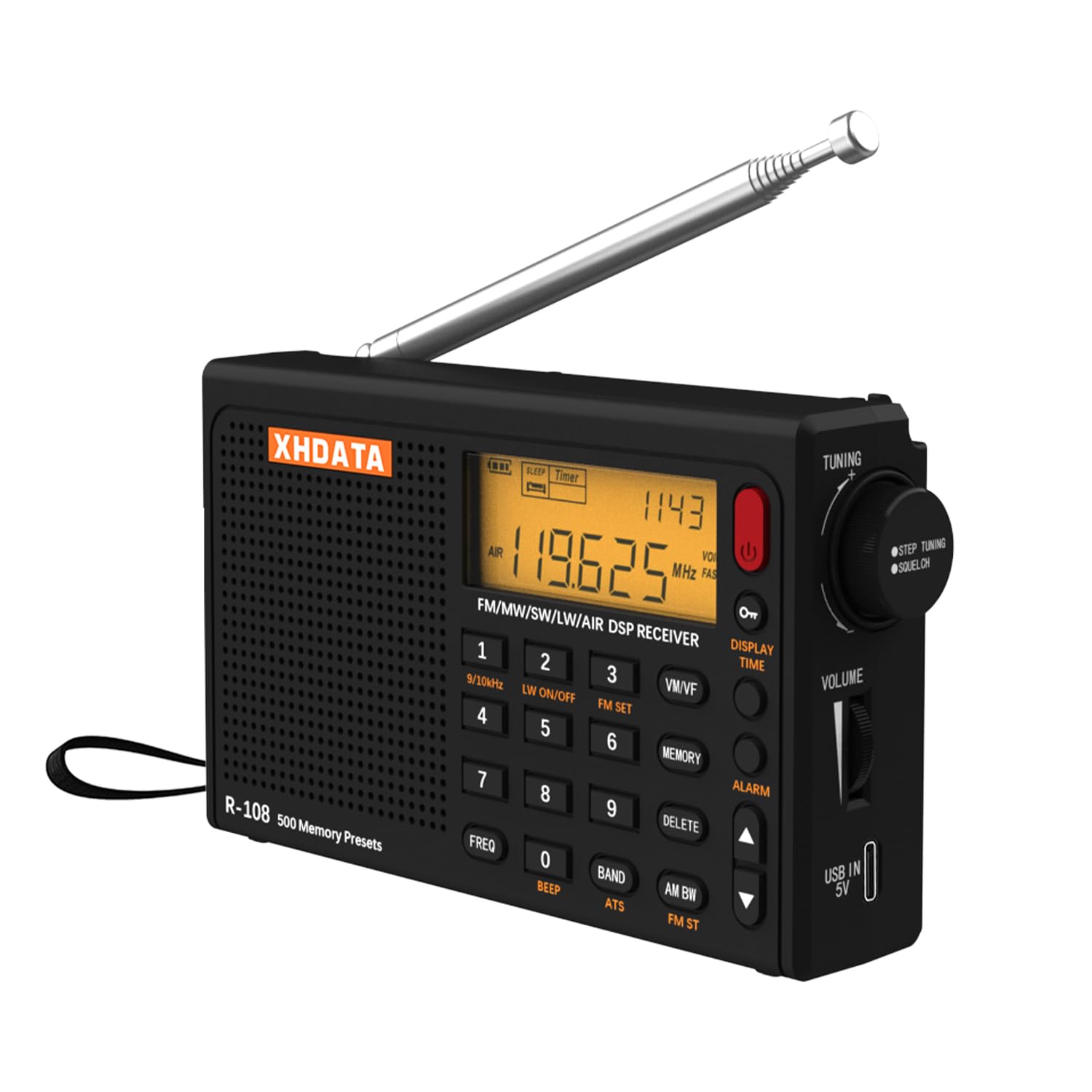
Image: Front view of the XHDATA R108 radio, detailing the LCD display, numeric keypad, tuning knob, and volume control.

Image: A close-up view of the XHDATA R108's LCD display, illustrating its ability to show time, temperature, and current frequency.
5. Setup
5.1 Battery Installation and Charging
- Open the battery compartment cover on the back of the radio.
- Insert the provided BL-5C rechargeable battery, ensuring correct polarity.
- Close the battery compartment cover.
- Connect the USB Type-C charging cable to the radio's USB port and to a 5V DC USB power adapter (not included).
- The battery icon on the LCD display will indicate charging status. A full charge is recommended before first use.

Image: The XHDATA R108 radio illustrating its USB Type-C charging port and the use of a BL-5C rechargeable battery for power.
5.2 Antenna Connection
- For FM, SW, LW, and Airband reception, extend the telescopic rod antenna fully.
- For improved reception on these bands, especially Shortwave, connect the external wire antenna to the dedicated jack. Extend the wire antenna and position it for optimal signal.
- For AM (MW) reception, the radio uses an internal ferrite bar antenna. Rotate the radio for best signal.

Image: A visual representation of the three antenna types used by the XHDATA R108: the extendable 50cm rod antenna, the internal AM antenna, and the port for connecting an external wire antenna.
6. Operating Instructions
6.1 Power On/Off
Press and hold the POWER button to turn the radio on or off.
6.2 Band Selection
Press the BAND button repeatedly to cycle through the available frequency bands: FM, AM, LW, SW, Airband.
6.3 Tuning Methods
- Manual Tuning: Rotate the TUNING knob to adjust the frequency incrementally.
- Direct Frequency Input: Use the numeric keypad to enter the desired frequency, then press FREQ or ENTER (depending on model variant) to confirm.
- Auto Scan Tuning (ATS): Press and hold the ATS button to automatically scan and store available stations in the current band. The radio can store up to 500 memory stations.

Image: The XHDATA R108 radio highlighting its capacity for 500 memory presets across FM, AM, SW, LW, and Airband frequencies.
6.4 Memory Functions
- Storing a Station: Tune to the desired station, then press and hold the MEMO button. Use the tuning knob or numeric keys to select a memory location, then press MEMO again to save.
- Recalling a Station: Press the MEMO button, then use the tuning knob or numeric keys to select a stored station.
6.5 Alarm Clock and Sleep Timer
- Setting Alarm: Refer to the detailed instructions in the included paper manual for setting the alarm time and activation.
- Sleep Timer: Press the SLEEP button repeatedly to set the automatic power-off timer (e.g., 10, 20, 30, 60, 90, 120 minutes).
6.6 Noise Reduction
The XHDATA R108 incorporates a noise reduction function to enhance audio clarity, especially in challenging reception conditions. Activate this feature by pressing the designated NR (Noise Reduction) button if available, or it may be automatically managed by the DSP chip.

Image: The XHDATA R108 radio illustrating its noise reduction capability, which improves sound quality by filtering unwanted interference.
6.7 Audio Output
The radio features a built-in speaker for direct audio playback. For private listening, connect 3.5mm stereo headphones to the headphone jack. The radio supports both mono and stereo audio output.

Image: The XHDATA R108 radio emphasizing its high-quality speaker, stereo sound capability, noise reduction feature, and earphone jack for private listening.
7. Maintenance
- Cleaning: Wipe the radio with a soft, dry cloth. Do not use abrasive cleaners or solvents.
- Storage: When not in use for extended periods, store the radio in a cool, dry place. Remove the battery if storing for several months to prevent leakage.
- Battery Care: Recharge the battery regularly, even if not in use, to maintain its lifespan. Avoid fully discharging the battery frequently.
8. Troubleshooting
| Problem | Possible Cause | Solution |
|---|---|---|
| Radio does not power on. | Battery is depleted or incorrectly installed. | Charge the battery. Ensure the battery is inserted with correct polarity. |
| Poor reception or static. | Antenna not extended, weak signal, or interference. | Extend the telescopic antenna. Connect the external antenna. Rotate the radio for AM. Move to an area with better signal or away from electronic interference. |
| No sound from speaker/headphones. | Volume too low, headphones not fully inserted, or faulty headphones. | Increase volume. Ensure headphones are fully plugged in. Test with different headphones. |
| Display is dim or unreadable. | Low battery or backlight setting. | Charge the battery. Check if there is a backlight adjustment function (refer to the paper manual). |
9. Specifications
| Feature | Detail |
|---|---|
| Brand | XHDATA |
| Model | R108 (X-R108) |
| Dimensions (L x W x H) | 12.7 cm x 3 cm x 7.6 cm |
| Frequency Bands | FM, AM, SW, LW, Airband (5 bands) |
| Tuner Technology | AM/FM, DSP Receiver |
| Connectivity | USB Type-C (for charging) |
| Power Source | Battery powered (1 x BL-5C Lithium Ion battery included) |
| Display Type | LCD (Liquid Crystal Display) |
| Audio Output Mode | Mono, Stereo (via headphones) |
| Features | Internal AM antenna, Portable, Rechargeable, Built-in clock, Dustproof (implied from original '防塵' but not explicitly stated as IP rating), Noise Reduction, 500 Memory Stations, Sleep Timer, Alarm Clock, Temperature Display, Signal Strength Display |
| Material | Plastic |
| Origin | China |
10. Warranty and Support
The XHDATA R108 radio comes with a one-year after-sales service warranty from the date of purchase. For warranty claims, technical support, or any inquiries regarding your product, please refer to the contact information provided in your original purchase documentation or contact XHDATA customer service directly.


