
Introduction
This manual provides comprehensive instructions for the assembly, operation, and maintenance of your Pamray S16 60-Inch L-Shaped Gaming Desk. Please read this manual carefully before beginning assembly or use to ensure proper function and safety. Keep this manual for future reference.
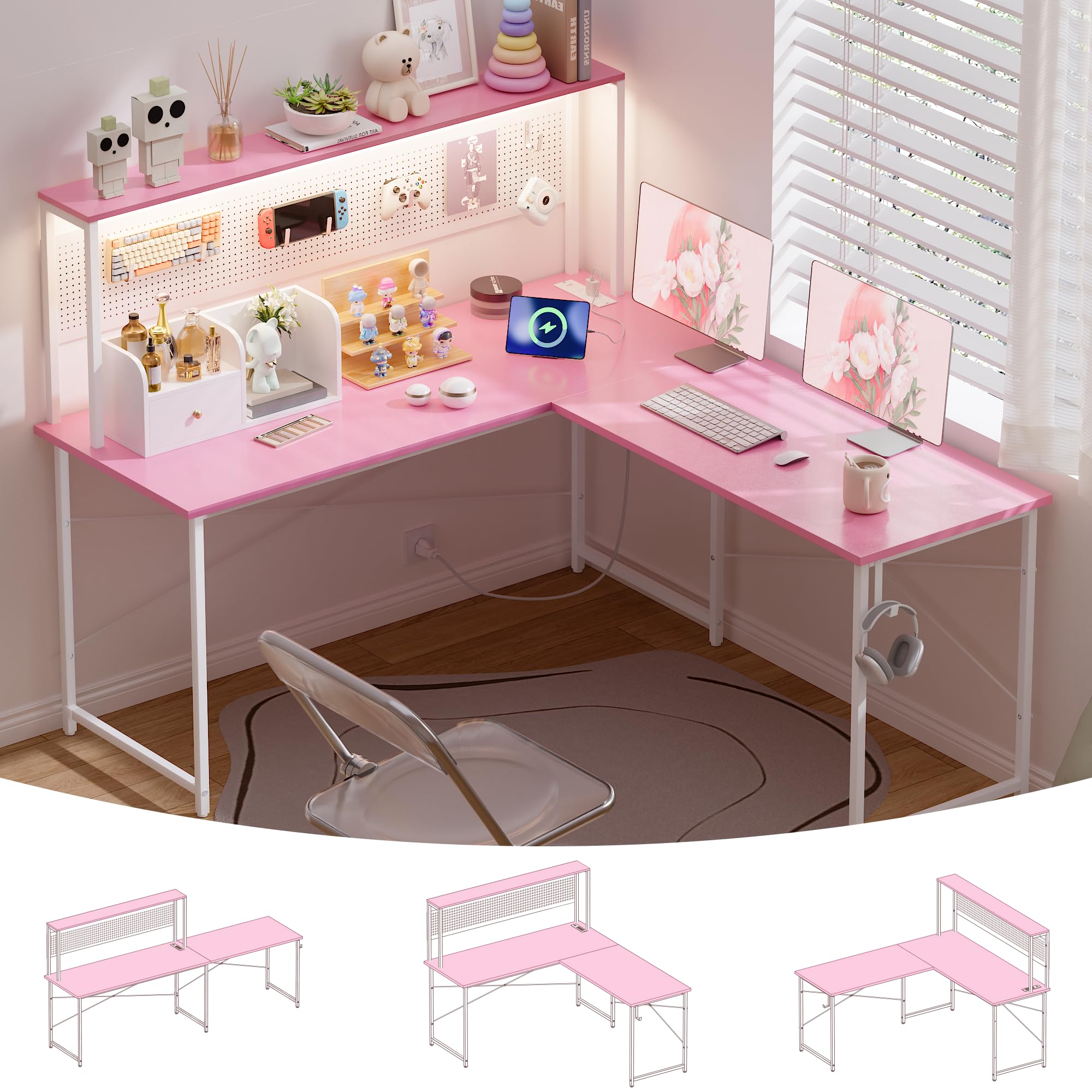
Image: The Pamray S16 60-inch L-shaped gaming desk in pink, showcasing its design with LED lights and storage.
Safety Information
To prevent injury or damage to the product, please adhere to the following safety guidelines:
- Ensure all components are securely fastened before placing items on the desk.
- Do not exceed the maximum weight recommendation of 200 pounds (90.7 kg) for the desktop.
- Keep liquids away from electrical components, including the power outlets and LED lights.
- Avoid placing hot items directly on the desktop surface without protective padding.
- Supervise children around the desk, especially during assembly and when using electrical features.
- Only use the provided power strip and LED light components. Do not attempt to modify or replace them with non-approved parts.
Package Contents
Before beginning assembly, please verify that all parts listed below are present and undamaged. If any parts are missing or damaged, contact customer support immediately.
- Desktop Panels (L-shaped sections)
- Metal Frame Components (legs, support bars, X-braces)
- Pegboard Panel
- Top Shelf
- Power Outlet Strip (with 3 AC, 1 USB, 1 Type-C ports)
- LED Light Strip
- Pegboard Hooks (4 large, 2 small)
- Adjustable Leg Pads
- Assembly Hardware (screws, bolts, Allen wrench)
- Instruction Manual
Assembly Instructions
Assembly is required for this desk. Please follow the steps carefully. All necessary tools are included in the accessory bag.

Image: Detailed dimensions and reversible configurations of the desk, illustrating L-shape and straight desk options.
Step 1: Prepare the Workspace
Clear an open area for assembly. Lay out all components and hardware, ensuring they are easily accessible. It is recommended to assemble the desk on a soft surface to prevent scratches.
Step 2: Assemble the Frame
Connect the metal frame components using the provided screws and Allen wrench. Ensure all connections are snug but do not overtighten until all parts are aligned. Attach the X-shaped back braces for added stability.
Step 3: Attach Desk Panels
Carefully place the desktop panels onto the assembled frame. Secure them using the designated screws. The desk can be assembled in an L-shape (left or right orientation) or as a long straight desk. Choose your desired configuration before securing the panels.
Step 4: Install Pegboard and Shelf
Attach the pegboard and top shelf to the upper frame structure. Secure them with the provided hardware. Insert the pegboard hooks into your desired positions for organizing accessories.
Step 5: Connect Power Outlets and LED Lights
Integrate the power outlet strip into its designated slot on the desktop. Connect the LED light strip to the underside of the top shelf and plug its USB connector into one of the USB ports on the power strip or another suitable USB power source.

Image: A fully assembled Pamray S16 L-shaped desk in pink, set up with multiple monitors and various accessories.
Features Overview
Reversible Design & Large Desktop
The Pamray S16 desk offers a versatile design that can be configured to suit your space. It can be set up as a 59.5-inch by 47-inch L-shaped desk, with the corner section reversible to either the left or right side. Alternatively, the desk can be converted into an 89-inch straight desk, providing ample workspace for multiple monitors, laptops, and other equipment. The total workspace is approximately 10.95 square feet.

Image: The large desktop surface of the Pamray S16 desk, accommodating multiple monitors and a laptop.
Built-in Power Outlet & Colorful LED Lights
The desk is equipped with a convenient built-in power strip featuring 3 standard AC power outlets (125V/12A), 1 USB port (5V/2A), and 1 Type-C charging port (5V/2A). This allows for easy charging and powering of your electronic devices directly from your workspace. The integrated LED lights offer 213 dynamic lighting modes and over 10,000 color options, which can be customized via a dedicated mobile application. The lights can also synchronize with music, creating an immersive environment.

Image: A close-up view of the RGB LED lights strip under the top shelf, with an illustration of the mobile app control interface.

Image: A detailed view of the built-in power outlet strip, showing 3 AC outlets, 1 USB port, and 1 Type-C charging port.
Versatile Pegboard with Hooks
The integrated pegboard provides vertical storage solutions, helping to keep your workspace organized and clutter-free. It comes with 4 large and 2 small hooks, allowing you to hang headphones, game controllers, cables, and other small accessories within easy reach. The customizable layout enables you to arrange items according to your preferences.

Image: The pegboard feature with various hooks, demonstrating its use for hanging gaming controllers and headphones.
Sturdy Structure
Constructed with a robust steel frame and reinforced with X-shaped back braces, the Pamray S16 desk is designed for durability and stability. It boasts a maximum load capacity of 200 pounds. Adjustable leg pads are included to ensure a firm stance on uneven floors, preventing wobbling and enhancing overall stability.
Operating Instructions
Using the Power Outlets
Once the desk is fully assembled and the power strip is connected to a wall outlet, you can use the integrated AC, USB, and Type-C ports to power and charge your devices. Ensure that the total power consumption of all connected devices does not exceed the rated power of 1500W.
Controlling the LED Lights
The LED lights are controlled via a dedicated mobile application. Download the app (refer to the QR code in the product packaging or on the LED controller for download instructions). Once installed and connected, you can:
- Select from 213 dynamic lighting modes.
- Choose from over 10,000 color options.
- Adjust brightness and speed.
- Enable music synchronization for reactive lighting effects.
Maintenance
Proper care and maintenance will extend the life and appearance of your Pamray S16 desk.
- Cleaning: Dust the desk regularly with a soft, dry cloth. For spills, wipe immediately with a damp cloth and dry thoroughly to prevent water damage. Avoid using harsh chemicals, abrasive cleaners, or solvents, as these can damage the finish.
- Structural Integrity: Periodically check all screws and bolts to ensure they remain tight. Retighten as necessary to maintain the desk's stability.
- Electrical Components: Keep the power outlets and LED light strip free from dust and debris. Do not attempt to disassemble or repair electrical components yourself.
Troubleshooting
If you encounter any issues with your Pamray S16 desk, refer to the following common problems and solutions:
| Problem | Solution |
|---|---|
| Desk is wobbly | Ensure all assembly screws and bolts are fully tightened. Adjust the adjustable leg pads on the bottom of the desk legs to compensate for uneven floor surfaces. |
| LED lights not working | Check if the LED light strip's USB connector is securely plugged into a functioning USB port. Verify that the mobile app is correctly installed and connected to the LED lights. Try restarting the app or unplugging/replugging the USB connection. |
| Power outlets not providing power | Confirm that the main power cord from the desk's power strip is securely plugged into a live wall outlet. Check your household circuit breaker to ensure it has not tripped. Test the wall outlet with another device to confirm it is working. |
Specifications
Detailed technical specifications for the Pamray S16 60-Inch L-Shaped Gaming Desk:
| Feature | Detail |
|---|---|
| Brand | Pamray |
| Model Number | S16 |
| Dimensions (L-Shape) | 17.7"D x 59.5"W x 50.7"H |
| Dimensions (Straight) | 17.7"D x 89"W x 50.7"H (approximate, when configured straight) |
| Color | Pink |
| Material | Engineered Wood (Tabletop), Metal (Frame) |
| Weight Capacity | 200 Pounds (90.7 kg) |
| Power Outlets | 3 AC (125V/12A), 1 USB (5V/2A), 1 Type-C (5V/2A) |
| Rated Power | 1500W |
| Special Features | Reversible Design, LED Lights (213 modes, 10,000+ colors, app control, music sync), Pegboard with Hooks, Adjustable Leg Pads |
Warranty and Support
Warranty Information
This Pamray product is covered by a Limited Warranty. For complete details regarding warranty coverage, terms, and duration, please refer to the warranty card included in your product packaging. Keep your proof of purchase for any warranty claims.
Customer Support
Should you require assistance with assembly, troubleshooting, missing parts, or any other product-related inquiries, please contact Pamray customer support. You can find contact information on the official Pamray website or by visiting their store on Amazon:
