
1. Product Overview
The GOOLOO A6 Gear Portable Air Compressor is a compact, wireless device designed for inflating tires and various other inflatable items. It features a digital pressure gauge, automatic shut-off, and an integrated LED light for convenience and safety.
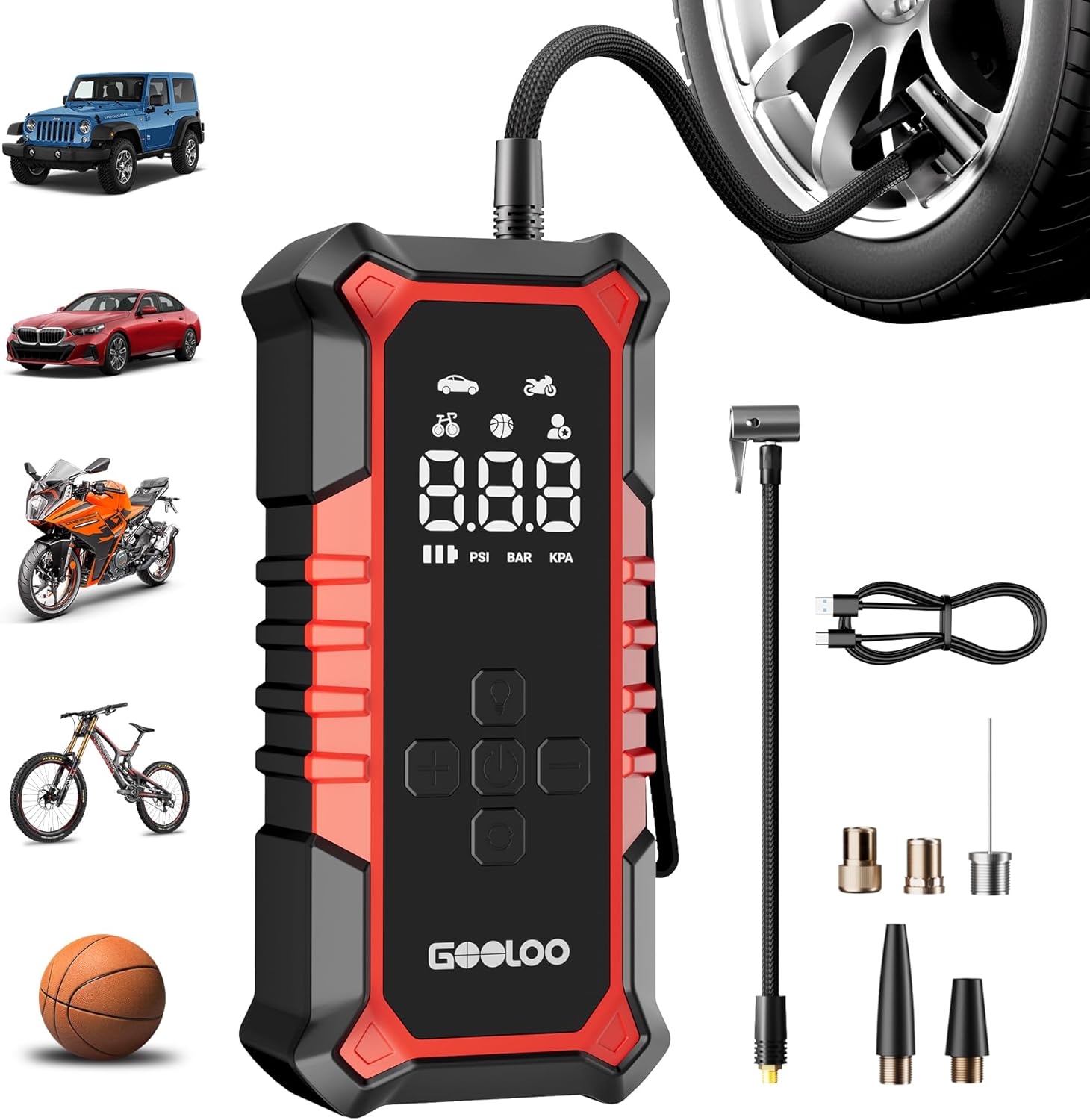
The GOOLOO A6 Gear portable air compressor, shown with its various inflation nozzles, charging cable, and inflation hose.
Key Features:
- Powerful and Fast Inflation: Capable of up to 160 PSI, with a 21,000 RPM motor, inflating a standard car tire (205/55 R16) from 30 to 36 PSI in under one minute.
- Long-lasting Battery: Equipped with a 7500 mAh lithium battery, providing up to 45 minutes of wireless operation. Sufficient to inflate multiple car, motorcycle, and bicycle tires, or over 100 sports balls on a single charge.
- Real-time PSI Monitoring with Auto Shut-off: Digital display provides accurate pressure readings and automatically stops inflation once the preset pressure is reached.
- Emergency LED Light: Features multiple lighting modes including flashlight, SOS, and strobe for visibility and emergency situations.
- Compact and Portable Design: Weighing approximately 476 grams (1.05 lbs) and measuring 15.2 x 5.3 x 7.4 cm, it is designed for easy transport and storage.
- Cordless Operation: Offers freedom from power cords, allowing inflation anywhere.
2. What's Included
Verify that all components are present in the package:
- GOOLOO A6 Gear Portable Air Compressor Unit
- Inflation Hose
- Presta Valve Adapter
- Needle Nozzle (for sports balls)
- Long Cone Nozzle
- Short Cone Nozzle
- USB-C Charging Cable
- User Manual

The complete package contents of the GOOLOO A6 Gear, including the main unit, inflation hose, various adapters, USB-C charging cable, and user manual.
3. Setup
3.1 Charging the Device
- Connect the provided USB-C charging cable to the charging port on the air compressor.
- Plug the other end of the cable into a compatible USB power adapter (not included) or a USB port.
- The battery indicator on the display will show the charging status. Ensure the device is fully charged before first use for optimal performance.
3.2 Attaching the Inflation Hose and Nozzle
- Screw the inflation hose securely onto the air outlet port of the compressor.
- Select the appropriate nozzle for the item you wish to inflate.
- Attach the selected nozzle to the end of the inflation hose.
4. Operating Instructions
4.1 Powering On/Off
- To power on, press and hold the power button (usually the center button) for 3 seconds.
- To power off, press and hold the power button again for 3 seconds. The device will also automatically power off after a period of inactivity.
4.2 Selecting Inflation Mode and Pressure Unit
- After powering on, press the 'Mode' button (often indicated by an icon like a car or motorcycle) to cycle through preset inflation modes: Car, Motorcycle, Bicycle, Ball, and Custom.
- To change the pressure unit (PSI, BAR, KPA), press the 'Unit' button (if available, or sometimes by holding the mode button).

A detailed view of the GOOLOO A6 Gear's digital display, illustrating real-time pressure monitoring, inflation modes, and selectable pressure units.
4.3 Setting Target Pressure
- Once a mode is selected, use the '+' and '-' buttons to adjust the target pressure. Refer to your vehicle's or item's recommended pressure.
4.4 Starting and Stopping Inflation
- Connect the inflation hose with the appropriate nozzle to the valve stem of the item to be inflated.
- Press the 'Start/Stop' button (often the power button or a dedicated play/pause icon) to begin inflation.
- The compressor will automatically stop once the preset target pressure is reached. You can also manually stop inflation by pressing the 'Start/Stop' button again.

The GOOLOO A6 Gear portable air compressor actively inflating a car tire, demonstrating its rapid inflation capability and automatic shut-off feature.
4.5 Using the LED Light
- Press the 'Light' button (often indicated by a flashlight icon) to cycle through the LED light modes: steady flashlight, SOS signal, and strobe light.
- Press the button again to turn off the light.

A person utilizing the GOOLOO A6 Gear's integrated LED light to illuminate an engine bay, showcasing its emergency flashlight, SOS, and strobe functions.
5. Maintenance
5.1 Cleaning
- Wipe the exterior of the compressor with a soft, damp cloth. Do not use harsh chemicals or abrasive cleaners.
- Ensure the air intake and outlet ports are free from dust and debris.
5.2 Storage
- Store the device in a cool, dry place, away from direct sunlight and extreme temperatures.
- Keep the inflation hose and nozzles organized to prevent damage.
5.3 Battery Care
- To prolong battery life, charge the device at least once every three months, even if not in use.
- Avoid fully discharging the battery frequently.
6. Troubleshooting
If you encounter issues with your GOOLOO A6 Gear, refer to the following common problems and solutions:
| Problem | Possible Cause | Solution |
|---|---|---|
| Device does not power on. | Low battery; Power button not held long enough. | Charge the device fully; Press and hold the power button for 3 seconds. |
| Compressor does not inflate. | Hose not securely attached; Nozzle not properly connected to valve; Target pressure set too low or already reached. | Ensure all connections are tight; Check and adjust target pressure. |
| Inaccurate pressure reading. | Loose connection; Sensor malfunction. | Ensure hose is tightly connected; If problem persists, contact customer support. |
| LED light not working. | Low battery; Light button not pressed correctly. | Charge the device; Press the light button to cycle modes. |
If the issue persists after attempting these solutions, please contact GOOLOO customer support for further assistance.
7. Specifications
| Feature | Specification |
|---|---|
| Brand | GOOLOO |
| Model Number | A6 Gear (PT-16) |
| Dimensions (L x W x H) | 15.2 x 5.3 x 7.4 cm |
| Weight | 476 Grams |
| Max Pressure | 160 PSI |
| Voltage | 12 Volts |
| Battery Capacity | 7500 mAh Lithium |
| Sound Level | 1.05 Decibels |
| Recommended Use | Tire Inflation |
8. Warranty and Support
For warranty information or technical support, please refer to the official GOOLOO website or contact their customer service directly. Keep your purchase receipt as proof of purchase.
GOOLOO Official Website: www.gooloo.com


