
Introduction
Thank you for choosing the AROEVE 5L Ultrasonic Cool Mist Humidifier. This manual provides important information for the safe operation, maintenance, and troubleshooting of your new humidifier. Please read it thoroughly before use and keep it for future reference.
Important Safety Instructions
WARNING: To reduce the risk of fire, electric shock, or injury, always follow these basic precautions:
- Place the humidifier on a firm, flat, waterproof surface at least 12 inches (30 cm) away from walls and appliances.
- Do not place the humidifier directly on carpet, towels, or other absorbent surfaces.
- Keep the humidifier out of reach of children and pets.
- Always unplug the humidifier before filling, cleaning, or moving it.
- Do not add essential oils directly into the water tank. Use the designated aroma diffuser tray only.
- Do not block the mist outlet or air intake.
- Use only clean, cool tap water. Distilled or demineralized water is recommended to prevent white dust.
- Never operate the humidifier without water in the tank.
- Do not attempt to repair or modify the humidifier yourself. Contact customer support for assistance.
Product Components
Package Contents
- AROEVE 5L Ultrasonic Cool Mist Humidifier (Model DH-JS15)
- Cleaning Brush
- User Manual
Product Diagram
The image below illustrates the main components of your AROEVE humidifier.
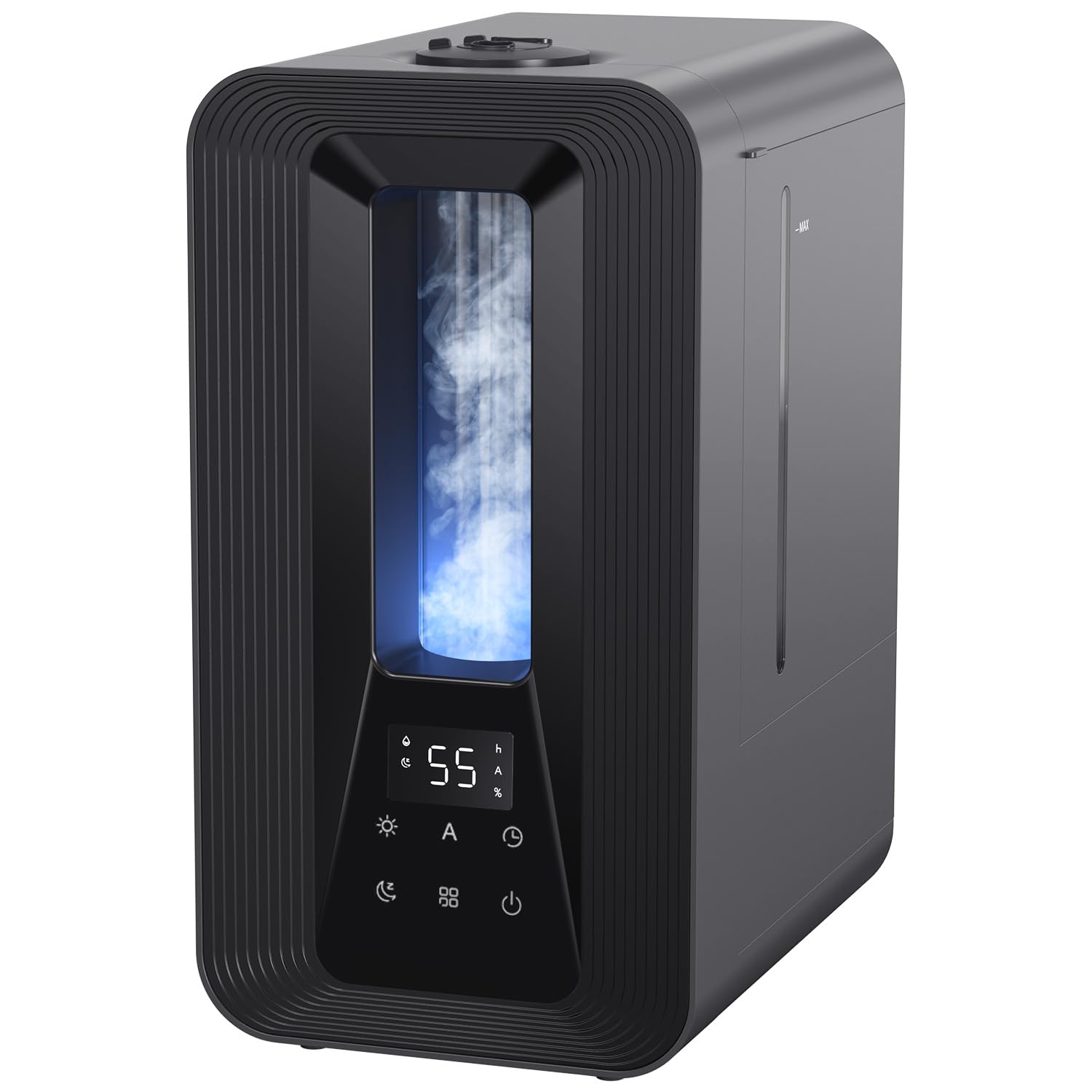
Figure 1: AROEVE 5L Ultrasonic Cool Mist Humidifier DH-JS15. Features include a digital display, control panel, mist outlet, and water tank.
Setup
Initial Setup and Filling
Follow these steps to set up your humidifier for the first time:
- Unpack the humidifier and remove all packaging materials.
- Place the humidifier on a flat, stable surface.
- Remove the top cover to access the water tank.
- Fill the water tank with clean, cool tap water up to the 'MAX' line. Do not overfill.

Figure 2: Easy top-fill design for convenient water replenishment.
Watch this video for a visual guide on filling and initial setup:
Video 1: This video demonstrates the key features of the AROEVE DH-JS15 Humidifier, including its easy top-fill design, adjustable mist levels, smart auto mode, programmable timer, 360° rotatable nozzles, simple cleaning process, aroma diffuser tray, 7-color ambient light, and ultra-quiet sleep mode.
Operating Instructions
Power On/Off
Press the Power button to turn the humidifier on or off.
Mist Output Control
The humidifier offers 3 mist levels. Press the Mist button repeatedly to cycle through low, medium, and high mist output settings.

Figure 3: The humidifier features dual 360° rotatable nozzles for wide mist distribution, reaching up to 80cm in height with a fine 5µm mist.
Smart Humidistat & Auto Mode
The intelligent humidistat automatically adjusts mist output to maintain your desired humidity level (40%-80%).
- Press the Auto button to activate Auto Mode.
- The humidifier will automatically adjust the mist level based on the room's humidity to reach the preset target.
- You can adjust the target humidity by pressing the Auto button again while in Auto Mode.

Figure 4: Intelligent humidistat display showing real-time humidity and target settings.

Figure 5: Smart humidistat provides personalized humidity for various benefits, including plant care, skin hydration, dry eye relief, and improved sleep quality.
Night Light Function
The humidifier features a 7-color LED ambient light.
- Press the Light button to turn on the ambient light.
- Press again to cycle through the 7 colors or set it to a specific color.
- Hold the Light button to turn off the light.

Figure 6: The 7-color ambient light creates a soothing atmosphere, ideal for bedrooms or nurseries.
Aroma Diffuser
Add your favorite essential oils to the dedicated aroma diffuser tray for a pleasant scent.
- Pull out the aroma diffuser tray located at the base of the humidifier.
- Add a few drops of essential oil onto the aroma pad.
- Push the tray back into place.
- Do not add essential oils directly into the water tank.

Figure 7: Dedicated tray for essential oils to infuse aromatherapy into your space.
Sleep Mode
For undisturbed rest, activate Sleep Mode:
- Press the Sleep button to enter Sleep Mode.
- In this mode, the display lights turn off, and the humidifier operates at an ultra-quiet 25dB.
- Press any button to exit Sleep Mode.

Figure 8: The humidifier operates at an ultra-quiet 25dB in sleep mode, ensuring a peaceful night.
Timer Function
Set a timer for automatic shut-off:
- Press the Timer button to set the operating duration (1-24 hours).
- The humidifier will automatically turn off once the set time has elapsed.
Maintenance
Cleaning the Humidifier
Regular cleaning is essential for optimal performance and hygiene. Clean the humidifier at least once a week.
- Unplug the humidifier from the power outlet.
- Remove the top cover and the water tank.
- Empty any remaining water from the tank and the base.
- Clean the water tank with a soft brush or cloth and mild detergent. Rinse thoroughly.
- Use the provided cleaning brush to clean the nebulizer and the water sensor in the base.
- Wipe the exterior of the humidifier with a soft, damp cloth. Do not immerse the base in water.
- Ensure all parts are completely dry before reassembling.

Figure 9: The humidifier features a detachable water tank and components for easy cleaning, along with a leak-proof design.
Storage
If the humidifier will not be used for an extended period:
- Perform a thorough cleaning as described above.
- Ensure all parts are completely dry.
- Store the humidifier in its original packaging in a cool, dry place.
Troubleshooting
If you encounter any issues with your humidifier, please refer to the table below for common problems and solutions.
| Problem | Possible Cause | Solution |
|---|---|---|
| No mist is being produced. | No water in the tank. Humidifier is not plugged in. Nebulizer is dirty. | Fill the water tank. Ensure the power cord is securely plugged in. Clean the nebulizer with the provided brush. |
| White dust around the humidifier. | Using hard water. | Use distilled or demineralized water. Clean the humidifier regularly. |
| Unusual odor. | Dirty water tank or base. Stagnant water. | Clean the water tank and base thoroughly. Change water daily. |
| Humidifier is leaking. | Water tank not properly seated. Overfilled water tank. | Ensure the water tank is correctly placed. Do not fill water above the MAX line. |
Specifications
Technical Data
| Feature | Detail |
|---|---|
| Brand | AROEVE |
| Model Name | DH-JS15 |
| Capacity | 5 Liters |
| Floor Area Coverage | 40 square meters |
| Operating Mode | Ultrasonic |
| Product Dimensions (DxWxH) | 17f. x 24an. x 32,7al. centimeters |
| Product Weight | 2.1 Kilograms |
| Power | 25 watts |
| Power Source | Corded Electric |
| Control Method | Touch |
| Run Time | 50 hours (on low setting) |
| Special Features | Automatic shut-off, Adjustable humidity control, Removable tank, Aroma diffuser, Humidistat, Low water level indicator, Night light, Digital display, Silent, Timer, Water level window |
| Included Components | Cleaning brush, humidifier |
| Material | Plastic |
| Color | Black |
| UPC | 850070209427 |
Warranty and Support
AROEVE products are designed for reliability and performance. For warranty information, technical support, or any questions regarding your humidifier, please contact AROEVE customer service through the retailer where you purchased the product or visit the official AROEVE website.
Please have your model number (DH-JS15) and proof of purchase ready when contacting support.
