
1. Introduction
Thank you for choosing the ByteTecpeak Z01 4-Wheel Mobility Scooter. This manual provides essential information for the safe and efficient operation, maintenance, and care of your scooter. The Z01 is designed for seniors, offering enhanced mobility with its ultra-lightweight, foldable design, long-lasting battery, and powerful motor.
Its ergonomic features and robust safety systems ensure a comfortable and secure riding experience for daily use, both indoors and outdoors.

Figure 1: Thoughtful design features of the Z01 mobility scooter, highlighting comfort, compact size, stability, and security.
2. Safety Information
Your safety is paramount. Please read and understand all safety instructions before operating the Z01 mobility scooter.
2.1 General Safety Guidelines
- Always ensure the scooter is fully unfolded and locked in place before use.
- Do not exceed the maximum weight recommendation of 150 kg.
- Avoid operating the scooter under the influence of alcohol or medication that may impair your judgment.
- Always wear appropriate safety gear, such as a helmet, if required by local regulations or for personal preference.
- Be aware of your surroundings and other pedestrians or vehicles.
2.2 Integrated Safety Features
- Electromagnetic Braking System: The Z01 is equipped with a highly reliable electromagnetic braking system for immediate and secure stopping.
- Anti-Tipping Wheels: Rear anti-tipping wheels provide additional stability, especially on inclines or uneven surfaces.
- Front LED Headlight: For improved visibility and safety during nighttime operation.
- Integrated Warning Bell: Use the bell to alert others of your presence.

Figure 2: Smart details for a carefree life, showing the ramp lift for easy access and the front LED headlight for easy night travel.

Figure 3: Careful details for more comfort and safety, illustrating the anti-tipping wheel for stability and the removable battery for convenient charging.
3. Setup
The Z01 mobility scooter features an ultra-light and foldable design for easy transport and storage. Follow these steps for initial setup:
3.1 Unfolding the Scooter
- Place the folded scooter on a flat, stable surface.
- Gently pull the handlebars upwards until the main frame locks into place.
- Unfold the seat and ensure it is securely positioned.
- Adjust the backrest and armrests to your preferred comfort level.
3.2 Battery Installation and Charging
The Z01 comes with a removable 12Ah Li-ion battery. For first use, ensure the battery is fully charged.
- To install: Slide the battery into its compartment until it clicks securely.
- To charge: The battery can be charged while installed or removed. Connect the charger to the battery port and then to a power outlet. The indicator light on the charger will show charging status.
- Charging time: Approximately 6-8 hours for a full charge.

Figure 4: Dimensions of the Z01 scooter in both unfolded and folded configurations, demonstrating its compact nature for storage and transport.

Figure 5: The Z01 scooter is lightweight and compact, easily fitting into a car trunk for transport.

Figure 6: The Z01 is light and compact, easy to transport and store indoors or with a pull bar.
4. Operating Instructions
The Z01 mobility scooter is designed for simple and intuitive operation.
4.1 Control Panel Overview
The control panel on the handlebars includes:
- Digital Color Display: Shows speed, battery level, and other important information.
- Speed Regulator: Adjusts the maximum speed of the scooter.
- Horn Button: Activates the warning bell.
- Headlight Switch: Turns the front LED headlight on/off.
- Forward/Reverse Levers: Simple lever control for movement. Push the right lever forward to move forward, the left lever back to reverse. Release both to stop.

Figure 7: Easy operation with simple lever control for forward and reverse, and a clear digital display.
4.2 Starting and Driving
- Insert the key into the ignition and turn it to the 'ON' position.
- Adjust the speed regulator to your desired speed setting (e.g., 1-2 km/h for a stroll, 3-4 km/h for a fast walk, 5-6 km/h for jogging pace).
- To move forward, gently push the right lever forward. To reverse, gently pull the left lever backward.
- To stop, release both levers. The electromagnetic brake will engage automatically.
- Use the headlight for low-light conditions and the horn to alert others.
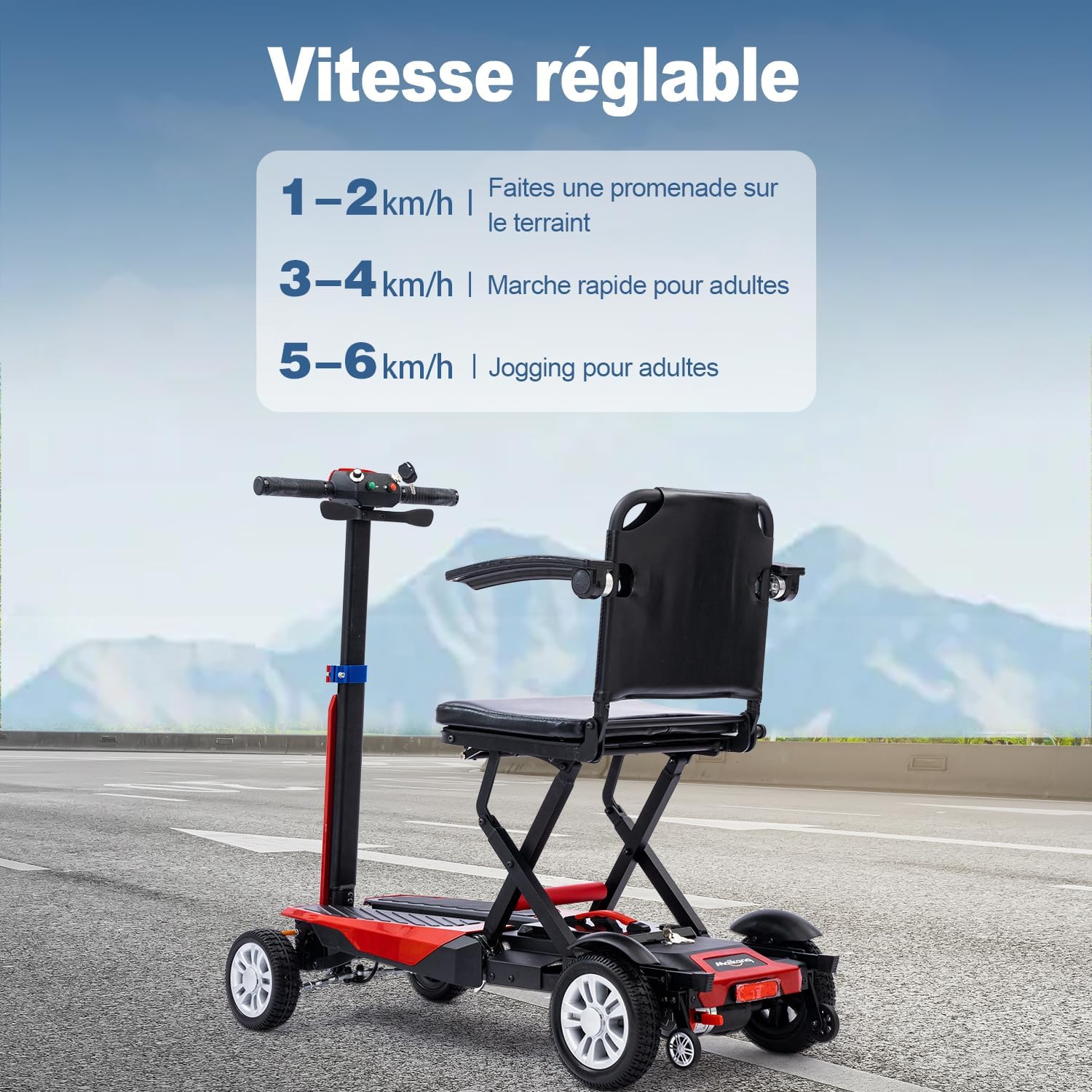
Figure 8: Adjustable speed settings for various activities and terrains.
4.3 Multi-Scenario Use
The Z01 is designed to adapt to various environments:
- Shopping: Navigate easily through stores.
- Elevators: Its compact size allows for easy access to elevators.
- Paved Paths: Enjoy smooth rides on paved surfaces.
- Speed Bumps: The robust design handles minor obstacles effectively.

Figure 9: The Z01 is suitable for multi-scenario use, including shopping, elevators, paved paths, and speed bumps.
4.4 Video Demonstration
Video 1: This video demonstrates the Z01 mobility scooter in use, highlighting its ease of operation, maneuverability, and ability to handle inclines. It shows a user getting on, operating the controls, driving on various surfaces, and demonstrating the anti-tipping wheels.
5. Maintenance
Regular maintenance ensures the longevity and optimal performance of your Z01 mobility scooter.
5.1 Cleaning
- Wipe down the scooter with a damp cloth. Avoid using harsh chemicals or abrasive cleaners.
- Ensure no water enters electrical components.
5.2 Battery Care
- Charge the battery regularly, even if the scooter is not in frequent use, to maintain battery health.
- Store the battery in a cool, dry place when not in use.
- Avoid fully discharging the battery frequently.
5.3 Tire Maintenance
The Z01 features thickened anti-puncture and anti-explosion tires for durability.
- Regularly inspect tires for wear and tear.
- Ensure tires are free from debris that could cause damage.

Figure 10: Thickened anti-puncture and anti-explosion tires with deep texture grip for enhanced durability and traction.
6. Troubleshooting
If you encounter any issues with your Z01 mobility scooter, refer to the table below for common problems and solutions.
| Problem | Possible Cause | Solution |
|---|---|---|
| Scooter does not turn on | Battery not installed correctly or discharged. Key not in 'ON' position. | Ensure battery is securely installed and charged. Turn key to 'ON'. |
| Scooter moves slowly or inconsistently | Low battery charge. Speed regulator set too low. Overload. | Charge battery. Adjust speed regulator. Ensure weight does not exceed 150 kg. |
| Brakes not engaging properly | Issue with electromagnetic braking system. | Contact customer support for assistance. Do not attempt to repair yourself. |
| Unusual noises during operation | Loose components or motor issue. | Inspect for loose parts. If noise persists, contact customer support. |
If the problem persists after attempting these solutions, please contact ByteTecpeak customer support.
7. Specifications
Below are the technical specifications for the ByteTecpeak Z01 Mobility Scooter:
| Feature | Specification |
|---|---|
| Model Name | Z01 |
| Brand | ByteTecpeak |
| Product Dimensions (L x W x H) | 85 x 98 x 46 cm (Unfolded) |
| Item Weight | 22.5 Kilograms (including battery) |
| Maximum Weight Recommendation | 150 Kilograms |
| Motor Power | 180W |
| Battery Type | 12Ah Li-ion Battery |
| Range | Up to 20 km |
| Maximum Speed | 6 Kilometers per hour |
| Brake Style | Electromagnetic |
| Material | Alloy Steel |
| Power Source | Battery Powered |

Figure 11: Robust frame made of high-quality steel, designed to support up to 150 kg.

Figure 12: Powerful 180W motor easily tackles slopes, offering silent and long-lasting operation.
8. Warranty & Support
The ByteTecpeak Z01 Mobility Scooter comes with a manufacturer's warranty. For specific warranty terms and conditions, please refer to the documentation included with your purchase or visit the official ByteTecpeak website.
For any questions, technical assistance, or service requests, please contact our dedicated customer support team. Contact information can typically be found on the product packaging or the ByteTecpeak brand store on Amazon.