
1. Introduction
Thank you for purchasing the ELECOM Open-Ear Wireless Headphones (Model: LBT-OWS02ECMWH). These headphones are designed to provide a unique audio experience by allowing you to enjoy music and calls while remaining aware of your surroundings. Featuring Bluetooth 5.4 connectivity, IPX5 water resistance, and comfortable ear-hook design, they are suitable for various activities, including sports and daily use.
2. Safety Information
Please read all safety instructions carefully before using this product. Keep this manual for future reference.
- Do not disassemble, repair, or modify the product.
- Avoid exposing the product to extreme temperatures, direct sunlight, or high humidity.
- Keep out of reach of children and pets.
- Do not use the product while driving or cycling in situations where awareness of surroundings is critical.
- Prolonged listening at high volume may cause hearing damage.
- Dispose of the product and its battery according to local regulations.
3. Package Contents
Ensure all items are present in the package:
- Open-Ear Wireless Headphones (Left and Right)
- Charging Case
- USB Charging Cable (USB-A to USB Type-C)
- Quick Start Guide
4. Product Diagram
Familiarize yourself with the components of your headphones and charging case.

Image: The ELECOM Open-Ear Wireless Headphones (white) and their charging case, showcasing the ear-hook design.

Image: A close-up view of a single ELECOM Open-Ear Wireless Headphone, highlighting its compact design and touch sensor area.
5. Setup
5.1 Charging the Headphones and Case
Before first use, fully charge the headphones and charging case.
- Place the headphones into the charging case.
- Connect the supplied USB Type-C cable to the charging port on the case and to a USB power adapter (not included) or a computer's USB port.
- The indicator lights on the case will show the charging status.
Charging Time:
- Headphones: Approximately 1.5 hours
- Charging Case: Approximately 1.5 hours

Image: The ELECOM charging case connected to a USB-C charging cable.
5.2 Bluetooth Pairing
To connect your headphones to a device for the first time:
- Open the charging case. The headphones will automatically enter pairing mode.
- On your device (smartphone, tablet, PC), enable Bluetooth and search for available devices.
- Select "LBT-OWS02ECMWH" from the list of found devices.
- Once connected, the headphones will automatically pair with your device when taken out of the case.
The headphones support multi-point connection and can register up to 8 devices.

Image: A person holding the charging case with headphones, next to a smartphone displaying Bluetooth settings, indicating the pairing process.
6. Operating Instructions
The headphones feature touch sensors for various controls.
6.1 Power On/Off
- Power On: Open the charging case or take out the headphones. They will power on automatically.
- Power Off: Place the headphones back into the charging case and close the lid. They will power off automatically.
6.2 Music Playback
- Play/Pause: Tap the touch sensor on either headphone once.
- Next Track: Double-tap the touch sensor on the right headphone.
- Previous Track: Double-tap the touch sensor on the left headphone.
6.3 Volume Control
- Volume Up: Triple-tap the touch sensor on the right headphone.
- Volume Down: Triple-tap the touch sensor on the left headphone.
6.4 Call Handling
The headphones have a built-in microphone for calls.
- Answer/End Call: Tap the touch sensor on either headphone once.
- Reject Call: Press and hold the touch sensor on either headphone for 2 seconds.
6.5 Voice Assistant
The headphones support voice assistants like Siri and Google Assistant.
- Activate Voice Assistant: Press and hold the touch sensor on either headphone for 2 seconds (when not on a call).
6.6 Single Earbud Use
You can use either the left or right headphone independently. If one headphone is not in use, ensure it is powered off or stored in the charging case.
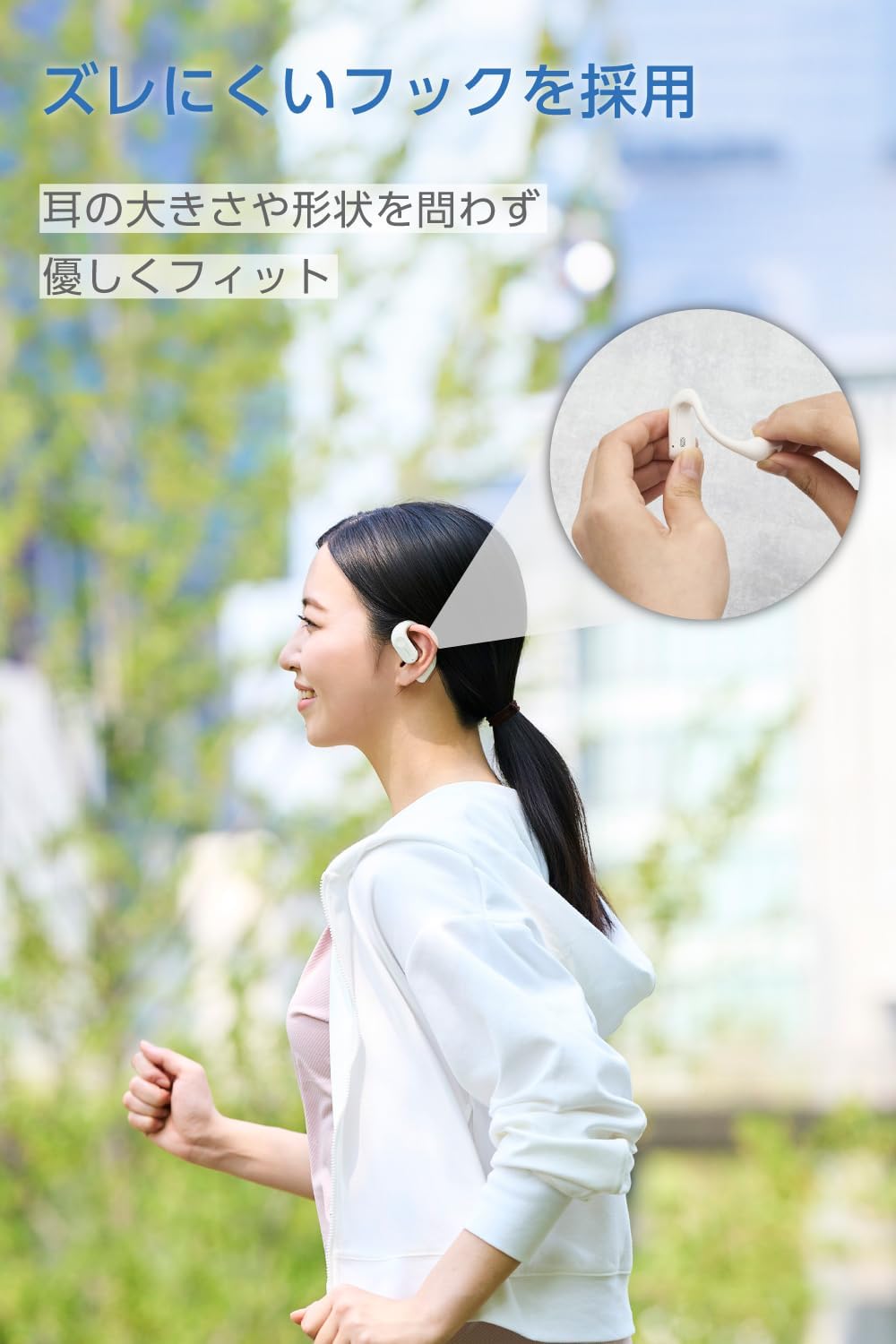
Image: A woman wearing the ELECOM Open-Ear Wireless Headphones, demonstrating the secure and comfortable fit during activity.
7. Maintenance
To ensure the longevity and optimal performance of your headphones:
- Wipe the headphones and charging case with a soft, dry cloth.
- Do not use abrasive cleaners or solvents.
- The headphones are IPX5 water-resistant, meaning they can withstand sweat and splashes. Do not submerge them in water. The charging case is not water-resistant.
- Store the headphones in their charging case when not in use to protect them and keep them charged.

Image: The ELECOM Open-Ear Wireless Headphones with water droplets, illustrating their IPX5 water resistance.
8. Troubleshooting
If you encounter issues, try the following solutions:
- No Sound: Ensure the headphones are charged, paired correctly, and the volume on both the headphones and your device is turned up.
- Cannot Pair: Make sure Bluetooth is enabled on your device and the headphones are in pairing mode. Try turning Bluetooth off and on again on your device.
- Charging Issues: Check if the charging cable is securely connected and the power source is working. Ensure the headphones are correctly seated in the charging case.
- Intermittent Connection: Ensure your device is within the 10m Bluetooth range and there are no significant obstacles between the headphones and your device.
If the problem persists, refer to the Quick Start Guide or contact customer support.
9. Specifications
| Communication Method | Bluetooth® Standard Version 5.4 |
| Output | Bluetooth Power Class 2 |
| Maximum Communication Distance | Approx. 10m (without obstacles) |
| Frequency Band | 2.4GHz band |
| Modulation Method | FHSS (Frequency Hopping Spread Spectrum) |
| Supported Bluetooth Profiles | A2DP, AVRCP, HFP |
| A2DP Supported Codecs | AAC, SBC |
| A2DP Content Protection | SCMS-T |
| Max Registered Devices | 8 units |
| Multipoint (Simultaneous Standby) | Supported |
| Playback Frequency Range (A2DP) | 20-20,000Hz |
| Continuous Playback Time | Approx. 7 hours (up to 22 hours with charging case) |
| Power Source | Rechargeable lithium-ion battery |
| Rated Voltage | DC5V |
| Charging Time | Headphones: Approx. 1.5 hours, Charging Case: Approx. 1.5 hours |
| Microphone Type | MEMS type |
| Headphone Type | Open-ear |
| Driver Unit | Approx. 12mm × 17mm |
| Operating Temperature | 5°C to 35°C |
| Operating Humidity | 20% to 80% (non-condensing) |
| Water Resistance | IPX5 (headphones only) |
| Dimensions (Headphone per ear) | Approx. 53mm × 37.8mm × 17.3mm |
| Dimensions (Charging Case) | Approx. 83mm × 66.4mm × 28.3mm |
| Weight (Headphone per ear) | Approx. 9.0g |
| Weight (Charging Case) | 61.0g |
| Color | Moon White |
10. Warranty Information
This product comes with a 1-year warranty from the date of purchase. Please retain your proof of purchase for warranty claims. The warranty covers manufacturing defects but does not cover damage caused by misuse, accidents, unauthorized modifications, or normal wear and tear.
11. Support
For further assistance, product information, or troubleshooting not covered in this manual, please visit the official ELECOM product support website:
ELECOM Product Support: 8056.jp
You can also visit the ELECOM Brand Store on Amazon for more products and information.