
1. Introduction
Thank you for choosing the Aspiron Professional 1300W Steam Mop Cleaner. This manual provides essential information for the safe and efficient operation, maintenance, and troubleshooting of your new steam mop. Please read it thoroughly before first use and keep it for future reference.

Image: The Aspiron Steam Mop in action, demonstrating its powerful steam cleaning capabilities on various floor types.
The Aspiron Steam Mop is designed for effective and chemical-free cleaning, utilizing high-temperature steam to sanitize and remove stubborn stains from a variety of surfaces. Its lightweight design and quick heat-up time make floor cleaning efficient and convenient.
2. Important Safety Information
- Always unplug the appliance from the electrical outlet when not in use and before performing any maintenance or cleaning.
- Do not leave the steam mop unattended while it is plugged in or operating.
- Keep the appliance out of reach of children and pets.
- Use only distilled or demineralized water in the water tank to prevent mineral buildup and extend product life.
- Do not add cleaning solutions, perfumes, or other chemicals directly into the water tank, unless using the dedicated detergent chamber.
- Ensure the mop pad is properly attached before operating.
- Do not direct steam at people, animals, or electrical outlets.
- Always check your flooring manufacturer's recommendations before using a steam cleaner on your floors.
- Do not immerse the appliance in water or any other liquid.
- If the power cord is damaged, it must be replaced by the manufacturer, its service agent, or similarly qualified persons to avoid a hazard.

Image: A clean floor, safe for children and pets, highlighting the chemical-free cleaning benefit of the steam mop.
3. Package Contents
Verify that all items are present and in good condition:
- Aspiron Steam Mop Unit (Main Body, Handle, Mop Head)
- 2 x Washable Microfiber Mop Pads
- Carpet Glider Attachment
- Water Filling Cup
- User Manual

Image: Two washable microfiber mop pads, emphasizing their reusability and ease of cleaning.
4. Product Overview
Key Features:
- Rapid Heat-Up: Generates 223°F hot steam in just 25 seconds.
- Chemical-Free Cleaning: Effectively eliminates dust and stains without harsh chemicals.
- Versatile Cleaning: Safe for hardwood, ceramic tiles, marble, and carpets.
- Adjustable Swivel Head: Allows for easy cleaning in hard-to-reach corners and around furniture.
- Detergent Chamber: Optional compartment for adding cleaning agents to tackle tough stains with a foot-press release.
- Large Water Tank: 12 oz capacity with a visible level indicator for extended cleaning sessions.

Image: Close-up of the steam mop head, illustrating its high-temperature steam and rapid heating capabilities for thorough cleaning.
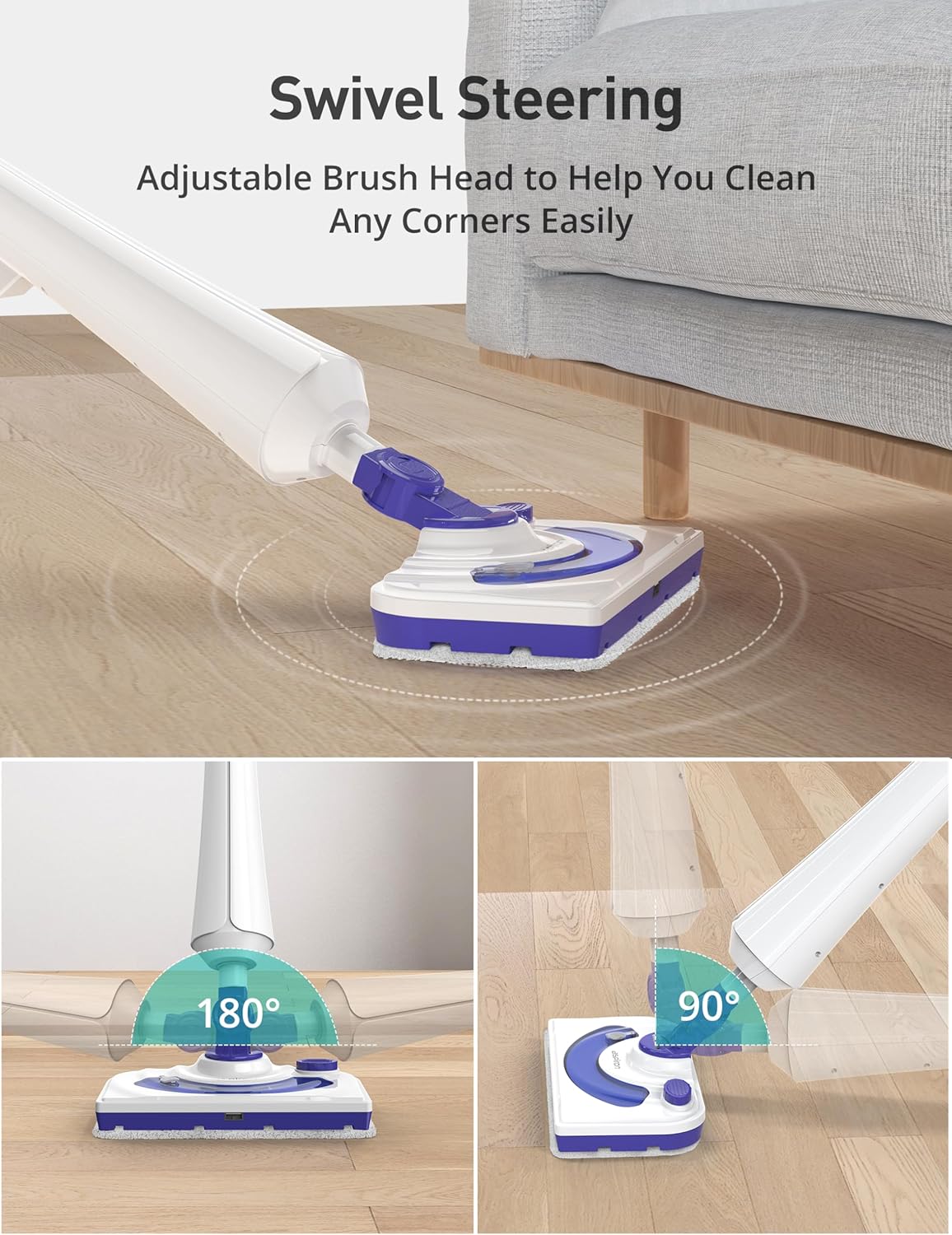
Image: The adjustable swivel head of the steam mop, demonstrating its flexibility for reaching tight spaces and corners.
5. Setup and Assembly
- Attach the Handle: Insert the handle into the main body of the steam mop until it clicks securely into place.
- Attach the Mop Head: Connect the mop head to the main body, ensuring it is firmly attached.
- Attach Mop Pad: Secure a clean microfiber mop pad to the bottom of the mop head using the Velcro fasteners.
- Fill Water Tank: Open the water tank cap. Use the provided filling cup to pour distilled or demineralized water into the 12 oz tank. Do not overfill. Close the cap securely.
- (Optional) Fill Detergent Chamber: If desired, open the detergent chamber on the mop head and add a small amount of cleaning agent. Close the cap.
- Attach Carpet Glider (for carpets only): If cleaning carpets, snap the carpet glider attachment onto the mop head over the microfiber pad.

Image: Filling the 12 oz water tank of the steam mop, with a clear view of the water level indicator.

Image: Demonstrating how to add detergent to the dedicated chamber on the mop head for enhanced cleaning.
6. Operating Instructions
- Power On: Plug the steam mop into a grounded electrical outlet. The indicator light will illuminate.
- Heat Up: Turn on the power switch. The mop will heat up rapidly, typically within 25 seconds. The indicator light will change color (e.g., from red to blue/green) when ready.
- Steam Cleaning:
- Hard Floors: Move the steam mop slowly and steadily across the floor surface. The steam will be released automatically. For heavily soiled areas, hold the mop over the spot for a few seconds.
- Carpets/Rugs: Ensure the carpet glider is attached. Move the mop over the carpet surface to refresh and deodorize. This is not for deep carpet cleaning.
- Detergent Release (Optional): If using the detergent chamber, press the foot pedal on the mop head to release the cleaning solution onto stubborn stains.
- Power Off: When finished, turn off the power switch and unplug the appliance.
- Cool Down: Allow the mop to cool down completely before emptying the water tank or removing the mop pad.

Image: The steam mop effectively cleaning various floor surfaces including wood, carpet, and tile, demonstrating its versatility.
7. Care and Maintenance
- Mop Pads: Remove the microfiber mop pads after each use. They are machine washable. Wash with similar colors and air dry. Do not use bleach or fabric softeners.
- Water Tank: Empty any remaining water from the tank after each use.
- Cleaning the Mop: Wipe the exterior of the steam mop with a damp cloth. Do not use abrasive cleaners.
- Descaling: If you notice reduced steam output, descaling may be necessary. Consult the full manual for detailed descaling instructions.
- Storage: Store the steam mop in a cool, dry place. Wrap the power cord neatly around the cord hooks on the handle.
8. Troubleshooting
| Problem | Possible Cause | Solution |
|---|---|---|
| No steam or low steam output | Water tank is empty; Mineral buildup; Mop not heated up. | Refill water tank; Descale the unit; Allow 25 seconds for heating. |
| Mop leaves streaks on the floor | Mop pad is dirty; Floor is excessively dirty. | Replace or clean mop pad; Pre-sweep or vacuum floor before steaming. |
| Mop not turning on | Not plugged in; Power switch off. | Ensure plug is fully inserted; Turn power switch to ON position. |
9. Specifications
- Model Number: AS-CA039
- Brand: Aspiron
- Power: 1300W
- Heat-Up Time: Approximately 25 seconds
- Steam Temperature: Up to 223°F (106°C)
- Water Tank Capacity: 12 oz (350 ml)
- Product Dimensions: 28.7 x 4.9 x 5.9 inches
- Item Weight: 5.44 pounds
- UPC: 779657325520
10. Warranty and Support
For warranty information or product support, please refer to the warranty card included in your package or visit the official Aspiron website. You may also contact customer service for assistance with any issues or questions regarding your steam mop.
Replacement steam mop pads can be purchased using ASIN: B07PPDY4XH.