
Introduction
This manual provides detailed instructions for the installation, operation, and maintenance of your BSEED Bathroom Exhaust Fan with Bluetooth Speaker and LED Light (Model FAN-02). This unit integrates a powerful exhaust fan, customizable LED lighting, a Bluetooth speaker, and a digital temperature display into a single device. Please read this manual thoroughly before installation and use to ensure proper function and safety.
What's in the Box
Carefully unpack all components and verify that you have received the following items:
- BSEED Bathroom Exhaust Fan Unit
- Remote Control
- Flexible Ducting
- Duct Clamps
- Installation Manual
- Protective Gloves

Setup and Installation
Before beginning installation, ensure the power supply to the installation area is turned off at the circuit breaker. It is recommended to consult a qualified electrician if you are unsure about any steps.
Pre-Installation Check
Before installing, connect the panel to the main unit and perform a functional test to ensure all features (fan, light, Bluetooth speaker) are working correctly. Connect the power cord to a power outlet and verify operation using the remote control.
Mounting the Unit
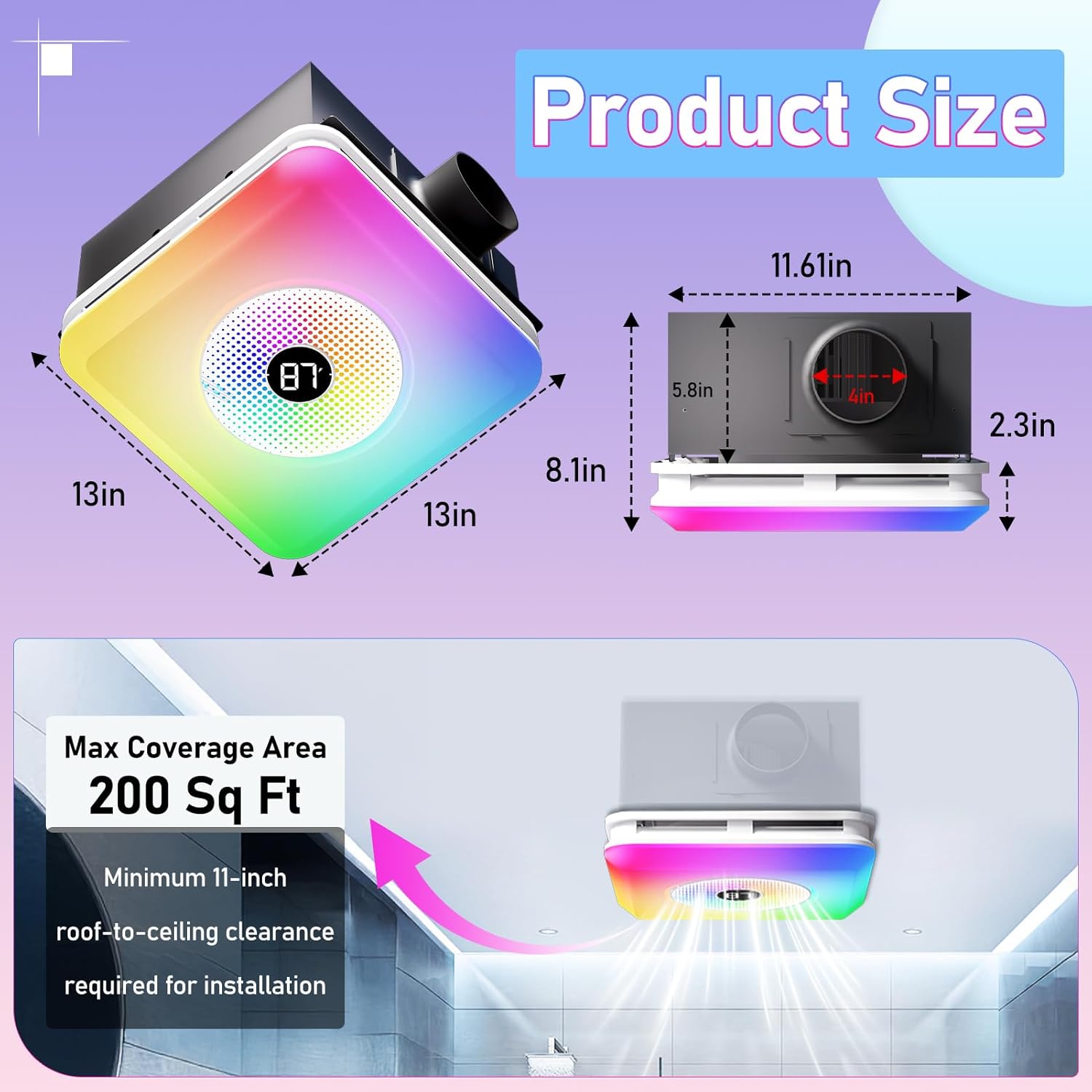
- Prepare the Ceiling Opening: Ensure a standard 11.22” x 11.22” ceiling opening is available. If not, carefully cut an opening of this size.
- Connect Ducting: Attach the flexible ducting to the exhaust port of the fan unit using the provided duct clamp. Secure tightly with a screwdriver.
- Electrical Connection: Connect the fan's wiring to your bathroom's electrical supply. Ensure all connections are secure and follow local electrical codes.
- Insert the Unit: Carefully push the main fan unit into the ceiling opening.
- Secure the Panel: Connect the light panel to the main unit's wiring. Compress the spring clips on the light panel and push it into the main unit until it sits flush with the ceiling.

Operating Instructions
The BSEED Bathroom Exhaust Fan is controlled via the included remote control. Ensure 2 AAA batteries (not included) are installed in the remote.
Remote Control Functions
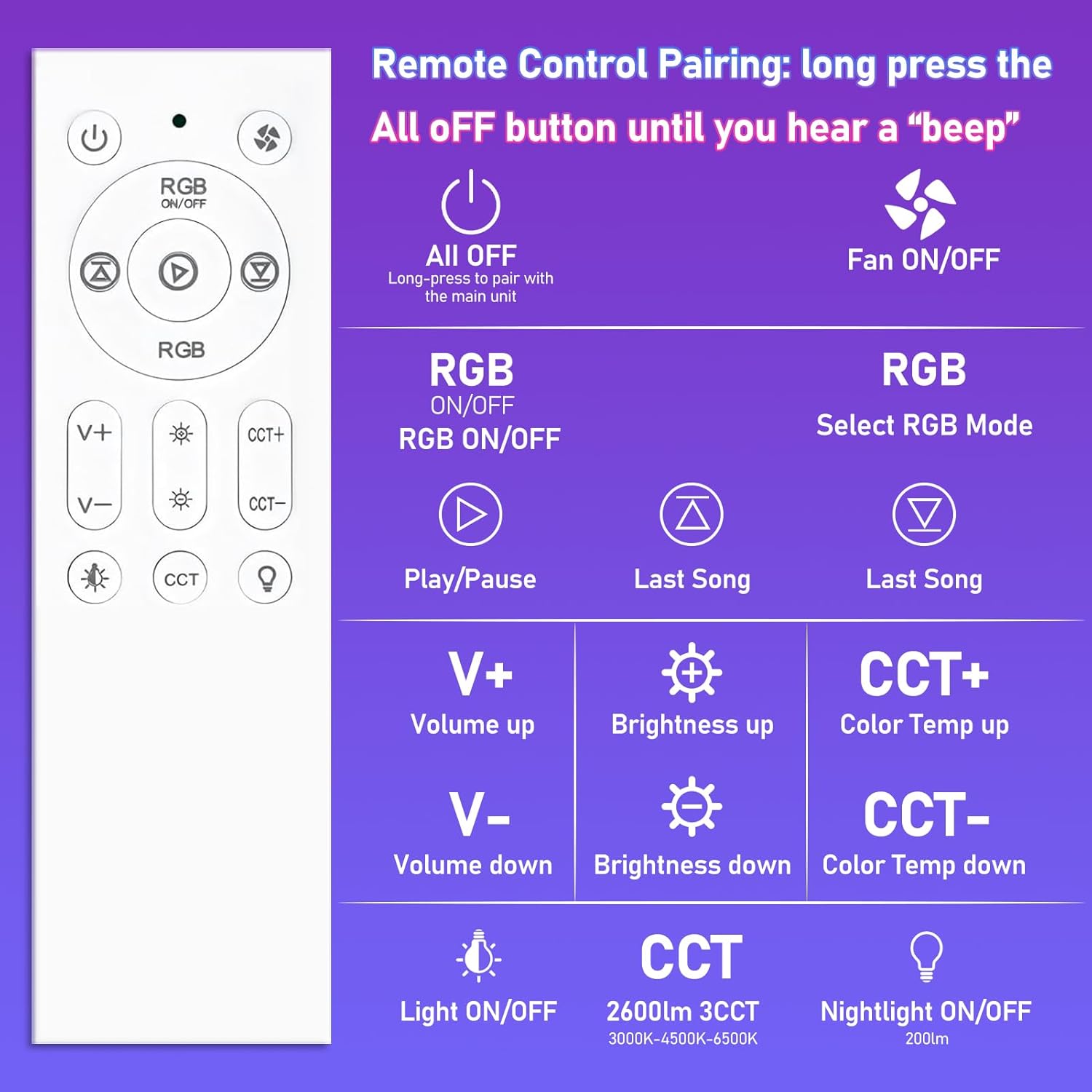
- Power Button: Long press the "All OFF" button to pair with the main unit. Short press to turn all functions off.
- Fan ON/OFF: Toggles the exhaust fan on or off.
- RGB ON/OFF: Activates or deactivates the RGB lighting.
- RGB Mode Selection: Cycles through various RGB lighting modes (e.g., Music Sync, Ripple, Breathing).
- Play/Pause: Controls media playback for the Bluetooth speaker.
- Volume Up/Down (V+/V-): Adjusts the volume of the Bluetooth speaker.
- Brightness Up/Down: Adjusts the brightness of the LED light.
- Color Temperature Up/Down (CCT+/CCT-): Changes the color temperature of the white light (3000K, 4500K, 6000K).
- Light ON/OFF: Toggles the main LED light on or off.
- CCT Button: Cycles through the three fixed color temperatures (3000K, 4500K, 6000K).
- Nightlight ON/OFF: Activates or deactivates the soft 200LM nightlight.
Bluetooth Speaker Pairing
To connect your device to the built-in Bluetooth speaker:
- Ensure the fan unit is powered on.
- On your mobile device, go to Bluetooth settings.
- Search for available devices and select "Music" or a similar name to pair.
- The speaker will automatically reconnect to the last paired device when powered on.
Features
Powerful and Quiet Exhaust Fan
The fan provides 230 CFM (Cubic Feet Per Minute) airflow, effectively removing steam and odors from bathrooms up to 200 square feet. Operating at a low noise level of 1.5 Sones, it ensures a quiet environment.
Dynamic LED Lighting
The integrated LED light offers versatile illumination options:
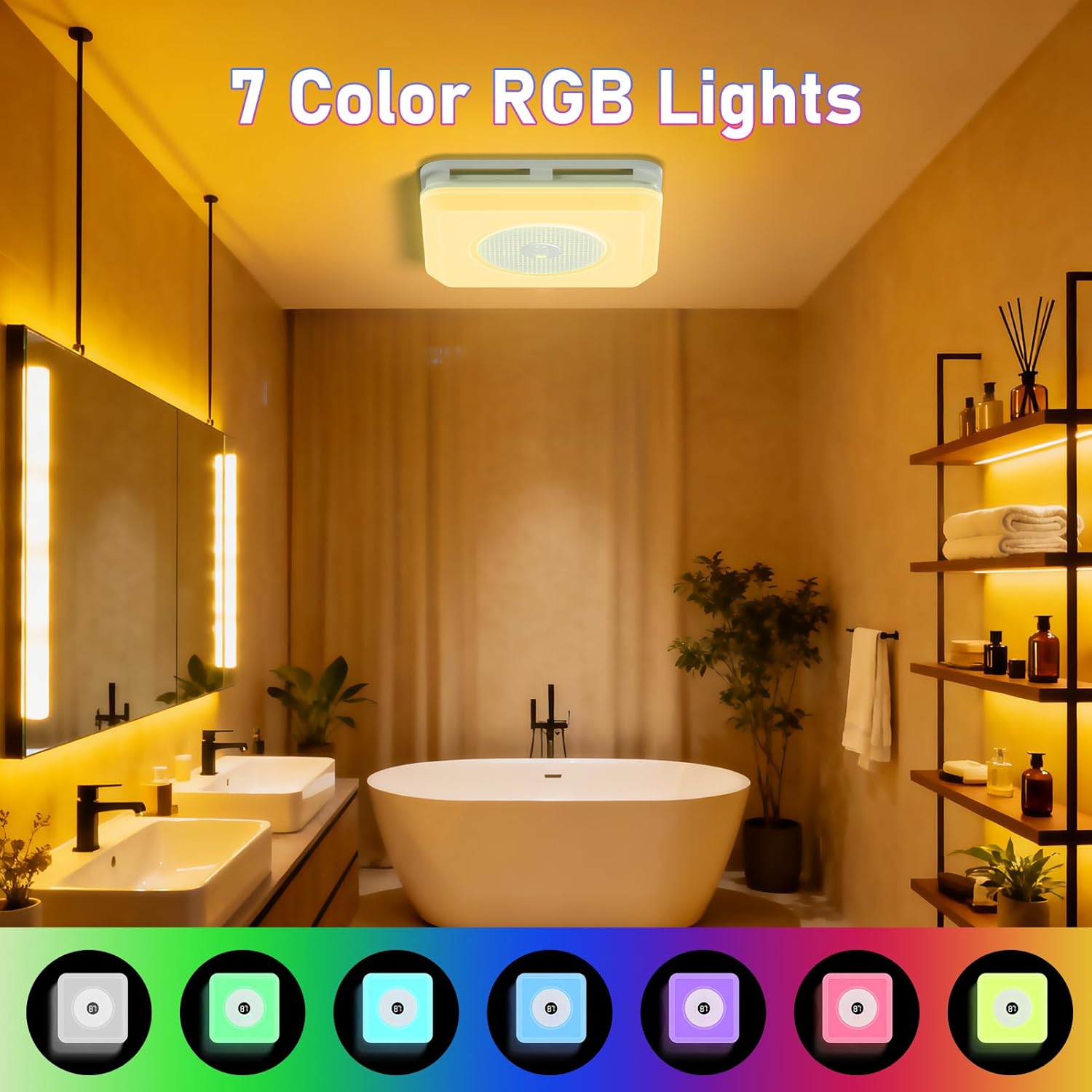
- 7-Color RGB: Choose from seven vibrant colors to create different moods.
- 3CCT Adjustable White Light: Select between 3000K (warm white), 4500K (natural white), and 6000K (cool white) to suit your preference.
- Stepless Dimming: Adjust the brightness of both white and RGB lights smoothly.
- Dynamic Modes: Includes Music Sync (lights react to audio), Ripple, and Breathing modes for an immersive experience.
- Nightlight: A soft 200LM nightlight provides subtle illumination for safety during nighttime.

Digital Display
The unit features a digital display that shows the current room temperature, providing useful information at a glance.
Maintenance
Regular maintenance ensures optimal performance and longevity of your exhaust fan.
- Cleaning the Grille: Periodically wipe the exterior grille with a soft, damp cloth. Do not use abrasive cleaners.
- Internal Cleaning: For deeper cleaning, turn off power at the circuit breaker. Remove the light panel by compressing the spring clips. Gently clean the fan blades and interior housing with a soft brush or vacuum cleaner. Reinstall the panel securely.
- Ducting Inspection: Annually inspect the ducting for any blockages or damage. Clear any obstructions to maintain efficient airflow.
Troubleshooting
If you encounter issues with your BSEED Bathroom Exhaust Fan, refer to the following common problems and solutions:
| Problem | Possible Cause | Solution |
|---|---|---|
| Fan does not turn on | No power supply; Remote control batteries dead; Unit not properly connected. | Check circuit breaker; Replace remote batteries; Verify electrical connections. |
| Light does not turn on | No power supply; Remote control batteries dead; Light panel connection loose. | Check circuit breaker; Replace remote batteries; Re-seat light panel connection. |
| Bluetooth speaker not pairing | Speaker not in pairing mode; Device too far; Already paired to another device. | Ensure fan is on; Move device closer; Disconnect from other devices and try again. |
| Weak airflow | Ducting blocked or kinked; Fan blades dirty. | Inspect and clear ducting; Clean fan blades. |
If the problem persists after trying these solutions, please contact customer support.
Specifications
| Feature | Specification |
|---|---|
| Brand | BSEED |
| Model Name | FAN-02 |
| Color | White |
| Air Flow Capacity | 230 Cubic Feet Per Minute (CFM) |
| Noise Level | 1.5 Sones |
| Wattage | 100 watts |
| Light Features | 7-Color RGB, 3CCT (3000K, 4500K, 6000K), Stepless Dimming, Nightlight (200LM), Music Sync, Ripple, Breathing Modes |
| Control Method | Remote Control |
| Digital Display | Temperature Display |
| Installation Type | Ceiling Mount |
| Product Dimensions | 17.5"D x 11.8"W x 15.7"H |
| Ceiling Opening Size | 11.22" x 11.22" (minimum 11-inch roof-to-ceiling clearance) |
| Item Weight | 11.58 pounds |
| Power Source | AC |
| Certifications | UL & FCC certified |
Warranty and Support
This product is backed by UL & FCC certification, ensuring quality and safety standards. For specific warranty details, please refer to the warranty card included with your purchase or contact BSEED customer support directly. For technical assistance, troubleshooting not covered in this manual, or replacement parts, please reach out to BSEED customer service through their official website or the contact information provided in your product packaging.
