1. Introduction
The VERKB T-09 Portable Bluetooth Karaoke Machine is designed to provide a versatile and immersive audio experience for various occasions. This system features a powerful 200W peak power output through a 6.5-inch full-range speaker, ensuring clear and rich sound. It includes two rechargeable wireless microphones for dynamic vocal performances and supports multiple connectivity options such as Bluetooth 5.3, TF Card, USB, and AUX. Dynamic LED lights enhance the atmosphere, making it suitable for home parties, outdoor gatherings, and professional use.
The machine also incorporates a recessed design to securely hold tablets up to 11 inches, transforming it into a convenient display for lyrics. With a built-in 6000mAh battery, it offers over 20 hours of continuous playback, and its lightweight design with an included shoulder strap ensures easy portability.
2. Setup
2.1 Package Contents
Please verify that all items are present in your package:
- 1 x VERKB T-09 Karaoke Speaker
- 2 x Rechargeable Wireless Microphones
- 2 x USB Charging Cables
- 1 x Carrying Strap
- 1 x User Manual
Note: A tablet device is not included in the package.

Figure 2.1: Package contents of the VERKB T-09 Karaoke Machine.
2.2 Initial Charging
Before first use, fully charge the karaoke machine and both wireless microphones. The main unit's built-in 6000mAh battery provides over 20 hours of playback on a full charge, which typically takes approximately 4 hours.
2.3 Microphone Setup
The two wireless microphones are rechargeable and designed for stable, professional-grade performance. Ensure they are charged before use. They will automatically pair with the karaoke machine when powered on.

Figure 2.2: Rechargeable wireless microphones.
2.4 Tablet Placement
The karaoke machine features a 21-cm wide recessed groove on top, designed to hold tablets up to 11 inches. This allows for convenient display of lyrics or video content during performances.
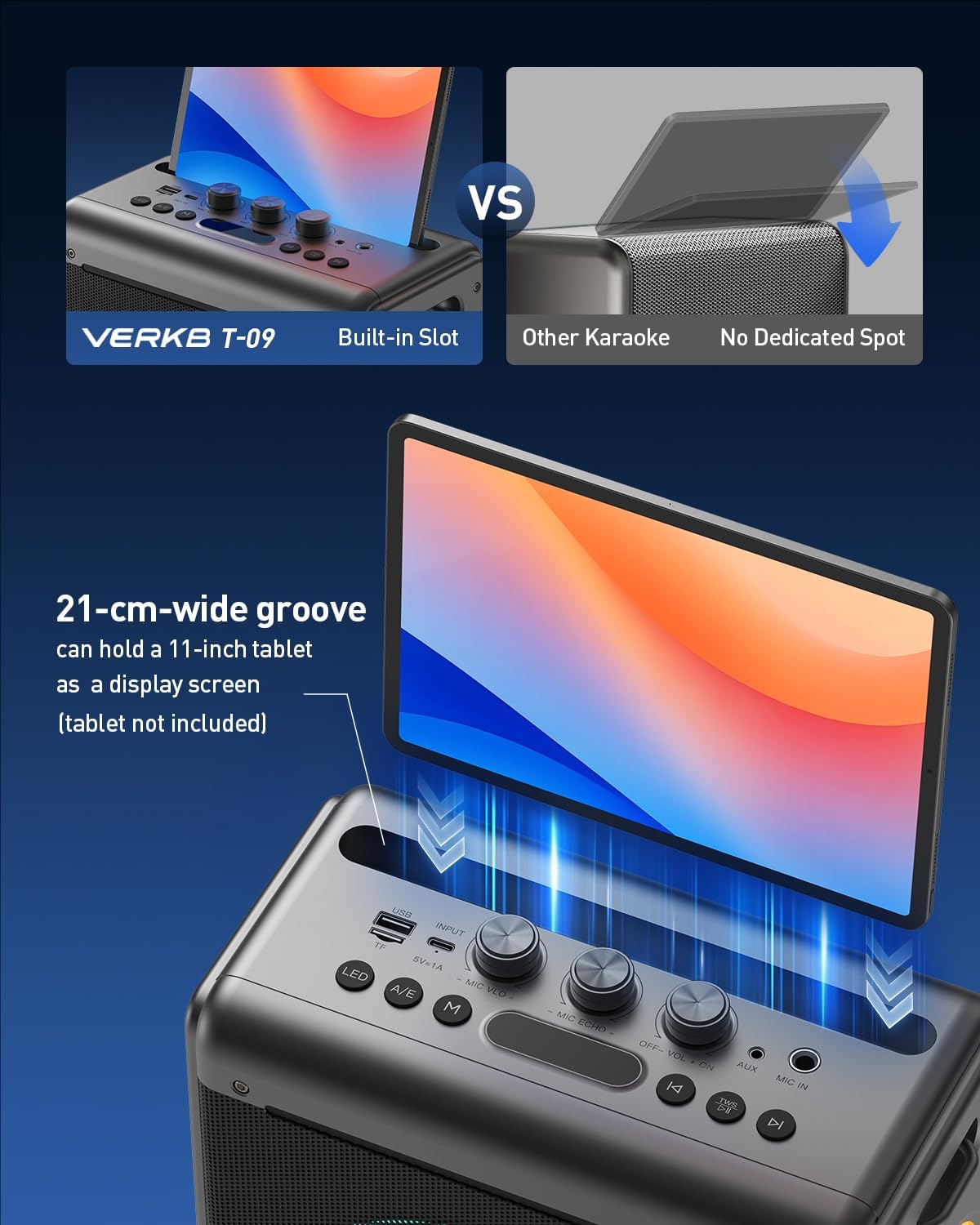
Figure 2.3: Tablet slot on the VERKB T-09.
3. Operating Instructions
3.1 Control Panel Overview
Figure 3.1: Control Panel Layout.
- USB Flash Drive Port: For playing audio from USB drives.
- Type-C Charging Port (5V=1A): For charging the main unit.
- Mic Vol +/-: Adjusts microphone volume.
- Mic Echo +/-: Adjusts microphone echo effect.
- Off - Vol + On: Power on/off and main speaker volume control.
- AUX Port: For connecting external audio devices via AUX cable.
- Mic Instrument Port: For connecting a wired microphone or instrument.
- LED Button: Short press to switch light modes; Long press to turn lights on/off.
- A/E Button: Short press to switch sound effects; Long press to turn off original song vocals.
- M Button: Short press to switch different modes (Bluetooth, AUX, USB, TF).
- Display Screen: Shows current mode and status.
- Previous Song Button: Short press for previous song; Long press for fast rewind.
- Play/Pause Button (TWS): Short press to play/pause; Long press for TWS pair/disconnect.
- Next Song Button: Short press for next song; Long press for fast forward.
3.2 Power On/Off
Rotate the 'Off - Vol + On' knob clockwise to power on the device. Rotate counter-clockwise until it clicks to power off.
3.3 Bluetooth Connection
The VERKB T-09 is equipped with Bluetooth 5.3 technology for instant pairing and stable wireless connectivity up to 50 feet. To connect:
- Ensure the karaoke machine is powered on and in Bluetooth mode (indicated by 'BLUE' on the display). If not, press the 'M' button to cycle through modes.
- Enable Bluetooth on your smart device (phone, tablet, computer).
- Search for 'VERKB T-09' in your device's Bluetooth settings and select to pair.
- A confirmation sound will indicate successful pairing.
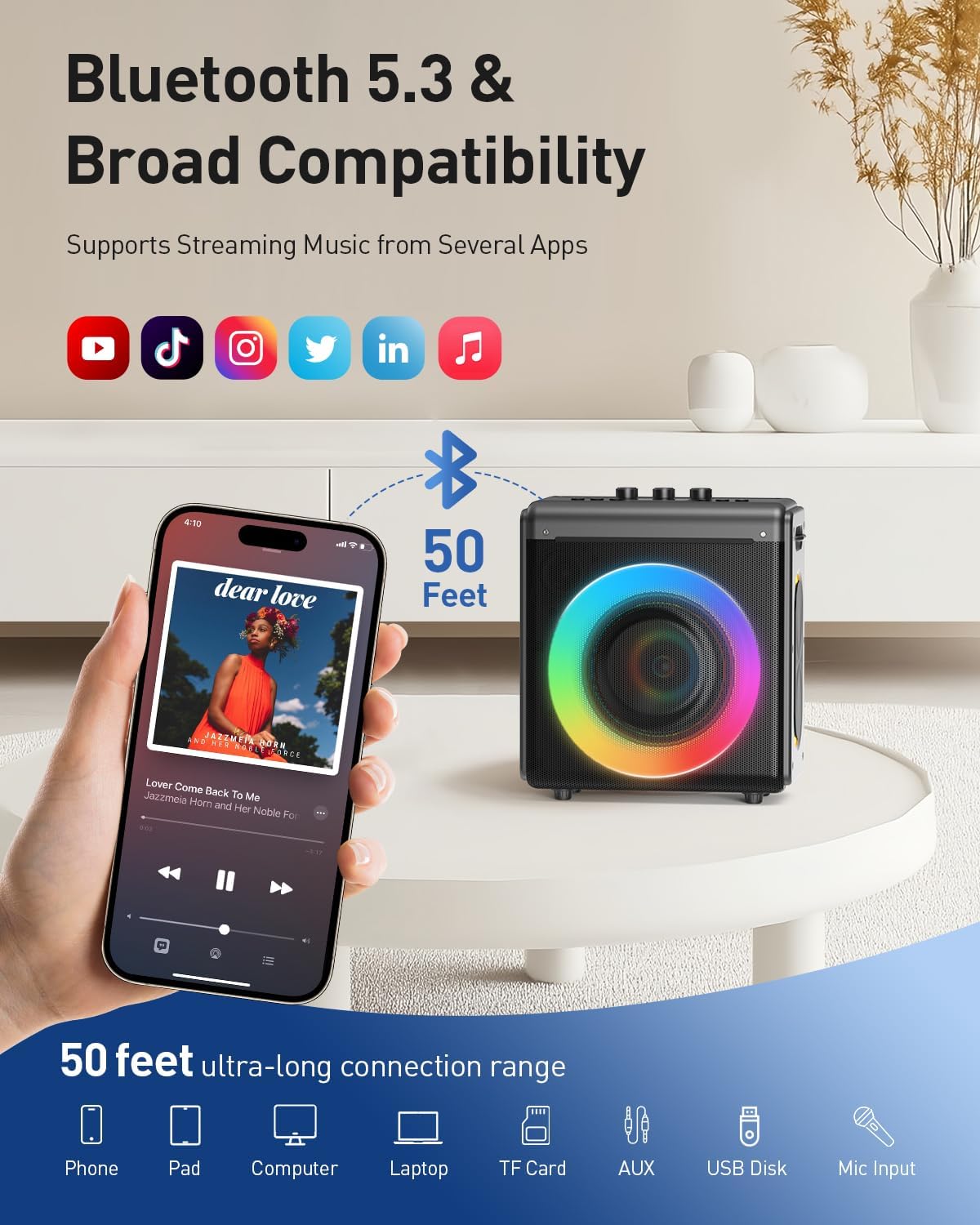
Figure 3.2: Bluetooth Connectivity.
3.4 Multi-Device Connectivity
In addition to Bluetooth, the machine supports:
- TF Card: Insert a Micro TF card into the TF slot to play stored audio.
- USB: Insert a USB drive into the USB port to play stored audio.
- AUX: Connect external audio devices using an AUX cable to the AUX port.
Use the 'M' button to switch between input modes.
3.5 Sound Adjustment
- Main Volume: Use the 'Off - Vol + On' knob to adjust the overall speaker volume.
- Microphone Volume: Use the 'Mic Vol +/-' knob to adjust the volume of the wireless microphones.
- Microphone Echo: Use the 'Mic Echo +/-' knob to customize the microphone reverb effect.
3.6 Vocal Effects and Removal
The machine features four vocal effects and a one-key vocal removal function:
- Vocal Effects: Short press the 'A/E' button to cycle through male, female, child, and monster voice effects.
- Vocal Removal: Long press the 'A/E' button to easily eliminate lead vocals from a song, allowing you to sing along to the instrumental track.
3.7 Dynamic LED Lights
The VERKB T-09 features dynamic LED lights that synchronize with the music, creating a vibrant party atmosphere. To control the lights:
- Change Mode: Short press the 'LED' button to switch between different light modes.
- Turn On/Off: Long press the 'LED' button to turn the lights on or off.
Video 3.1: Demonstration of the dynamic LED lights on the VERKB T-09 Karaoke Machine.
This video shows the VERKB T-09 Karaoke Machine with its LED lights cycling through various colors, demonstrating the visual effects that enhance the karaoke experience.
3.8 Wireless Stereo Pairing (TWS Mode)
For an enhanced audio experience, two VERKB T-09 units can be connected wirelessly to form a synchronized dual-channel stereo system. This creates a wide, full-bodied soundstage with immersive surround sound. To activate TWS mode:
- Ensure both VERKB T-09 units are powered on and in Bluetooth mode.
- On one unit (the primary unit), long press the 'TWS' button (Play/Pause button).
- The primary unit will search for the secondary unit. Once connected, a confirmation sound will play.
- Connect your smart device to the primary unit via Bluetooth. Audio will now play in stereo through both units.
- To disconnect TWS, long press the 'TWS' button on either unit.
Video 3.2: Demonstration of TWS (True Wireless Stereo) pairing for enhanced sound.
This video illustrates how two VERKB T-09 Karaoke Machines can be paired wirelessly to create a stereo sound experience, ideal for larger spaces or more immersive audio.
4. Maintenance
4.1 Cleaning
To maintain the appearance and functionality of your karaoke machine:
- Wipe the exterior surfaces with a soft, dry cloth.
- Avoid using abrasive cleaners, solvents, or strong chemicals.
- Ensure all ports are free from dust and debris.
4.2 Storage
When not in use for extended periods, store the karaoke machine in a cool, dry place away from direct sunlight and extreme temperatures. Ensure the battery is partially charged (around 50%) before storage to prolong its lifespan.
5. Troubleshooting
If you encounter issues with your VERKB T-09 Karaoke Machine, please refer to the following common solutions:
| Problem | Possible Cause | Solution |
|---|---|---|
| No power/Device won't turn on | Low battery; Power knob off | Charge the device fully; Rotate the 'Off - Vol + On' knob clockwise. |
| No sound from speaker | Volume too low; Incorrect input mode; Device not paired (Bluetooth) | Increase main volume; Press 'M' to select correct input; Re-pair Bluetooth device. |
| Microphone not working | Microphone off; Low microphone volume; Microphone battery low | Ensure microphone is powered on; Adjust 'Mic Vol +/-' knob; Charge microphones. |
| Bluetooth pairing issues | Device too far; Interference; Incorrect pairing process | Move device closer to karaoke machine; Ensure no other devices are interfering; Follow Bluetooth pairing steps (Section 3.3). |
| TWS pairing fails | Units too far apart; Incorrect TWS pairing process | Ensure units are within range; Follow TWS pairing steps (Section 3.8). |
6. Specifications
| Brand | VERKB |
| Model Number | T-09 |
| Product Dimensions | 10.5 x 11 x 5 inches |
| Item Weight | 8.53 pounds |
| Manufacturer | VERKB |
| Color | Gray |
| Special Features | Echo Effect, Portable, Rechargeable, Dynamic LED Lights, TWS Functionality, Vocal Effects, Vocal Removal |
| Connectivity | Bluetooth 5.3, TF Card, USB, AUX |
| Battery Life | Over 20 hours (6000mAh) |
| Peak Power | 200W |
| Speaker Size | 6.5-inch full-range speaker |
| Tablet Support | Recessed slot for tablets up to 11 inches |
7. Warranty and Support
VERKB offers a 3-year warranty for the T-09 Karaoke Machine. Additionally, customers receive lifetime technical support and friendly customer service. Should you encounter any issues while using your karaoke machine, please contact VERKB customer service for prompt and professional assistance.
Video 7.1: Overview of the VERKB T-09 Karaoke Machine features and family fun.
This video highlights the various features of the VERKB T-09, including its sound quality, portability, and ease of use for family entertainment.


