
1. Introduction
This manual provides essential information for the safe and efficient operation, maintenance, and care of your WeHawk WX-11 1000W Electric Scooter. Please read this manual thoroughly before using the scooter to ensure proper handling and to prevent damage or injury. Keep this manual for future reference.
2. Safety Information
Your safety is paramount. Always adhere to the following safety guidelines:
- Always wear a helmet and appropriate safety gear, including gloves and protective footwear.
- Familiarize yourself with local traffic laws and regulations regarding electric scooters.
- Perform a pre-ride inspection before each use, checking brakes, tires, lights, and battery level.
- Do not operate the scooter under the influence of alcohol or drugs.
- Avoid riding in adverse weather conditions such as heavy rain, snow, or ice.
- Maintain a safe speed and distance from other vehicles and pedestrians.
- Ensure both feet are on the footrest while riding.
- The maximum weight capacity is 180 kg (396 lbs). Do not exceed this limit.
- This scooter is designed for two riders. Ensure the passenger is seated securely.
3. Product Overview
The WeHawk WX-11 is a 1000W electric scooter designed for urban mobility. It features a robust frame, dual suspension, and a powerful brushless motor.

Image 3.1: Front-side view of the WeHawk WX-11 Electric Scooter, showcasing its design and Union Jack fender accents.

Image 3.2: The WeHawk WX-11 Electric Scooter, with an inset showing its digital display panel.
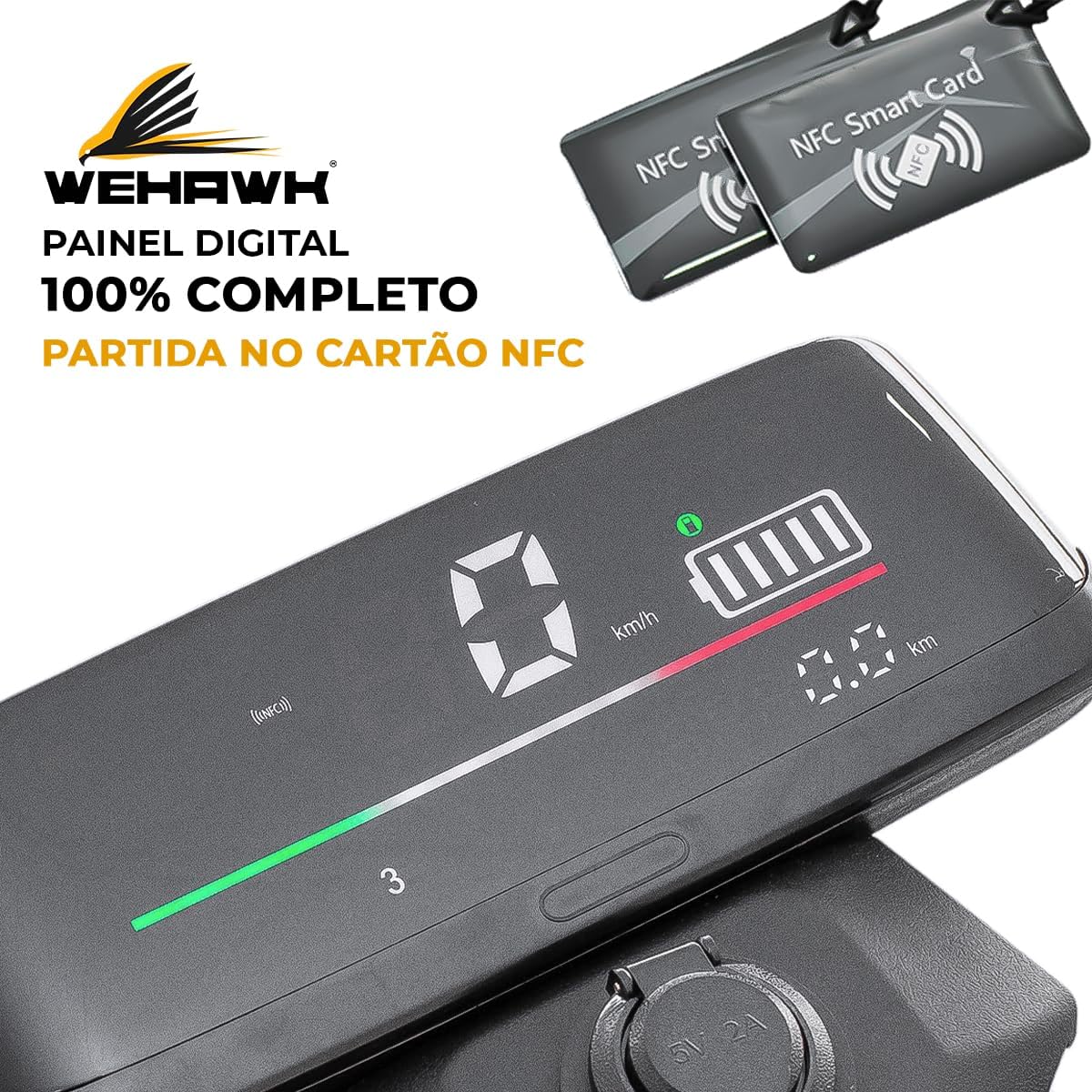
Image 3.3: Detailed view of the WeHawk WX-11's digital display, showing speed, battery level, and distance, alongside NFC smart cards used for starting the scooter.

Image 3.4: Close-up of the WeHawk WX-11's LED headlights, designed for maximum visibility.
4. Setup
4.1 Unpacking and Initial Inspection
Carefully remove the scooter from its packaging. Inspect for any signs of damage during transit. Ensure all components listed in the packing list are present. If any damage or missing parts are found, contact customer support immediately.
4.2 Assembly
Your WeHawk WX-11 scooter may require minor assembly. Typically, this involves attaching the handlebars, mirrors, and any other accessories. Refer to the included assembly guide for detailed, step-by-step instructions. Ensure all bolts and fasteners are securely tightened before first use.
4.3 Charging the Battery
Before initial use, fully charge the scooter's 60V 20Ah Lithium battery. Connect the charger to the scooter's charging port and then to a standard 110V or 220V AC power outlet. The charging indicator on the charger will typically change color (e.g., red to green) when charging is complete. Avoid overcharging. Unplug the charger once the battery is full.
4.4 Pre-Ride Checks
Before each ride, perform the following checks:
- Tires: Check tire pressure. Ensure tires are properly inflated to the recommended PSI (refer to tire sidewall for details).
- Brakes: Test both front and rear brakes to ensure they are functioning correctly and provide adequate stopping power.
- Lights: Verify that the headlights, taillights, and turn signals are operational.
- Battery: Check the battery level on the digital display.
- Fasteners: Ensure all visible bolts and nuts are tight.
5. Operating Instructions
5.1 Starting the Scooter
- Ensure the scooter is on its kickstand and the main power switch (if present) is in the 'ON' position.
- Place the NFC smart card near the designated NFC reader area on the scooter (refer to Image 3.3 for visual reference). The scooter will power on, and the digital display will illuminate.
- Once powered on, gently push off with your foot to gain initial momentum, then slowly twist the throttle to accelerate.
5.2 Riding
- Maintain a balanced posture with both feet on the footrest.
- Accelerate smoothly using the throttle. Avoid sudden, jerky movements.
- Use turn signals when changing direction.
- Be aware of your surroundings and anticipate potential hazards.
5.3 Braking
The WeHawk WX-11 is equipped with a front disc brake. To brake, gently squeeze the brake levers. Apply both brakes simultaneously for optimal stopping power and control. Avoid sudden, hard braking, especially at high speeds or on slippery surfaces.
5.4 Parking
When parking, ensure the scooter is on a stable, level surface. Engage the kickstand fully to prevent the scooter from tipping over. To turn off the scooter, use the NFC card again or the main power switch, if applicable.
6. Maintenance
Regular maintenance ensures the longevity and safe operation of your scooter.
6.1 Battery Care
- Charge the battery regularly, even if the scooter is not in use for extended periods (at least once a month).
- Store the scooter and battery in a cool, dry place, away from direct sunlight and extreme temperatures.
- Do not expose the battery to water or moisture.
- If the battery shows signs of damage or unusual behavior, contact a qualified technician.
6.2 Tires
- Regularly check tire pressure and inflate to the manufacturer's recommended PSI.
- Inspect tires for wear, punctures, or damage. Replace worn or damaged tires promptly.
6.3 Brakes
- Inspect brake pads for wear and replace them when necessary.
- Check brake cables for fraying or damage. Ensure brake levers operate smoothly.
6.4 General Cleaning
Clean the scooter regularly with a damp cloth. Avoid using high-pressure washers or harsh chemicals, which can damage electrical components or paint. Ensure the charging port is dry before charging.
7. Troubleshooting
This section addresses common issues you might encounter with your WeHawk WX-11 Electric Scooter.
| Problem | Possible Cause | Solution |
|---|---|---|
| Scooter does not power on | Low battery; NFC card not detected; Main power switch off | Charge battery; Ensure NFC card is correctly placed; Check main power switch |
| Motor not engaging | Throttle issue; Brake engaged; Controller fault | Check throttle connection; Ensure brakes are not applied; Contact support if issue persists |
| Reduced range or power | Under-inflated tires; Battery degradation; Overload | Inflate tires to correct pressure; Battery may need replacement over time; Reduce load |
| Brakes feel weak | Worn brake pads; Loose brake cable; Air in hydraulic system (if applicable) | Inspect and replace brake pads; Adjust brake cable tension; Consult a technician |
For issues not listed here or if troubleshooting steps do not resolve the problem, please contact WeHawk customer support.
8. Specifications
| Feature | Specification |
|---|---|
| Brand | WeHawk |
| Model Name | WX-11 |
| Motor | 1000W Brushless |
| Maximum Speed | Up to 32 Km/h (20 mph) |
| Controller | 60V |
| Tire Size | Front/Rear 10 inches |
| Maximum Load Capacity | 180 kg (396 lbs) |
| Seating Capacity | 2 riders |
| Net Weight | 80 kg (176 lbs) |
| Battery | 60V 20Ah Lithium |
| Brakes | Front Disc Brake |
| Suspension | Dual Suspension |
| Voltage | 110V, 220V (Charger) |
| Special Features | Lockable |
| Included Components | Charger |
| Material | Metal |
9. Warranty and Support
For warranty information, please refer to the documentation provided at the time of purchase or contact your retailer. WeHawk is committed to providing quality products and customer satisfaction.
If you require technical assistance, have questions about operation, or need to report a defect, please contact WeHawk customer support through the official website or your point of purchase. Please have your model number (WX-11) and purchase details ready when contacting support.