
WeHawk WX-11
WeHawk WX-11 1000W Electric Scooter User Manual
Model: WX-11 | Brand: WeHawk
1. Introduction
This manual provides essential information for the safe and efficient operation, maintenance, and troubleshooting of your WeHawk WX-11 1000W Electric Scooter. Please read this manual thoroughly before using the scooter to ensure proper handling and to prevent damage or injury.
General Safety Guidelines
- Always wear a helmet and appropriate safety gear (gloves, knee pads, elbow pads) when operating the scooter.
- Do not operate the scooter under the influence of alcohol or drugs.
- Observe all local traffic laws and regulations.
- Ensure the scooter is in good working condition before each ride.
- Avoid riding in adverse weather conditions (heavy rain, snow, ice).
- The scooter is designed for two riders with a maximum combined weight of 180 kg. Do not exceed this limit.

Figure 1.1: Front view of the WeHawk WX-11 Electric Scooter, showcasing its sleek design and robust build.
2. Setup and Initial Preparation
Unpacking and Assembly
Your WeHawk WX-11 scooter comes largely pre-assembled. Carefully remove all packaging materials. Ensure all components listed in the packing list are present. Minor assembly may be required for handlebars and mirrors. Refer to the included assembly guide for detailed steps.
Battery Charging
Before first use, fully charge the scooter's lithium battery. The scooter includes a dedicated charger. Connect the charger to the scooter's charging port and then to a standard electrical outlet (110V or 220V). The charging indicator on the charger will show the charging status. A full charge typically takes several hours. Do not overcharge the battery.
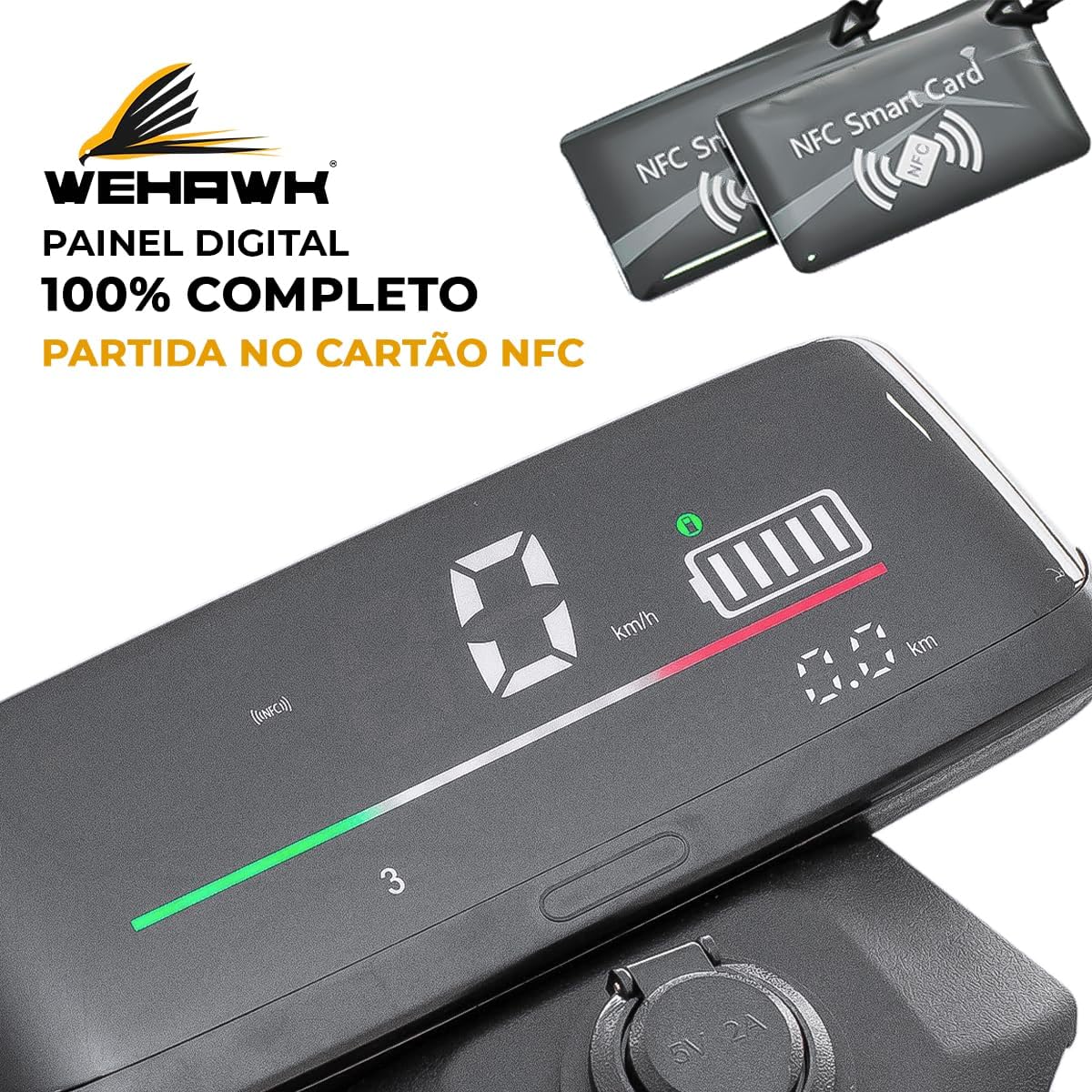
Figure 2.1: The digital display panel and NFC smart cards used for starting the scooter. The display shows speed, battery level, and distance.
The battery is removable for convenient charging. To remove, unlock the seat compartment and follow the instructions for battery disconnection. Always ensure the battery is securely reinstalled before riding.

Figure 2.2: View of the dual rear suspension and the spacious under-seat storage compartment, which also houses the removable battery.
3. Operating Instructions
Controls and Features
- Handlebars: Equipped with throttle on the right, brake levers, and control buttons for lights and horn.
- Digital Display: Shows current speed, battery charge level, and distance traveled.
- LED Headlights: For maximum visibility at any time.
- Dual Suspension: Provides a smooth and comfortable ride.
- NFC Smart Card Start: The scooter is started using an NFC card for enhanced security.
- Reverse Function: Allows for easy maneuvering in tight spaces.

Figure 3.1: Top-down view of the handlebars, showing the controls and the integrated digital display.
Starting and Riding
- Ensure the battery is charged and properly installed.
- Place the NFC smart card near the designated reader on the scooter to activate the system.
- Once activated, gently twist the throttle to accelerate.
- Use the brake levers to slow down or stop. The scooter is equipped with a front disc brake for effective stopping power.
- To engage the reverse function, refer to the specific button or switch on the handlebar controls.

Figure 3.2: Close-up of the powerful LED headlight, designed for optimal visibility during night rides.
4. Maintenance
Regular maintenance ensures the longevity and safe operation of your WeHawk WX-11 scooter.
Battery Care
- Charge the battery regularly, even if the scooter is not in use, to maintain its health.
- Avoid completely draining the battery before recharging.
- Store the scooter and battery in a cool, dry place away from direct sunlight and extreme temperatures.
Tire Pressure
Maintain proper tire pressure for optimal performance and safety. The recommended tire pressure is 18 to 22 PSI for both front and rear tires. Check tire pressure regularly using a reliable gauge.
Cleaning
Clean the scooter with a damp cloth and mild detergent. Avoid using high-pressure water jets directly on electrical components. Do not use abrasive cleaners or solvents.
Brake Inspection
Regularly inspect the front disc brake system for wear and tear. Ensure the brake levers operate smoothly and provide adequate stopping power. If you notice any issues, consult a qualified technician.
5. Troubleshooting
This section addresses common issues you might encounter with your WeHawk WX-11 scooter.
- Scooter does not turn on: Ensure the battery is fully charged and properly connected. Verify the NFC card is correctly used to activate the system.
- Loss of power during operation: The battery might be low. Recharge the battery. Check for loose connections.
- Brakes feel weak: Inspect the brake pads for wear. Ensure the brake cables (if applicable) are properly tensioned. Seek professional assistance if the issue persists.
- Unusual noises: Stop riding immediately and inspect the scooter for any loose parts or damage.
For issues not covered here, or if you are unsure about a repair, please contact WeHawk customer support or a certified service center.
6. Specifications
| Feature | Specification |
|---|---|
| Model Name | Moto Elétrica Wehawk 1000W Sem CNH (WX-11) |
| Motor Type | Brushless 1000W |
| Maximum Speed | 0 to 32 Km/h |
| Controller | 60V |
| Tire Size | Front/Rear 10 inches |
| Maximum Load Capacity | 180 Kg |
| Seating Capacity | 2 Lugares (2 Seats) |
| Net Weight | 80 Kg |
| Battery | Lithium 60V 20Ah |
| Brake Type | Front Disc Brake |
| Suspension | Dual Suspension |
| Voltage | 110V, 220V |
| Material | Metal |
| Special Features | Lockable, NFC Smart Card Start, Reverse Function |
| Included Components | Charger |

Figure 6.1: Dimensional overview of the WeHawk WX-11 Electric Scooter, including height, length, and handlebar width.
7. Warranty and Support
Warranty Information
For specific warranty terms and conditions, please refer to the documentation provided at the time of purchase or contact the seller directly. The standard return policy allows for a refund or replacement within 7 days of purchase, subject to conditions.
Customer Support
If you have any questions, require technical assistance, or need to report an issue with your WeHawk WX-11 Electric Scooter, please contact the official seller, WeHawk Oficial. You can typically find their contact information on your purchase receipt or through the platform where you purchased the product.
For general inquiries, you may also visit the WeHawk brand page.
Ask a question about this manual
Ask about setup, troubleshooting, compatibility, parts, safety, or missing instructions. Manuals+ will review the question and use this page’s manual context to help answer it.