Introduction
This manual provides detailed instructions for the RCA Wireless Earbuds Bluetooth 5.3 Headphones. Please read this manual thoroughly before using the product to ensure proper operation and to maximize its lifespan. These earbuds are designed for active use, featuring a secure over-ear hook design and IPX5 water resistance, making them suitable for sports and workouts.
What's in the Box
Verify that all items are present upon unboxing:
- RCA Wireless Earbuds (Left and Right)
- Charging Case
- USB-C Charging Cable
- Ear Tips (Small, Medium, Large)
- User Manual

Image: The RCA Wireless Earbuds securely placed within their charging case, with digital displays indicating battery percentages for both earbuds and the case.
Product Diagram
Familiarize yourself with the components of your RCA Wireless Earbuds:
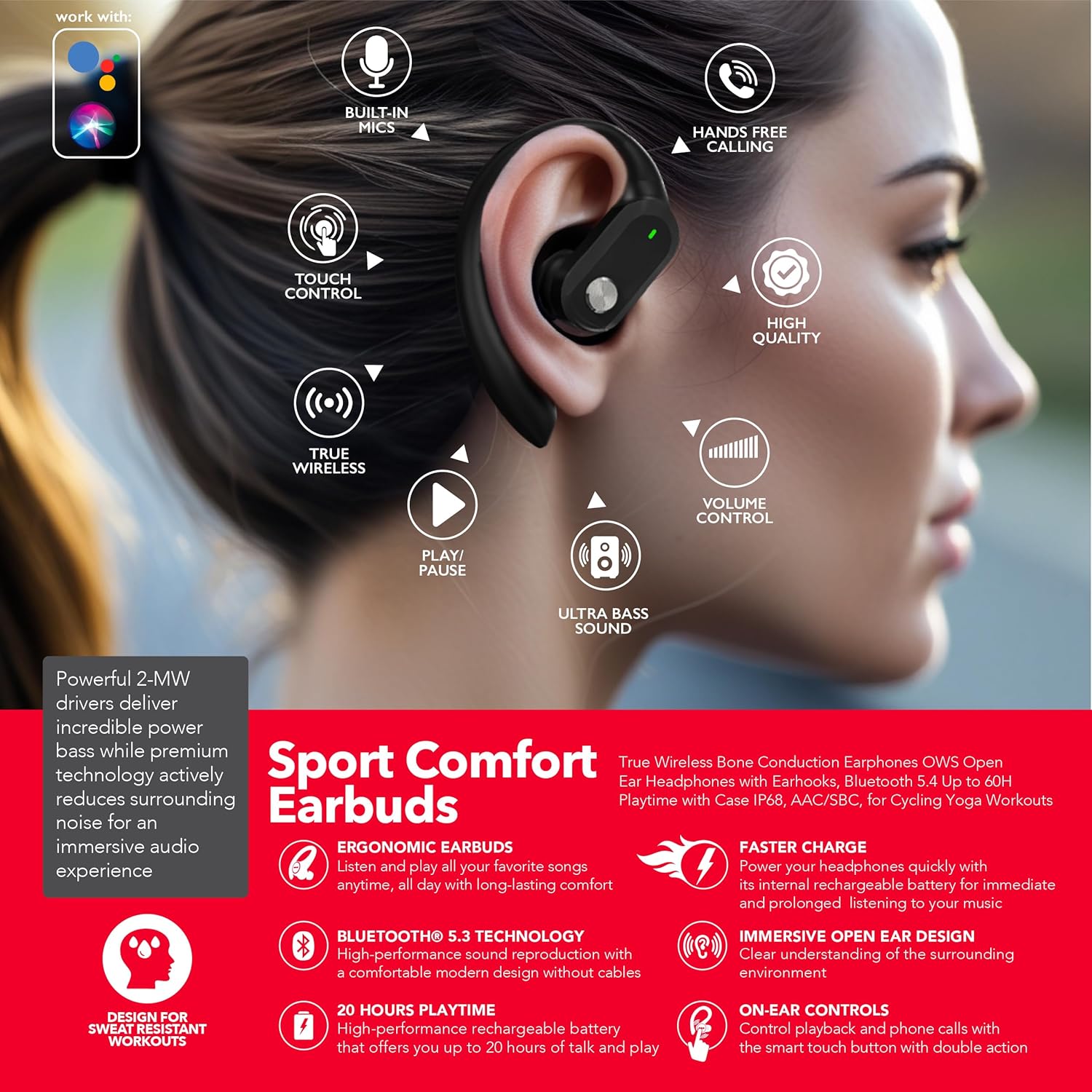
Image: A detailed view of an earbud being worn, highlighting key features such as the touch control panel, integrated microphone, and the ergonomic earhook for secure fit.
- Earhook: Provides a secure fit over the ear, ideal for active use.
- Touch Control Area: For managing music, calls, and voice assistant.
- Microphone: Built-in for hands-free calling and voice commands.
- Ear Tip: Soft silicone tips for comfort and sound isolation.
- Charging Contacts: Located on the earbuds, for charging within the case.
Setup
1. Charging the Earbuds and Case
- Place the earbuds into the charging case. Ensure the charging contacts align.
- Connect the USB-C charging cable to the charging port on the case and the other end to a USB power adapter (not included).
- The LED indicators on the case will show charging status. A full charge for the case takes approximately 1.5 hours. The earbuds will charge automatically when placed in the case.
The earbuds provide up to 6 hours of playtime on a single charge, and the charging case extends total playtime to up to 48 hours.
2. Bluetooth Pairing
- Open the charging case. The earbuds will automatically enter pairing mode, indicated by flashing LED lights on the earbuds.
- On your device (smartphone, tablet, etc.), enable Bluetooth and search for available devices.
- Select "RCA Earbuds" from the list of found devices.
- Once connected, the earbud LEDs will stop flashing, and you will hear a confirmation tone.
The earbuds utilize Bluetooth 5.3 for a stable and efficient wireless connection.
3. Fitting the Earbuds
For optimal sound quality and secure fit, choose the correct size ear tips and adjust the earhooks.
- Select the ear tips that provide a comfortable seal in your ear canal. Three sizes (S, M, L) are included.
- Place the earbud into your ear, then gently hook the earhook over the top of your ear.
- Adjust the earbud and earhook until it feels secure and comfortable, ensuring the sound nozzle is directed towards your ear canal.

Image: The RCA Wireless Earbuds displayed individually, highlighting their flexible earhook design which ensures a stable fit during physical activity.
Operating Instructions
Touch Controls
The earbuds feature intuitive touch controls on the outer surface of each earbud.
| Action | Function |
|---|---|
| Single Tap (Left/Right) | Play/Pause Music, Answer/End Call |
| Double Tap (Right Earbud) | Next Track |
| Double Tap (Left Earbud) | Previous Track |
| Triple Tap (Right Earbud) | Volume Up |
| Triple Tap (Left Earbud) | Volume Down |
| Long Press (2 seconds) | Reject Call, Activate Voice Assistant |
Maintenance
Cleaning
- Regularly clean the earbuds and charging case with a soft, dry, lint-free cloth.
- Remove ear tips and clean them with mild soap and water, then dry thoroughly before reattaching.
- Ensure charging contacts on both earbuds and case are free of dust and debris.
Storage
- When not in use, store the earbuds in their charging case to protect them and keep them charged.
- Store in a cool, dry place away from extreme temperatures and direct sunlight.
Water Resistance
These earbuds are rated IPX5 water resistant, meaning they can withstand sweat and light splashes of water. They are not designed for submersion in water. Do not use them while swimming or showering.
Troubleshooting
- Earbuds not pairing: Ensure earbuds are charged and in pairing mode. Turn off and on Bluetooth on your device. Try forgetting the device in your Bluetooth settings and re-pairing.
- No sound from one earbud: Place both earbuds back in the case, close it, then reopen to reset. Check device's audio balance settings.
- Charging issues: Ensure the charging cable is securely connected and the power source is active. Clean the charging contacts on both earbuds and the case.
- Low volume: Adjust volume on both your device and using the earbud touch controls. Ensure ear tips provide a good seal.
- Intermittent connection: Ensure you are within the Bluetooth range (10 meters) of your device. Avoid obstacles between the earbuds and your device.
Specifications
| Feature | Detail |
|---|---|
| Model Name | Sport Comfort Earbuds (WAVE-40 BLACK) |
| Connectivity Technology | Wireless (Bluetooth 5.3) |
| Bluetooth Range | 10 Meters |
| Battery Life (Earbuds) | Up to 6 Hours |
| Total Playtime (with Case) | Up to 48 Hours |
| Charging Time | 1.5 Hours (Case) |
| Water Resistance Level | IPX5 (Water Resistant) |
| Control Type | Touch Control |
| Microphones | Built-in with Environmental Noise Cancelling (ENC) |
| Earpiece Shape | Hook (Over Ear) |
| Item Weight (per earbud) | 7.8g |
| Carrying Case Battery Capacity | 420 mAh |
| Impedance | 16 Ohm |
| Audio Latency | 16 Milliseconds |
Safety Information
- Avoid listening at high volume levels for extended periods to prevent hearing damage.
- Do not use the earbuds in situations where inability to hear ambient sounds could be dangerous (e.g., driving, cycling, walking in traffic).
- Keep the product and its accessories out of reach of children and pets to prevent choking hazards.
- Do not expose the earbuds or charging case to extreme temperatures, direct sunlight, or fire.
- Dispose of the product and its battery responsibly according to local regulations.
Warranty and Support
RCA products are designed for reliability and performance. For warranty information, technical support, or customer service inquiries, please refer to the contact details provided on the RCA official website or the product packaging. Please retain your proof of purchase for any warranty claims.
For further assistance, visit the RCA Store on Amazon.


