
Introduction
This manual provides essential information for the safe and efficient use of your Kooduu Sensa Play Bluetooth Speaker Light. Please read these instructions carefully before using the product and retain them for future reference.
The Kooduu Sensa Play combines a portable speaker with a dimmable LED light, designed for both indoor and outdoor environments. It features sound by JBL, Bluetooth 5.3 connectivity, and a rechargeable battery.
Safety Information
- Do not expose the device to extreme temperatures, direct sunlight, or high humidity.
- Keep away from water and liquids. This product is not waterproof.
- Do not attempt to disassemble, repair, or modify the device. This will void the warranty.
- Use only the provided USB-C charging cable.
- Keep out of reach of children and pets.
- Ensure proper ventilation during charging and operation.
Package Contents
Verify that all items are present in your package:
- Kooduu Sensa Play Speaker Light
- USB-C Charging Cable
- User Manual (this document)

Image: The Kooduu Sensa Play Speaker Light in three colors (black, orange, white) with its included USB-C charging cable and user manual.
Product Overview
Familiarize yourself with the main components and controls of your Sensa Play speaker light.
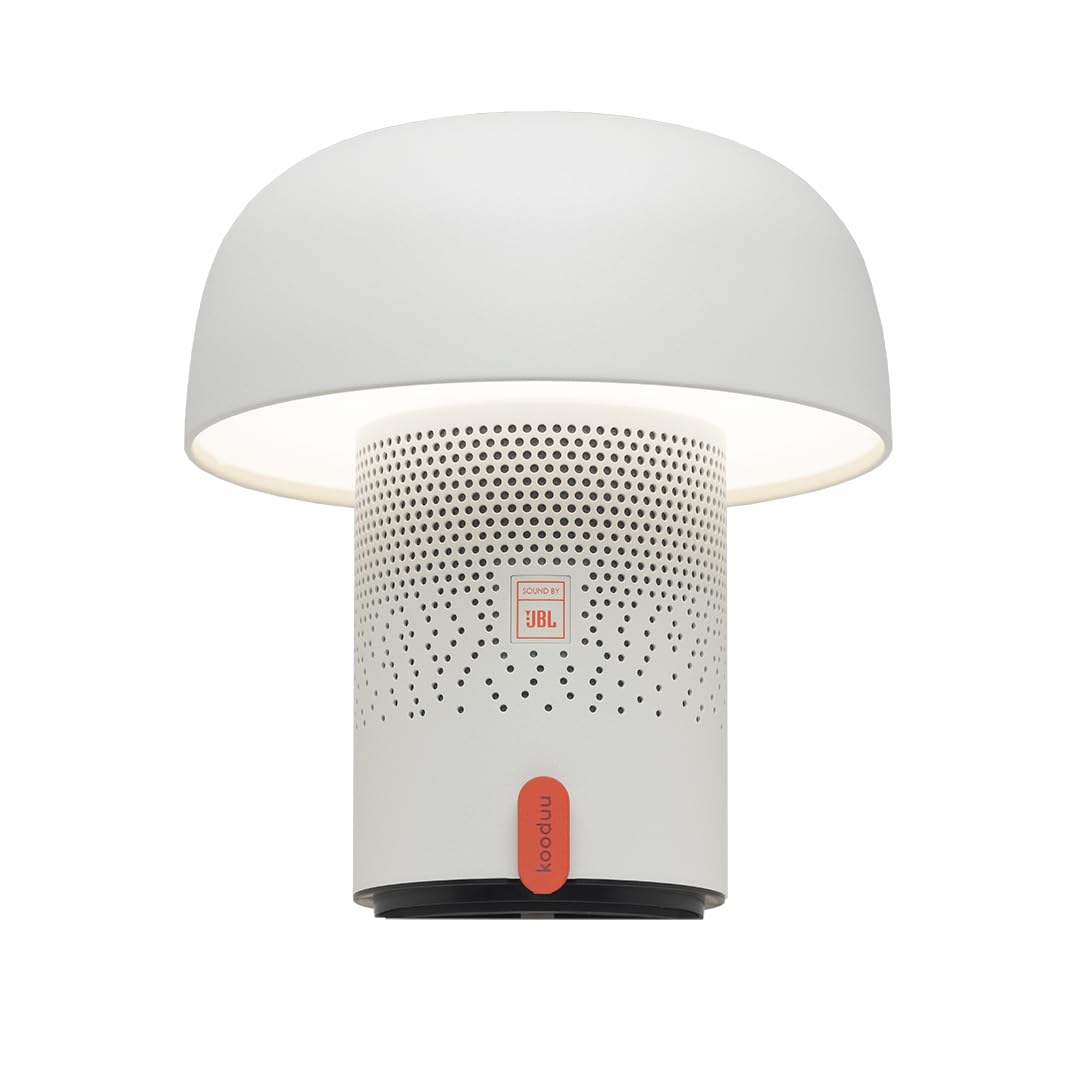
Image: Front view of the Kooduu Sensa Play Bluetooth Speaker Light in white, showing the speaker grille and the orange control button.
Key Components:
- Light Diffuser: Top section providing ambient light.
- Speaker Grille: Perforated section for audio output.
- Control Button: Orange button on the front for power and light adjustment.
- Charging Port: USB-C port located at the base for charging.
- Power Button (Base): Button on the underside for initial power on/off and Bluetooth pairing.
Video: An overview of the Kooduu Sensa Play, demonstrating its design and features in various settings.
Setup
1. Charging the Device
Before first use, fully charge your Sensa Play speaker light.
- Connect the provided USB-C charging cable to the charging port at the base of the speaker light.
- Connect the other end of the USB-C cable to a compatible USB power adapter (not included) or a computer's USB port.
- The charging indicator light (if present, refer to product for exact location) will illuminate during charging and turn off when fully charged.
- A full charge takes approximately 3 hours and provides up to 10-11 hours of battery life.

Image: The Kooduu Sensa Play in a living room setting, highlighting its portability and rechargeable features.
2. Power On/Off
- To power on, press and hold the power button located on the underside of the device for a few seconds until you hear an audible cue or see the light illuminate.
- To power off, press and hold the same power button until the device shuts down.
3. Bluetooth Pairing (Single Speaker)
- Ensure the Sensa Play is powered on.
- The speaker will automatically enter Bluetooth pairing mode, indicated by a flashing LED light (refer to product for exact indicator).
- On your smartphone, tablet, or other Bluetooth-enabled device, go to the Bluetooth settings.
- Select "Kooduu Sensa Play" from the list of available devices.
- Once connected, you will hear a confirmation sound, and the LED indicator will stop flashing.

Image: A person controlling music playback on a smartphone, connected to the Kooduu Sensa Play speaker light.
4. True Wireless Stereo (TWS) Pairing (Two Speakers)
To enjoy a stereo sound experience, you can pair two Kooduu Sensa Play speakers together.
- Ensure both Sensa Play speakers are powered on and not connected to any other Bluetooth device.
- On one speaker (this will be your primary speaker), quickly double-press the power button on the underside. The speaker will enter TWS pairing mode.
- The two speakers will automatically search for and connect to each other. You will hear a confirmation sound when they are successfully paired.
- Once TWS paired, connect your Bluetooth device to the primary speaker as described in step 3 above. The primary speaker will then transmit audio to the secondary speaker for stereo playback.

Image: Two Kooduu Sensa Play speaker lights, demonstrating the True Wireless Stereo pairing capability.
Operation
1. Light Control
- Turn Light On/Off: Briefly press the orange control button on the front of the speaker light.
- Adjust Brightness: Press and hold the orange control button. The light will cycle through brightness levels (0-100%). Release the button when the desired brightness is reached.

Image: Two Kooduu Sensa Play speaker lights illustrating the adjustable brightness feature in different ambient light conditions.
2. Audio Playback
- Once connected via Bluetooth, control music playback (play, pause, skip tracks, volume) directly from your paired device.
- The Sensa Play speaker light does not have dedicated volume or track control buttons.
Maintenance
- Clean the device with a soft, dry cloth. Do not use abrasive cleaners or solvents.
- Store the speaker light in a cool, dry place when not in use for extended periods.
- Avoid dropping or subjecting the device to strong impacts.
Troubleshooting
| Problem | Possible Solution |
|---|---|
| Device does not power on. | Ensure the battery is charged. Connect to power and try again. |
| Cannot pair via Bluetooth. |
|
| No sound or poor sound quality. |
|
| Light does not turn on or adjust. |
|
Specifications
| Feature | Detail |
|---|---|
| Model Name | Sensa Play |
| Model Number | 0798919120321 |
| Brand | Kooduu (Adesso Home) |
| Connectivity | Bluetooth 5.3 |
| Speaker Output Power | 10 Watts |
| Audio Output Mode | Stereo (with TWS pairing) |
| Light Type | Dimmable LED, 2700K Warm Light, 1.5-2.0 Watt |
| Battery Life | Up to 10-11 hours |
| Battery Charge Time | Approximately 3 hours |
| Charging Port | USB-C |
| Control Method | Touch (for light), Buttons (for power/pairing) |
| Dimensions (Standard) | 8.50"H x 7.50"W (21 cm H x 19 cm W) |
| Dimensions (Mini) | 6.25"H x 5.50"W (16 cm H x 14 cm W) |
| Material | Steel & powder coated shell |

Image: Comparison of the standard and mini versions of the Kooduu Sensa Play, with their respective dimensions.
Warranty and Support
The Kooduu Sensa Play comes with a limited warranty. Please refer to the warranty card included in your package or visit the official Kooduu website for detailed warranty terms and conditions.
For technical support, troubleshooting assistance, or warranty claims, please contact Adesso Home customer service through their official channels. Contact information can typically be found on the product packaging or their website.


