
1. Safety Information
Please read all instructions carefully before using the product. Retain this manual for future reference.
- Always ensure the gimbal is in the unlocked state before use to prevent motor damage.
- Avoid using the device for movements that are excessively fast, as this may affect tracking performance and stability.
- When using the balance handle, ensure the gimbal is turned off.
- Keep the device away from water and extreme temperatures.
- Do not attempt to disassemble or repair the device yourself. Contact customer support if issues arise.
2. Package Contents
Verify that all items are included in your package:
- 69'' Auto Face Tracking Selfie Stick Tripod
- Instruction Manual
3. Product Overview
The SelfieShow TT07 is a versatile 69-inch auto face tracking selfie stick tripod stand designed for mobile phones. It features an intelligent AI system for accurate face and body tracking, gesture control, and a multi-functional remote. This device is ideal for vlogging, video recording, selfies, and group photos, offering stable and flexible shooting options without the need for an external app.
Key Features:
- Smart Auto Tracking: 360° rotation with AI system to follow your face or body.
- Automatic Pop-Open Tripod: Legs deploy automatically when placed on a flat surface or by pressing a button.
- Adjustable Height: Telescoping aluminum pole extends from 14.8 inches (37.65 cm) to 69.29 inches (176 cm).
- Multi-Angle Shooting: Supports 360° panoramic, 270° up/down, horizontal, and vertical shooting.
- No App & Gesture Control: Activate tracking with an "OK" gesture and pause with a "PALM" gesture.
- Multi-functional Remote: Detachable remote for photo/video capture and short video browsing (e.g., TikTok).
- Universal Compatibility: Compatible with most smartphones (iPhone, Galaxy, Google Pixel, OnePlus, Motorola, Xiaomi, Huawei) and features a standard 1/4" screw mount for digital cameras, action cameras, and ring lights.
4. Setup
4.1 Unfolding the Tripod
The tripod features an automatic pop-open design. To deploy the legs:
- Hold the selfie stick vertically.
- Gently tap the base on a flat surface, or press the button located at the base. The three legs will automatically extend to form a stable tripod.

Image: Automatic Pop-up Design. The image illustrates the trigger release mechanism and the three steps for the tripod legs to automatically open when the base touches the ground.
4.2 Attaching Your Phone
The phone clip is detachable and universally compatible:
- Extend the phone clip to fit your smartphone.
- Securely place your phone into the clip. Ensure it is firmly held to prevent accidental drops.
- The phone clip can be detached and used separately as a phone stand.

Image: Detachable Phone Clip. This image demonstrates how to attach a smartphone to the clip and shows the clip being used as a separate phone stand on a table.
4.3 Powering On
To power on the device:
- Long press the Power Button on the device handle to turn it on/off.
- Ensure the gimbal is in the unlocked position before powering on for tracking functions.
5. Operating Instructions
5.1 Auto Face Tracking and Gesture Control
The device uses an AI system for intelligent face and body tracking without requiring an app.
- Start Tracking: Make an "OK" gesture (thumb and forefinger forming a circle) towards the device's camera. The device will begin tracking your face or body.
- Pause Tracking: Make a "PALM" gesture (open hand) towards the device's camera to pause tracking.
- 360° Auto-rotation: Double-click the gesture button (or the power button, depending on model variation) to initiate a 360° auto-rotation.
- Protagonist Mode: Make an "OK" gesture to lock onto the main subject.
- Adjust Framing: Use a "Double L" gesture to adjust the framing.
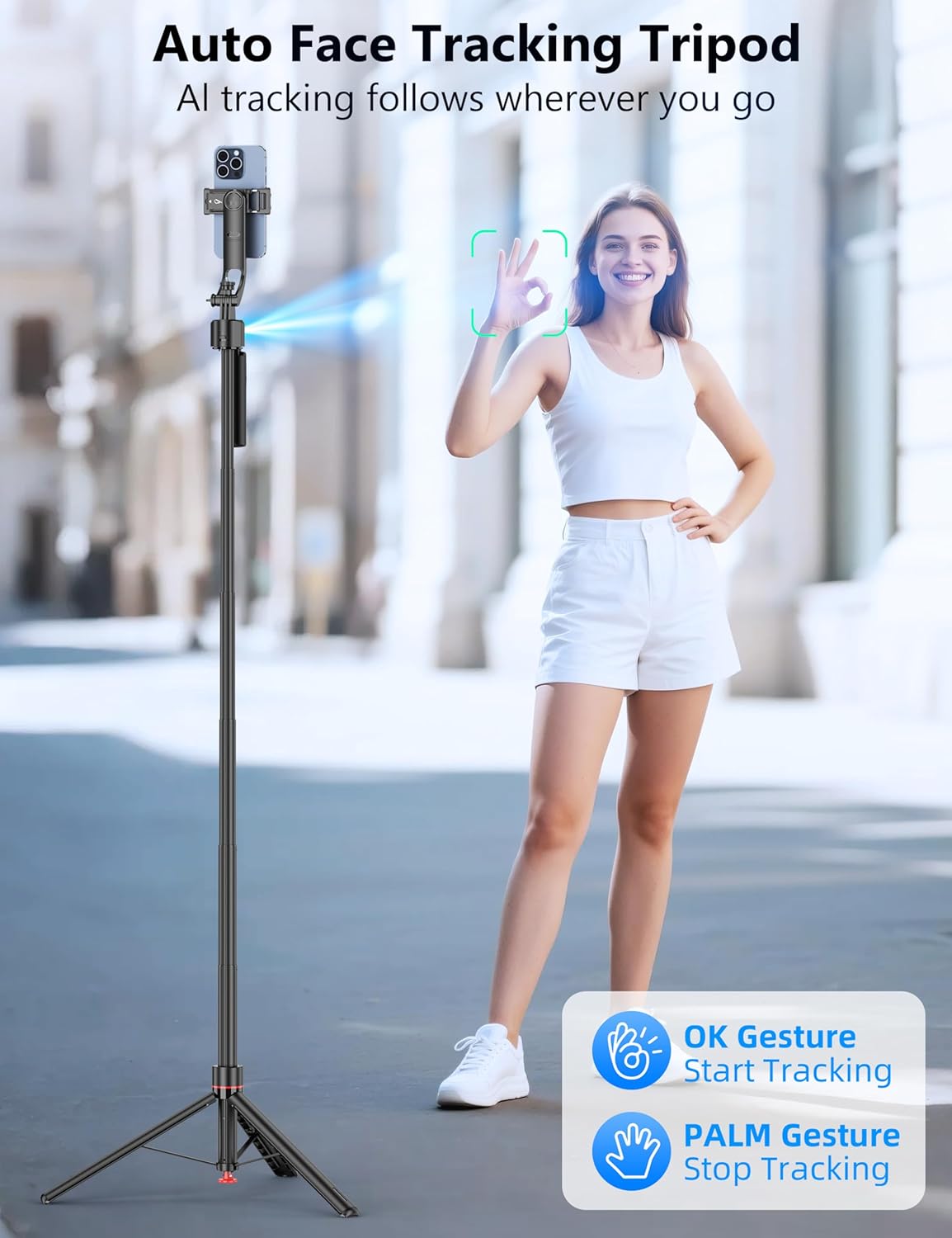
Image: Auto Face Tracking Tripod. A woman makes an 'OK' gesture, and green tracking boxes appear around her face, indicating active face tracking.

Image: Gesture Control & No App Required. This image details the power button and gesture button functions, along with visual examples of the 'PALM' gesture for pause and 'OK' gesture for start.
5.2 Adjusting Height and Angle
The selfie stick tripod offers flexible adjustments for various shooting scenarios:
- Height Adjustment: Extend the aluminum telescoping pole to your desired height, from 14.8 inches (37.65 cm) to 69.29 inches (176 cm).
- Pitch Adjustment: The device allows for 270° up and down shooting angles.
- Rotation: Achieve 360° panoramic shooting and easily switch between horizontal and vertical orientations.

Image: Easily Adjust the Height. The image shows the tripod extended to 176cm (69 inches) with a phone attached, illustrating its use for both standing and sitting shots.

Image: Support Any Angles Shooting. This image visually explains the 360° rotation, 270° pitch, and 90° tilt capabilities for diverse shooting perspectives.
5.3 Using the Multi-functional Remote
The detachable remote control allows for convenient operation from a distance (up to 33 feet/10 meters).
- Connect: Pair the remote with your phone via Bluetooth.
- Camera Button: Click to take photos or start/stop video recording.
- Like Button: Click to pause/double-click to like (useful for short video apps).
- Arrow Buttons: Control mouse direction for navigation in certain apps.
- Power Switch: Left push to turn on, right push to turn off.

Image: Multi-functional Video Remote. The image highlights the remote's buttons and their functions, including arrow buttons, like button, power switch, and camera button, along with its 33ft/10m range.
5.4 Universal Compatibility
The device is designed for wide compatibility:
- Smartphones: Supports iPhone series (16 Pro Max/16 Max/16 Pro/16 Plus/15/14/13/12/11/8 Plus/8/X/XS Max/XS/XR/7/6s/SE), Galaxy series (S22 Ultra/S22+/S22/S21 FE 5G/S21 Ultra 5G/S21+ 5G/S21 5G/S20 FE/S20 Ultra/S20+/S20/S10+/S10/S10e/S9+/S9/S8+/S8/S7 Edge/Note 20/Note 10/Note 9/Note 8/Galaxy Z Fold 3/Galaxy Z Flip 3), Google Pixel, OnePlus, Motorola, Xiaomi, Huawei, etc.
- Other Devices: The 1/4" screw mount allows attachment of most digital cameras, action cameras (like GoPro), and ring lights.

Image: Widely Compatible. This image shows the extendable phone holder and the 1/4" interface, demonstrating compatibility with various phone sizes, fill lights, cameras, and GoPros.
6. Maintenance
To ensure the longevity and optimal performance of your SelfieShow TT07:
- Cleaning: Wipe the device with a soft, dry cloth. Do not use harsh chemicals or abrasive cleaners.
- Storage: Store the tripod in a cool, dry place away from direct sunlight when not in use.
- Battery: Charge the device regularly, even if not in frequent use, to maintain battery health.
7. Troubleshooting
If you encounter issues with your SelfieShow TT07, please refer to the following common solutions:
- Device not powering on: Ensure the device is charged. Connect it to a power source using the provided charging cable.
- Face tracking not working: Verify the gimbal is in the unlocked state. Ensure sufficient lighting and that your gestures are clear and visible to the device's camera. Avoid very fast movements.
- Remote control not connecting: Check if the remote's battery is charged. Ensure Bluetooth is enabled on your phone and the remote is in pairing mode. Re-pair the remote if necessary.
- Tripod legs not deploying: Ensure the base is tapped firmly on a flat surface or the release button is fully pressed. Check for any obstructions.
- Unstable phone: Ensure your phone is securely seated in the phone clip.
If the problem persists, please contact customer support for further assistance.
8. Specifications
| Brand | SelfieShow |
| Model Name | TT07 |
| Color | Black |
| Material | Acrylonitrile Butadiene Styrene (ABS), Aluminum |
| Item Weight | 555 Grams (1.22 pounds) |
| Maximum Height | 69.29 Inches (176 cm) |
| Minimum Height | 88 Millimeters |
| Folded Size | 14.82 inches (h) x 50.8 mm (w) x 88 mm (l) |
| Tripod Head Type | Ball Heads |
| Special Feature | Rotatable, Auto Face Tracking, Gesture Control, No App |
| Battery Average Life | 1.3 Hours |
| Compatible Devices | Most smartphones (iPhone, Galaxy, Google Pixel, OnePlus, Motorola, Xiaomi, Huawei), Digital Cameras, Action Cameras (GoPro), Ring Lights |
| UPC | 614162256641 |
9. Warranty Information
This SelfieShow TT07 Auto Face Tracking Selfie Stick Tripod Stand comes with a 1-Year Warranty from the date of purchase. This warranty covers manufacturing defects and malfunctions under normal use. It does not cover damage caused by misuse, accidents, unauthorized modifications, or improper storage.
Please retain your proof of purchase for warranty claims.
10. Customer Support
For any questions, technical support, or warranty claims, please contact SelfieShow customer service through the retailer where you purchased the product or visit the official SelfieShow website for contact information.
We are committed to providing you with the best possible experience with your SelfieShow product.
11. Product Video
Video: 69'' Auto Face Tracking Selfie Stick Tripod Stand. This video demonstrates the key features and usage of the SelfieShow TT07, including its automatic pop-open design, intelligent face tracking, adjustable height, and remote control capabilities.