
1. Introduction
Thank you for choosing the OUKITEL P800 Portable Power Station. This manual provides essential information for the safe and efficient use of your device. Please read it thoroughly before operation and retain it for future reference. The OUKITEL P800 is designed to provide reliable power for various applications, including home backup, camping, and RV use, featuring an 800W output, 512Wh capacity, and a 100W solar panel.
2. What's in the Box
Upon unpacking, please verify that all the following items are included:
- OUKITEL P800 Portable Power Station
- 100W Solar Panel
- AC Charging Cable
- Car Charging Cable
- Solar Charging Cable (5521-MC4)
- User Manual
Note: Due to the product's weight, the power station and solar panel may be delivered separately.
3. Product Overview
The OUKITEL P800 is a versatile portable power station designed for various power needs. Watch this video for a quick overview of its capabilities.
Video: An overview of the OUKITEL P800 Portable Power Station, highlighting its features and applications.
3.1 Key Features
- High Output & Capacity: 800W (1600W peak) AC output and 512Wh LiFePO4 battery capacity.
- Fast Charging: Charges from 0 to 100% in approximately 44 minutes via 500W AC input. Supports 200W solar input.
- Multiple Output Ports: Includes 2x AC, 1x Type-C (PD 100W Max), 2x USB-A (5V 2.4A), 1x QC-USB (QC3.0 18W Max), 2x DC (12V/3A), and 1x Car Charging Port (12V 10A).
- Emergency Power Supply (EPS): Provides uninterrupted power within 0.01 seconds during outages.
- Durable LiFePO4 Battery: Offers over 4,000 charge cycles and a lifespan of up to 10 years. Integrated Battery Management System (BMS) and Microcontroller Unit (MCU) for safety.
- Portable Design: Weighs 13.6 lbs and measures 11.54"L × 7"W × 8"H.
- Integrated LED Light: Features SOS, steady glow, and strobe modes for illumination.
3.2 Port Layout
The OUKITEL P800 features a variety of input and output ports for versatile power management.

Image: Front panel of the OUKITEL P800, highlighting the various output ports.

Image: Detailed diagram of the OUKITEL P800's input and output ports.
4. Setup
4.1 Initial Inspection
Before first use, inspect the power station and all accessories for any signs of damage. Ensure all cables are securely connected.
4.2 Solar Panel Setup
To set up the solar panel for charging:
- Unfold the 100W solar panel and position it in direct sunlight.
- Extend the kickstands on the back of the solar panel to achieve an optimal angle towards the sun.
- Connect the solar charging cable (5521-MC4) to the solar panel.
- Locate the PV IN port on the OUKITEL P800 power station and connect the other end of the solar charging cable.
- The display on the power station will indicate the input wattage from the solar panel.
Video: Demonstrates the setup and connection of a solar panel to an OUKITEL power station. This process is similar for the 100W solar panel included with the P800.
5. Charging the OUKITEL P800
The OUKITEL P800 offers multiple charging methods to ensure you always have power.
5.1 AC Wall Charging
For the fastest charging, use the included AC charging cable.
- Connect the AC charging cable to the AC input port on the power station.
- Plug the other end of the AC charging cable into a standard wall outlet.
- The power station's display will show the charging status and estimated time to full charge. A full charge from 0% takes approximately 44 minutes.

Image: The OUKITEL P800 connected to a wall outlet for AC charging.
5.2 Solar Charging
Utilize the included 100W solar panel for eco-friendly charging.
- Follow the solar panel setup instructions in Section 4.2.
- Ensure the solar panel is exposed to maximum direct sunlight for optimal charging efficiency.
- The power station supports up to 200W solar input. Combining AC and solar charging can further reduce charging time.

Image: The OUKITEL P800 connected to both a solar panel and a wall outlet for combined charging.
5.3 Car Charging
Charge your power station on the go using your vehicle's 12V outlet.
- Connect the car charging cable to the car charging input port on the power station.
- Plug the other end into your vehicle's 12V cigarette lighter socket.
- Ensure your vehicle's engine is running to prevent draining the car battery.
6. Operating the Power Station
6.1 Powering On/Off
- To power on the unit, press and hold the main power button for a few seconds until the display illuminates.
- To power off, press and hold the main power button again until the display turns off.
6.2 Using AC Outputs
The OUKITEL P800 provides two standard AC outlets for household appliances.
- Press the AC power button to activate the AC outlets. The AC indicator on the display will light up.
- Plug your AC devices into the outlets. Ensure the total power consumption does not exceed 800W (1600W peak).
- After use, press the AC power button again to turn off the AC outlets and conserve power.
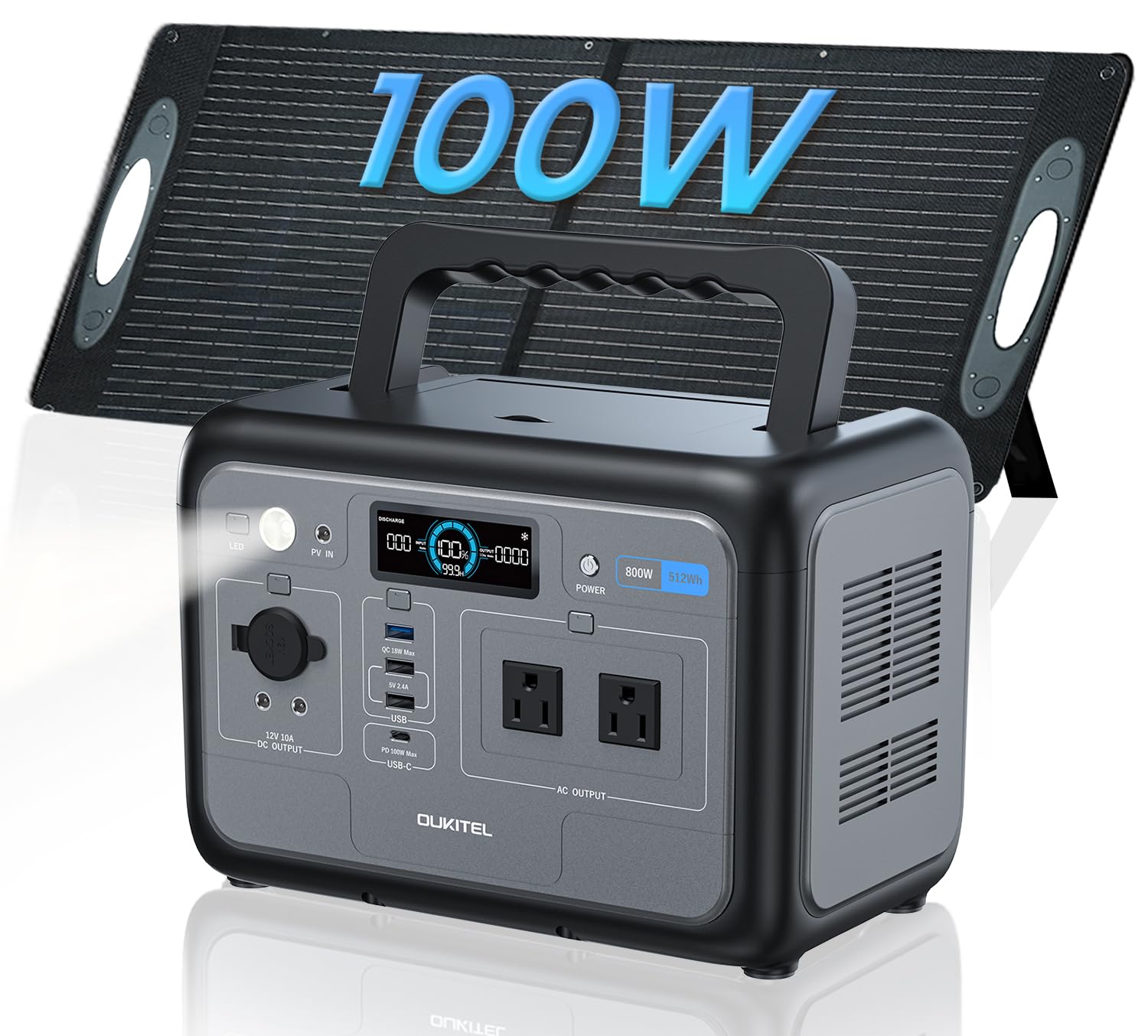
Image: The OUKITEL P800 providing power to a laptop and other devices, demonstrating its use as a home backup or workstation power source.
6.3 Using DC and USB Outputs
The power station includes various DC and USB ports for charging smaller electronics.
- Press the DC power button to activate the DC and USB ports. The DC indicator will light up.
- Connect your devices to the appropriate USB-A, USB-C, or DC5521 ports.
- The USB-C port supports Power Delivery (PD) up to 100W for fast charging compatible laptops and smartphones.
- The QC-USB port supports Quick Charge 3.0 for rapid charging of compatible devices.
- After use, press the DC power button again to turn off these outputs.

Image: The OUKITEL P800 simultaneously charging multiple devices, showcasing its versatility.
6.4 Emergency Power Supply (EPS) Function
The EPS function provides seamless power during outages.
- Connect the OUKITEL P800 to a wall outlet via the AC charging cable.
- Connect your critical devices (e.g., computer, medical equipment) to the AC outlets of the P800.
- In the event of a power failure, the P800 will automatically switch to battery power within 0.01 seconds, ensuring uninterrupted operation for connected devices.

Image: The OUKITEL P800 acting as an EPS for a desktop computer, showing the quick switchover time.
6.5 LED Light Function
The built-in LED light provides illumination in various situations.
- Press the LED light button once for steady illumination.
- Press again to cycle through SOS mode (flashing signal).
- Press a third time for strobe mode (rapid flashing).
- Press a fourth time to turn off the LED light.
7. Maintenance
Proper maintenance ensures the longevity and optimal performance of your OUKITEL P800.
- Storage: If the product is left unused for a long period, charge it to 100% every three months to maintain battery health. Store in a cool, dry place away from direct sunlight and extreme temperatures.
- Cleaning: Use a dry, soft cloth to clean the exterior of the power station. Do not use liquid cleaners or immerse the unit in water.
- Battery Care: The integrated LiFePO4 battery is designed for over 4,000 charge cycles. Avoid fully discharging the battery frequently to prolong its lifespan.
- Safety: Do not disassemble, repair, or modify the unit. Avoid dropping or subjecting the unit to strong impacts.

Image: Internal view of the OUKITEL P800, illustrating the durable LiFePO4 battery and BMS for extended lifespan.

Image: The OUKITEL P800 operating quietly with various safety protections, suitable for indoor use.
8. Troubleshooting
If you encounter issues with your OUKITEL P800, refer to the following common problems and solutions:
| Problem | Possible Cause | Solution |
|---|---|---|
| Power Station does not turn on. | Battery is completely discharged. | Connect to AC power for charging. |
| AC outlets not working. | AC output not activated or overloaded. | Press the AC power button. Reduce connected load if exceeding 800W. |
| Solar charging is slow or not working. | Insufficient sunlight, panel not angled correctly, or cable issue. | Ensure direct sunlight, adjust panel angle, check cable connections. |
| USB/DC ports not working. | DC output not activated. | Press the DC power button. |
| Unit overheats. | Excessive load or poor ventilation. | Reduce load, ensure proper ventilation around the unit. The BMS will automatically shut down if temperature limits are exceeded. |
If the problem persists, please contact OUKITEL customer support for assistance.
9. Specifications
| Feature | Detail |
|---|---|
| Brand | OUKITEL |
| Model | P800 |
| Battery Type | LiFePO4 |
| Capacity | 512Wh |
| AC Output | 800W (Rated), 1600W (Peak) |
| AC Input | 500W Max |
| Solar Input | 200W Max |
| USB-C Output | PD 100W Max |
| USB-A Output | 2x 5V/2.4A, 1x QC3.0 18W Max |
| DC Output | 2x DC5521 (12V/3A), 1x Car Charging Port (12V/10A) |
| Dimensions (L×W×H) | 11.54" × 7" × 8" (29.3cm × 17.8cm × 20.3cm) |
| Weight | 13.6 lbs (6 kg) |
| Lifespan | 4000+ cycles to 80% capacity |
| Operating Temperature | -10°C to 40°C (14°F to 104°F) |
10. Warranty & Support
10.1 Product Warranty
The OUKITEL P800 Portable Power Station comes with a 5-year warranty (2 years standard + 3-year extended). Please retain your proof of purchase for warranty claims.
10.2 Customer Support
For any questions, technical assistance, or warranty inquiries, please contact OUKITEL Official customer service. You can find contact information on the official OUKITEL website or through your purchase platform.
- 24/7 Support Service
- Over 100 Experts & Engineers available for assistance.

Image: OUKITEL's commitment to customer care and support.