
1. Important Safety Instructions
Please read and understand all safety instructions before operating the OUKITEL P1000 PLUS. Failure to follow these instructions may result in electric shock, fire, or serious injury.
- Do not disassemble, repair, or modify the unit.
- Keep the unit away from fire, water, and extreme temperatures.
- Do not use the unit in wet conditions or expose it to rain.
- Ensure proper ventilation during use to prevent overheating.
- Keep out of reach of children and pets.
- Use only approved accessories and charging cables.
- If the unit emits smoke, strange odors, or unusual noise, discontinue use immediately and contact support.
2. Product Overview
The OUKITEL P1000 PLUS is a portable power station designed to provide reliable power for various applications, from home backup to outdoor adventures. It features a robust LiFePO4 battery, multiple output ports, and fast charging capabilities.
Key Features:
- 1800W Continuous Output (3600W Peak): Powers a wide range of appliances.
- 1024Wh Capacity: Extended runtime for essential devices.
- 1200W Fast Charging: Recharges from 0-100% in approximately 41 minutes (AC + Solar).
- LiFePO4 Battery: Offers over 3,500 charge cycles for a lifespan exceeding 10 years.
- App Control: Monitor and manage the power station via a smartphone application.
- 0.01s UPS Function: Provides uninterrupted power during outages.
- 11 Output Ports: Versatile connectivity for various devices.

Image: The OUKITEL P1000 PLUS providing power to common household appliances, demonstrating its capacity and output.
3. Getting Started
Package Contents:
Verify that all items are present in the package:
- OUKITEL P1000 PLUS Power Station
- AC Charging Cable
- Car Charging Cable
- Solar Charging Cable (MC4 to XT60)
- User Manual
Initial Charge:
Before first use, fully charge the OUKITEL P1000 PLUS. Connect the AC charging cable to a wall outlet and to the AC input port on the power station. The display will indicate charging status. It is recommended to fully charge the unit every 3 months if not in regular use to maintain battery health.
4. Operating Instructions
Powering On/Off:
- To turn on the unit, press and hold the main power button for 3 seconds. The display will illuminate.
- To turn off the unit, press and hold the main power button for 3 seconds. The display will turn off.
Using Output Ports:
The P1000 PLUS features 11 output ports:
- 4 x AC Outlets: For standard household appliances (1800W continuous, 3600W peak). Press the AC power button to activate.
- 2 x USB-A Quick Charge 3.0 Ports: For fast charging compatible USB devices.
- 1 x USB-C PD 20W Port: For charging smaller USB-C devices.
- 1 x USB-C PD 100W Port: For fast charging laptops and other high-power USB-C devices.
- 2 x DC5521 Outlets: For 12V DC devices. Press the DC power button to activate.
- 1 x Cigarette Lighter Port: For 12V car accessories. Press the DC power button to activate.
Ensure that the total power consumption of connected devices does not exceed the unit's maximum output capacity to prevent overload.

Image: Detailed view of the OUKITEL P1000 PLUS's optimized and versatile output ports.
5. Charging the Power Station
The OUKITEL P1000 PLUS supports multiple charging methods:
AC Wall Charging:
Connect the AC charging cable to the unit's AC input port and a standard wall outlet. The unit supports 1200W fast AC charging, reaching 0-70% in approximately 30 minutes.

Image: The power station undergoing fast AC charging from a wall outlet.
Solar Charging:
Connect compatible solar panels (up to 500W) to the unit's solar input port using the provided MC4 to XT60 cable. The unit can be fully charged in approximately 2 hours with 500W solar input.

Image: The power station being charged by solar panels in an outdoor setting.
AC + Solar Combined Charging:
For the fastest charging, combine AC and solar inputs. This method can charge the unit from 0-100% in approximately 41 minutes.
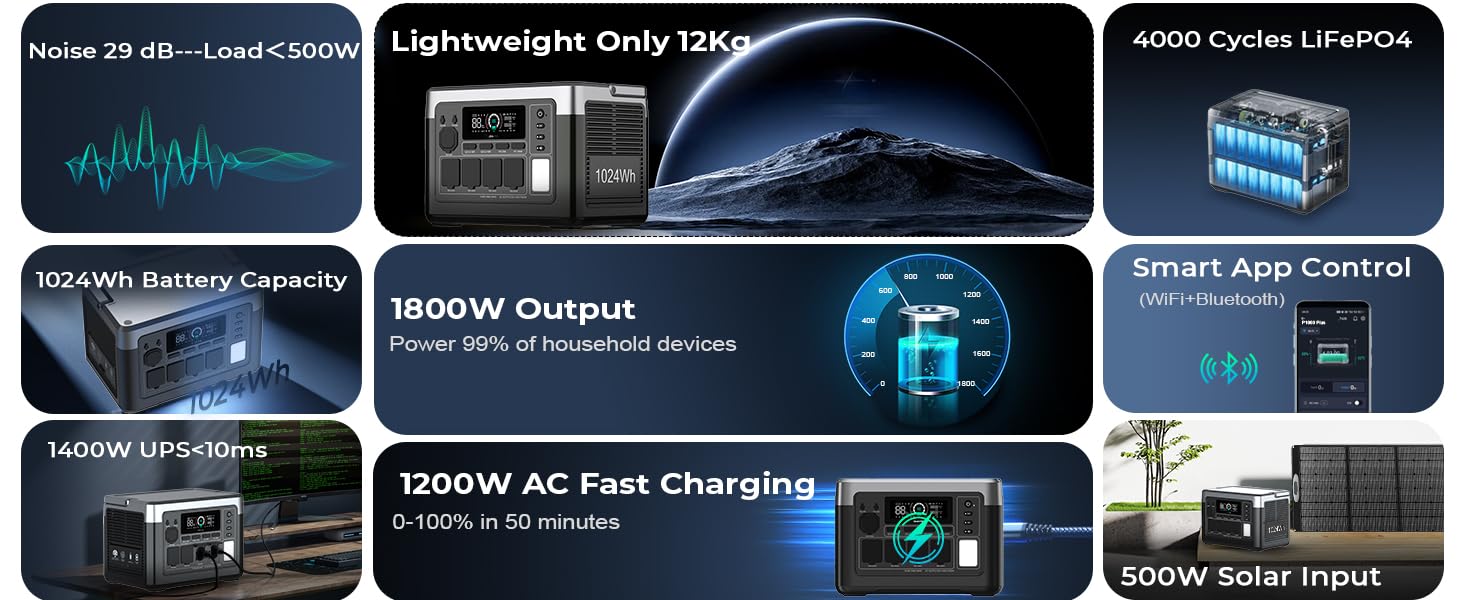
Image: The power station utilizing both AC and solar panel inputs for rapid charging.
Car Charging:
Connect the car charging cable to your vehicle's 12V cigarette lighter socket and the unit's input port. This method is suitable for charging on the go.
6. App Control
The OUKITEL P1000 PLUS can be controlled and monitored using the OUKITEL smartphone application. This allows for remote management and real-time data access.
Connecting to the App:
- Download the OUKITEL app from your device's app store.
- Ensure Bluetooth and Wi-Fi are enabled on your smartphone.
- Open the app and follow the on-screen instructions to pair with your P1000 PLUS.
App Features:
- Monitor real-time battery level, input/output power, and charging status.
- Adjust AC charging power.
- Control individual output ports.
- View temperature and other operational data.

Image: A user interacting with the OUKITEL app on a smartphone to manage the power station.
7. UPS Function (Uninterruptible Power Supply)
The OUKITEL P1000 PLUS features a 0.01-second Uninterruptible Power Supply (UPS) function. When connected to an AC wall outlet and simultaneously powering devices, the unit can automatically switch to battery power in the event of a power outage, ensuring continuous operation for connected electronics.
How to Use UPS:
- Connect the P1000 PLUS to an AC wall outlet using the AC charging cable.
- Connect your critical devices (e.g., computers, medical equipment) to the AC output ports of the P1000 PLUS.
- In case of a power failure, the P1000 PLUS will automatically provide power from its internal battery to the connected devices with minimal interruption.
This feature is ideal for protecting sensitive electronics from data loss or disruption during unexpected power interruptions.

Image: The power station acting as a UPS, keeping essential home appliances running during a power interruption.
8. Maintenance and Storage
General Maintenance:
- Clean the unit with a dry, soft cloth. Do not use abrasive cleaners or solvents.
- Regularly check ports for dust or debris and clean if necessary.
- Avoid dropping or subjecting the unit to strong impacts.
Storage:
- Store the unit in a cool, dry place, away from direct sunlight and heat sources.
- For long-term storage, charge the unit to approximately 50-80% every 3 months to prolong battery life.
- Avoid storing the unit in environments with extreme temperatures (below 0°C or above 40°C).

Image: An illustration of the advanced battery technology and BMS for safety and longevity.
9. Troubleshooting
If you encounter issues with your OUKITEL P1000 PLUS, refer to the following common problems and solutions:
| Problem | Possible Cause | Solution |
|---|---|---|
| Unit does not turn on | Battery is depleted; Power button not pressed long enough. | Charge the unit; Press and hold the power button for 3 seconds. |
| No output from AC ports | AC output not activated; Overload protection triggered. | Press the AC power button; Reduce connected load, then restart AC output. |
| Slow charging via solar | Insufficient sunlight; Panels not optimally angled; Dirty panels. | Ensure direct sunlight; Adjust panel angle; Clean panels. |
| App connection issues | Bluetooth/Wi-Fi off; App not updated; Unit too far from phone. | Enable Bluetooth/Wi-Fi; Update app; Move phone closer to unit. |
If the problem persists, please contact OUKITEL customer support.
10. Specifications
Detailed technical specifications for the OUKITEL P1000 PLUS:
| Feature | Specification |
|---|---|
| Model | P1000 PLUS |
| Battery Type | LiFePO4 |
| Capacity | 1024Wh |
| AC Output | 1800W (Continuous), 3600W (Peak), 120V |
| USB-A Output | 2 x Quick Charge 3.0 |
| USB-C Output | 1 x PD 20W, 1 x PD 100W |
| DC Output | 2 x DC5521, 1 x Cigarette Lighter Port |
| AC Input | 1200W Max |
| Solar Input | 500W Max |
| UPS Switching Time | 0.01s |
| Dimensions (L x W x H) | 11.42" x 6.7" x 7.87" |
| Weight | 13.2 pounds (6 Kilograms) |
| Operating Temperature | 0°C to 40°C (32°F to 104°F) |
11. Warranty and Support
The OUKITEL P1000 PLUS comes with a 5-year warranty, ensuring reliable service and peace of mind. This warranty covers defects in materials and workmanship under normal use.
Customer Support:
For technical assistance, warranty claims, or any questions regarding your OUKITEL P1000 PLUS, please contact our dedicated customer support team. You can find contact information on our official website or through the OUKITEL app.
- Online Support: Visit www.oukitel.com for FAQs and support resources.
- Email Support: Refer to your product packaging or official website for the support email address.