
1. Introduction
Thank you for choosing the THREEKEY TK-CW305 Qi2 25W Magnetic Wireless Charger. This device is designed to provide efficient and fast wireless charging for compatible smartphones and other Qi-enabled devices, featuring a built-in cooling fan for optimal performance and a strong magnetic connection for secure placement. This charger has achieved official Qi2 25W certification, ensuring high standards of wireless charging technology. Please read this manual thoroughly before use to ensure proper operation and safety.

Image 1.1: Confirmation of THREEKEY's Qi2 25W certification, showing the charger's rear with regulatory markings.
2. Package Contents
Verify that all items listed below are included in your package:
- 2 x THREEKEY Qi2 25W Magnetic Wireless Charging Pads
- 2 x 6.6ft (2m) USB-C to USB-C Braided Cables
- 2 x 45W USB-C Power Adapters
- 1 x User Manual (this document)

Image 2.1: The complete package contents, including two magnetic wireless charging pads, two braided USB-C cables, and two 45W power adapters.
3. Product Features
3.1 Qi2 25W Ultra-Fast Wireless Charging
Experience rapid charging speeds with Qi2 certification, delivering up to 25W for compatible devices. This significantly reduces charging time compared to standard wireless chargers.

Image 3.1: Illustration of the 25W fast charging capability, demonstrating an iPhone 16 Pro Max reaching 50% charge in 30 minutes.
3.2 Integrated High-Speed Cooling Fan
The built-in cooling fan actively dissipates heat during charging, ensuring your device and the charger remain at optimal temperatures. This prevents overheating and maintains consistent charging efficiency, potentially reducing device temperature by up to 15°F.

Image 3.2: Depiction of the high-speed cooling fan operating within the charger, visible through a transparent phone case, ensuring stable charging temperatures.
3.3 Magnetic Pinpoint Alignment
Equipped with strong magnets, the charger automatically aligns with your compatible device, ensuring a perfect connection every time. This eliminates guesswork and maximizes charging efficiency.
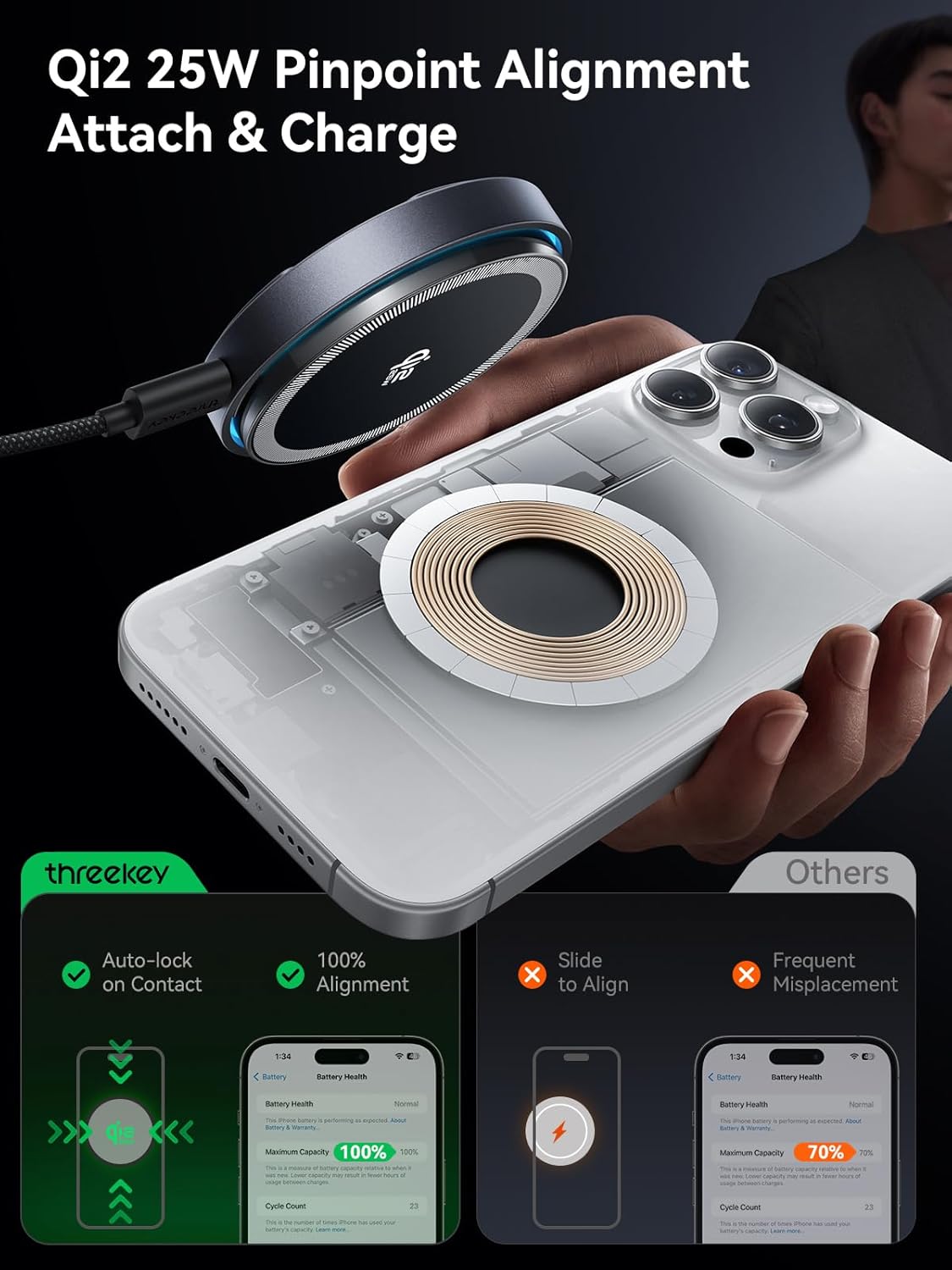
Image 3.3: A diagram illustrating the precise magnetic alignment of the charger with a smartphone, ensuring optimal charging contact.
3.4 Durable 6.6ft Braided Cable
The included 6.6ft (2m) USB-C to USB-C cable features a robust nylon braided design, providing enhanced durability and flexibility for long-term use. It has been tested to withstand over 30,000 bends.

Image 3.4: Close-up view of the durable nylon braided cable, highlighting its robust construction.
4. Setup Instructions
- Connect the Power Adapter: Plug the 45W USB-C power adapter into a wall outlet.
- Connect the Cable: Insert one end of the provided 6.6ft USB-C to USB-C braided cable into the 45W power adapter and the other end into the USB-C port on the THREEKEY wireless charging pad.
- Placement: Place the charging pad on a flat, stable surface. Ensure there is adequate ventilation around the charger for optimal cooling fan operation.
- Power On: Once connected, the charger is ready for use. An indicator light on the charger may illuminate to confirm power.
5. Operating Instructions
- Prepare Your Device: Ensure your smartphone or other device is compatible with Qi2 wireless charging and has a magnetic case if not natively magnetic (e.g., MagSafe compatible iPhones). For optimal charging, remove any thick cases (over 0.16 inches / 4mm) or metallic objects from your device.
- Place Device on Charger: Gently place your device onto the center of the THREEKEY wireless charging pad. The magnetic connection will automatically align your device for optimal charging.
- Confirm Charging: Your device's screen should indicate that it is charging. The cooling fan may activate during charging, especially during fast charging sessions, to maintain temperature.
- Remove Device: Once charging is complete or you need to use your device, simply lift it off the charging pad.

Image 5.1: A graphic illustrating how phone case thickness affects charging performance, with optimal charging for cases under 0.10 inches.
6. Compatibility
The THREEKEY TK-CW305 charger is designed for wide compatibility with various devices:
- iPhone 17/16 Series & iPhone Air: Supports fast wireless charging up to 25W when paired with the included 45W USB-C Power Adapter.
- iPhone 15/14/13/12 Series: Supports fast wireless charging up to 15W when paired with the included 45W USB-C Power Adapter.
- Android Phones: Supports fast wireless charging up to 15W for compatible models (e.g., Samsung Galaxy S23 series, Google Pixel 10 series) when paired with the included 45W USB-C Power Adapter.
- AirPods: Supports 5W wireless charging for AirPods models with a wireless charging case.

Image 6.1: A visual guide to device compatibility and corresponding charging speeds.
7. Safety Information
To ensure safe operation and prevent damage, please observe the following safety precautions:
- Do not expose the charger to water, moisture, or extreme temperatures.
- Avoid dropping, disassembling, or attempting to repair the charger yourself.
- Keep the charger away from strong magnetic fields to prevent interference.
- Do not place metallic objects, credit cards, or NFC tags between your device and the charging pad, as this may interfere with charging or damage the items.
- Use only the provided power adapter and cable for optimal performance and safety.
- Ensure adequate ventilation around the charger during use.
- If the charger emits smoke, unusual odors, or excessive heat, immediately unplug it from the power source.
8. Maintenance
Proper maintenance ensures the longevity and performance of your charger:
- Cleaning: Disconnect the charger from the power source before cleaning. Use a soft, dry, lint-free cloth to wipe the surface of the charging pad. Do not use harsh chemicals, cleaning solvents, or abrasive cleaners.
- Storage: When not in use for extended periods, store the charger in a cool, dry place away from direct sunlight and extreme temperatures.
- Cable Care: Avoid sharp bends or kinks in the cable. Do not pull the cable to disconnect it from the power adapter or charger; always grasp the plug.
9. Troubleshooting
If you encounter issues with your THREEKEY wireless charger, refer to the following table:
| Problem | Possible Cause | Solution |
|---|---|---|
| Device not charging or charging slowly. |
|
|
| LED indicator is too bright for bedroom use. | The LED ring is designed to indicate charging status. | Consider placing the charger where the light is less disruptive, or cover the LED with a non-obstructive material if necessary. The light is largely covered when a phone is placed on the charger. |
| Cooling fan is noisy. | Fan operation is normal during fast charging to prevent overheating. | The fan is designed to operate quietly (below 35 dB). If noise is excessive, ensure the charger is on a flat surface and free from obstructions. If the issue persists, contact support. |
| Charger feels warm during use. | Normal operation, especially during fast charging. | The cooling fan is designed to manage heat. Ensure proper ventilation. If it becomes excessively hot to touch, unplug and contact support. |
10. Specifications
| Feature | Detail |
|---|---|
| Model Number | TK-CW305 |
| Input | 5V/3A, 9V/3A, 12V/3A (via 45W USB-C Power Adapter) |
| Output (Wireless) | Up to 25W (Qi2 Certified) |
| Cable Length | 6.6 ft (2 meters) |
| Cooling System | Integrated High-Speed Cooling Fan |
| Dimensions | Approximately 6.18 x 5.75 x 1.5 inches (Package) |
| Weight | Approximately 15.8 ounces (Package) |
| Manufacturer | Shenzhen Suiqi Innovation Technology Co.,Ltd. |
11. Warranty and Support
THREEKEY products are manufactured to high-quality standards. For warranty information or technical support, please refer to the warranty card included in your package or visit the official THREEKEY website. If you have any questions or require assistance, please contact our customer service team.
Contact Information: Please refer to the product packaging or the official THREEKEY website for the most up-to-date contact details.