
Introduction
Welcome to your Rivins F22 FRS Walkie Talkies. This manual provides detailed instructions for the proper setup, operation, and maintenance of your device to ensure optimal performance and a reliable communication experience. Please read this manual thoroughly before using your walkie talkies.
What's in the Box
The Rivins F22 Walkie Talkie package includes the following components:
- 2 x F22 FRS Walkie Talkies
- 2 x Belt Clips
- 2 x Hand Straps
- 2 x 1400mAh Rechargeable Batteries with Type-C Port
- 1 x 2-in-1 Type-C Charging Cable
- 1 x Instruction Manual
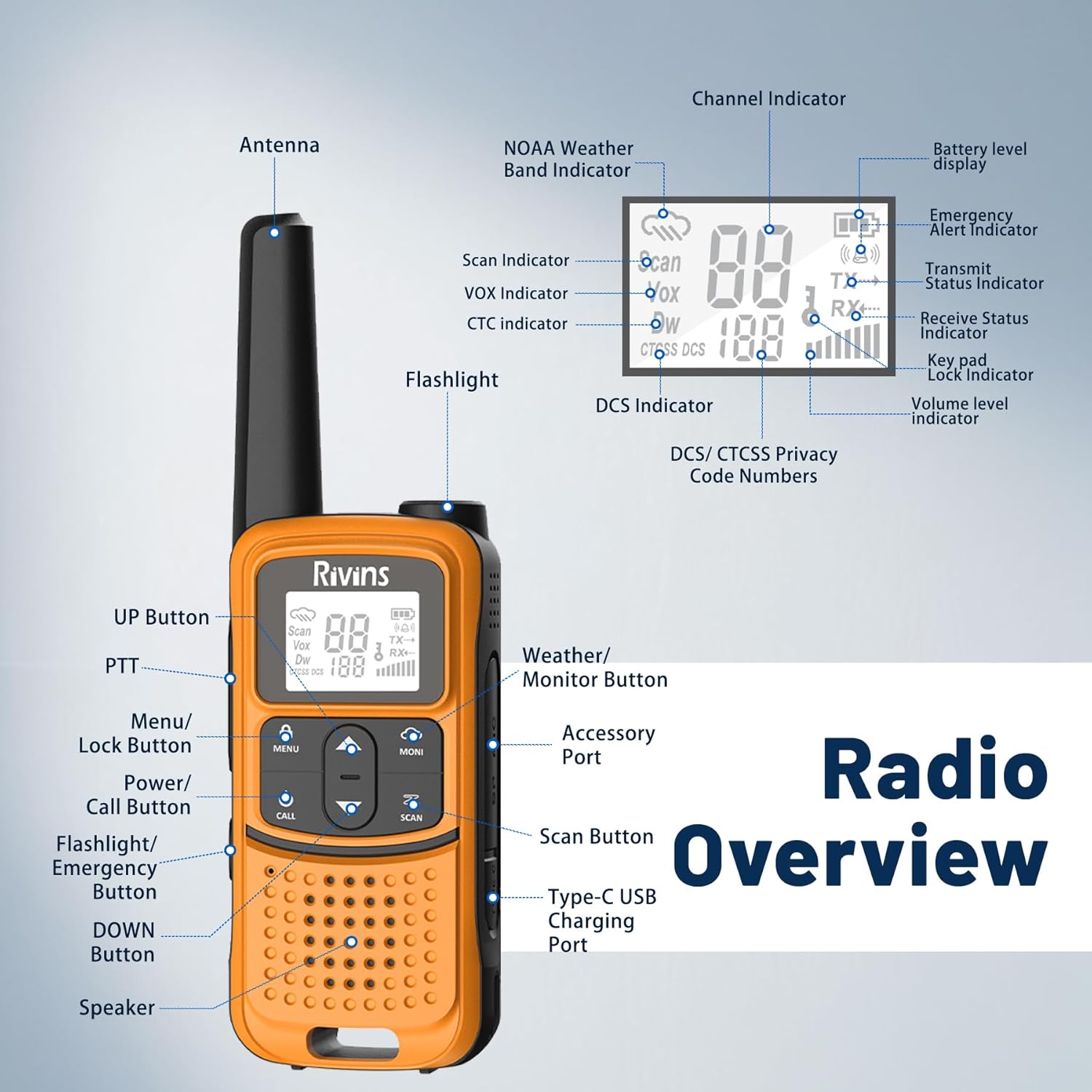
Image: All components included in the Rivins F22 Walkie Talkie package, neatly arranged.
Product Overview
Familiarize yourself with the physical components and display indicators of your Rivins F22 walkie talkie for effective operation.

Image: This diagram illustrates the various parts of the Rivins F22 walkie talkie, including the antenna, flashlight, Push-to-Talk (PTT) button, Menu/Lock button, Power/Call button, Up/Down buttons, Scan button, Weather/Monitor button, Accessory Port, Type-C USB Charging Port, and Speaker. The display indicators include Channel Indicator, NOAA Weather Band Indicator, Scan Indicator, VOX Indicator, CTCSS/DCS Indicator, Battery Level, Emergency Alert, Transmit/Receive Status, Keypad Lock, and Volume Level.
Setup
Battery Installation
The Rivins F22 walkie talkies are equipped with a 1400mAh rechargeable lithium battery. Ensure the battery is correctly installed before use.
- Locate the battery compartment cover on the back of the walkie talkie.
- Gently slide or lift the cover to open the compartment.
- Insert the 1400mAh lithium battery, ensuring the contacts align correctly.
- Close the battery compartment cover until it securely locks into place.

Image: A close-up view of the Rivins F22 walkie talkie's rear, illustrating the process of inserting the rechargeable battery into its compartment.
Charging the Battery
For optimal performance, fully charge the battery before initial use. A complete charge typically takes approximately 2 hours.
- Connect the provided Type-C charging cable to the charging port located on the side or bottom of the walkie talkie.
- Connect the other end of the USB-C cable to a compatible USB power source (e.g., computer, car charger, wall adapter, power bank).
- The battery indicator on the walkie talkie's display will show the charging status.
- Once fully charged, disconnect the charging cable.
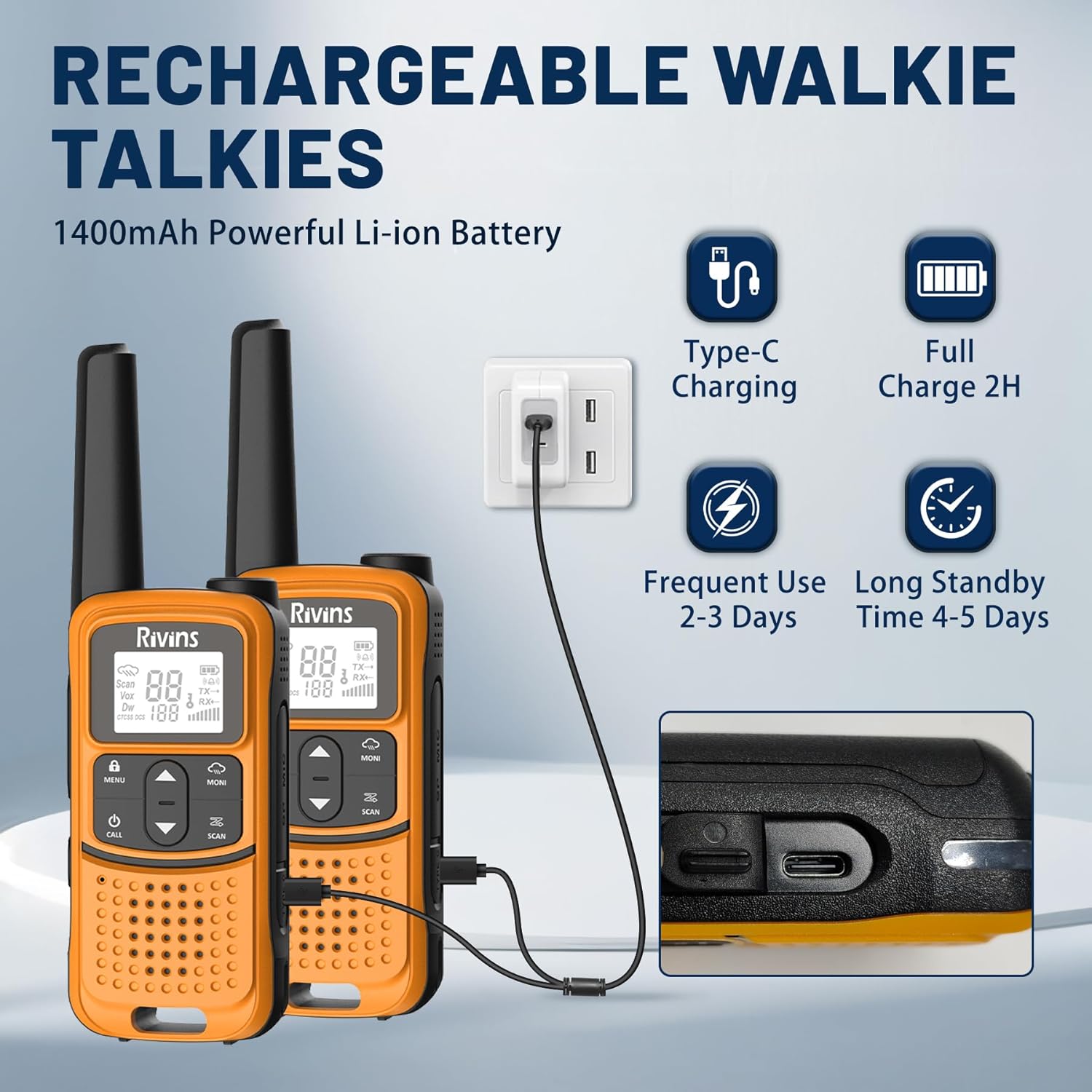
Image: A Rivins F22 walkie talkie being charged via its USB-C port, connected to a wall adapter.

Image: This graphic illustrates the versatility of the Rivins F22's Type-C charging, showing compatibility with computer chargers, car chargers, standard power outlet chargers, and portable power banks.
Attaching the Belt Clip and Hand Strap
The included belt clip and hand strap provide convenient carrying options.
- To attach the belt clip, slide it into the designated slot on the back of the walkie talkie until it clicks securely into place. No screws are required.
- To remove the belt clip, press the release tab (if present) and slide the clip off.
- Thread the hand strap through the small loop located on the top or side of the walkie talkie for added security during use.

Image: A step-by-step visual guide demonstrating the easy installation of the belt clip onto the Rivins F22 walkie talkie.
Operating Instructions
Power On/Off
To power on or off your walkie talkie, press and hold the Power/Call button until the display illuminates or turns off.
Adjusting Volume
Use the UP and DOWN arrow buttons to increase or decrease the speaker volume to a comfortable listening level.
Selecting a Channel
Your Rivins F22 walkie talkie has 22 available channels.
- Press the MENU/LOCK button once to enter channel selection mode. The channel number on the display will flash.
- Use the UP and DOWN arrow buttons to select your desired channel (1-22).
- Press MENU/LOCK again to confirm your selection and exit channel selection mode.
Transmitting and Receiving
To communicate with another walkie talkie, ensure both devices are on the same channel and privacy code.
- To transmit, press and hold the PTT (Push-to-Talk) button located on the side of the radio. Speak clearly into the microphone.
- Release the PTT button to receive messages.
Setting Privacy Codes (CTCSS/DCS)
The F22 offers 155 privacy codes (CTCSS/DCS) to help reduce interference from other users on the same channel.
- Press the MENU/LOCK button twice to enter CTCSS/DCS selection mode. The privacy code will flash.
- Use the UP and DOWN arrow buttons to select your desired privacy code (1-155).
- Press MENU/LOCK to confirm your selection.
Advanced Features
NOAA Weather Alerts
The Rivins F22 can receive NOAA National Weather Service alerts, providing critical information on weather conditions and potential hazards.
- To activate the NOAA Weather Alert function, press the Weather/Monitor button.
- The radio will scan 12 NOAA channels in your area to provide real-time weather updates.
- Press the Weather/Monitor button again to exit NOAA mode.

Image: This graphic highlights the NOAA Weather Alert feature, showing its ability to provide real-time warnings for various natural disasters such as hurricanes, snowstorms, floods, mudslides, wildfires, and earthquakes, crucial for outdoor safety.
VOX (Voice Operated Exchange) Function
VOX allows for hands-free transmission, activating the microphone automatically when you speak.
- Press the MENU/LOCK button repeatedly until "VOX" appears on the display.
- Use the UP and DOWN arrow buttons to select a sensitivity level (1-3, where 3 is the most sensitive) or to turn VOX off.
- Press MENU/LOCK to confirm your selection.

Image: A construction worker is shown communicating hands-free using the walkie talkie, illustrating the convenience of the VOX function in busy environments.
LED Flashlight
The integrated LED flashlight provides convenient illumination.
- To activate the flashlight, short press the Flashlight/Emergency button.
- Short press the button again to turn off the flashlight.

Image: A person is shown using the walkie talkie's built-in LED flashlight at night while camping, demonstrating its utility in dark conditions.
Scan Function
The scan function allows you to monitor all active channels for conversations.
- To activate the scan function, press the SCAN button. The radio will begin scanning through channels.
- When an active channel is detected, the radio will pause on that channel.
- Press the SCAN button again to stop scanning.
Communication Range
The effective communication range of the Rivins F22 walkie talkies varies depending on terrain and obstructions. In open areas, the range can be up to 2-3 miles. In built-up areas with obstructions, the range is typically 0.5-1 mile.

Image: This illustration visually represents the communication range of the walkie talkie, showing a longer range in open, rural areas (2-3 miles) compared to shorter ranges in urban, built-up environments (0.5-1 mile).
Official Product Video
Video: An official video from Rivins Direct demonstrating the features and usage of the Rivins F22 walkie talkies, including their long-range capabilities and suitability for various activities.
Maintenance
Battery Care
- Always charge the battery fully before its first use.
- Avoid completely draining the battery or overcharging it for extended periods to maximize its lifespan.
- If storing the walkie talkie for a long time, charge the battery to about 50% and store it in a cool, dry place.
Cleaning
- Wipe the exterior of the radio with a soft, slightly damp cloth.
- Do not use harsh chemicals, solvents, or abrasive cleaners, as these can damage the casing or internal components.
- Ensure the charging port and accessory port are kept clean and free of dust or debris.
Water Resistance
The Rivins F22 walkie talkie is not water resistant. To prevent damage, avoid exposing the device to rain, splashes, or submersion in water.
Troubleshooting
If you encounter issues with your Rivins F22 walkie talkies, refer to the table below for common problems and their solutions.
| Problem | Possible Cause | Solution |
|---|---|---|
| No Power | Battery is low or not installed correctly. | Charge the battery fully. Ensure the battery is properly seated in the compartment. |
| Cannot Transmit or Receive | Radios are on different channels or privacy codes. Out of communication range. | Verify both radios are set to the same channel and privacy code. Move closer to the other radio. |
| Static or Poor Audio Quality | Weak signal, electromagnetic interference, or low battery. | Move to an open area with fewer obstructions. Change to a different channel. Charge the battery. |
| VOX Not Activating | VOX sensitivity level is too low or the feature is disabled. | Increase the VOX sensitivity level in the menu settings. Ensure VOX is enabled. |
| Keypad Locked | Keypad lock feature is active. | Press and hold the MENU/LOCK button until the lock icon disappears from the display. |
Specifications
Below are the technical specifications for the Rivins F22 Rechargeable Walkie Talkies:
| Feature | Detail |
|---|---|
| Brand | Rivins |
| Model | F22 |
| Color | Orange |
| Number of Channels | 22 FRS Channels |
| Privacy Codes | 155 (CTCSS/DCS) |
| Frequency Range | 462-467 MHz |
| Maximum Talking Range | Up to 3 miles (varies by terrain; 0.5-1 mile in built-up areas, 2-3 miles in open areas) |
| Battery Type | 1400mAh Rechargeable Lithium-ion |
| Battery Life (Average) | Up to 96 hours (standby), 2-3 days (frequent use) |
| Charging Time | Approximately 2 hours for a full charge |
| Charging Port | USB-C |
| Special Features | NOAA Weather Alerts, VOX (Voice Operated Exchange), LED Flashlight, Scan Function |
| Water Resistance Level | Not Water Resistant |
| FCC ID | 2AJGM-F22 |
Warranty and Support
Warranty Information
Your Rivins F22 Walkie Talkie is covered by a 1-Year Warranty from the date of purchase. This warranty covers manufacturing defects under normal use. Please retain your proof of purchase for warranty claims.
Customer Support
For technical assistance, troubleshooting beyond this manual, or to inquire about warranty claims, please contact Rivins customer support. Refer to the product packaging or the official Rivins website for the most current contact information.
Important Safety Guidelines
Please observe the following safety precautions to ensure safe and proper operation of your Rivins F22 walkie talkies:
- Do not operate the radio in environments with potentially explosive atmospheres (e.g., near flammable gas, dust particles, metallic powders).
- Do not attempt to modify or disassemble the radio. Unauthorized modifications can void your warranty and violate FCC regulations.
- Keep the radio away from medical devices such as pacemakers, as it may cause interference.
- Use only Rivins-approved batteries and charging accessories. Using unapproved accessories may cause damage or injury.
- Dispose of batteries responsibly according to local regulations. Do not incinerate batteries.
- Avoid exposing the radio to extreme temperatures, direct sunlight for extended periods, or high humidity.
- Keep the device out of reach of small children to prevent accidental ingestion of small parts.
