
Introduction
Thank you for choosing the CUTEBEE Bread Factory Book Nook Kit. This detailed wooden puzzle kit allows you to construct a miniature mechanical bakery with interactive features including LED lighting, music, and moving parts. This manual provides essential information for assembly, operation, and care to ensure a rewarding building experience and long-lasting enjoyment of your model.
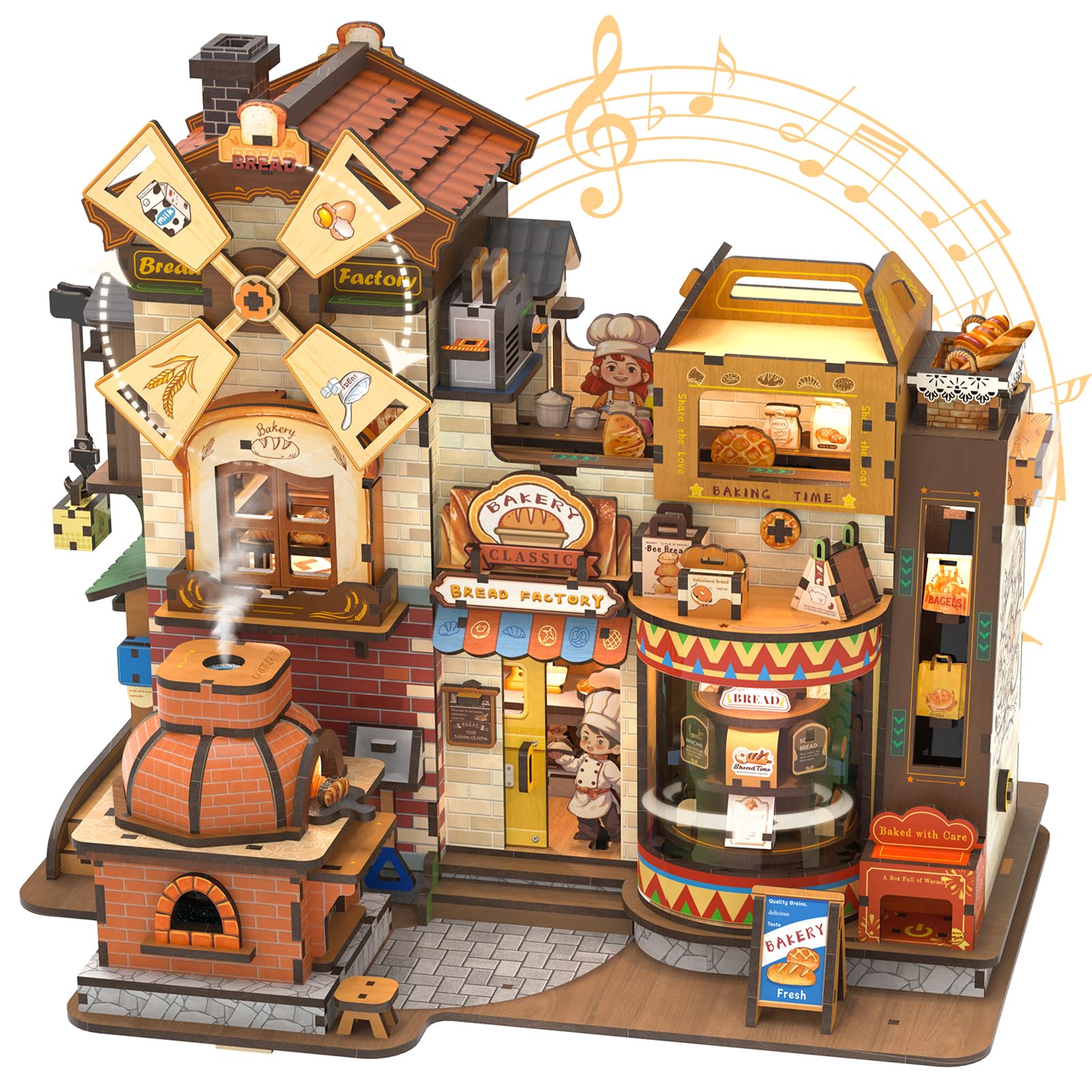
Image: Fully assembled CUTEBEE Bread Factory Book Nook Kit, showcasing its intricate details, windmill, and bakery storefront.
Safety Information
Warning:
- Not suitable for children under 14 years.
- Use only under adult supervision.
- Contains small parts which may pose a choking hazard.
- Keep away from open flames and excessive heat.
- Handle sharp tools (e.g., tweezers) with care during assembly.
Package Contents
Before beginning assembly, please verify that all components are present. The kit includes:
- 576 precisely laser-cut wooden parts.
- Illustrated instruction manual.
- LED lighting components.
- Music module.
- Mechanical gears and rotating elements.
- USB Type-C power cable.
- Note: Silicone glue is required for assembly and is not included in the kit.

Image: Various laser-cut wooden parts, assembly tools like tweezers, and a section of the instruction manual, indicating the detailed nature of the kit.
Assembly Instructions
Assembly typically takes 10-12 hours and requires patience and attention to detail. Follow the included illustrated manual step-by-step.
- Preparation: Unpack all components and organize them by part number as indicated in the manual. Ensure you have a clean, well-lit workspace.
- Part Removal: Carefully detach wooden parts from their sheets. Use a craft knife or sandpaper if necessary to smooth edges.
- Gluing: Apply silicone glue sparingly to designated areas. Allow sufficient drying time for each section before proceeding.
- Mechanical Components: Assemble gears and rotating elements according to the diagrams. Ensure smooth movement before securing.
- Electrical Wiring: Connect LED lights and the music module as shown in the wiring diagrams. Pay close attention to polarity.
- Final Assembly: Join larger sections of the model, ensuring all connections are secure and aligned.

Image: Close-up showing the spinning windmill, packaging conveyor belt, graffiti-covered walls, and the bread delivery chef figure, highlighting the intricate details of the kit.
Operating Instructions
The CUTEBEE Bread Factory features interactive elements for an engaging experience.
Powering On/Off
- Connect the provided USB Type-C cable to the designated port on the model and to a 5V power source (e.g., USB wall adapter, power bank).
- Locate the touch sensor (often integrated into a specific part of the model, refer to the manual for exact location).
- Short Tap: A short tap on the touch sensor will activate the music, LED lights, and mechanical movements (e.g., rotating windmill, conveyor belt).
- Long Press: A long press on the touch sensor will power off all functions.

Image: Underside view of the CUTEBEE Bread Factory model, showing the Type-C power input port.
Interactive Features
- LED Lighting: Warm LED lights illuminate the bakery interior and exterior, creating a cozy atmosphere.
- Music: A gentle melody plays when activated, enhancing the miniature world.
- Mechanical Movements: Observe the rotating windmill, the 360° bread display, and the historical oven with integrated rotation mechanisms.
- Mist Effect: A subtle mist effect may be present, adding to the realism (ensure water reservoir, if applicable, is filled as per manual).

Image: Two views of the CUTEBEE Bread Factory, one in daylight and one at night with the LED lights illuminated, demonstrating the touch switch functionality.
Maintenance
To ensure the longevity and appearance of your CUTEBEE Bread Factory Book Nook Kit, follow these maintenance guidelines:
- Cleaning: Gently dust the model with a soft, dry cloth or a soft brush. Avoid using liquid cleaners or abrasive materials.
- Storage: Store the model in a dry environment, away from direct sunlight and extreme temperature fluctuations, to prevent warping or fading of the wooden parts.
- Electrical Components: Ensure the USB Type-C connection is secure. Do not attempt to modify the electrical wiring.
- Moving Parts: Periodically check mechanical parts for smooth operation. If any part becomes stiff, ensure no dust or debris is obstructing its movement.
Troubleshooting
| Problem | Possible Cause | Solution |
|---|---|---|
| Lights/Music/Movement not working |
|
|
| Mechanical parts are stiff or not moving |
|
|
| Parts do not fit together |
|
|
Specifications
| Feature | Detail |
|---|---|
| Product Dimensions | 27.1 x 17.5 x 23.1 cm (L x W x H) |
| Item Weight | 1.69 Kilograms |
| Number of Parts | 576 |
| Material | Wood |
| Recommended Age | 14+ years (Manufacturer recommended age: 82 years and older, Minimum age by manufacturer: 980 months - Note: This appears to be an error in the source data, 14+ is more appropriate for complex models) |
| Power Source | USB Type-C (5V) |
| Features | LED Lighting, Music, Mechanical Movement (rotating windmill, bread display, oven), Touch Sensor Control |
| Model Number | CB-EAHB501-DE |
Warranty and Support
CUTEBEE provides a 100% quality control before shipping. If you encounter any issues or have questions regarding your kit, please contact CUTEBEE customer support. Refer to the packaging or the seller's information for contact details.
Please retain your proof of purchase for warranty claims.
