
OYLUS ZB-001H
Contents
OYLUS 2-Inch Clear Ice Ball Maker (Model ZB-001H) Instruction Manual
Your Guide to Perfect Ice Spheres
1. Introduction
Thank you for choosing the OYLUS 2-Inch Clear Ice Ball Maker, Model ZB-001H. This appliance is designed to produce crystal-clear, slow-melting ice spheres for an enhanced beverage experience. Please read this manual thoroughly before operating the machine to ensure safe and efficient use. Keep this manual for future reference.
2. Important Safety Information
To reduce the risk of fire, electric shock, or injury, always follow basic safety precautions when using electrical appliances. This includes:
- Read all instructions before use.
- Do not touch hot surfaces. Use handles or knobs.
- To protect against electrical shock, do not immerse cord, plugs, or the appliance in water or other liquid.
- Close supervision is necessary when any appliance is used by or near children.
- Unplug from outlet when not in use and before cleaning. Allow to cool before putting on or taking off parts.
- Do not operate any appliance with a damaged cord or plug or after the appliance malfunctions or has been damaged in any manner.
- Do not use outdoors.
- Do not let cord hang over edge of table or counter, or touch hot surfaces.
- Do not place on or near a hot gas or electric burner, or in a heated oven.
- Always attach plug to appliance first, then plug cord into the wall outlet. To disconnect, turn any control to “off,” then remove plug from wall outlet.
- Do not use appliance for other than intended use.
3. What's in the Box
Upon unpacking, please ensure all items are present:
- OYLUS 2-Inch Clear Ice Ball Maker Unit
- Ice Basket
- Ice Scoop/Tongs
- Water Supply Hose (for automatic fill)
- Drain Hose Connector and Plug (for drainage)
- User Manual (this document)
4. Product Overview
The OYLUS Ice Ball Maker features a sleek design with an intuitive LCD touch panel and a transparent viewing window. Key components include:
- LCD Touch Panel: Displays operational status, alerts, and allows control of functions.
- Transparent Viewing Window: Allows monitoring of ice production and ice levels.
- Ice Basket: Removable basket for collecting and storing ice balls.
- Water Tank: Internal reservoir for manual water filling.
- Water Inlet Port: Located at the back for connecting an external water supply hose.
- Water Outlet Port: Located at the back for connecting a drain hose.

Figure 1: OYLUS 2-Inch Clear Ice Ball Maker

Figure 2: LCD Touch Panel for easy control and status display.
5. Setup
5.1 Unpacking and Placement
- Carefully remove the ice maker from its packaging.
- Place the unit on a stable, level surface away from direct sunlight and heat sources. Ensure adequate ventilation around the unit.
- Allow the unit to stand upright for at least 2 hours before plugging it in, especially if it was transported horizontally.
5.2 Initial Cleaning
Before first use, it is recommended to run a self-cleaning cycle:
- Fill the water tank with clean drinking water.
- Press the self-cleaning button on the LCD panel. The machine will automatically rinse its internal components.
- Once the cycle is complete, drain the water using the drain hose (see Section 6.3).

Figure 3: The self-cleaning system ensures hygienic ice production.
5.3 Water Filling Options
The OYLUS Ice Ball Maker offers two methods for water supply:
- Manual Water Fill: Remove the ice basket, fill the water tank with clean drinking water up to the MAX line, then replace the ice basket.
- Automatic Water Line Connection: For continuous operation, connect the provided water supply hose to the 'water inlet' port at the back of the machine and to a potable water source. Ensure the connection is secure to prevent leaks.

Figure 4: Dual water filling options for convenience.
Video 1: Demonstrates the effortless use of the OYLUS Smart Ice Ball Maker, including water filling and ice retrieval.
6. Operation
6.1 Making Ice Balls
- Ensure the water tank is filled or the water line is connected.
- Press the Power button on the LCD touch panel to start the ice-making process. The machine will begin producing clear ice spheres.
- The machine can produce 4 ice spheres in approximately 35 minutes, with a daily capacity of up to 144 ice balls.
- The built-in cold storage helps keep the finished ice balls chilled. For longer-term storage, transfer ice balls to a freezer.

Figure 5: Enjoy crystal-clear ice spheres in your beverages.

Figure 6: Solid, dense ice balls melt slowly, preserving drink flavor.
Video 2: An overview of the OYLUS 2-inch Clear Sphere Ice Maker, highlighting its features and ice quality.
6.2 LCD Indicators
The LCD panel provides visual cues for the machine's status:
- Water Shortage Alert: An indicator will light up when the water level is low, prompting you to refill the tank or check the water line connection.
- Ice Full Alert: The machine will pause operation and an indicator will light up when the ice basket is full, preventing overflow.

Figure 7: Water Shortage Alert on the LCD panel.

Figure 8: Ice Full Alert on the LCD panel.
7. Maintenance
7.1 Self-Cleaning Function
Regularly use the self-cleaning function to maintain hygiene and extend the machine's lifespan:
- Ensure the water tank is filled with clean water.
- Press the dedicated self-cleaning button on the LCD panel. The machine will perform an automatic cleaning cycle.
- After the cycle, drain the water as described below.
7.2 Draining Water
To drain water from the machine:
- Locate the 'water outlet' port at the back of the machine.
- Remove the clip from the port.
- Insert the water drain hose connector (10mm diameter) into the port and reattach the clip.
- Connect the other end of the drain hose to a suitable drain or container.
- If not using the drain hose, attach the provided drain hose plug to seal the port after draining.
8. Troubleshooting
Refer to the following table for common issues and their solutions:
| Problem | Possible Cause | Solution |
|---|---|---|
| Machine does not turn on | No power supply | Check power cord connection and wall outlet. |
| Water Shortage Alert (indicator on) | Low water level in tank or disconnected water line | Refill water tank or ensure water supply hose is properly connected and water source is active. |
| Ice Full Alert (indicator on) | Ice basket is full | Remove ice balls from the basket. The machine will resume operation automatically. |
| Ice balls are not clear | Water quality issues | Use filtered or purified water with a TDS value less than 200 for optimal clarity. |
| Unusual noise during operation | Normal operation sounds or unit not level | Ensure the unit is on a stable, level surface. If noise persists and is excessive, contact customer support. |
9. Specifications
- Model Name: ZB-001H
- Product Dimensions: 18"D x 17.3"W x 12.5"H
- Capacity: 0.4 Gallons (Water Tank)
- Wattage: 5 watts
- Voltage/Frequency: 110V/60Hz
- Rated Current: 2.5A
- Refrigerant: R290
- Ice Production: Up to 144 ice balls per day
- Ice Ball Size: 2 inches
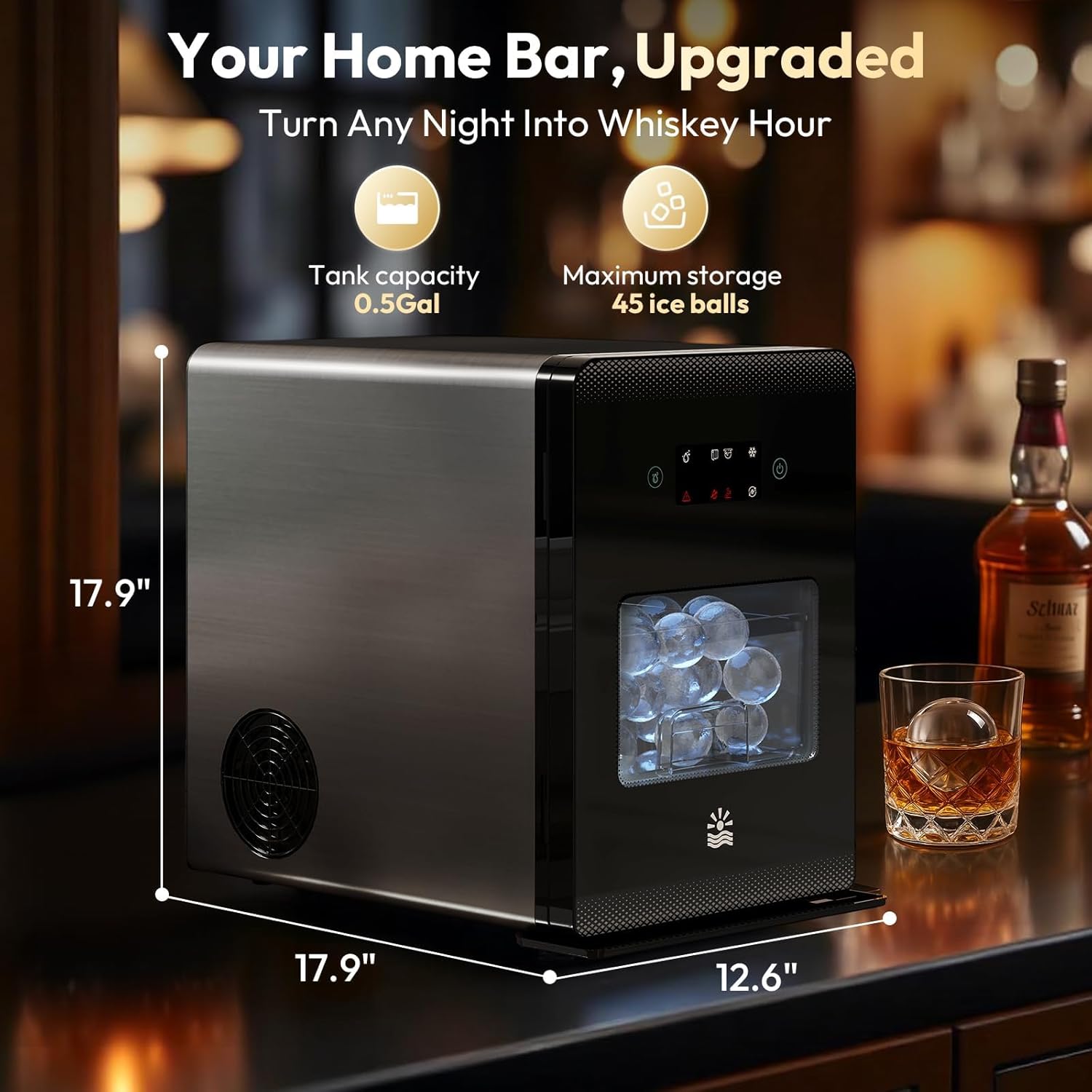
Figure 9: Product dimensions for placement reference.
10. Warranty and Support
The OYLUS 2-Inch Clear Ice Ball Maker comes with a 1-year quality protection. For any inquiries, technical assistance, or warranty claims, please contact OYLUS customer support. Our 24/7 rapid response system is available to assist you.
For support, please visit the official OYLUS website or refer to the contact information provided on your product packaging.
Documents and downloads
Ask a question about this manual
Ask about setup, troubleshooting, compatibility, parts, safety, or missing instructions. Manuals+ will review the question and use this page’s manual context to help answer it.