
1. Introduction
Thank you for choosing the Garvee 55-inch Coffee Bar Cabinet. This manual provides essential information for the safe assembly, operation, and maintenance of your new cabinet. Please read these instructions thoroughly before beginning assembly and retain them for future reference.
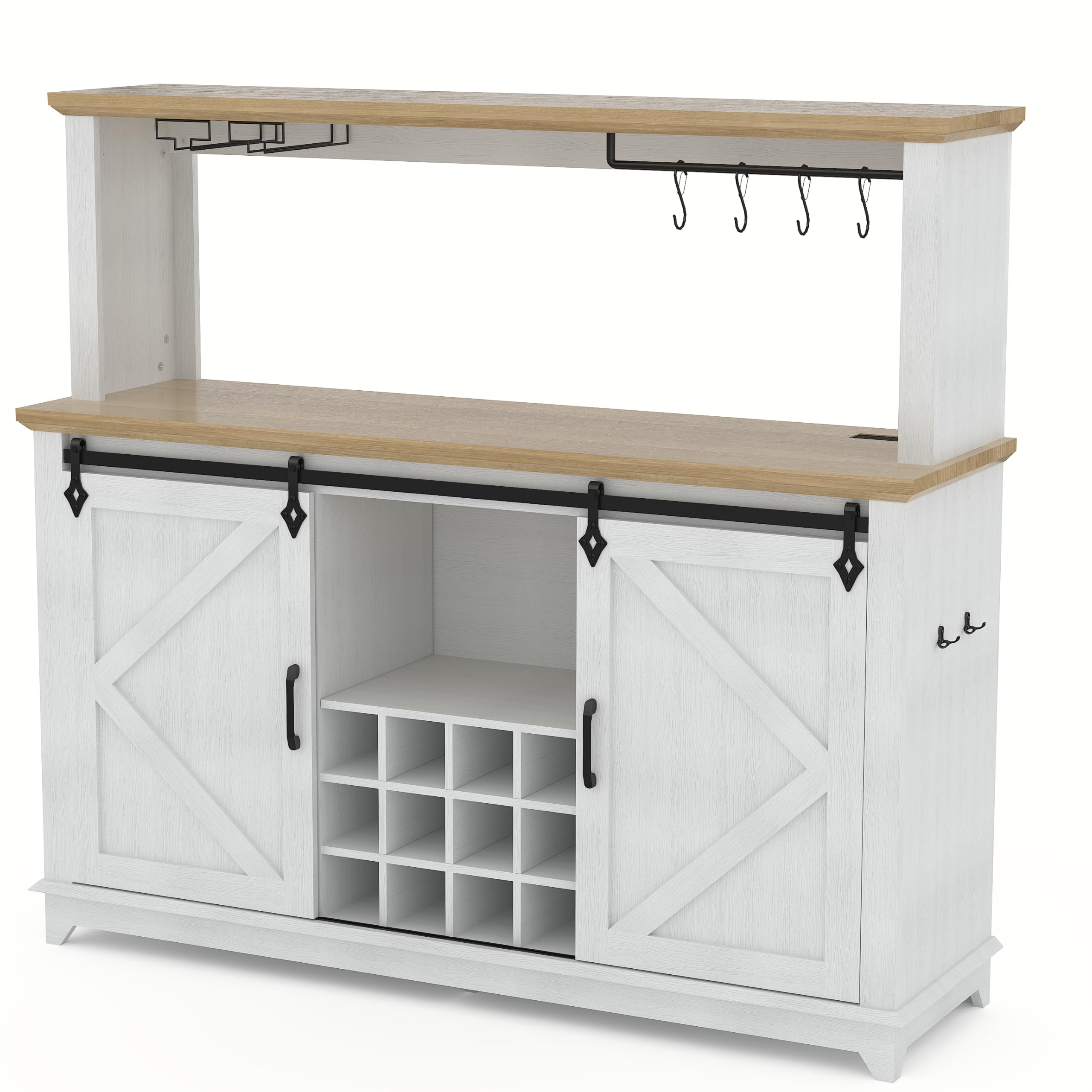
Image 1.1: The Garvee 55-inch Coffee Bar Cabinet in White, showcasing its overall design with sliding barn doors and upper shelving.
2. Safety Information
Please observe the following safety precautions during assembly and use of this product:
- Keep all small parts and packaging materials away from children and pets to prevent choking hazards.
- Assemble the cabinet on a soft, clean surface to prevent scratches.
- Ensure all connections are securely tightened before use. Periodically check and re-tighten hardware as needed.
- Do not overload shelves or drawers. Refer to the specifications for weight limits.
- Use the included anti-tip kit to secure the cabinet to a wall, especially in homes with children or pets, to prevent tipping injuries.
- Do not place hot items directly on the cabinet surface without protective padding.
- Ensure the power outlet and USB ports are used with compatible devices and within specified electrical ratings. Avoid liquid spills near electrical components.
3. Setup and Assembly
3.1 Package Contents
Before assembly, verify that all parts and hardware are present by comparing them against the parts list provided in your assembly guide. If any components are missing or damaged, contact customer support immediately.
3.2 Assembly Instructions
The Garvee Coffee Bar Cabinet is designed for hassle-free assembly. Follow the detailed, step-by-step instructions provided in the separate assembly manual included with your product. All parts are pre-drilled and labeled for ease of identification.
- Unpack all components and lay them out on a clean, soft surface.
- Identify each part using the labels and the assembly manual's parts list.
- Follow the graphical and written instructions carefully, ensuring all fasteners are tightened appropriately. Do not overtighten.
- Install the anti-tip kit as directed to secure the cabinet to a wall.

Image 3.1: Diagram illustrating the dimensions of the Garvee Coffee Bar Cabinet, including height, width, and depth, and weight capacities for different sections.
4. Operating Instructions
4.1 Sliding Barn Doors
The cabinet features two smooth-gliding barn doors. To open or close, gently slide the door along its track. Ensure the track is free from obstructions for optimal movement.

Image 4.1: Detail showing the smooth-glide mechanism of the barn door, highlighting its movement and the integrated wine bottle storage.
4.2 Built-in Charging Station
The cabinet includes a built-in charging station with 2 AC outlets (125V/12A 60Hz 1500W) and 2 USB ports (5V/2A Max). Connect the cabinet's power cord to a standard wall outlet. Use the outlets and USB ports to power or charge compatible electronic devices.
- AC Outlets: For appliances requiring standard wall power. Do not exceed 1500W total.
- USB Ports: For charging smartphones, tablets, and other USB-powered devices.

Image 4.2: Close-up view of the built-in charging station, showing the two AC outlets and two USB ports, with a phone charging.
4.3 Adjustable RGB LED Lighting
The integrated LED strip offers three lighting modes. Use the control switch (location specified in assembly manual) to cycle through the modes:
- Blue Light: Provides a cool, ambient glow.
- Natural White: Offers bright, clear illumination.
- Yellow Light: Creates a warm, inviting atmosphere.

Image 4.3: Visual representation of the adjustable RGB light strip, demonstrating the blue, natural white, and yellow light modes within the cabinet.
4.4 Storage and Organization
The cabinet provides various storage options:
- Upper Shelves: For displaying decorative items or storing frequently used coffee bar essentials.
- Wine Glass Rack: Designed to hold wine glasses securely.
- Coffee Cup Hooks: Convenient for hanging coffee mugs.
- Storage Drawers: For small items, cutlery, or accessories.
- Wine Bottle Rack: Holds multiple wine bottles horizontally.
- Adjustable Shelves: Customize shelf height to accommodate various items.

Image 4.4: Diagram illustrating the various storage zones within the cabinet, including extra storage, common storage, closed storage, open storage, mug/wine display, and towel storage areas.
5. Maintenance
Proper care will extend the life and appearance of your Garvee Coffee Bar Cabinet.
- Cleaning: Wipe surfaces with a soft, damp cloth. Avoid harsh chemicals or abrasive cleaners, which can damage the finish. For spills, clean immediately.
- Hardware: Periodically check all screws and fasteners to ensure they remain tight. Re-tighten as necessary.
- Sliding Doors: Keep the barn door tracks clean and free of debris to ensure smooth operation.
- Electrical Components: Ensure the power outlet and LED strip areas remain dry. Disconnect power before cleaning near electrical components.
- Environmental Conditions: Avoid exposing the cabinet to extreme temperature changes or high humidity, which can affect the engineered wood.
6. Troubleshooting
Refer to the following table for common issues and their solutions.
| Problem | Possible Cause | Solution |
|---|---|---|
| LED lights not working. |
|
|
| Power outlets/USB ports not functioning. |
|
|
| Sliding barn doors stick or are difficult to move. |
|
|
7. Specifications
| Feature | Detail |
|---|---|
| Brand | Garvee |
| Model Number | PHK_34PJLVCH-8133xN2aL |
| Color | White |
| Material | Engineered Wood |
| Product Dimensions (D x W x H) | 16"D x 55"W x 50"H |
| Power Outlet | 2 AC Outlets (125V/12A 60Hz 1500W) |
| USB Ports | 2 USB Ports (5V/2A Max) |
| LED Lighting | Adjustable RGB Light Strip (3 Modes) |
| Number of Drawers | 6 |
| Number of Doors | 2 (Sliding Barn Style) |
| Assembly Required | Yes |
8. Support and Warranty
Garvee is committed to providing excellent customer service.
8.1 Customer Support
If you have any questions regarding assembly, missing parts, operation, or general inquiries, please contact Garvee customer support. Dedicated support is available 24/7 to assist you before and after purchase.
For assistance, please visit the Garvee Store on Amazon or refer to the contact information provided in your purchase documentation.
8.2 Return Policy
This product is eligible for a 30-day easy return policy. Please refer to your purchase platform's return guidelines for detailed information on initiating a return or exchange.