1. Introduction
Thank you for choosing the Berrcom Thermometer Bundle. This package includes two essential devices for accurate temperature measurement: the Berrcom Digital Thermometer DT101 and the Berrcom Forehead and Ear Thermometer ET003. This manual provides detailed instructions for the safe and proper use, maintenance, and troubleshooting of both devices. Please read it thoroughly before first use.

Image 1.1: The Berrcom DT101 Digital Thermometer (left) and the Berrcom ET003 Forehead and Ear Thermometer (right).
2. Safety Information
- Always read the instructions carefully before use.
- Do not allow children to take their own temperatures unsupervised.
- Do not drop the thermometer or expose it to heavy shock.
- Avoid exposing the thermometer to direct sunlight, extreme temperatures, or high humidity.
- Do not attempt to disassemble or repair the thermometer yourself.
- Keep batteries out of reach of children. If swallowed, seek medical attention immediately.
- Consult a physician if you have concerns about your temperature readings.
3. Berrcom Digital Thermometer DT101 Overview
3.1 Key Features
- Large LCD screen for quick and clear readings.
- Audible beeper alarm for temperature completion.
- Memory display for the last reading.
- Automatic shut-off to conserve battery life.
- Easily switchable units between Fahrenheit (℉) and Celsius (℃).
- Suitable for oral, rectal, and underarm use for all ages.
- Waterproof design for easy cleaning.

Image 3.1: The Berrcom DT101 Digital Thermometer shown in its product box.

Image 3.2: The DT101 thermometer offers high accuracy measurements with a precision of ±0.1℃/0.2℉.
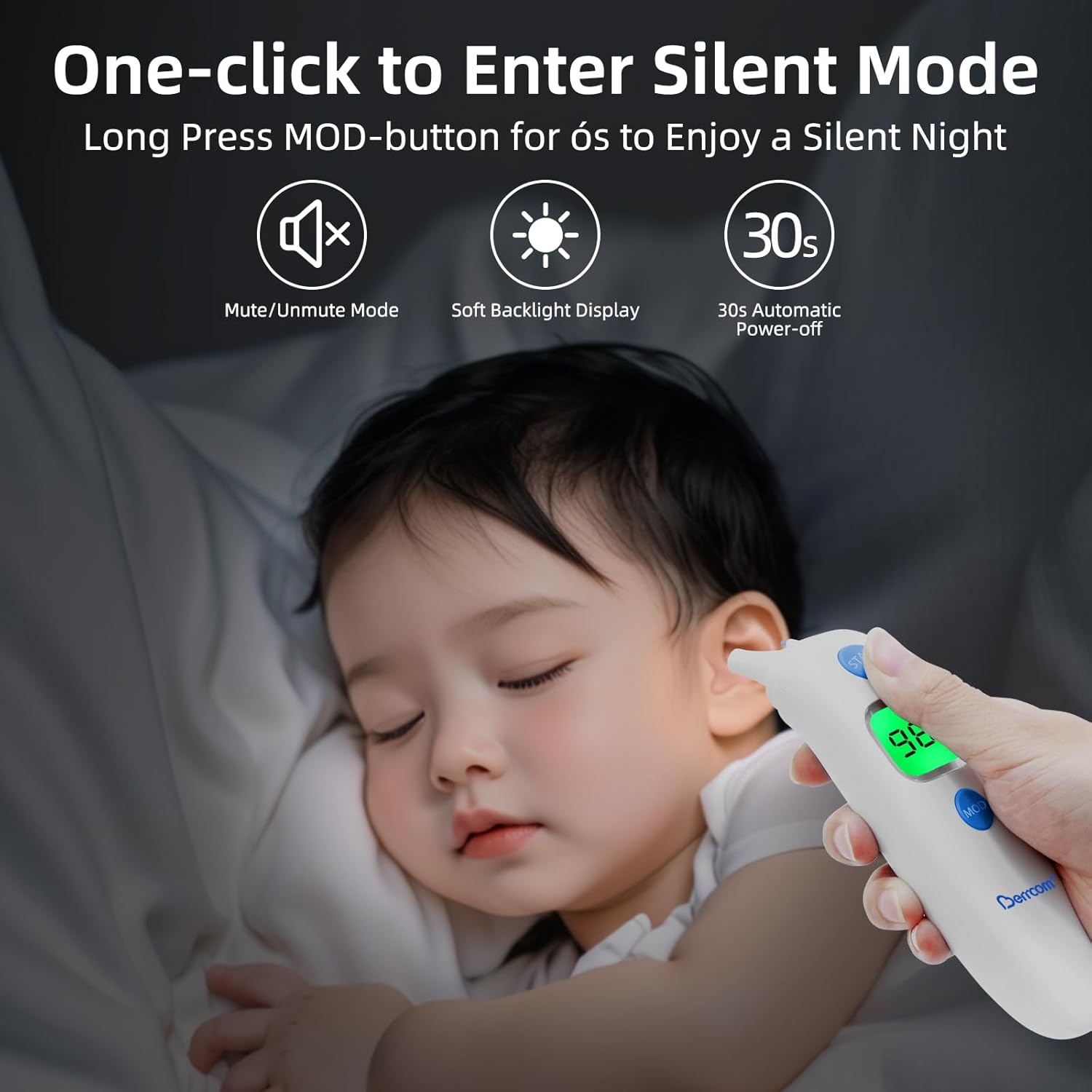
Image 3.3: The DT101 is versatile, suitable for oral, rectal, and underarm temperature measurement in babies, kids, and adults.

Image 3.4: The DT101 thermometer is waterproof, allowing for easy and hygienic cleaning.
4. Berrcom Forehead and Ear Thermometer ET003 Overview
4.1 Key Features
- Dual mode: Forehead and Ear temperature measurement.
- Suitable for babies, children, and adults.
- ℃ and ℉ units are easily switchable.
- Automatic shut-off function (30 seconds) to save energy.
- Fever warning system: short beep and red backlight for temperatures above normal range.
- 4 measurement modes and 2-color backlight display.
- 20 sets of memory recall.
- Silent mode for undisturbed measurements.

Image 4.1: The Berrcom ET003 thermometer with its protective cap, which needs to be removed for ear measurements.

Image 4.2: Key features of the ET003 include multiple measurement modes, backlight display, memory recall, and fever alerts.

Image 4.3: The ET003 features a silent mode, activated by a long press of the MOD button, ideal for measuring temperature without disturbing a sleeping child.

Image 4.4: The ET003 provides intelligent fever alarms with two backlight indicators: green for normal temperature and red for elevated temperatures (fever).
5. Setup and Initial Use
5.1 Battery Installation
Both thermometers require batteries for operation. Please refer to the specific battery compartment on each device. Typically, this involves sliding open a cover, inserting the batteries according to the polarity indicators (+/-), and then closing the cover securely.
5.2 Unit Selection (℃/℉)
To switch between Celsius (℃) and Fahrenheit (℉):
- DT101: With the device off, press and hold the power button for approximately 3 seconds until the unit changes.
- ET003: With the device off, press and hold the 'MOD' button for approximately 3 seconds until the unit changes.
6. Operating Instructions
6.1 Berrcom Digital Thermometer DT101
- Power On: Press the power button. The display will show the last measured temperature for 2 seconds, then 'Lo℉' or 'Lo℃' indicating it's ready for measurement.
- Placement:
- Oral Use: Place the tip under the tongue, close the mouth, and breathe normally through the nose.
- Rectal Use: Apply a water-soluble lubricant to the tip. Gently insert the tip no more than 1/2 inch into the rectum.
- Underarm (Axillary) Use: Place the tip in the armpit, ensuring good skin contact. Hold the arm firmly against the body.
- Measurement: The '℉' or '℃' symbol will flash during measurement. A beeping sound will indicate completion (approximately 10-60 seconds depending on site).
- Read Result: The temperature will be displayed.
- Power Off: Press the power button to turn off, or it will automatically shut off after approximately 10 minutes of inactivity.
6.2 Berrcom Forehead and Ear Thermometer ET003
- Power On: Press the 'START' button. The device will perform a self-test, display the last reading, and then show '---℉' or '---℃' indicating readiness.
- Mode Selection: Press the 'MOD' button to switch between Forehead mode (icon of a head) and Ear mode (icon of an ear).
- Measurement:
- Forehead Mode: Ensure the probe cover is on. Gently place the probe against the center of the forehead. Press and release the 'START' button.
- Ear Mode: Remove the probe cover. Gently insert the probe into the ear canal. Press and release the 'START' button.
- Read Result: The temperature will be displayed on the LCD screen. The backlight color will indicate temperature status (Green: Normal, Red: Fever).
- Memory Recall: While the device is on, briefly press the 'MOD' button to cycle through the last 20 readings.
- Silent Mode: With the device on, long press the 'MOD' button for 6 seconds to toggle silent mode on/off.
- Power Off: The device will automatically shut off after approximately 30 seconds of inactivity.
7. Maintenance
7.1 Cleaning
- DT101: Clean the thermometer tip with an alcohol swab or cotton swab moistened with 70% isopropyl alcohol before and after each use. The DT101 is waterproof and can be rinsed under water, but do not immerse the entire device for extended periods.
- ET003: For the forehead sensor, wipe gently with an alcohol swab. For the ear probe, clean the tip with an alcohol swab. Ensure the probe is completely dry before use. Do not use abrasive cleaners.
7.2 Storage
Store both thermometers in a cool, dry place, away from direct sunlight and extreme temperatures. Keep them in their protective cases or original packaging when not in use.
7.3 Battery Replacement
When the low battery indicator appears on the display, replace the batteries immediately. Refer to section 5.1 for battery installation instructions. Dispose of used batteries according to local regulations.
8. Troubleshooting
| Problem | Possible Cause | Solution |
|---|---|---|
| Thermometer does not turn on. | Dead batteries or incorrect battery installation. | Replace batteries, ensuring correct polarity. |
| 'Lo℉' or 'Lo℃' displayed after measurement. | Temperature is below the measurable range. | Ensure proper contact with the measurement site. If ambient temperature is too low, warm the device slightly. |
| 'Hi℉' or 'Hi℃' displayed. | Temperature is above the measurable range. | This indicates a very high temperature. Seek medical attention if concerned. |
| Inaccurate readings. | Improper placement, movement during measurement, or dirty sensor. | Ensure correct placement and stillness. Clean the sensor according to maintenance instructions. Wait 30 minutes after eating, drinking, or exercising before taking oral temperature. |
| ET003 backlight is red. | Indicates a fever (temperature above normal range). | This is a feature, not a malfunction. Consult a doctor if fever persists or is high. |
9. Specifications
9.1 Berrcom Digital Thermometer DT101
- Measurement Range: 89.6℉ - 109.2℉ (32.0℃ - 42.9℃)
- Accuracy: ±0.2℉ (±0.1℃)
- Display: LCD
- Battery: 1.5V button cell battery (e.g., LR41)
- Auto Shut-off: Approx. 10 minutes
9.2 Berrcom Forehead and Ear Thermometer ET003
- Measurement Range: 89.6℉ - 109.2℉ (32.0℃ - 42.9℃)
- Accuracy: ±0.4℉ (±0.2℃) for forehead, ±0.2℉ (±0.1℃) for ear
- Display: Backlit LCD
- Battery: 2 x AAA batteries (not included)
- Memory: 20 readings
- Auto Shut-off: Approx. 30 seconds
10. Warranty and Support
Berrcom products are manufactured under strict quality guidelines. For warranty information, technical support, or service inquiries, please refer to the warranty card included with your purchase or visit the official Berrcom website. Please retain your proof of purchase for warranty claims.
For further assistance, you may contact Berrcom customer support through their official channels. Visit the Berrcom Store on Amazon for more product information.


