
Introduction
The ATK F1 Extreme Wireless Gaming Mouse is engineered for professional esports players and enthusiasts who demand precision, speed, and control. This manual provides essential information for setting up, operating, maintaining, and troubleshooting your device to ensure optimal performance.
This model features dual-mode connectivity (2.4 GHz wireless & USB-C wired), an adjustable polling rate up to 8000 Hz, and is built with the PixArt PAW3950 Ultra sensor. Its ultra-lightweight design and ice-feeling surface coating are designed to minimize hand fatigue during extended use.
Setup Guide
Package Contents
- ATK Blazing Sky F1 Extreme Wireless Gaming Mouse
- USB-C to USB-A Cable
- 8K Dongle (for F1 Extreme)
- User Manual
Charging the Mouse
Before first use, it is recommended to fully charge the mouse. Connect the provided USB-C cable to the mouse and the USB-A end to your computer or a compatible USB power adapter. The mouse features a 200mAh battery.
Connecting the Mouse
The ATK F1 Extreme supports dual-mode connectivity:
- 2.4 GHz Wireless Mode:
Insert the 8K dongle into an available USB port on your computer. The mouse should automatically connect. Ensure the mouse is powered on. This mode provides a lag-free connection suitable for competitive gaming. - USB-C Wired Mode:
Connect the mouse directly to your computer using the provided USB-C to USB-A cable. This mode provides consistent power and instant plug-and-play stability, and also charges the mouse.
Driver Installation
For full customization and optimal performance, download and install the ATK HUB/Web Driver. Visit atk.pro for the latest drivers and software.
System Requirements
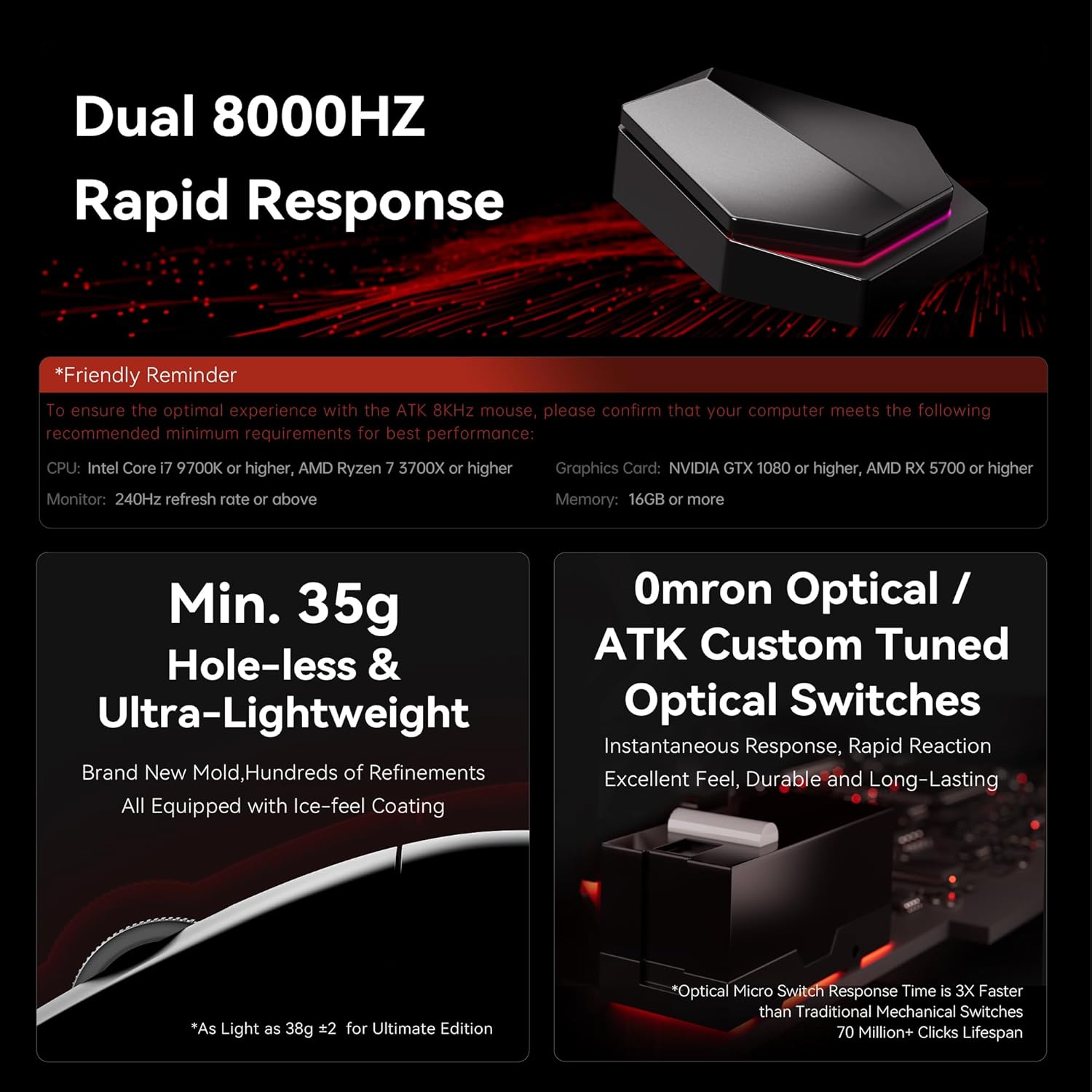
To ensure the optimal experience with the ATK F1 Extreme mouse, please confirm that your computer meets the following recommended minimum requirements:
- CPU: Intel Core i7 9700K or higher, AMD Ryzen 7 3700X or higher
- Graphics Card: NVIDIA GTX 1080 or higher, AMD RX 5700 or higher
- Monitor: 240Hz refresh rate or above
- Memory: 16GB or more

This image illustrates key features such as the 8000Hz polling rate, ultra-lightweight design, and Omron optical switches, along with system requirements for optimal performance.
Operating Instructions
Power On/Off
Locate the power switch on the underside of the mouse to turn it on or off.
Adjusting Polling Rate
The ATK F1 Extreme supports an adjustable polling rate from 125 Hz up to 8000 Hz. This can be configured through the ATK HUB software. A higher polling rate delivers ultra-low latency response and smoother cursor tracking, which is beneficial for competitive gaming.
DPI and Sensor Performance
The mouse is equipped with the PixArt PAW3950 Ultra sensor, offering high-resolution tracking and stable aim. DPI settings can be customized via the ATK HUB software to suit your preferences. The sensor supports a DPI range of 10-30000, which can be over-clocked to 42000.
This image provides detailed specifications for the PAW3950 and PAW3950 Ultra flagship sensors, including DPI range, tracking speed, acceleration, and LOD adjustment.
Programmable Buttons
The ATK F1 Extreme features programmable buttons. Utilize the ATK HUB software to assign custom functions, macros, or keybinds to these buttons for enhanced control and efficiency in games and applications.
Battery Life Management
The F1 Extreme model has a 200mAh battery, providing approximately 60 hours of battery life at 1000Hz polling rate. Battery life can vary based on usage, polling rate, and other settings. Monitor battery status through the ATK HUB software and recharge as needed.

This image highlights the Smartspeed Wireless Gen-2 technology, the ATK HUB/Web Driver, and provides physical dimensions and weights for the F1 Pro, F1 Pro Max, and F1 Extreme Edition mice.
Maintenance
Cleaning
To maintain optimal performance and hygiene, regularly clean your mouse. Use a soft, dry, lint-free cloth to wipe the surface. For stubborn dirt, slightly dampen the cloth with water or a mild cleaning solution. Avoid using harsh chemicals or abrasive materials.
Sensor Care
Keep the optical sensor on the underside of the mouse clean and free from dust or debris. A small brush or compressed air can be used to gently clear any obstructions.
Battery Longevity
To prolong battery life, avoid fully discharging the mouse frequently. Store the mouse in a cool, dry place when not in use for extended periods.
Troubleshooting
Connectivity Issues
- Wireless Connection Lost: Ensure the 8K dongle is securely plugged into a USB port and the mouse is powered on. Try plugging the dongle into a different USB port.
- Lag or Disconnections: Ensure there are no strong wireless interferences (e.g., other 2.4 GHz devices) nearby. Try moving the dongle closer to the mouse, possibly using a USB extension cable.
- Wired Connection Not Detected: Check if the USB-C cable is properly connected to both the mouse and the computer. Try a different USB port or cable.
Tracking Problems
- Erratic Cursor Movement: Clean the optical sensor on the underside of the mouse. Ensure you are using the mouse on a suitable surface (a mouse pad is recommended).
- No Movement: Check if the mouse is powered on and connected. If in wireless mode, ensure the battery is charged.
Software Issues
If the ATK HUB software is not detecting the mouse or settings are not applying, try reinstalling the software from atk.pro. Ensure your operating system is up to date.
Specifications

This table provides a comprehensive overview of specifications for the ATK Blazing Sky F1 series, including sensor type, polling rate, battery life, and weight.
| Feature | Detail |
|---|---|
| Product Dimensions | 4.65 x 2.45 x 0.1 inches (118.2mm x 62.4mm x 38.8mm) |
| Item Weight | 1.23 ounces (approx. 35g ±2g) |
| Item Model Number | ATK Blazing Sky F1 Extreme |
| Batteries | 1 Nonstandard Battery (200mAh, included) |
| Manufacturer | ATK |
| Color | Black |
| Connectivity Technology | USB (Wired) / 2.4 GHz (Wireless) |
| Special Features | Ultra-Lightweight, Programmable Buttons, Rechargeable, Ice-Feel Coating |
| Movement Detection Technology | Optical (PixArt PAW3950 Ultra) |
| DPI Range | 10-30000 (overclockable to 42000) |
| Tracking Speed | 750 IPS |
| Acceleration | 50G |
| LOD Adjustment | 0.7mm~1.7mm (Precision 0.1mm/step, adjustable in 11 steps) |
| Controller | Nordic 52840 |
| Transmission Technology | Smartspeed Wireless Gen-2, ATK ApexShark Professional Esports Firmware |
| Polling Rate | Wired 8K Hz / Wireless 8K Hz |
| Battery Life | 60 H (at 1000Hz) |
| Primary Switch | Omron Optical / ATK Custom Tuned Optical Switches |
| Side Switch | TTC |
| Scroll Wheel | F-Switch E10 Flagship |
| Mouse Feet | 100% Teflon Feet |
| Dongle | 8K Dongle |
Warranty and Support
Warranty Information
For detailed warranty information regarding your ATK Blazing Sky F1 Extreme Wireless Gaming Mouse, please refer to the official ATK website or contact ATK customer support. Warranty terms typically cover manufacturing defects for a specified period from the date of purchase.
Customer Support
If you encounter any issues not covered in the troubleshooting section or require further assistance, please visit the official ATK website for support resources, FAQs, and contact information:
This website also provides access to product driver downloads and other services.


