
1. Introduction
Thank you for choosing the Uwant D500 Cordless Wet and Dry Vacuum Cleaner. This manual provides essential information for the safe and efficient use of your appliance. Please read it thoroughly before first use and keep it for future reference.
The Uwant D500 is designed for versatile cleaning, offering powerful suction for both wet and dry messes, advanced self-cleaning features, and hot air drying to maintain hygiene.
2. Important Safety Instructions
WARNING: To reduce the risk of fire, electric shock, or injury, read all instructions before operating this appliance.
- This appliance is for household use only. Do not use outdoors or on wet surfaces other than those intended for wet cleaning.
- Do not allow to be used as a toy. Close attention is necessary when used by or near children.
- Use only as described in this manual. Use only manufacturer's recommended attachments.
- Do not use with damaged cord or plug. If appliance is not working as it should, has been dropped, damaged, left outdoors, or dropped into water, return it to a service center.
- Do not pull or carry by cord, use cord as a handle, close a door on cord, or pull cord around sharp edges or corners. Do not run appliance over cord. Keep cord away from heated surfaces.
- Do not unplug by pulling on cord. To unplug, grasp the plug, not the cord.
- Do not handle plug or appliance with wet hands.
- Do not put any object into openings. Do not use with any opening blocked; keep free of dust, lint, hair, and anything that may reduce air flow.
- Keep hair, loose clothing, fingers, and all parts of body away from openings and moving parts.
- Do not pick up anything that is burning or smoking, such as cigarettes, matches, or hot ashes.
- Do not use to pick up flammable or combustible liquids, such as gasoline, or use in areas where they may be present.
- Do not pick up toxic material, such as chlorine bleach, ammonia, or drain cleaner.
- Do not use without filters in place.
- Turn off all controls before unplugging.
- Use extra care when cleaning on stairs.
- Do not use to pick up hard or sharp objects such as glass, nails, screws, coins, etc.
- Prevent unintentional starting. Ensure the switch is in the off-position before connecting to battery pack, picking up or carrying the appliance.
- Recharge only with the charger specified by the manufacturer.
3. Package Contents and Product Overview
3.1 Package Contents
Ensure all items are present in the package:
- Uwant D500 Main Unit
- Handle Assembly
- Charging Dock
- Power Adapter
- Crevice Tool
- Dusting Brush
- Mop (Roller Brush)
- Deodorizing Stick (may be pre-installed or separate)
- User Manual (this document)
3.2 Product Features
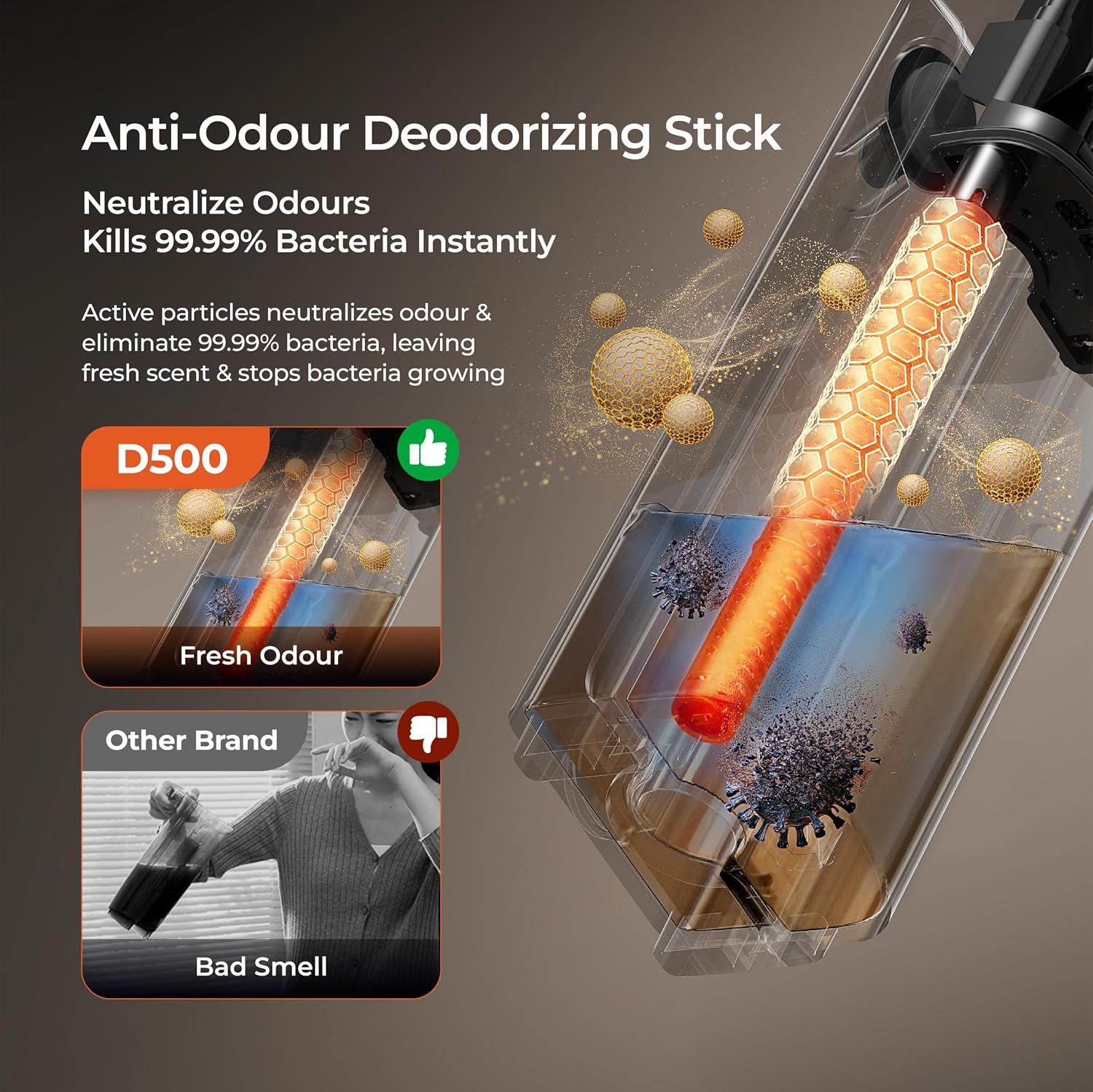
Figure 1: Overview of the Uwant D500 Cordless Wet and Dry Vacuum Cleaner.
AI Self-Cleaning and 65°C Hot Air Drying
The D500 features an automatic self-cleaning cycle that activates when docked. Dual-brush electrolyzed water cleans the roller brush, followed by 65°C hot air drying to prevent bacterial growth and odors, ensuring the brush is ready for the next use.

Figure 2: Illustration of the AI Self-Cleaning process, showing water flow and brush rotation.

Figure 3: Visual representation of the 65°C hot air drying system for the roller brush and water tank.
Anti-Odour Deodorizing Stick
An integrated deodorizing stick helps neutralize odors and eliminate bacteria during and after cleaning, contributing to a fresh scent. This item may be sold separately.

Figure 4: Diagram showing the deodorizing stick within the dirty water tank, neutralizing odors and bacteria.
180° Ultra Lie-Flat Design
The vacuum's flexible design allows it to lie completely flat, enabling easy cleaning under furniture like beds and sofas, and reaching tight corners.

Figure 5: The Uwant D500 vacuum cleaner positioned flat to clean under low furniture.
Anti-Tangle Brush and 17kPa Powerful Suction
The specially designed anti-tangle brush minimizes hair and debris entanglement, making it suitable for homes with pets. This is combined with a powerful 17kPa suction to effectively pick up dirt, debris, and spills.
Note: While a dedicated image specifically illustrating 17kPa suction is not available, the vacuum is engineered for strong cleaning performance.
IPX6 Washable Roller Brush
The brush head is IPX6 waterproof, allowing for direct rinsing with water for quick and thorough cleaning, preventing clogging and maintaining suction power.

Figure 6: The IPX6 waterproof roller brush being rinsed under water, highlighting its easy maintenance.
Triple-Edge Cleaning, All-in-One Water Tank, 3-Level Water Flow, and Cleaning Modes
The advanced triple-edge design ensures thorough cleaning along baseboards, corners, and edges. The convenient combined clean and dirty water tank system simplifies operation. The D500 offers three water flow settings (Low, Medium, High) to customize cleaning for different floor types and mess levels, and features Intelligent, Dry, and Boost cleaning modes.

Figure 7: Composite image illustrating various features including All-in-One Water Tank, Tri-Edge Cleaning, Water Level Control, and Three Cleaning Modes.
Real-Time Electrolyte Water Sterilization
A built-in electrolyte cube transforms normal water into powerful electrolyzed cleaning water, providing deeper sanitization without harsh chemicals. This process is instant and pollution-free.
Note: A dedicated image for real-time electrolyte water sterilization is not available.
4. Setup and First Use
4.1 Assembly
- Unpack all components and ensure they are free from damage.
- Insert the handle assembly into the main unit until it clicks securely into place.
- Place the charging dock on a flat, stable surface near a power outlet.
- Connect the power adapter to the charging dock and plug it into the wall outlet.
4.2 Charging the Battery
Before first use, fully charge the vacuum cleaner. Place the assembled D500 onto the charging dock. The indicator lights on the display will show the charging status. A full charge typically takes approximately 4-5 hours (refer to product specifications for exact time).
4.3 Filling the Clean Water Tank
- Press the release button to detach the clean water tank from the main unit.
- Open the tank cap.
- Fill the tank with clean tap water. Do not exceed the MAX fill line. For enhanced cleaning, ensure the electrolyte cube is present in the tank.
- Close the cap securely and reattach the clean water tank to the main unit until it clicks.
5. Operation
5.1 Powering On/Off
Press the Power button on the handle to turn the vacuum cleaner ON or OFF.
5.2 Selecting Cleaning Mode
Press the Mode button on the handle to cycle through the available cleaning modes:
- Intelligent Mode: Automatically adjusts suction and water flow based on detected mess.
- Dry Mode: For vacuuming dry debris without dispensing water.
- Boost Mode: Provides maximum suction and water flow for stubborn stains.
5.3 Adjusting Water Flow (in Wet Modes)
In Intelligent or Boost modes, you can adjust the water flow level (Low, Medium, High) using the dedicated button on the handle to suit different floor types and cleaning needs.
5.4 Cleaning Process
- Ensure the clean water tank is filled and the dirty water tank is empty.
- Select the desired cleaning mode and water flow.
- Tilt the vacuum cleaner back and begin cleaning. Move the vacuum slowly over the area to be cleaned.
- The display will provide real-time information on battery level, mode, and water tank status.
CAUTION: Do not use the vacuum to pick up large objects that may damage the roller brush or suction mechanism.
6. Maintenance
Regular maintenance ensures optimal performance and extends the lifespan of your Uwant D500.
6.1 Self-Cleaning Cycle
- After each use, place the vacuum cleaner back on the charging dock.
- Ensure there is sufficient clean water in the clean water tank.
- Press the Self-Clean button (if available, or it may start automatically). The vacuum will perform a self-cleaning cycle for the roller brush and internal pipes.
- Once the self-cleaning is complete, the hot air drying cycle will begin automatically.
6.2 Emptying and Cleaning the Dirty Water Tank
- Press the release button to detach the dirty water tank.
- Carefully remove the lid and dispose of the dirty water and debris.
- Rinse the dirty water tank and its components thoroughly with clean water.
- Allow all parts to air dry completely before reassembling and reattaching to the main unit.
6.3 Cleaning the Roller Brush
Even with self-cleaning, periodic manual cleaning of the roller brush is recommended.
- Turn off the vacuum and remove it from the charging dock.
- Open the brush cover and remove the roller brush.
- Rinse the roller brush under running water to remove any tangled hair or debris. Use the provided cleaning tool if necessary.
- Ensure the brush is completely dry before reinstalling it.
6.4 Cleaning the Filter
The filter should be cleaned regularly to maintain suction performance.
- Locate and remove the filter from the dirty water tank assembly.
- Tap off any loose debris. Rinse the filter under running water.
- Allow the filter to air dry completely for at least 24 hours before reinstalling. Do not use the vacuum with a wet filter.
7. Troubleshooting
| Problem | Possible Cause | Solution |
|---|---|---|
| Vacuum does not turn on. | Battery is low or depleted. | Charge the vacuum fully. |
| No suction or weak suction. | Dirty water tank is full. Roller brush is clogged. Filter is clogged. Suction inlet is blocked. |
Empty the dirty water tank. Clean the roller brush. Clean and dry the filter. Check and clear any blockages in the suction path. |
| Water leakage. | Water tanks not properly installed. Tank caps not sealed. Damaged tank. |
Ensure both clean and dirty water tanks are securely attached. Check that tank caps are tightly closed. Contact customer support if a tank is damaged. |
| Unpleasant odor during use. | Dirty water tank needs cleaning. Roller brush needs cleaning/drying. Deodorizing stick needs replacement. |
Empty and thoroughly clean the dirty water tank. Run self-cleaning cycle and ensure hot air drying completes. Manually clean and dry the roller brush. Replace the deodorizing stick (if applicable). |
| Self-cleaning not working. | Insufficient clean water. Vacuum not properly docked. |
Fill the clean water tank. Ensure the vacuum is correctly placed on the charging dock. |
8. Specifications
| Feature | Detail |
|---|---|
| Model Name | D500 |
| Brand | Uwant |
| Type | Cordless Wet and Dry Vacuum Cleaner |
| Suction Power | 17 kPa |
| Drying Temperature | 65°C Hot Air |
| Lie-Flat Angle | 180° |
| Brush Head Waterproof Rating | IPX6 |
| Power Source | Battery Powered |
| Voltage | 220 Volts |
| Number of Speeds/Power Levels | 3 (Water Flow) |
| Recommended Surfaces | Carpet, Hard Floor, Upholstery |
| Dimensions (L x W x H) | 27L x 25W x 112H centimetres |
9. Warranty and Customer Support
For warranty information and customer support, please refer to the warranty card included with your product or visit the official Uwant website. Please have your model number (D500) and purchase details ready when contacting support.
Keep your proof of purchase for warranty claims.


