
BEILOCKERY S029122
BEILOCKERY S029122 Industrial Plastic Hopper Dryer Machine User Manual
Model: S029122
1. Introduction
This manual provides essential information for the safe and efficient operation, installation, and maintenance of your BEILOCKERY S029122 Industrial Plastic Hopper Dryer Machine. This machine is designed for drying various plastic materials, including PP, PE, ABS, and PVC pellets, by removing surface moisture through a hot air circulation method. Please read this manual thoroughly before operating the equipment.
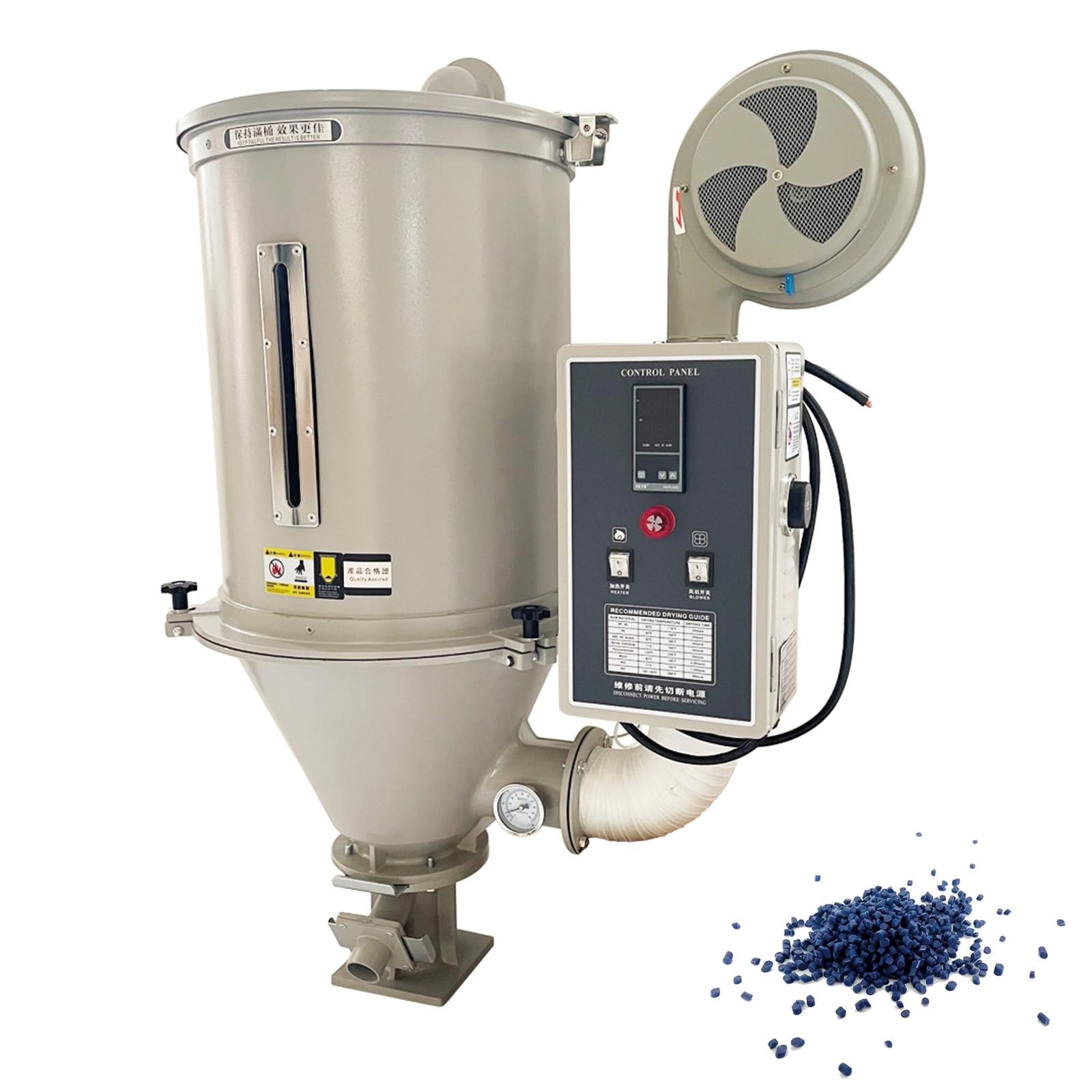
Image 1.1: Overview of the BEILOCKERY S029122 Industrial Plastic Hopper Dryer Machine. Key specifications are visible: Capacity 100kg, Voltage 220V, Phase 3, Motor 5kw, Package size 24.8*40.55*47.24 in, Weight 101 lb (46kg).
2. Safety Information
Always adhere to the following safety guidelines to prevent injury and equipment damage:
- Ensure the machine is connected to a dedicated three-phase 220V power supply by a qualified electrician.
- Do not operate the machine with damaged power cords or plugs.
- Keep hands and loose clothing away from moving parts, especially the blower fan.
- Ensure adequate ventilation in the operating area.
- Do not attempt to open or service the machine while it is powered on. Disconnect power before any maintenance or cleaning.
- Wear appropriate personal protective equipment (PPE) such as safety glasses and gloves.
- The machine operates at high temperatures. Avoid direct contact with heated surfaces.
- Do not use the machine to dry materials other than specified plastic pellets.
3. Product Components
Familiarize yourself with the main components of the hopper dryer machine:

Image 3.1: Labeled diagram of the hopper dryer machine, indicating components such as the exhaust pipe, blower, air regulation cover, temperature controller, switch, heating tube, thermometer, base, handwheel, viewing window, snap fastener, and cover.
- Hopper: The main container for plastic pellets.
- Blower: Circulates hot air through the hopper.
- Heating Tube: Heats the air for drying. Designed as a bent pipe to prevent dust accumulation.
- Control Panel: Houses the temperature controller, switches, and display.
- Temperature Controller: Manages and displays the drying temperature.
- Thermometer: Provides a precise digital display of temperature.
- Viewing Window: Allows observation of material levels.
- Base: Provides stable support for the machine.
4. Specifications
| Parameter | Value |
|---|---|
| Model Number | S029122 |
| Capacity | 100 kg |
| Voltage | 220V |
| Phase Number | 3 |
| Motor Power | 5 kW |
| Product Dimensions (L x W x H) | 40.55 x 24.8 x 47.24 inches |
| Item Weight | 207 pounds (approx. 94 kg) |
| Material (Contact Parts) | Stainless Steel |
| Temperature Control Accuracy | ±3 degrees Celsius |
| Applicable Materials | PP, PE, ABS, PVC, etc. |

Image 4.1: Diagram illustrating the product dimensions: 24.8 inches (width), 40.55 inches (depth), and 47.24 inches (height).
5. Setup and Installation
- Unpacking: Carefully remove all packaging materials and inspect the machine for any shipping damage. Report any damage to your supplier immediately.
- Placement: Select a clean, tidy, and level working environment. Ensure sufficient space around the machine for operation, maintenance, and heat dissipation. Consider the stacking of other equipment and materials, leaving appropriate clearance.
- Electrical Connection: The machine requires a three-phase 220V power supply. This connection must be performed by a qualified electrician to ensure proper wiring and safety. Ensure the power source matches the machine's requirements.
- Exhaust System: If necessary, reserve space and install an appropriate exhaust system to manage moisture-laden air expelled during the drying process.
- Assembly: Ensure all components, such as the hopper and base, are securely assembled according to the product diagram.

Image 5.1: Illustration showing the required three-phase 220V electrical connection for the machine.
6. Operating Instructions
- Power On: After ensuring all connections are secure and safe, switch on the main power supply to the machine.
- Load Materials: Open the hopper cover and load the plastic pellets into the hopper. Ensure the material does not exceed the maximum capacity (100kg). Close the cover securely using the snap fasteners.
- Set Temperature: Use the intelligent temperature control system on the control panel to set the desired drying temperature. Refer to the recommended drying guide on the control panel or material specifications for appropriate settings. The system maintains temperature within ±3 degrees Celsius.
- Start Drying: Activate the heating switch and the fan switch on the control panel. The hot air circulation will begin, and the heating tube will warm the air.
- Monitor Process: Monitor the current temperature display on the control panel. The viewing window allows for visual inspection of the material. The system includes a high-temperature alarm for safety.
- Drying Completion: Once the drying cycle is complete and the materials have reached the desired moisture content, switch off the heating and fan. Allow the machine to cool down before unloading.
- Unload Materials: Open the discharge gate at the bottom of the hopper to unload the dried pellets.

Image 6.1: The control panel, highlighting features such as current temperature display, preset temperature, temperature adjustment buttons, high temperature alarm, fan switch, heating switch, and a reference table for drying guidelines.

Image 6.2: The hopper dryer is suitable for drying various plastic materials, including PP, PE, ABS, and PVC pellets.
7. Maintenance
Regular maintenance ensures optimal performance and extends the lifespan of your machine.
- Daily Cleaning: After each use, ensure the hopper is empty. The barrel body and base can be separated for easy cleaning of internal residues. This prevents contamination and ensures efficient drying.
- Heating Tube Inspection: The heating tube is designed as a bent pipe to effectively prevent dust accumulation. Periodically inspect it for any debris and clean if necessary.
- Fan Inspection: Regularly check the copper core fan for any obstructions or unusual noises. Ensure stable operation and low noise levels.
- Thermometer Calibration: Periodically verify the accuracy of the thermometer.
- General Inspection: Routinely check all fasteners, electrical connections, and moving parts for wear or damage. Tighten any loose connections.

Image 7.1: Detailed view of key components: a high-sensitivity thermometer, the bent heating tube designed to prevent dust, and the strong, stable copper core fan.
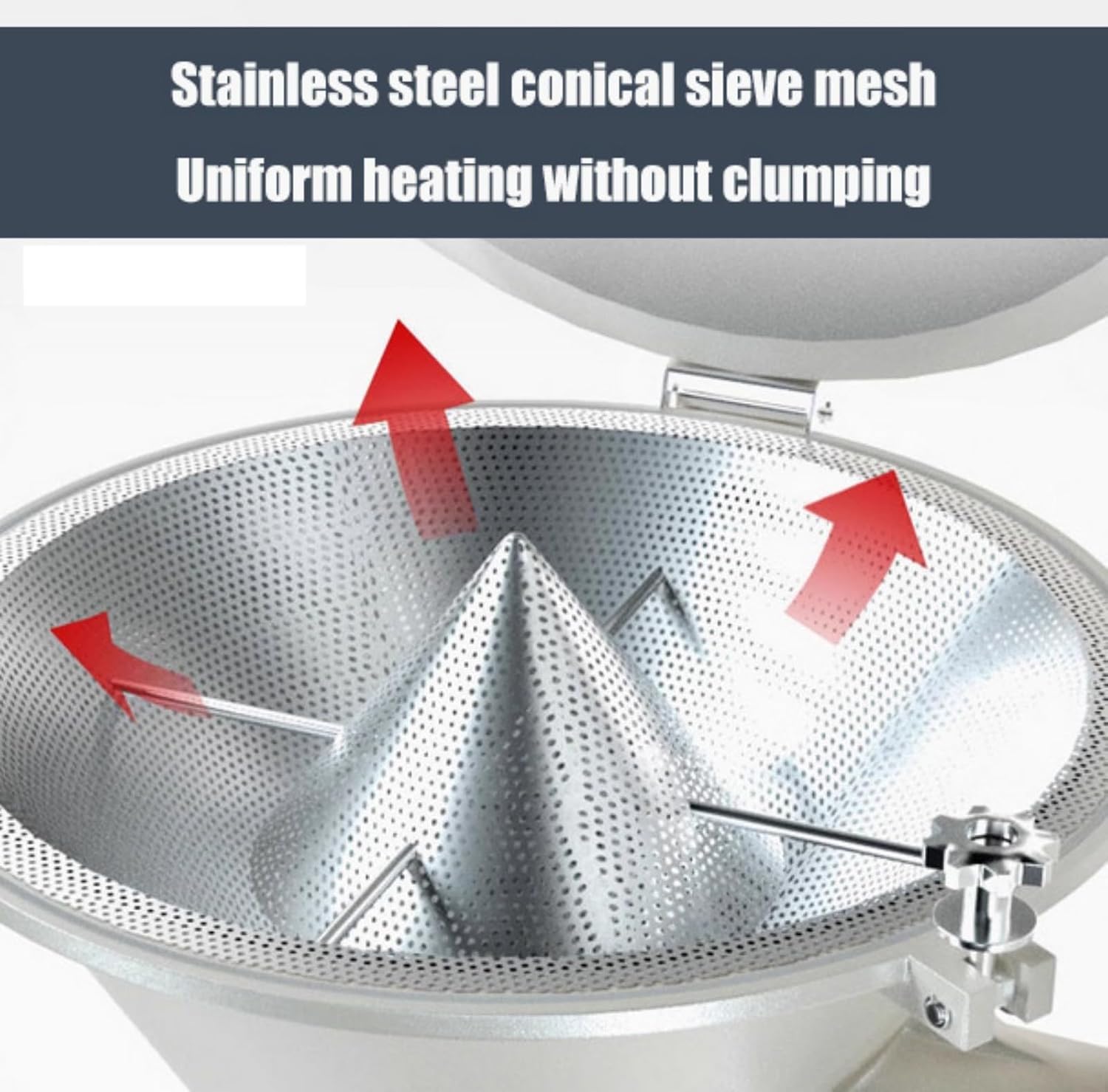
Image 7.2: The stainless steel conical sieve mesh ensures uniform heating of pellets without clumping.
8. Troubleshooting
This section addresses common issues you might encounter. For problems not listed here, contact customer support.
| Problem | Possible Cause | Solution |
|---|---|---|
| Machine does not power on | No power supply; loose electrical connection; tripped circuit breaker. | Check power cord, ensure secure connection, reset circuit breaker, verify 3-phase 220V supply. |
| Temperature not reaching set point | Heating element malfunction; fan issue; incorrect temperature setting. | Check heating element and fan operation. Verify temperature settings. Ensure hopper cover is sealed. |
| Drying inefficient | Overloaded hopper; insufficient airflow; high ambient humidity; material type. | Reduce material load. Check fan for obstructions. Ensure proper ventilation. Adjust drying time/temperature. |
| Unusual noise during operation | Fan obstruction; loose components; motor issue. | Power off and inspect fan for debris. Check all fasteners. If noise persists, contact support. |
| High temperature alarm activates | Overheating; sensor malfunction. | Immediately power off the machine. Allow to cool. Check for obstructions. If alarm persists, contact support. |
9. Warranty and Support
For warranty information, please refer to the documentation provided at the time of purchase or contact your vendor. For technical support, spare parts, or service inquiries, please contact BEILOCKERY customer service through your purchase channel. Please have your model number (S029122) and purchase date ready when contacting support.
Ask a question about this manual
Ask about setup, troubleshooting, compatibility, parts, safety, or missing instructions. Manuals+ will review the question and use this page’s manual context to help answer it.