
Introduction
This manual provides detailed instructions for the installation and maintenance of your FLYRUIT Monitor Wall Mount. This fixed wall mount is designed for 15.6-inch digital picture frames and other monitors ranging from 14 to 24 inches, offering a secure and low-profile mounting solution.
Please read these instructions carefully before installation to ensure proper setup and safe operation.
Safety Information
- Ensure the mounting surface can safely support the combined weight of the mount and the display.
- Always use appropriate tools and follow all installation steps precisely.
- If you are unsure about any part of the installation process, seek professional assistance.
- Do not exceed the maximum load capacity of 30 lbs (13.6 kg).
- Keep children and pets away from the installation area.
Package Contents
Verify that all components are present before beginning installation:
- 1 x Fixed-position wall bracket
- 1 x Complete mounting hardware set (screws, anchors, washers, etc.)
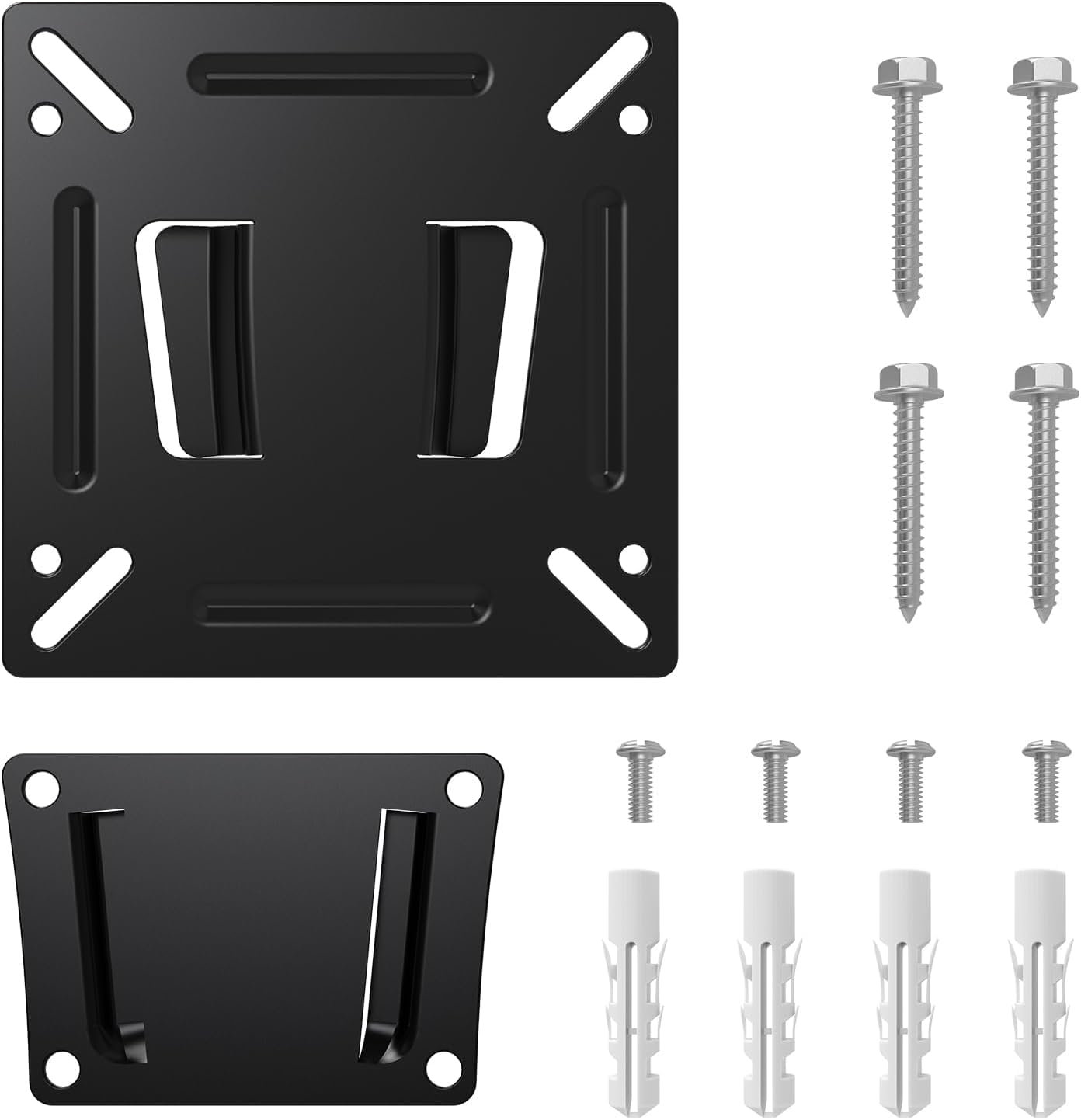
Image: Overview of the FLYRUIT Monitor Wall Mount and its included hardware. This includes the main metal wall bracket and a set of screws and anchors for installation.
Setup and Installation
This section guides you through the process of mounting your display to the wall.
- Prepare the Wall:
Identify the desired mounting location. For optimal stability, it is recommended to mount directly to concrete or solid brick surfaces. If mounting to wood studs, locate the center of the studs.
- Mark Drilling Holes:
Hold the wall bracket against the wall at the desired height and use a pencil to mark the drilling points through the bracket's holes.
- Drill Pilot Holes:
Using an appropriate drill bit for your wall type (e.g., masonry bit for concrete/brick, wood bit for studs), drill pilot holes at the marked locations. Ensure the depth is sufficient for the wall anchors or screws.
- Install Wall Anchors (if needed):
If mounting into concrete or brick, insert the provided wall anchors into the pilot holes until they are flush with the wall surface.
- Attach Wall Bracket:
Align the wall bracket with the drilled holes. Secure the bracket to the wall using the provided screws. Tighten all screws firmly, but do not overtighten.
- Attach Display to Bracket:
Locate the VESA mounting holes on the back of your digital picture frame or monitor. This mount supports VESA patterns of 75x75mm and 100x100mm. Align the display with the bracket and secure it using the appropriate screws from the hardware set. Ensure the display is level and securely fastened.
- Final Check:
Gently pull on the mounted display to ensure it is securely attached to the wall and the bracket. Verify all connections are tight.
Operating Instructions
The FLYRUIT Monitor Wall Mount is a fixed-position bracket. Once installed, it holds your display securely in a static position with a low profile of 12mm from the wall. No adjustments are required or possible after installation.
Ensure your display is properly connected to its power source and any necessary input devices as per its own instruction manual.
Maintenance
- Periodically check all screws and connections to ensure they remain tight and secure.
- Clean the metal surface of the mount with a soft, dry cloth. Avoid abrasive cleaners or solvents.
- Do not hang anything from the mount or apply excessive force to the mounted display.
Troubleshooting
- Display feels loose after installation: Re-check all mounting screws on both the wall and the display. Ensure they are tightened securely. Verify the wall anchors (if used) are properly seated.
- Mounting holes on display do not match: Confirm your display's VESA pattern is either 75x75mm or 100x100mm. If it differs, this mount is not compatible.
- Mount appears unstable: Ensure the mount is installed on a solid surface (concrete, brick, or wood stud). Drywall alone is not sufficient without proper stud attachment or heavy-duty anchors (not included).
Specifications
| Brand | FLYRUIT |
| Model Numbers | Frame156, M15R2, Frame157 |
| Mounting Type | Wall Mount |
| Movement Type | Fixed |
| Material | Metal |
| Compatible Devices | Monitors, 15.6-inch Digital Picture Frames (e.g., Flyruit Frame156, M15R2, Frame157), TVs (14-24 inches) |
| Maximum Load Capacity | 30 lbs (13.6 kg) |
| Compatible VESA Patterns | 75x75mm, 100x100mm |
| Profile from Wall | 12mm |
Warranty and Support
This FLYRUIT product comes with a 1-year warranty from the date of purchase, covering manufacturing defects.
For any questions regarding installation, troubleshooting, or warranty claims, please contact FLYRUIT customer support. Refer to your purchase documentation for specific contact details or visit the official FLYRUIT store on Amazon: FLYRUIT Store.