Introduction
Thank you for choosing the Hiswelle 2.1Gal/8L Smart Humidifier. This device is designed to enhance your indoor environment by providing cool mist humidification, smart control features, and ambient lighting. Please read this manual thoroughly before use to ensure proper operation and maintenance.
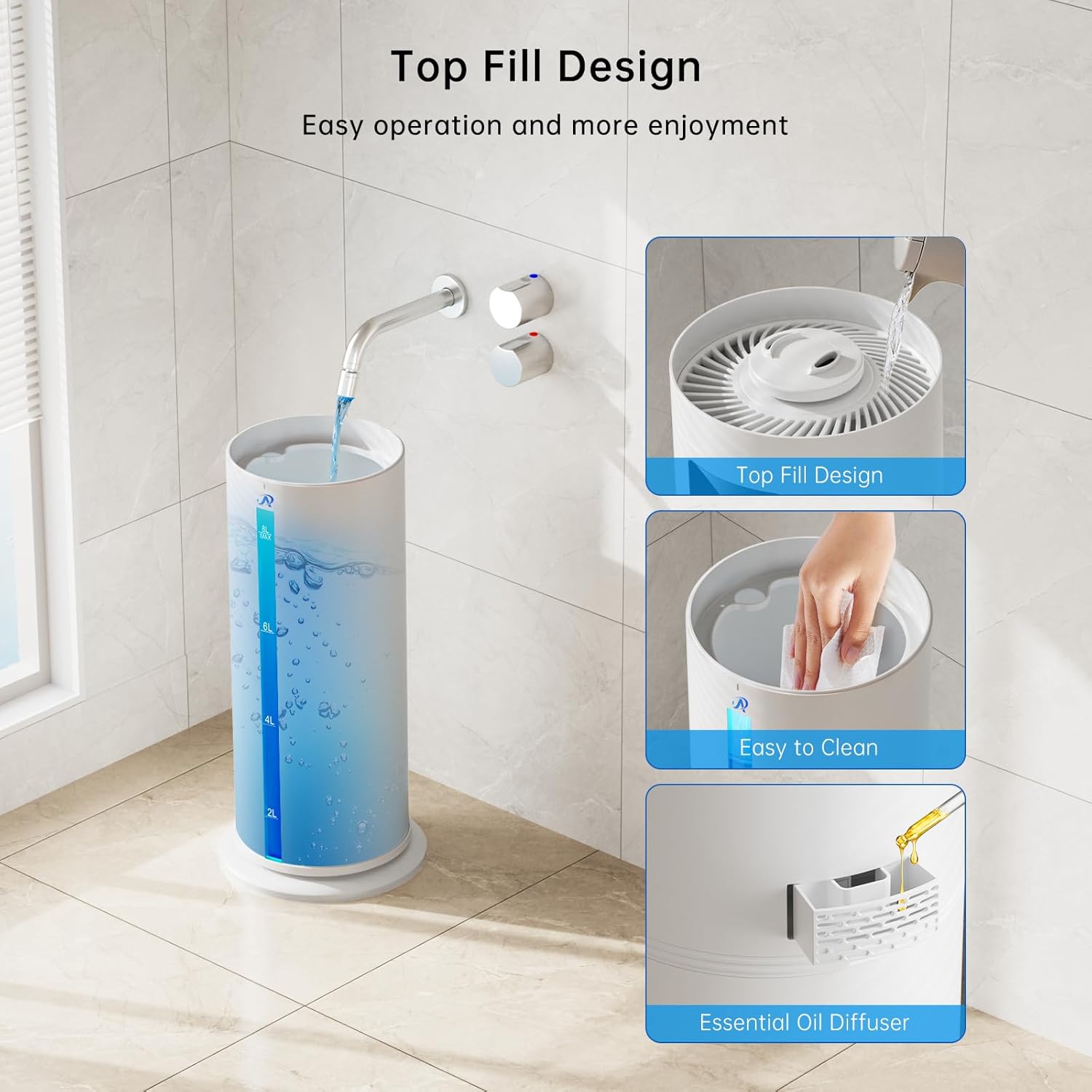
Image: Hiswelle 8L Cool Mist Air Humidifier operating in a room with plants, demonstrating its use in maintaining a healthy environment.
Video: An overview of the Hiswelle 8L Cool Mist Air Humidifier, showcasing its features and operation in a home or office setting, ideal for plants and general comfort.
Product Overview
The Hiswelle Smart Humidifier consists of several key components for its operation. Familiarize yourself with each part before assembly and use.

Image: A detailed breakdown of the Hiswelle Humidifier's components, including the Water Tank, Base Chamber, Water Inlet Tank, Essential Oil Tray, Filter, and Water Intake Cover.
Components:
- Water Tank: The main reservoir for water (8L / 2.1Gal capacity).
- Base Chamber: Houses the electronic controls and misting mechanism.
- Water Inlet Tank: Connects the water tank to the base chamber.
- Essential Oil Tray: For adding essential oils for aromatherapy.
- Filter: Helps purify the water.
- Water Intake Cover: Located at the bottom of the water tank.
- Remote Control: For convenient operation from a distance.
- User Manual: This instruction guide.
Setup
Follow these steps for initial setup:
- Unpack all components from the box.
- Place the humidifier base on a flat, stable surface.
- Remove the water tank from the base chamber.
- Fill the water tank with clean, cool water. The top-fill design allows for easy refilling directly from the top without removing the tank. Do not exceed the "MAX" fill line.
- Place the water tank back onto the base chamber, ensuring it is securely seated.
- Plug the power cord into a suitable electrical outlet.
- For first-time use, the humidifier may make sounds while pumping water. Allow 20-30 seconds for misting to begin.

Image: The humidifier's top-fill design for easy water addition, a view of the wide opening for simple cleaning, and the integrated essential oil diffuser.
Operating Instructions
Your Hiswelle Smart Humidifier offers multiple ways to control its functions: via the control panel, remote control, or the Tuyar Smart App.
Control Options:
- Control Panel: Touch-sensitive buttons on the device for direct control.
- Remote Control: Use the included remote for convenient operation from a distance (up to 20ft range).
- Tuyar Smart App: Download the app (2.4GHz WiFi only) to control the humidifier from your smartphone, offering advanced features like scheduling and custom settings.

Image: The Hiswelle Humidifier highlighting its versatile control options: smartphone app, remote control, and the integrated touch control panel.
Video: A short demonstration of the Hiswelle 8L Smart Humidifier's APP and Remote Control features, showcasing its 4 levels of cool mist.
Mist Levels:
Choose from 4 mist modes to suit your needs:
- Level 1 (Soft Mist): Ideal for babies or light humidification.
- Level 2 & 3 (Medium Mist): General use for maintaining comfortable humidity.
- Level 4 (Intense Hydration): For quick humidification or for plants requiring higher moisture.

Image: The humidifier's digital display showing the four mist levels: Low, Medium, High, and Highest, along with a visual representation of the mist output for each setting.
Custom Humidity Control:
The smart humidity sensor allows you to set a target humidity level between 40% and 90% RH. The humidifier will automatically adjust its output to maintain this level.

Image: The humidifier's display showing custom humidity settings, with a graph illustrating how the device automatically adjusts to maintain target humidity levels for different needs like plants (60-70%), family (40-50%), and others.
Timer Function:
Set the humidifier to operate for a specific duration, from 1 to 16 hours. It will automatically shut off once the timer expires, ideal for offices or bedtime use.
Quiet Sleep Mode:
In Sleep Mode, the humidifier operates at a low noise level (as quiet as 35 dB) and the display lights can be turned off, ensuring an undisturbed sleeping environment.

Image: The humidifier operating quietly in a bedroom at night, with a visual indicator of its low noise level (35dB) and the option for 7 color lights, ensuring peaceful sleep.
7-Color Ambient Light:
The humidifier features LED ambient lighting with 7 selectable colors. Use it as a mood light for relaxation or as a soft-glow nightlight. You can choose a dynamic lighting mode or turn the light off completely.
Aromatherapy Function:
Utilize the built-in essential oil diffuser by adding a few drops of your favorite essential oil to the aroma pad. This provides a pleasant fragrance while humidifying the air.
360° Rotating Nozzle:
The mist outlet can be rotated 360° to adjust the spray direction, ensuring even humidification throughout your room.
Maintenance and Cleaning
Regular cleaning is essential to maintain the performance and longevity of your humidifier. Always turn off and unplug the humidifier before any cleaning or maintenance.
Video: A step-by-step guide on how to clean the Hiswelle Humidifier, demonstrating the process of disassembling, cleaning components with a vinegar solution, rinsing, and reassembling.
General Cleaning:
- Wipe the exterior of the humidifier with a soft, damp cloth.
- Do not clean the main body under running water.
- Do not let water splash into the air outlets.
- Do not use chemical agents for cleaning.
Descaling (Removing Mineral Buildup):
- Remove all components (water tank, water inlet tank, filter, essential oil tray) from the base chamber.
- Pour out any remaining water from the base chamber.
- Prepare a descaling solution by mixing white vinegar with water (1:5 ratio).
- Pour the solution into the base chamber, ensuring it does not contact the air outlet. Allow parts to soak for 15-20 minutes.
- Use a brush to remove scale from all parts.
- Pour out the solution and rinse all components thoroughly under running water.
- Dry all components completely with a soft cloth before reassembling or storing.
Troubleshooting
| Problem | Possible Cause | Solution |
|---|---|---|
| No mist or low mist output | Low water level; mineral buildup; incorrect assembly. | Refill water tank; clean components as per maintenance section; ensure all parts are correctly assembled. |
| Unusual noise | Humidifier not on a flat surface; water tank not seated correctly; mineral buildup. | Place on a flat surface; re-seat water tank; clean components. |
| Water leakage | Water tank not properly sealed; damaged component. | Ensure water tank is correctly placed and sealed; inspect for damage and contact support if necessary. |
| App connectivity issues | Incorrect WiFi network (only 2.4GHz supported); app not updated. | Ensure your WiFi is 2.4GHz; update the Tuyar Smart App; restart humidifier and router. |
Specifications
| Brand | Hiswelle |
| Model Name | HQ-JS2306 |
| Capacity | 8L / 2.1 Gallons |
| Floor Area Coverage | Up to 500 Square Feet |
| Operation Mode | Ultrasonic |
| Noise Level | As quiet as 35 dB |
| Timer | 1-16 Hours |
| Special Features | 7-Color Night Light, Aroma Diffuser, Top Fill, 4 Mist Modes, 360° Rotating Nozzle, APP & Remote Control, Custom Humidity (40%-90% RH), Humidistat, Auto Shut Off, Digital Display, Low Water Indicator, Easy to Clean |
| Product Dimensions | 7.8"D x 7.8"W x 23.6"H |
| Item Weight | 6.12 pounds |
| Wattage | 30 watts |
Warranty and Support
Hiswelle products come with a standard warranty. For specific warranty details, please refer to the warranty card included in your product packaging or contact customer support.
If you encounter any issues or have questions regarding your humidifier, please contact Hiswelle customer support:
- Email: hiswelle_service@outlook.com
- Service Hours: Mon-Fri, 9:00 AM - 5:00 PM PST/PDT


