Introduction
This manual provides detailed instructions for the safe and effective use of your Nikon NIKKOR Z 24-70mm f/2.8 S II lens. This lens features an internal zoom mechanism, enhancing versatility, stability, and compactness. It incorporates Nikon's advanced autofocus system for faster, quieter operation and a new optical design for superior sharpness, bokeh, and anti-glare performance. Please read this manual thoroughly before using the lens and keep it for future reference.
Key Features
- Internal Zoom Mechanism: Enhances zooming stability and dust- and drip-resistant performance. Ideal for use with gimbals and matte boxes, as the center of gravity remains unchanged during zooming.
- Advanced Autofocus System: Offers 5x faster and 50% quieter autofocus compared to the previous model, minimizing operational sounds during video recording.
- Smooth Focus Transitions: Suppresses focus breathing to less than half the amount of the previous generation 24-70mm f/2.8 S, ensuring jitter-free subject tracking.
- Custom Control Ring: Features a control ring click on/off switch, allowing users to choose between precise, incremental click adjustments or smooth, seamless changes. Compatible with Z9, Z8, Z7II, Z6III, Z6II, Z5II, Z5, Zf, and Z50II cameras.
- Close Focus/High Magnification: Focuses as close as 9.5 inches (24mm) with a maximum magnification of 0.32x at 70mm.
- Beautiful Bokeh: The constant f/2.8 aperture combined with 11 rounded diaphragm blades produces soft, round bokeh with natural gradation.
- Pro-Grade Weather Sealing: Designed with robust weather sealing for reliable performance in challenging environments.
- Lightweight Design: Among full-frame interchangeable lenses for mirrorless cameras, this lens offers a lightweight design for enhanced portability.

Image: The NIKKOR Z 24-70mm f/2.8 S II lens mounted on a Nikon Z series camera, illustrating its internal zoom mechanism, sealed construction against dust and moisture, and smooth zooming capability.

Image: A photographer using the NIKKOR Z 24-70mm f/2.8 S II lens on a camera mounted on a gimbal, demonstrating its suitability for stable video recording due to its internal zoom.
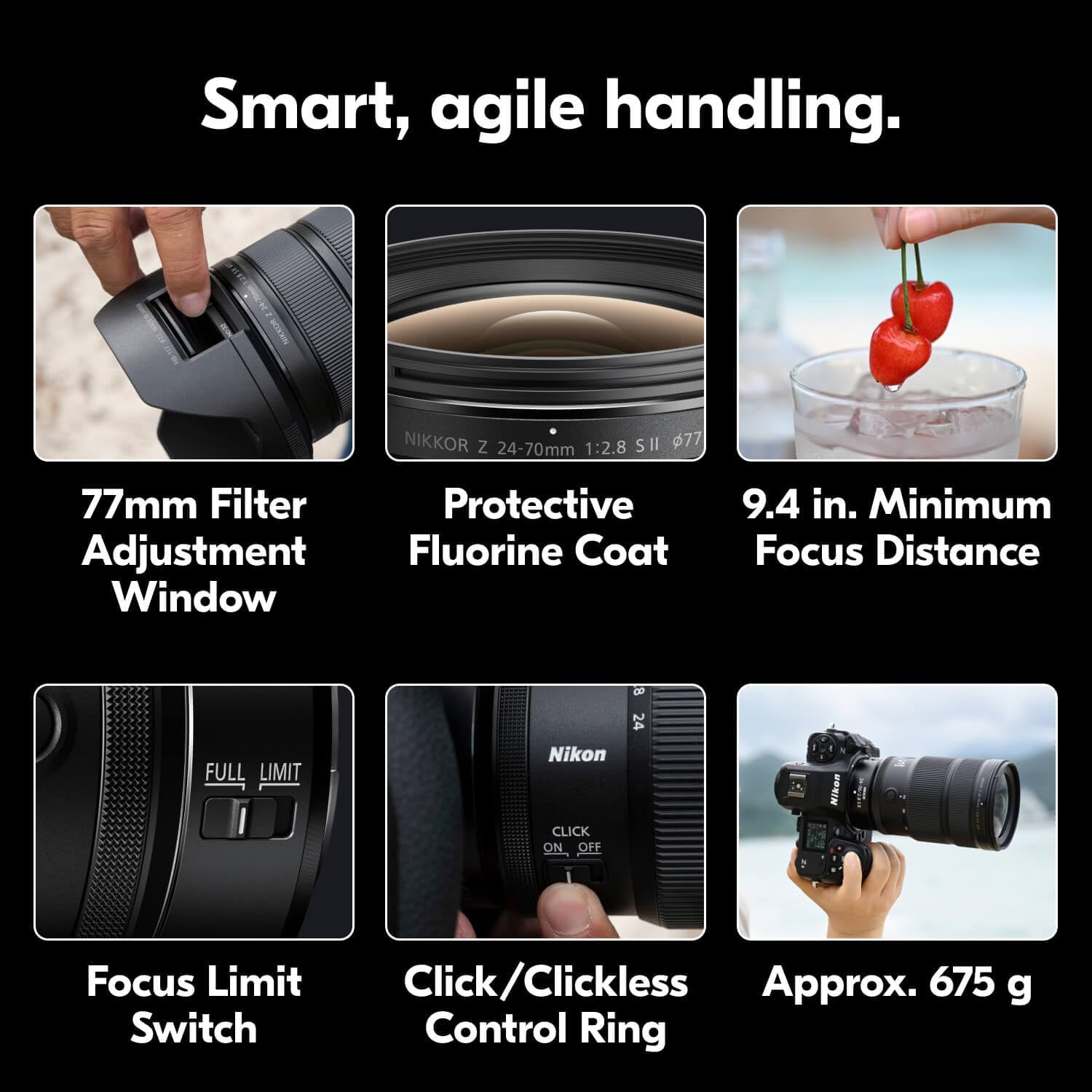
Image: An action shot of an athlete running, highlighting the lens's fast autofocus system, capable of capturing sharp images of moving subjects.

Image: The NIKKOR Z 24-70mm f/2.8 S II lens on a camera with water droplets on its surface, demonstrating its pro-grade weather sealing for use in various conditions.
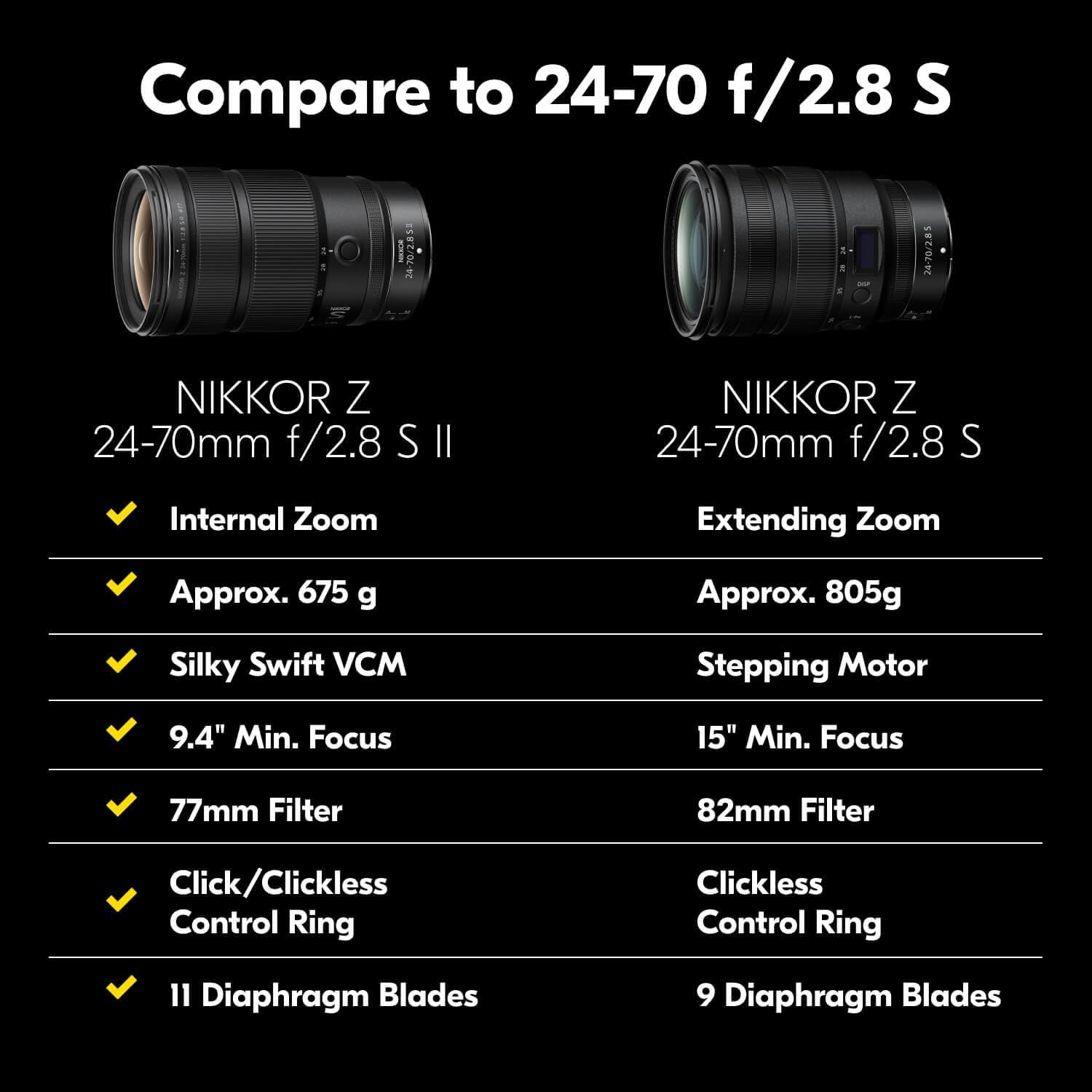
Image: A portrait of a woman with a beautifully blurred background, illustrating the lens's ability to produce soft, round bokeh and high image quality.

Image: A composite image detailing the smart and agile handling features of the lens, including the 77mm filter adjustment window, protective fluorine coat, 9.4 in. minimum focus distance, focus limit switch, click/clickless control ring, and approximate weight of 675g.
What's in the Box
Your Nikon NIKKOR Z 24-70mm f/2.8 S II lens package includes the following items:
- LC-77B Lens Cap (front cap)
- LF-N1 Lens Cap (rear cap)
- HB-117 Lens Hood
- CL-C2 Lens Case
Setup
Attaching the Lens
- Ensure your camera is turned off.
- Remove the camera body cap and the rear lens cap.
- Align the mounting mark on the lens with the mounting mark on the camera body.
- Rotate the lens counter-clockwise until it clicks into place.
Detaching the Lens
- Ensure your camera is turned off.
- While pressing the lens release button on the camera body, rotate the lens clockwise until it detaches.
- Attach the front and rear lens caps.
Operating the Lens
Zooming
The NIKKOR Z 24-70mm f/2.8 S II features an internal zoom mechanism. Rotate the zoom ring to adjust the focal length between 24mm and 70mm. The lens length does not change during zooming, maintaining balance and stability.
Focusing
- Autofocus (AF): Set the AF/MF switch on the lens to 'A' for autofocus. The camera will automatically focus on your subject.
- Manual Focus (MF): Set the AF/MF switch on the lens to 'M' for manual focus. Rotate the focus ring to adjust focus manually.
- Focus Limiter Switch: Use the focus limiter switch to restrict the autofocus range, which can speed up focusing when shooting subjects within a specific distance.
Control Ring
The customizable control ring can be assigned various functions such as aperture, ISO, or exposure compensation via your camera's menu. The click on/off switch allows you to choose between tactile feedback or smooth, silent adjustments, particularly useful for video recording.
OLED Display
The OLED display on the lens provides essential information such as aperture, focus distance, and reproduction ratio, allowing for quick adjustments and monitoring.
Image Quality & Performance
The NIKKOR Z 24-70mm f/2.8 S II lens is engineered for exceptional optical performance:
- Sharpness: Delivers edge-to-edge sharpness across the entire zoom range, a hallmark of Nikon's S-line lenses.
- Bokeh: The constant f/2.8 aperture and 11 rounded diaphragm blades create beautifully soft and creamy background blur.
- Low Light Performance: The wide f/2.8 aperture allows for excellent light gathering, making it suitable for shooting in challenging low-light conditions.
- Color Accuracy: Known for its accurate color reproduction and excellent tonal rendition.
- Weather Sealing: Robust construction with extensive weather sealing protects against dust and moisture, ensuring reliability in various shooting environments.
Maintenance & Care
- Cleaning: Use a soft, lint-free cloth to clean the lens surface. For stubborn smudges, use a lens cleaning solution and a microfiber cloth. Avoid harsh chemicals.
- Storage: When not in use, attach the front and rear lens caps and store the lens in its case in a cool, dry place away from direct sunlight and extreme temperatures.
- Handling: Avoid dropping or subjecting the lens to strong impacts. Do not attempt to disassemble or repair the lens yourself.
Troubleshooting
- Lens not recognized by camera: Ensure the lens is securely attached to the camera body and that the camera's firmware is up to date.
- Autofocus not working: Check the AF/MF switch on the lens and the camera's focus mode settings. Ensure there is sufficient light for the autofocus system to operate.
- Image quality issues: Verify lens cleanliness, check camera settings (aperture, shutter speed, ISO), and ensure proper focus.
- For further assistance, refer to your camera's instruction manual or contact Nikon customer support.
Specifications
| Feature | Detail |
|---|---|
| Product Dimensions | 5.59 x 3.31 x 3.31 inches |
| Item Weight | 1.49 pounds |
| ASIN | B0FNCDZW6V |
| Item Model Number | 20129 |
| Date First Available | August 22, 2025 |
| Manufacturer | Nikon |
| Brand | Nikon |
| Focal Length Description | Wide angle 24 to 70 Millimeter Zoom |
| Lens Type | Wide Angle |
| Compatible Mountings | Nikon Z |
| Camera Lens Description | 24-70 |
Warranty & Support
For warranty information, product registration, and technical support, please visit the official Nikon USA website or contact Nikon customer service. Keep your proof of purchase for warranty claims.
Online resources and FAQs are available at www.nikonusa.com.


