
1. Introduction
This manual provides instructions for the safe and effective use of your VATOS Electronic Scoring Soccer Toy Game Set. Please read all instructions carefully before assembly and operation.
What's Included
- Electronic Scoring Soccer Target x 1
- Fabric Ball x 1
- Adhesive Ball x 1
- Sticky Hook x 4

Image 1: Components included in the VATOS Electronic Scoring Soccer Game Set, detailing the electronic target, two types of balls, and mounting hooks.
2. Safety Guidelines
Always use this product under adult supervision. Ensure the play area is clear of obstacles to prevent accidents. The soccer balls and target are made of soft, skin-friendly fabric to minimize injury risk. Do not modify the product or use it for purposes other than intended.
3. Setup Instructions
Battery Installation
- Locate the battery compartment on the back of the electronic scoring soccer target.
- Unscrew the battery compartment cover.
- Insert 3 AA batteries (not included), ensuring correct polarity (+/-).
- Replace the battery compartment cover and secure it with the screw.
Mounting the Target
- Choose a suitable flat surface, such as a wall, for mounting the target.
- Clean the surface thoroughly to ensure the sticky hooks adhere properly.
- Peel off the protective film from the back of each sticky hook.
- Press the sticky hooks firmly onto the desired locations on the wall, ensuring they are spaced appropriately to support the target.
- Attach the loops on the electronic scoring soccer target to the hooks.

Image 2: Illustration of sticky hook installation for mounting the soccer target.
Video 1: Official product video demonstrating the setup process, including battery installation and mounting the target, as well as showcasing game modes and scoring.
4. Operating Instructions
Power On/Off
To power on the electronic scoring target, slide the ON/OFF switch to the 'ON' position. To power off, slide the switch to the 'OFF' position.
Game Modes
The soccer toy features two distinct game modes:
- Single-Player Training Mode: Challenge yourself with timed missions (1, 2, or 3 minutes) to achieve the highest score, up to 99 points.
- Two-Player Competition Mode: Engage in alternating shooting competitions with another player. This mode is suitable for interactive play between children or with adults.
Use the 'SELECT' button to switch between modes and confirm your selection. Refer to Video 1 for a visual demonstration of mode selection.
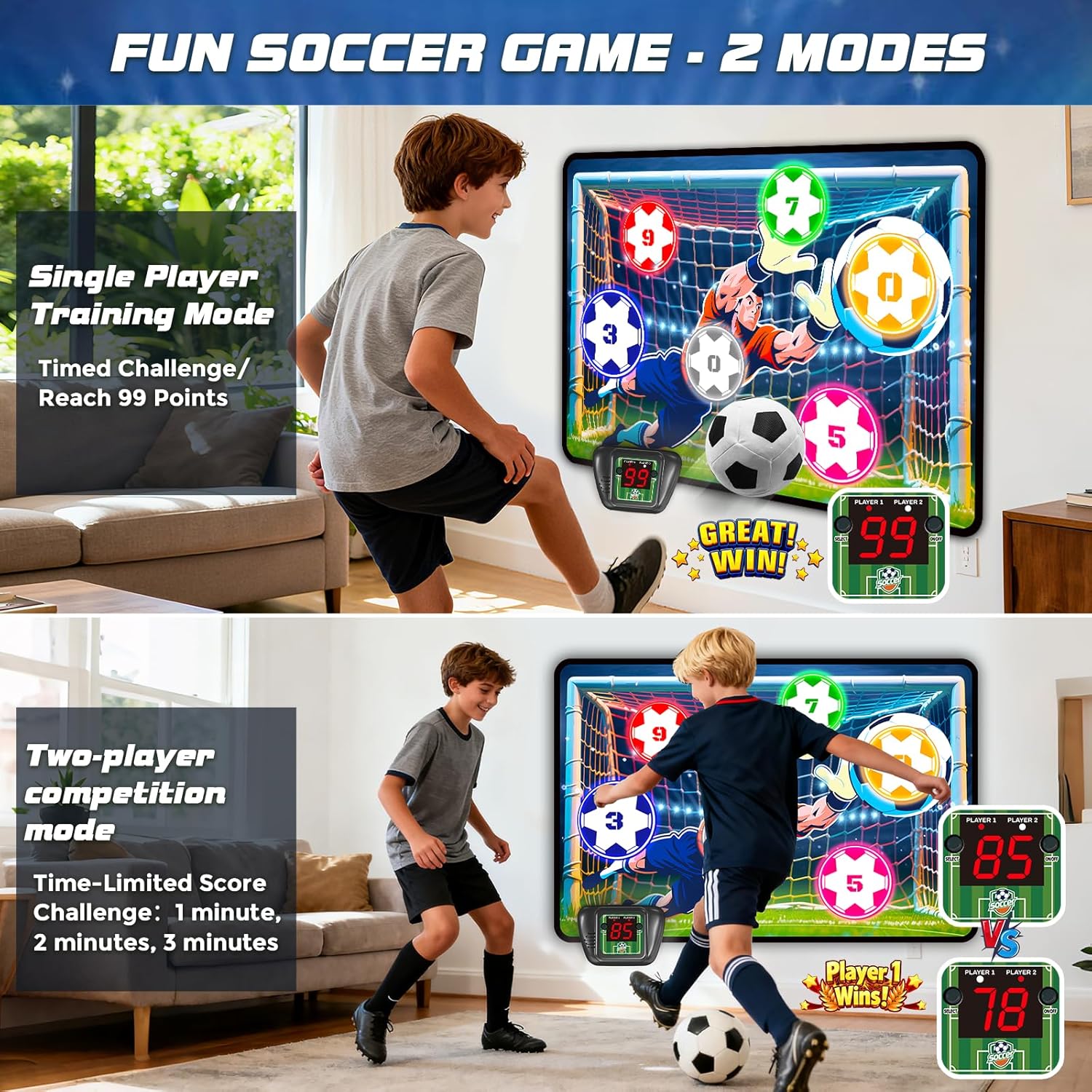
Image 3: The two game modes of the electronic scoring soccer toy: single-player training and two-player competition.
Scoring System
The target area includes clearly marked colored zones for 0, 3, 5, 7, and 9 points. When a ball hits a scoring zone, the intelligent sensor module automatically records the score. Real-time scores are displayed on the electronic unit, accompanied by sound effects.
Mute Function
To mute the sound effects, long-press the 'SELECT' button on the electronic unit. Repeat the action to unmute.

Image 4: Detailed view of the electronic scoring unit, highlighting the display, select button, and ON/OFF switch.
5. Care and Maintenance
- Wipe the fabric target and balls with a damp cloth to clean. Do not immerse the electronic unit in water.
- Store the game set in a dry place away from direct sunlight when not in use.
- Remove batteries if the product will not be used for an extended period to prevent leakage.
6. Troubleshooting
| Problem | Possible Cause | Solution |
|---|---|---|
| No power/display not working | Batteries are dead or incorrectly inserted. | Check battery polarity and replace with new AA batteries. Ensure the ON/OFF switch is in the 'ON' position. |
| Scoring is inconsistent or not registering | Ball not hitting the sensor area directly or with enough force. | Ensure the ball makes direct contact with the colored scoring zones. Check if the target is securely mounted and not moving excessively. |
| No sound | Mute function is activated. | Long-press the 'SELECT' button to unmute the sound. |
7. Product Specifications
| Feature | Detail |
|---|---|
| Brand | VATOS |
| Model Number | KB220937 |
| Target Dimensions | 43.3" x 29.5" (110cm x 75cm) |
| Ball Size | 5.9" (15cm) |
| Material | Fabric, Plastic |
| Power Source | 3 x AA Batteries (not included) |
| Number of Players | 1-2 |
| Recommended Age | 3+ Years |
| Usage | Indoor, Outdoor |
8. Warranty and Customer Support
For warranty information or customer support, please refer to the contact details provided on the product packaging or visit the official VATOS website. Keep your purchase receipt for any warranty claims.